> ## Documentation Index
> Fetch the complete documentation index at: https://docs.envzero.com/llms.txt
> Use this file to discover all available pages before exploring further.
# Workflow Enhancement
> Configure per-environment variables, revisions, and workspace names when creating or deploying env zero Workflows, customizing each sub-environment separately.
Creating a workflow is a great way to have a deployment of your infrastructure and create dependencies between different parts of your infrastructure, allowing you to manage your infrastructure as you scale. However, you may want to have different variables and settings for each part, so today you can do it when creating or deploying a new Workflow.
## Workflow Settings
A [Workflow](/guides/admin-guide/workflows) is an Environment that instead of managing a single IaC, manages multiple and their respective dependencies.
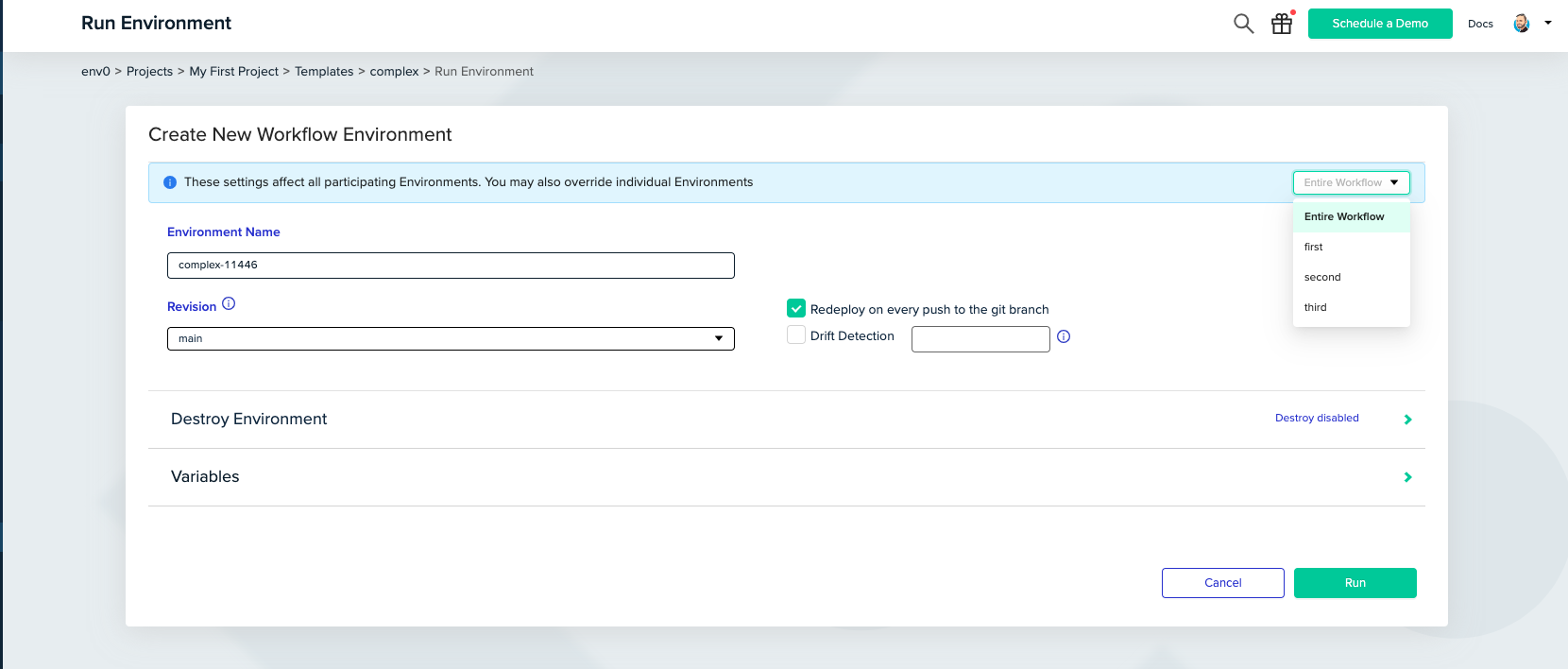
When creating or deploying a new Workflow you can choose each environment inside the Workflow and set different variables, revisions, and workspace names for each environment.
 You can read more about this feature [here](/guides/admin-guide/workflows/create-a-new-workflow).