> ## Documentation Index
> Fetch the complete documentation index at: https://docs.envzero.com/llms.txt
> Use this file to discover all available pages before exploring further.
# Self Hosted Agents Monitoring
> View the current state of all self-hosted agents from the Organization Settings Agents page in env zero, with a full overview of each agent's status.
env zero now includes self-hosted agent monitoring, available directly within the env zero app.
## Monitoring Your Agent States
With our new release, accessing critical information about your agents has never been easier. Navigate to the *Organization Settings > Agents* page, and you'll find a comprehensive overview of all your agents and their respective states.
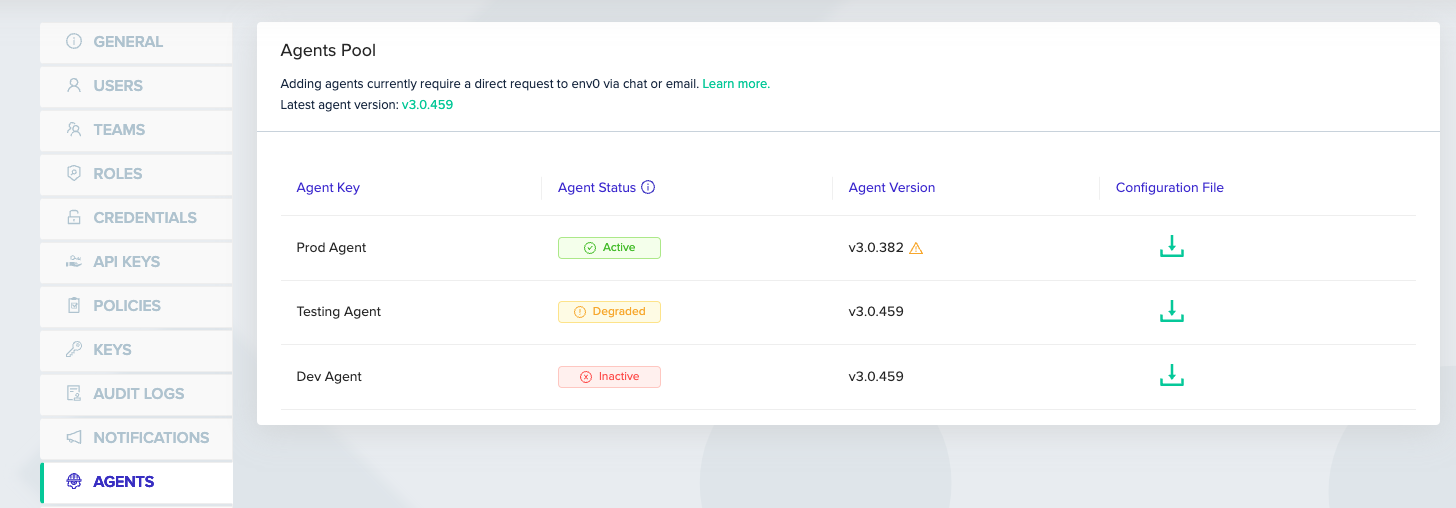 On the Agents tab, you can now quickly identify the status of each agent, which falls into one of the following categories:
* `Active`: Indicates that the agent is functioning properly and is ready to execute deployment jobs.
* Active agents are waiting for jobs to be assigned.
* `Inactive`: No agent has been detected. The agent might not have been installed or not been able to reach env0.
* 5 minutes of inactivity will mark the agent as Inactive.
* `Degraded`: An agent that is able to poll env0 but not apply to start jobs. The degraded state indicates that the jobs are queueing up with no runners to execute them.
* 5 minutes of a job waiting in queue will trigger the degraded state.
> Supported Agent Version
>
> To take advantage of this enhanced monitoring functionality, make sure to update your agent to the latest version that supports agent version monitoring ([3.0.458 release](https://github.com/env0/self-hosted/releases/tag/v3.0.458)). Once your agent is up to date, you'll be able to view your agent versions in the env0 app.
Stay on top of your self-hosted agents' performance and gain valuable insights into their states effortlessly, thanks to our latest monitoring feature. You can read more in [our docs](/guides/admin-guide/self-hosted-kubernetes-agent/self-hosted-agents-monitoring)
On the Agents tab, you can now quickly identify the status of each agent, which falls into one of the following categories:
* `Active`: Indicates that the agent is functioning properly and is ready to execute deployment jobs.
* Active agents are waiting for jobs to be assigned.
* `Inactive`: No agent has been detected. The agent might not have been installed or not been able to reach env0.
* 5 minutes of inactivity will mark the agent as Inactive.
* `Degraded`: An agent that is able to poll env0 but not apply to start jobs. The degraded state indicates that the jobs are queueing up with no runners to execute them.
* 5 minutes of a job waiting in queue will trigger the degraded state.
> Supported Agent Version
>
> To take advantage of this enhanced monitoring functionality, make sure to update your agent to the latest version that supports agent version monitoring ([3.0.458 release](https://github.com/env0/self-hosted/releases/tag/v3.0.458)). Once your agent is up to date, you'll be able to view your agent versions in the env0 app.
Stay on top of your self-hosted agents' performance and gain valuable insights into their states effortlessly, thanks to our latest monitoring feature. You can read more in [our docs](/guides/admin-guide/self-hosted-kubernetes-agent/self-hosted-agents-monitoring)