> ## Documentation Index
> Fetch the complete documentation index at: https://docs.envzero.com/llms.txt
> Use this file to discover all available pages before exploring further.
# Partial Workflow Deployment
> Run or destroy a subset of a workflow in env zero with Partial Workflow Deployment, choosing to start from a specific node or redeploy a single sub-environment.
env zero now supports Partial Workflow Deployment.
Partial Workflow Deployment lets you redeploy or destroy a subset of your workflow's graph as needed, rather than running a full top-to-bottom deployment.
Partial Workflow Deployment can be triggered either from the three-dot menu in graph nodes:
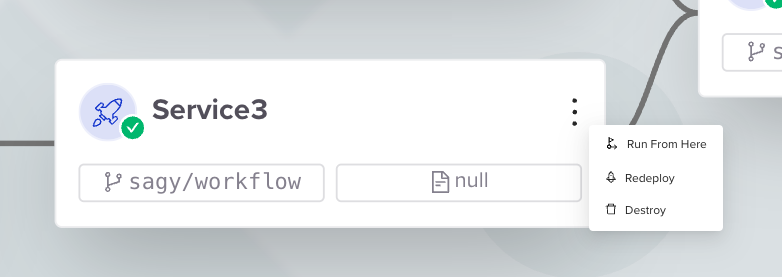 Or directly from the sub-environment page:
 There are three deployment options:
1. [Run From Here](/guides/admin-guide/workflows/workflow-partial-deployment#deploying-a-subset-of-the-workflow) - Deploy the workflow according to the latest workflow file used, starting from the selected sub-environment
2. [Single Sub-Environment Redeploy.](/guides/admin-guide/workflows/workflow-partial-deployment#deploying-a-single-sub-environment)
3. [Single Sub-Environment Destroy.](/guides/admin-guide/workflows/workflow-partial-deployment#destroying-a-single-environment)
Read more about it [here](/guides/admin-guide/workflows/workflow-partial-deployment)
There are three deployment options:
1. [Run From Here](/guides/admin-guide/workflows/workflow-partial-deployment#deploying-a-subset-of-the-workflow) - Deploy the workflow according to the latest workflow file used, starting from the selected sub-environment
2. [Single Sub-Environment Redeploy.](/guides/admin-guide/workflows/workflow-partial-deployment#deploying-a-single-sub-environment)
3. [Single Sub-Environment Destroy.](/guides/admin-guide/workflows/workflow-partial-deployment#destroying-a-single-environment)
Read more about it [here](/guides/admin-guide/workflows/workflow-partial-deployment)