> ## Documentation Index
> Fetch the complete documentation index at: https://docs.envzero.com/llms.txt
> Use this file to discover all available pages before exploring further.
# Custom Flow Schema (v2)
> Reference for the version 2 env0.yml custom flow schema, where each configured step appears as a separate deployment step in the env zero UI with its own logs.
## Overview
The `version: 2` env0.yaml schema introduces a change to how custom flow steps are configured and shown on env zero UI. These changes are reflected by:
1. A new step schema, described here.
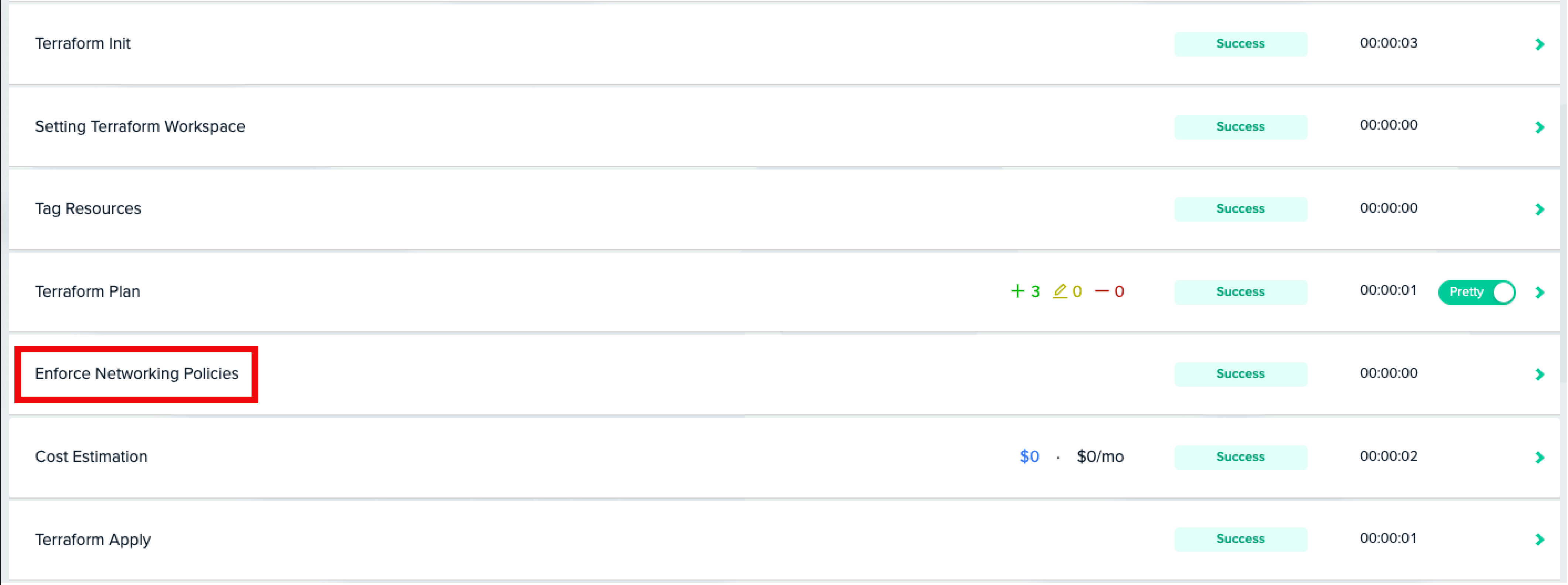
2. Each custom step configured will be presented as a **separate** deployment step in env zero UI.
For example this env0.yaml:
```yaml theme={null}
version: 2
deploy:
steps:
terraformPlan:
after:
- name: Enforce Networking Policies
run: ./enforce-networking-policies-script.sh
env:
FOO: bar
```
Would yield this deployment step list:
 **V1 String-Only Steps Backward Compatibility**
As the `version: 1` schema steps used to be a list of strings, the new `version: 2` schema keeps this syntax as backward compatible. The only difference is that now string-only steps will have their name originated by the command they execute. For example, if a step is configured as:
```yaml theme={null}
version: 2
deploy:
steps:
terraformPlan:
after:
- echo foo
```
then his custom deployment step name would be ***echo foo*** in env zero UI.
## New Step Schema
The `version: 2` steps are now configured as an `object`, rather than a `string`. This `object` includes the following attributes:
1. `name`(**Required**) - The name of the step that would be shown in env zero UI.
2. `run` (Exactly one of `run` or `use` is **required**) - The bash command/s to execute.
3. `use` (Exactly one of `run` or `use` is **required**) - The GIT URL of the env zero plugin in the form of `@` (for e.g `https://github.com/env0/env0-opa-plugin@1.0.0`)
4. `env` - An `object` containing a map of environment variables by key and value that will be available to the step. A reference to another environment variable value that's available to the deployment is achievable by prefixing the value with the `$` sign.
5. `input`(Relevant for plugins only) - An `object` of attributes that are required as inputs to the env zero plugin. Read more about it [here](/guides/integrations/plugins).
6. `executeAfterChild` (Relevant for project level custom flows only) - Defaults to `false`. When set to `true` the step will run after all the children's (sub projects and environments under that project) similar hooks finished to run.
Support for multiline strings
In case you'd like to include multiple bash commands under a single step, you can use the supported YAML multiline string syntax. Here's an example:
```yaml theme={null}
version: 2
deploy:
steps:
terraformPlan:
after:
- name: An Example of Multiline string
run: |
echo foo
echo bar
echo baz
```
## Migrating from v1 Schema
To migrate from the `version: 1` schema and keep the same deployments step structure in env zero UI, you'll need to include minor changes to your `env0.yaml` file.
Here's an example of how to migrate such a file to `version: 2`:
### Before
```yaml theme={null}
version: 1
deploy:
steps:
terraformPlan:
after:
- pip install jq
- echo "Installed jq"
- jq --help
```
### After
```yaml theme={null}
version: 2
deploy:
steps:
terraformPlan:
after:
- name: "Terraform Plan: After"
run: |
pip install jq
echo "Installed jq"
jq --help
```
## Next steps
* [Custom Flows Overview](/guides/admin-guide/custom-flows) - Full reference for hook stages, shell settings, and system variables.
* [Project-Level Custom Flow](/guides/admin-guide/custom-flows/project-level-custom-flow) - Share a custom flow across all environments in a project.
* [Managing Variables](/guides/admin-guide/variables) - Set variables consumed by custom flow steps.
**V1 String-Only Steps Backward Compatibility**
As the `version: 1` schema steps used to be a list of strings, the new `version: 2` schema keeps this syntax as backward compatible. The only difference is that now string-only steps will have their name originated by the command they execute. For example, if a step is configured as:
```yaml theme={null}
version: 2
deploy:
steps:
terraformPlan:
after:
- echo foo
```
then his custom deployment step name would be ***echo foo*** in env zero UI.
## New Step Schema
The `version: 2` steps are now configured as an `object`, rather than a `string`. This `object` includes the following attributes:
1. `name`(**Required**) - The name of the step that would be shown in env zero UI.
2. `run` (Exactly one of `run` or `use` is **required**) - The bash command/s to execute.
3. `use` (Exactly one of `run` or `use` is **required**) - The GIT URL of the env zero plugin in the form of `@` (for e.g `https://github.com/env0/env0-opa-plugin@1.0.0`)
4. `env` - An `object` containing a map of environment variables by key and value that will be available to the step. A reference to another environment variable value that's available to the deployment is achievable by prefixing the value with the `$` sign.
5. `input`(Relevant for plugins only) - An `object` of attributes that are required as inputs to the env zero plugin. Read more about it [here](/guides/integrations/plugins).
6. `executeAfterChild` (Relevant for project level custom flows only) - Defaults to `false`. When set to `true` the step will run after all the children's (sub projects and environments under that project) similar hooks finished to run.
Support for multiline strings
In case you'd like to include multiple bash commands under a single step, you can use the supported YAML multiline string syntax. Here's an example:
```yaml theme={null}
version: 2
deploy:
steps:
terraformPlan:
after:
- name: An Example of Multiline string
run: |
echo foo
echo bar
echo baz
```
## Migrating from v1 Schema
To migrate from the `version: 1` schema and keep the same deployments step structure in env zero UI, you'll need to include minor changes to your `env0.yaml` file.
Here's an example of how to migrate such a file to `version: 2`:
### Before
```yaml theme={null}
version: 1
deploy:
steps:
terraformPlan:
after:
- pip install jq
- echo "Installed jq"
- jq --help
```
### After
```yaml theme={null}
version: 2
deploy:
steps:
terraformPlan:
after:
- name: "Terraform Plan: After"
run: |
pip install jq
echo "Installed jq"
jq --help
```
## Next steps
* [Custom Flows Overview](/guides/admin-guide/custom-flows) - Full reference for hook stages, shell settings, and system variables.
* [Project-Level Custom Flow](/guides/admin-guide/custom-flows/project-level-custom-flow) - Share a custom flow across all environments in a project.
* [Managing Variables](/guides/admin-guide/variables) - Set variables consumed by custom flow steps.