> ## Documentation Index
> Fetch the complete documentation index at: https://docs.envzero.com/llms.txt
> Use this file to discover all available pages before exploring further.
# Managing Environments
> Create, manage, and automate IaC deployments as environments in env zero for Terraform, CloudFormation, Pulumi, Helm, and Kubernetes namespaces.
## What are Environments?
Environments in env zero are your Infrastructure-as-Code (IaC) deployments - think of them as managed Terraform workspaces, CloudFormation stacks, Pulumi stacks, or Kubernetes namespaces. Each environment represents a complete deployment of your infrastructure code with its own state, variables, and lifecycle.
Your users manage their environments in [Projects](/guides/admin-guide/projects) where they can create, destroy, and redeploy environments. The user who creates an environment becomes the owner, while administrators manage access control and budgets through [policies](/guides/policies-governance/policies) defined at the Project and Organization levels.
## Environment Mapping to IaC Tools
Here's how env zero environments correlate with terms from various IaC and cloud management tools:
* **Terraform:** An env zero environment is equivalent to a Terraform workspace or module
* **Terragrunt:** An env zero environment matches a specific Terragrunt configuration directory managing Terraform modules
* **CloudFormation:** An env zero environment corresponds to a CloudFormation stack
* **Pulumi:** An env zero environment maps to a Pulumi stack
* **Kubernetes:** An env zero environment relates to a Kubernetes namespace or a set of YAML files
* **Helm:** An env zero environment aligns with a Helm release
## Creating Environments
### Two Creation Approaches
You can create environments in two ways:
**Template-based Creation:**
* Use pre-configured [templates](/guides/admin-guide/templates) for standardized, reusable deployments
* Built-in RBAC and governance controls
* Ideal for teams wanting consistency and standardization
**Direct VCS Integration:**
* Connect directly to your Git repository for quick deployments
* Avoid template complexity for simple use cases
* Perfect for rapid prototyping and experimentation
Both approaches support all IaC frameworks: Terraform, OpenTofu, Pulumi, CloudFormation, Kubernetes, and Helm.
For detailed setup instructions, see [Setting Up a New Environment](/guides/admin-guide/environments/setting-up-a-new-environment).
## Environment Lifecycle Management
### Core Operations
**Deploy:** Run `terraform apply` (or equivalent) to create or update infrastructure
* Automatically runs `terraform plan` first to show changes
* Stores outputs and state for future reference
* Sends email notifications on success or failure
**Destroy:** Clean up resources with `terraform destroy` (or equivalent)
* Can be triggered manually or automatically via TTL
* Queued if another operation is in progress
**Redeploy:** Update existing environments with code changes
* For inactive environments: deploys from scratch with new TTL
* For active environments: updates with latest code changes
### Environment States
Environments can be in one of these states:
* **Active** - Successfully deployed and running
* **Inactive** - Successfully destroyed (manual or automatic)
* **Deploy in progress** - Currently being deployed
* **Undeploy in progress** - Currently being destroyed
* **Failed** - Errors encountered during deployment/undeployment
* **Waiting for approval** - Plan created, awaiting Deployer approval
### Time-to-Live (TTL)
TTL controls automatic environment destruction:
* **Predefined values:** 12 hours, 1 day, 3 days, 1 week, 1 month, infinite
* **Custom dates:** Set specific end-of-life dates
* **Policy control:** Admins can set defaults and maximums via [TTL Policies](/guides/policies-governance/policy-ttl)
## Advanced Operations
### Continuous Deployment
Automatically redeploy environments on Git pushes to specific branches. See [Continuous Deployment](/guides/admin-guide/environments/continuous-deployment) for setup.
### Bulk Operations
Manage multiple environments simultaneously - deploy, destroy, approve plans, lock and release locks, and more. Learn more in [Bulk Operations](/guides/admin-guide/environments/bulk-operations).
### Workflow Triggers
Chain environment deployments for complex workflows (e.g., dev → staging → production). See [Workflow Triggers](/guides/admin-guide/environments/workflow-triggers).
### Plan on Pull Request
Preview infrastructure changes before merging code. Details in [Plan on Pull Request](/guides/admin-guide/environments/plan-on-pull-request).
## Access Control & Governance
### Role-Based Permissions
**Planner Role:** Can create plans but requires Deployer approval for execution
**Deployer Role:** Can execute plans and approve deployments
**Admin Role:** Full control over all environment operations
### Approval Workflows
* **Manual Approval:** Plans require Deployer review before execution
* **Automatic Approval:** Deployers and Admins can enable immediate execution
### Environment Locking
Prevent changes to critical environments during maintenance. Learn more in [Environment Locking](/guides/admin-guide/environments/environment-locking).
## Key Features
### Environment Management
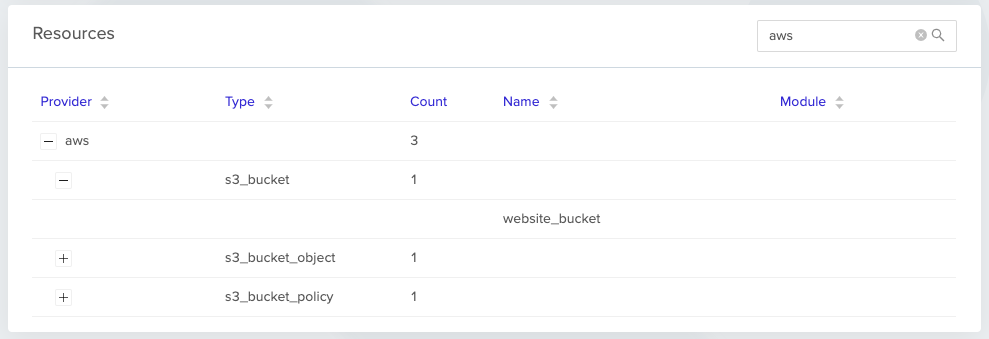
* **Resource tracking:** View all cloud resources managed by each environment
* **Deployment history:** Complete log of all environment operations
* **Import existing:** Bring existing infrastructure under env zero management
* **Archive/Unarchive:** Manage environment lifecycle without destroying resources
### Integration & Automation
* **VCS Integration:** GitHub, GitLab, Bitbucket, Azure DevOps
* **Cloud Providers:** AWS, Azure, GCP, and other platforms
* **API Access:** Programmatic environment management via REST API
* **Terraform Provider:** Manage env zero resources using Terraform itself
### Environment Resources
When environments are active, you can view all managed resources organized by provider and type with search functionality.
 ## Best Practices
### Development Workflows
* Use short TTLs for development environments
* Enable continuous deployment for dev branches
* Implement proper approval workflows for production
### Production Management
* Set infinite TTL for production environments
* Require manual approval for all changes
* Use environment locking for critical systems
## Next steps
* [Using env zero Templates](/guides/admin-guide/env-zero-templates) - Define reusable blueprints for your environments.
* [Creating & Managing Projects](/guides/admin-guide/env-zero-projects) - Group environments and control access with projects.
* [Deploy Your First Environment](/guides/getting-started/running-your-first-environment) - Deploy your first environment from a template.
## Best Practices
### Development Workflows
* Use short TTLs for development environments
* Enable continuous deployment for dev branches
* Implement proper approval workflows for production
### Production Management
* Set infinite TTL for production environments
* Require manual approval for all changes
* Use environment locking for critical systems
## Next steps
* [Using env zero Templates](/guides/admin-guide/env-zero-templates) - Define reusable blueprints for your environments.
* [Creating & Managing Projects](/guides/admin-guide/env-zero-projects) - Group environments and control access with projects.
* [Deploy Your First Environment](/guides/getting-started/running-your-first-environment) - Deploy your first environment from a template.