> ## Documentation Index
> Fetch the complete documentation index at: https://docs.envzero.com/llms.txt
> Use this file to discover all available pages before exploring further.
# Auto-Create Environments from Pull Requests
> Automatically create and destroy environments from pull requests using glob pattern directory mapping and per-project discovery settings in env zero.
Manual environment creation and deployment can become tedious and error-prone at scale. env zero enables you to automatically create and destroy environments from pull requests. This uses a preconfigured directory structure to streamline your workflow, save time, and reduce errors.
To enable this capability, follow the steps below:
### Get started
In this example, we will create a `Terragrunt` configuration based on [Terragrunt Infrastructure Example](https://github.com/env0/terragrunt-infrastructure-example) repository.
First things first, you will need to create a one time configuration of your discovery settings. This is a per Project configuration.
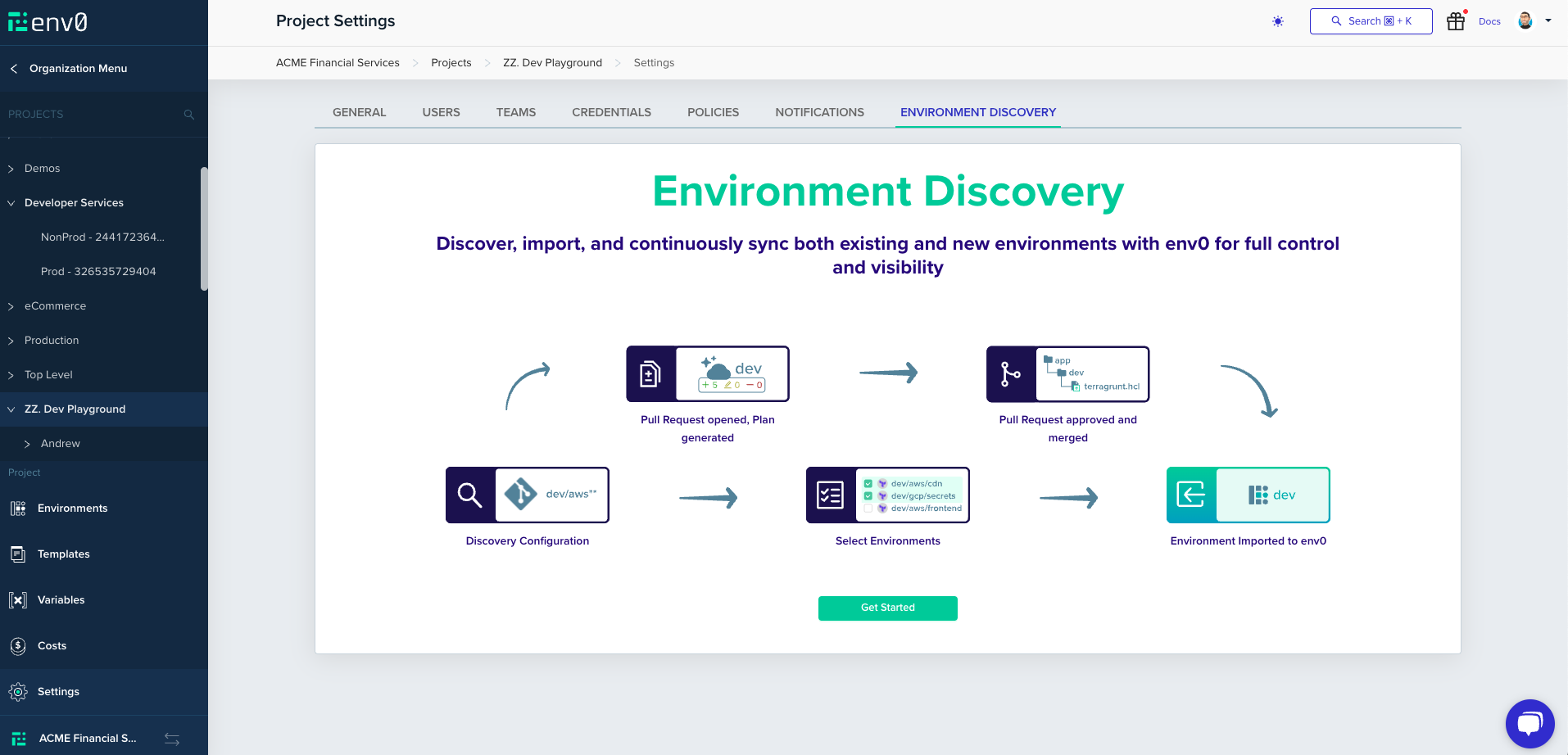
Under `Project Settings` select `Environment Discovery` tab. To continue, click `Get Started`.
 ### Choose The Infrastructure
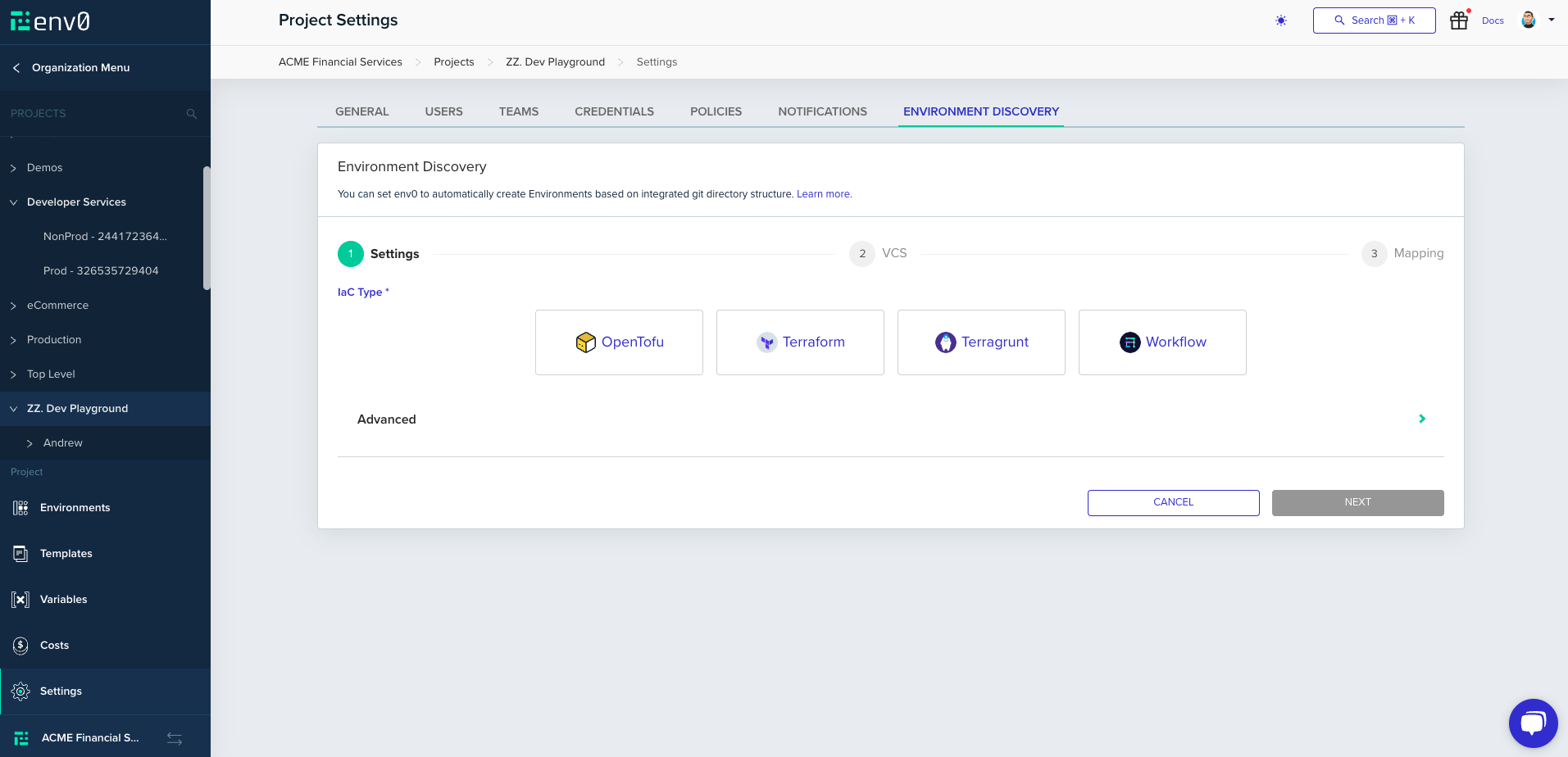
As with setting up a [Template](/guides/admin-guide/templates), choose the type of infrastructure you are using, then click `Next`.
### Choose The Infrastructure
As with setting up a [Template](/guides/admin-guide/templates), choose the type of infrastructure you are using, then click `Next`.
 ### Configure Your Repository
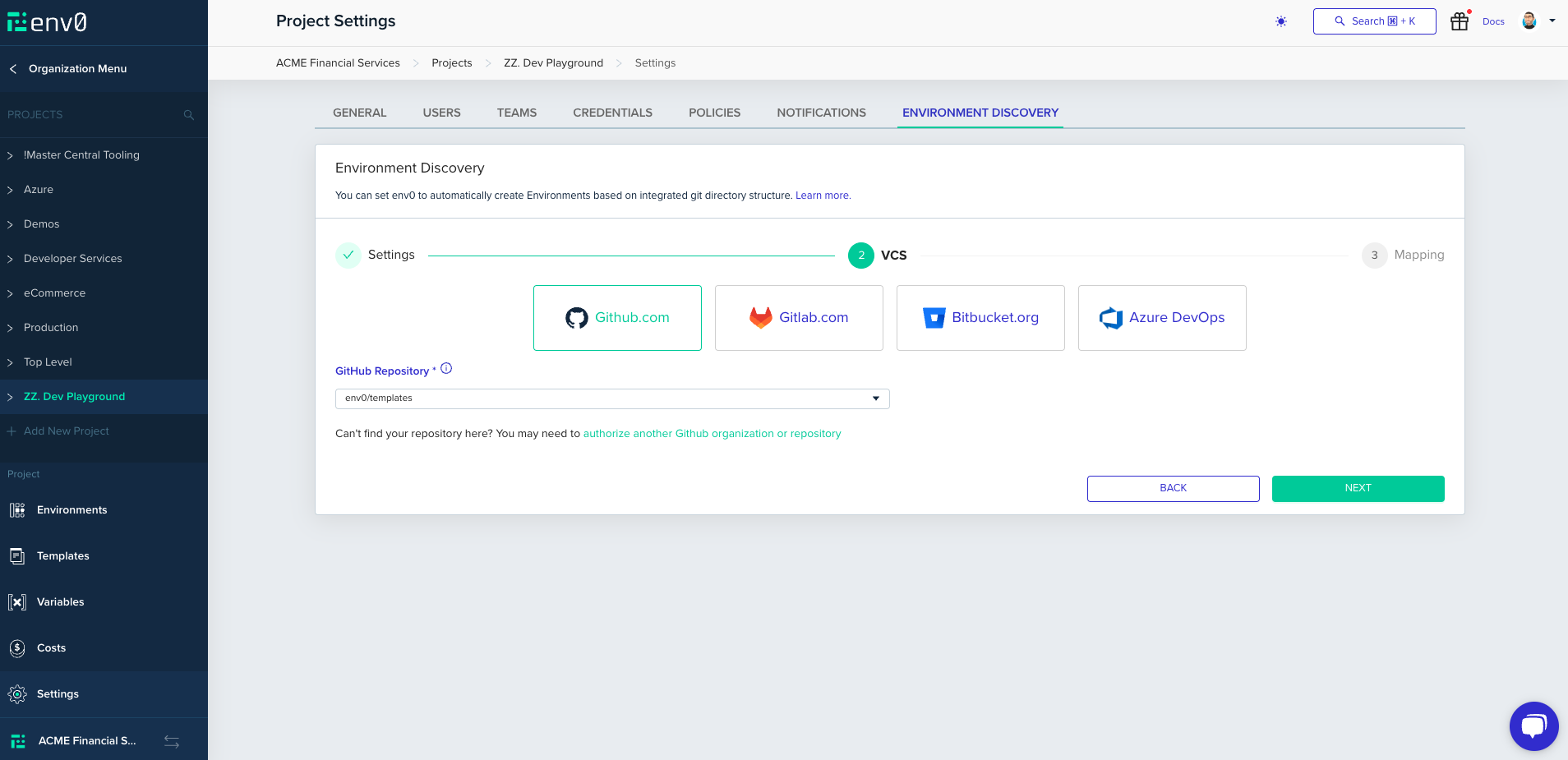
Next, choose the desired Git provider, and configure the repository you would like to discover from and click `Next`
### Configure Your Repository
Next, choose the desired Git provider, and configure the repository you would like to discover from and click `Next`
 ### Configure the Environment Mapping
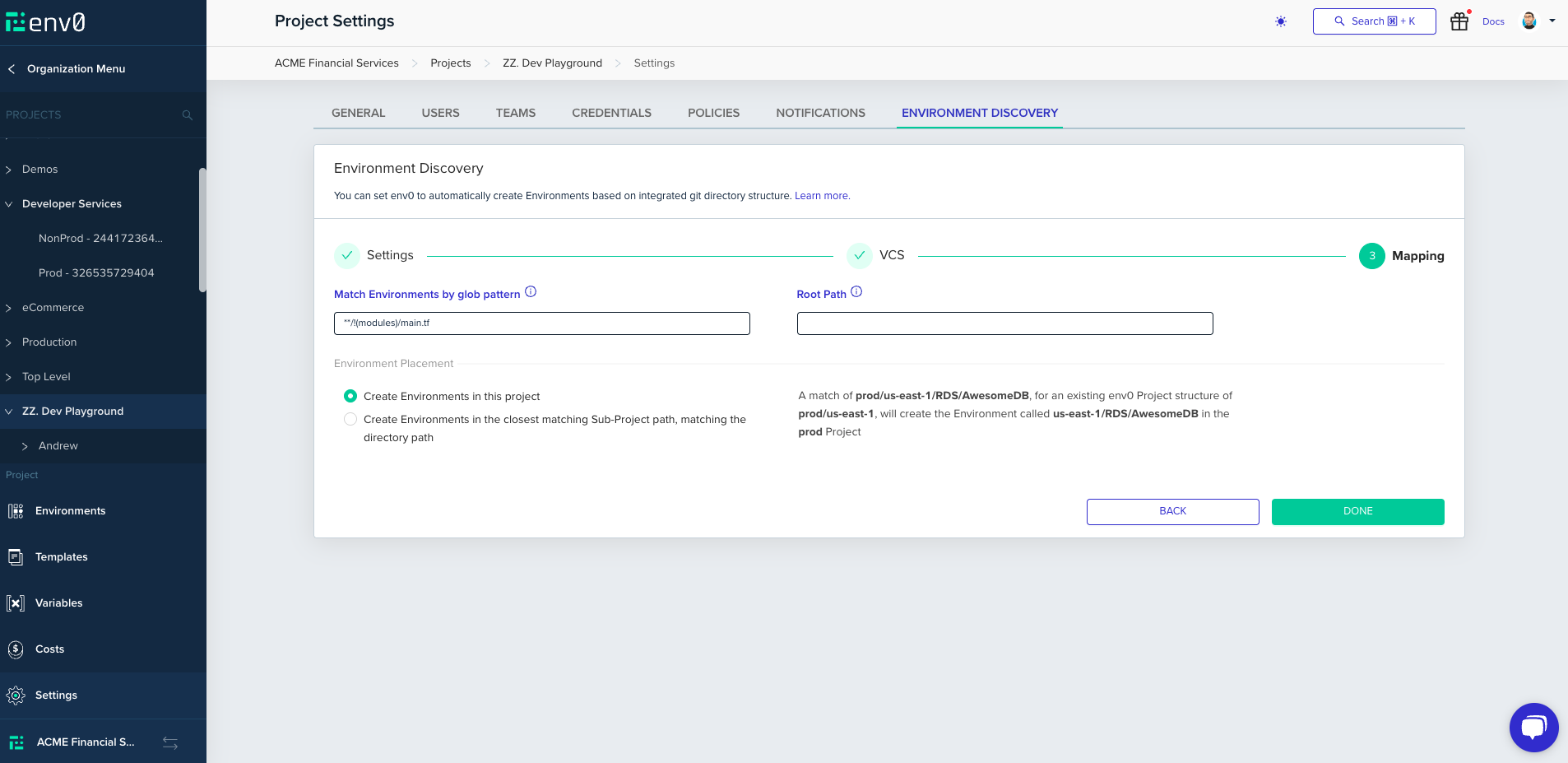
The final step is crucial as it defines the structure of your project. In this section, you will specify the layout of your project, including which Environments will be created, how they will be named, and where they will be located within env zero
### Configure the Environment Mapping
The final step is crucial as it defines the structure of your project. In this section, you will specify the layout of your project, including which Environments will be created, how they will be named, and where they will be located within env zero
 Let's break it down step by step:
#### Match Environments Glob
You will need to define your project structure using a multi-glob pattern. Any match to this pattern will trigger the creation and planning of an environment in env zero. In this example, we aim to create an env zero Environment for any `terragrunt.hcl` file that is not located under the `_envcommon` folder
Let's break it down step by step:
#### Match Environments Glob
You will need to define your project structure using a multi-glob pattern. Any match to this pattern will trigger the creation and planning of an environment in env zero. In this example, we aim to create an env zero Environment for any `terragrunt.hcl` file that is not located under the `_envcommon` folder
 **[Glob pattern](https://en.wikipedia.org/wiki/Glob_\(programming\))**
Glob patterns specify sets of filenames with wildcard characters. For example, `\*.tf` or `prod/\*\*`
For example, you can configure pattern like `src/prod/**/*.tf`\
In this case, we will create new env zero Environments only if the new `main.tf` is located under `src/prod/...`
We also support extglob patterns with that you can write pattern which ignores files or use a list of folders.\
Note that for extglob, when using OR/AND statements, make sure to wrap each option with parentheses, for example:
* `!(prod/us-east-1/\*\*)+(dev/us-east-1/**|dev/us-west-2/main.tf)`\
This means we will listen to any change in `dev/us-east-1` and `dev/us-west-2/main.tf`, and ignore changes under `prod/us-east-1`. (Recommend including exclusions first.)
* `+(Terraform/!(prod)**|Terragrunt/dev/**)`\
Listen for any changes in `Terraform` or `Terragrunt/dev` but ignore any changes in `Terraform/prod`
#### Root Path
The root path configuration defines the starting point from which env zero will generate environments. For instance, if the glob pattern is set to `src/prod/storage/*_/_.tf`, and the discovered file is `src/prod/storage/environment0/main.tf`, with the root path configured as `src/prod`, env zero will exclude the root path from the full path of the discovered `main.tf` file. Therefore, it will be treated as `storage/environment0/main.tf` when determining where to place the environment.
#### Environment Placement
This section will let you choose the Environment placement strategy within your project.
**[Glob pattern](https://en.wikipedia.org/wiki/Glob_\(programming\))**
Glob patterns specify sets of filenames with wildcard characters. For example, `\*.tf` or `prod/\*\*`
For example, you can configure pattern like `src/prod/**/*.tf`\
In this case, we will create new env zero Environments only if the new `main.tf` is located under `src/prod/...`
We also support extglob patterns with that you can write pattern which ignores files or use a list of folders.\
Note that for extglob, when using OR/AND statements, make sure to wrap each option with parentheses, for example:
* `!(prod/us-east-1/\*\*)+(dev/us-east-1/**|dev/us-west-2/main.tf)`\
This means we will listen to any change in `dev/us-east-1` and `dev/us-west-2/main.tf`, and ignore changes under `prod/us-east-1`. (Recommend including exclusions first.)
* `+(Terraform/!(prod)**|Terragrunt/dev/**)`\
Listen for any changes in `Terraform` or `Terragrunt/dev` but ignore any changes in `Terraform/prod`
#### Root Path
The root path configuration defines the starting point from which env zero will generate environments. For instance, if the glob pattern is set to `src/prod/storage/*_/_.tf`, and the discovered file is `src/prod/storage/environment0/main.tf`, with the root path configured as `src/prod`, env zero will exclude the root path from the full path of the discovered `main.tf` file. Therefore, it will be treated as `storage/environment0/main.tf` when determining where to place the environment.
#### Environment Placement
This section will let you choose the Environment placement strategy within your project.
 Let's consider a env zero Project hierarchy of
```yaml theme={null}
- environment-discovery
- - prod
- - non-prod
```
**Create Environments in this project** - Will not consider Sub-Projects when creating the environments. In our case, a PR to change `prod/us-east-1/prod/mysql` will create an Environment called `us-east-1/prod/mysql`
**Create Environments in the closest matching Sub-Project path, matching the directory path** - Will consider the closest Sub-Project to match the path, for example a PR to change `prod/us-east-1/prod/mysql` will create an Environment called `us-east-1/prod/mysql` on `prod` Sub-Project
Click `Done` and you should be greeted with the success screen if all went well. The discovery process will be started automatically but automatic Pull Request creation should be enabled in the settings section.
### Enabling Automatic Pull Request Creation
Let's consider a env zero Project hierarchy of
```yaml theme={null}
- environment-discovery
- - prod
- - non-prod
```
**Create Environments in this project** - Will not consider Sub-Projects when creating the environments. In our case, a PR to change `prod/us-east-1/prod/mysql` will create an Environment called `us-east-1/prod/mysql`
**Create Environments in the closest matching Sub-Project path, matching the directory path** - Will consider the closest Sub-Project to match the path, for example a PR to change `prod/us-east-1/prod/mysql` will create an Environment called `us-east-1/prod/mysql` on `prod` Sub-Project
Click `Done` and you should be greeted with the success screen if all went well. The discovery process will be started automatically but automatic Pull Request creation should be enabled in the settings section.
### Enabling Automatic Pull Request Creation
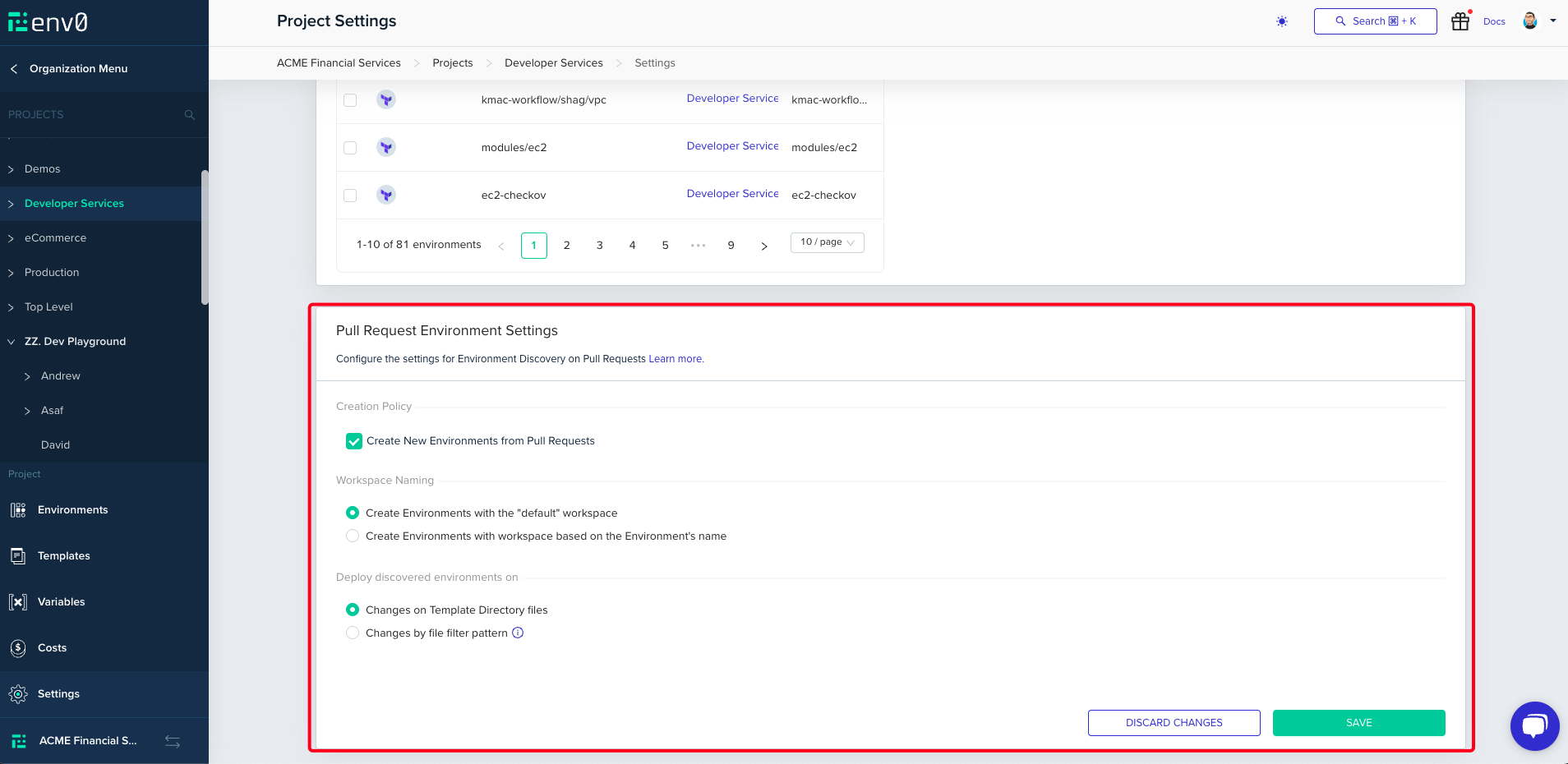 #### Workspace Naming
Here we can choose to either use `default` as the workspace names or derive it from the Environment's name
#### Deploy Discovered Environments on
In the next section, you'll be able to set the [Continuous Deployment](/guides/admin-guide/environments/continuous-deployment) and [PR Plan](/guides/admin-guide/environments/plan-on-pull-request) settings which your Environments will be created with.
#### Workspace Naming
Here we can choose to either use `default` as the workspace names or derive it from the Environment's name
#### Deploy Discovered Environments on
In the next section, you'll be able to set the [Continuous Deployment](/guides/admin-guide/environments/continuous-deployment) and [PR Plan](/guides/admin-guide/environments/plan-on-pull-request) settings which your Environments will be created with.
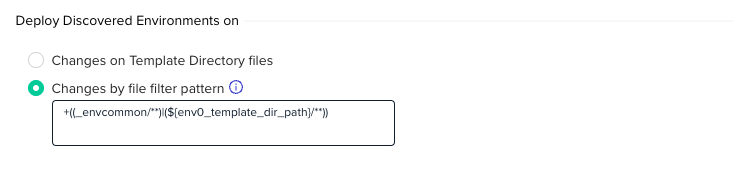 **Changes on Template Directory files** - The Environment will only plan / deploy on changes to the directory matched by the main glob pattern
**Changes by file filter pattern** - The Environment will plan / deploy on changes matching the given multi glob pattern.
Custom Glob Variables
We also support using custom string templates that are set during runtime -
* `env0_template_dir_path` - The entire template path.
* `env0_template_dir_name` - The **name** of the directory of the template files.
* `env0_template_dir_ancestors` - Will be interpolated with each ancestor directory up the template path, and is meant to be used in an extended glob expression. It is most useful for picking up configuration files up the path, like in a Terragrunt style repository. *\*\* NOTE: this should NOT be used with a file extension\
e.g: If the template directory is `non-prod/us-east-1/dev/postgres`, then it will be interpolated as \`non-prod/*|non-prod/us-east-1/*|non-prod/us-east-1/dev/*|non-prod/us-east-1/dev/postgres/\*\`.
example usage:\
`+((_envcommon/${env0_template_dir_name}/**)|(${env0_template_dir_path}/**)|${env0_template_dir_ancestors})` which means match everything under the path defined in the environment's template and match any changes under `_envcommon` matching the template dir name, and any files changes in the ancestors (or parent) folders.
Heads Up
In case the even that the environment creation glob and the environment CD / PR plan glob do not match, it is possible that the changes that trigger the Environment creation won't trigger the initial PR Plan (see section below for more info)
In our example, we would like other changes to trigger a plan, and not only those under the Template Directory.
## Using Environment Discovery
After configured, using environment discovery is easy as opening and merging a pull request.
1. Create a branch with desired changes and open a PR.
**Changes on Template Directory files** - The Environment will only plan / deploy on changes to the directory matched by the main glob pattern
**Changes by file filter pattern** - The Environment will plan / deploy on changes matching the given multi glob pattern.
Custom Glob Variables
We also support using custom string templates that are set during runtime -
* `env0_template_dir_path` - The entire template path.
* `env0_template_dir_name` - The **name** of the directory of the template files.
* `env0_template_dir_ancestors` - Will be interpolated with each ancestor directory up the template path, and is meant to be used in an extended glob expression. It is most useful for picking up configuration files up the path, like in a Terragrunt style repository. *\*\* NOTE: this should NOT be used with a file extension\
e.g: If the template directory is `non-prod/us-east-1/dev/postgres`, then it will be interpolated as \`non-prod/*|non-prod/us-east-1/*|non-prod/us-east-1/dev/*|non-prod/us-east-1/dev/postgres/\*\`.
example usage:\
`+((_envcommon/${env0_template_dir_name}/**)|(${env0_template_dir_path}/**)|${env0_template_dir_ancestors})` which means match everything under the path defined in the environment's template and match any changes under `_envcommon` matching the template dir name, and any files changes in the ancestors (or parent) folders.
Heads Up
In case the even that the environment creation glob and the environment CD / PR plan glob do not match, it is possible that the changes that trigger the Environment creation won't trigger the initial PR Plan (see section below for more info)
In our example, we would like other changes to trigger a plan, and not only those under the Template Directory.
## Using Environment Discovery
After configured, using environment discovery is easy as opening and merging a pull request.
1. Create a branch with desired changes and open a PR.
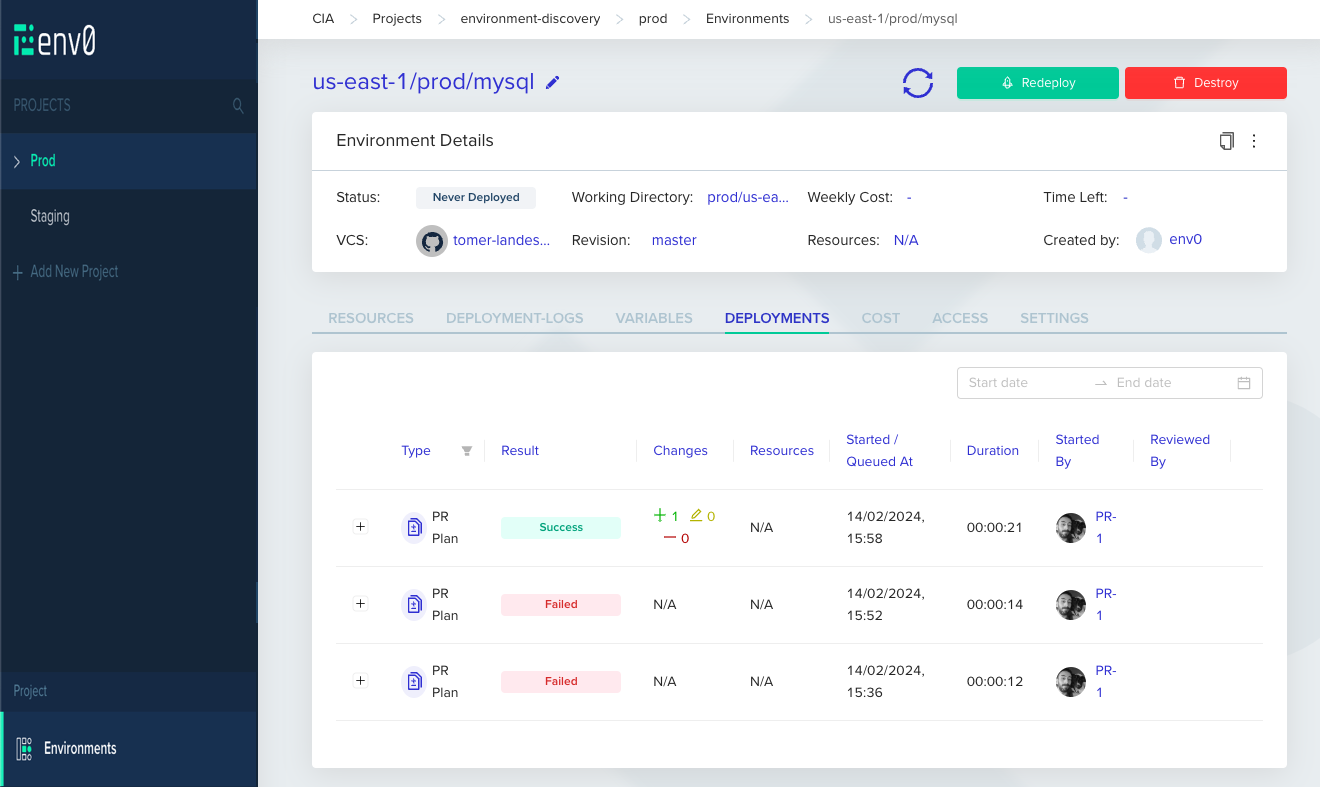
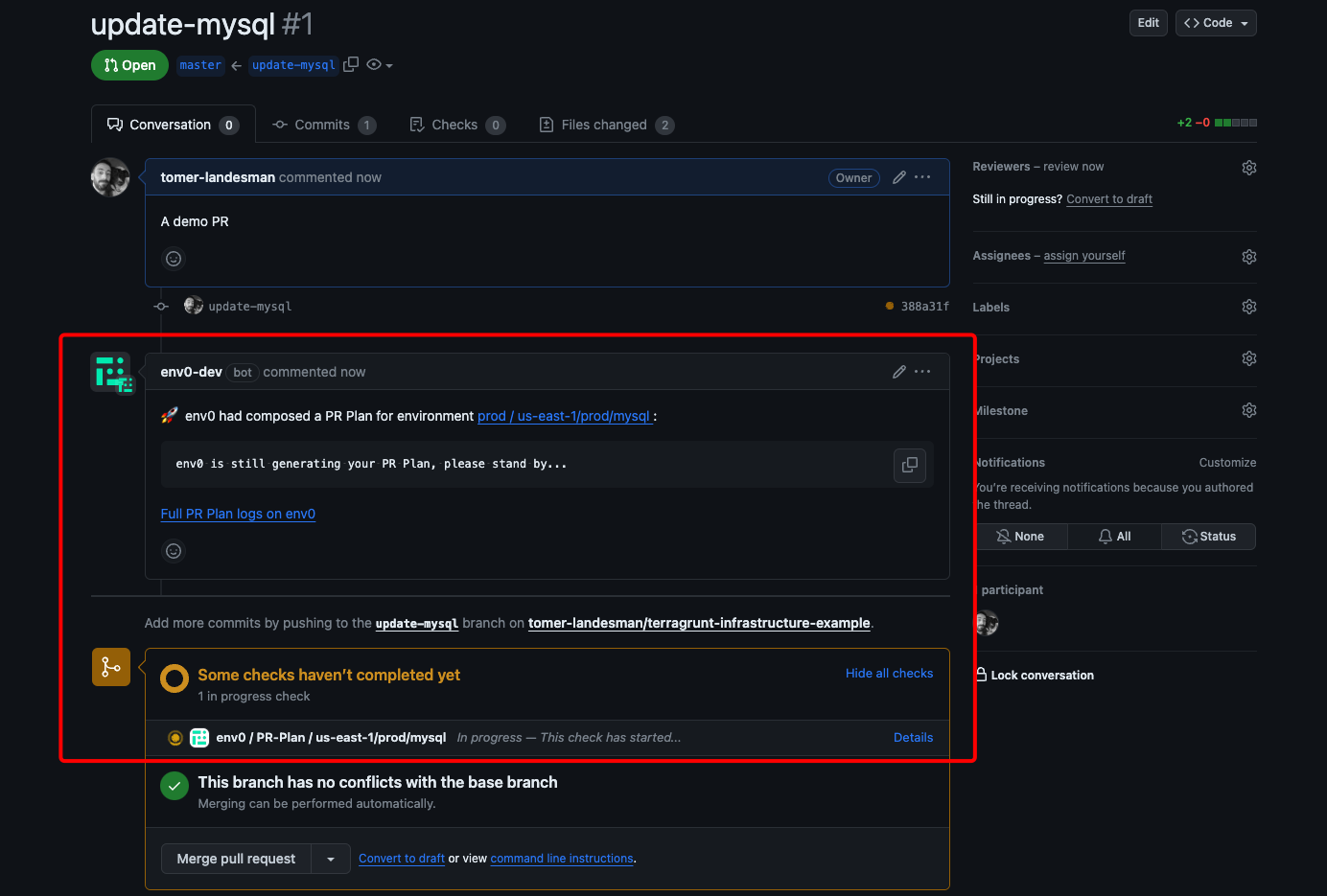 2. Navigate to the relevant Project or Sub-Project in env zero or click the env zero bot comment (Remember: multiple environments can be created via a single PR)
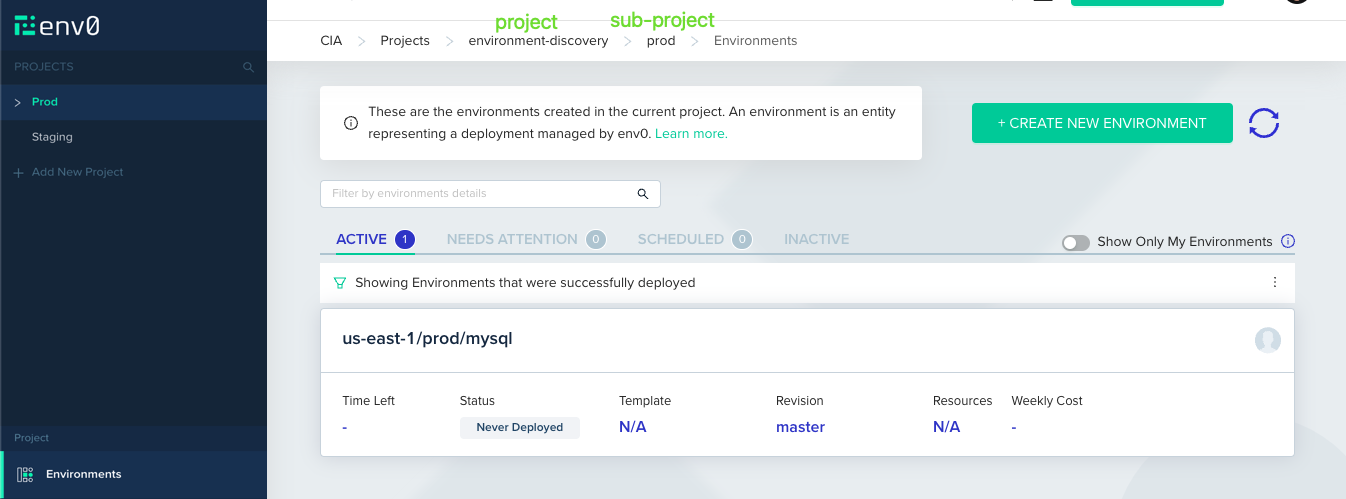 3. In the `Deployments` tab, you'll be able to see the initial PR Plan env zero ran on your code.
 Closing a PR
 will archive the `Never Deployed` Environment. Note, that for Bitbucket Cloud and Bitbucket Server automatic archival is not supported, and you will have to do so manually.
4. After the plan has been reviewed and merged, env zero will trigger a deployment for that Environment.
Closing a PR
Closing a PR will archive the `Never Deployed` Environment. Note, that for Bitbucket Cloud and Bitbucket Server automatic archival is not supported, and you will have to do so manually.
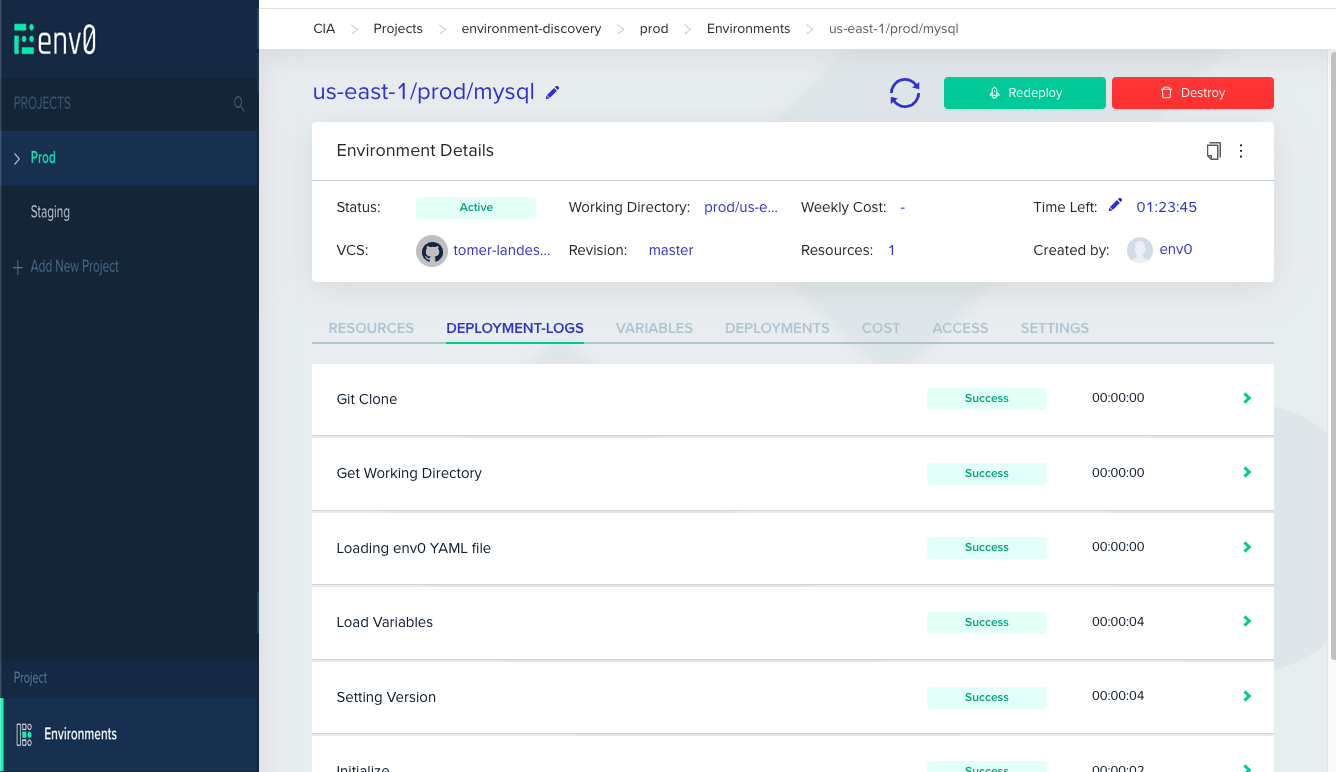
4. After the plan has been reviewed and merged, env zero will trigger a deployment for that Environment.
 ## Next steps
* [Discovery by File](/guides/admin-guide/environment-discovery/discovery-by-file) - Use env0-discovery.yml to define environments from a marker file.
* [Import External Environments into env zero](/guides/admin-guide/environment-discovery/onboarding-import-external-environments-into-env-zero) - Migrate existing environments into env zero in bulk.
* [Running Plan on Pull Requests](/guides/admin-guide/environments/plan-on-pull-request) - Review infrastructure changes automatically on every pull request.
## Next steps
* [Discovery by File](/guides/admin-guide/environment-discovery/discovery-by-file) - Use env0-discovery.yml to define environments from a marker file.
* [Import External Environments into env zero](/guides/admin-guide/environment-discovery/onboarding-import-external-environments-into-env-zero) - Migrate existing environments into env zero in bulk.
* [Running Plan on Pull Requests](/guides/admin-guide/environments/plan-on-pull-request) - Review infrastructure changes automatically on every pull request.