> ## Documentation Index
> Fetch the complete documentation index at: https://docs.envzero.com/llms.txt
> Use this file to discover all available pages before exploring further.
# Discovery by File
> Use env0-discovery.yml marker files to create environments from existing templates, avoiding circular dependencies with the env zero Terraform Provider.
Discovery by File enables teams to create and manage environments from templates using YAML marker files in their repositories. This code-first approach eliminates the circular dependency problem that occurs when using the env zero Terraform Provider.
Place a single `env0-discovery.yml` file at the root of your repository. env zero automatically discovers this file and creates environments based on its contents, referencing existing templates rather than requiring infrastructure code in the same repository.
## How It Works
Discovery by File uses a marker file named `env0-discovery.yml` that you place at the root of your repository. When you configure discovery rules at the project level, env zero scans your GitHub organization for this file and automatically creates environments based on its contents.
Each repository can have only one `env0-discovery.yml` file, located at the root path. This file can define one or more environments, each referencing an existing env zero template. The environments are created in the project specified by your discovery rule configuration, subject to proper authorization checks.
## Prerequisites
Before setting up Discovery by File, ensure you have:
* A GitHub VCS connection of type Deployment connected to your env zero organization. See [managing VCS connections](/guides/admin-guide/manage-vcs) for details
* At least one template created in your env zero project
* Project-level permissions to configure discovery rules
* Appropriate repository access permissions
## Setting Up Discovery Rules
Discovery rules are configured at the project level and define which repositories env zero should scan for the `env0-discovery.yml` file.
### Access Discovery Configuration
Open your project and navigate to the project settings page.
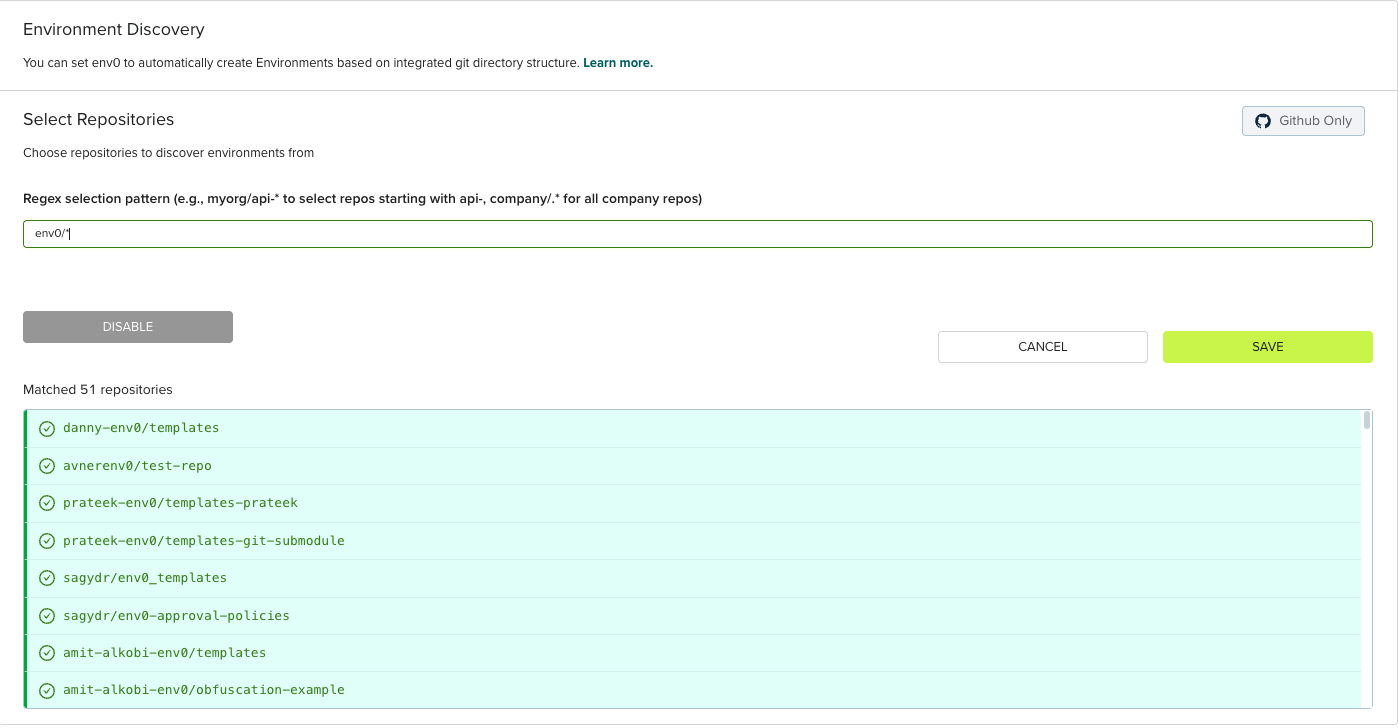
Select the **Environment Discovery** tab, then click **File Discovery** to begin configuration.
 Repository scope works by regex. Enter a regex pattern to specify which repositories should accept discovery file changes from.
 **Authorization Requirements**
Users can only create environments in projects where their repository is allowed for discovery. The discovery regex is applied for sub-projects as well. For example, if project "us-east-1" is a sub-project under "prod" and "prod" is configured with a discovery rule allowing the repository, you can create environments in "us-east-1" by specifying:
```yaml theme={null}
environments:
testEnv:
name: "test"
projectName: "us-east-1" # "us-east-1" is under "prod" project
templateName: "ec2"
```
## Creating env0-discovery.yml Files
The `env0-discovery.yml` file is a YAML configuration file that defines one or more environments. Each repository must have exactly one `env0-discovery.yml` file, and it must be placed at the root path of the repository.
env zero relies on a file named **env0-discovery.yml** to describe the environments and their configurations. Each environment definition in the file should contain:
1. ***name*** (required): The name of the environment to create. Will be displayed in the env zero UI
2. ***templateId*** (required, conflicts with ***templateName***): The ID of an existing env zero [template](/guides/admin-guide/templates) to use (e.g., `123456-asdasd-1556`)
3. ***templateName*** (required, conflicts with ***templateId***): The name of an existing env zero [template](/guides/admin-guide/templates) to use (e.g., `EC2-Instance`)
**Template Reference**
You must specify exactly one of `templateId` or `templateName`, not both. While you can reference templates by name, using `templateId` is more reliable as template names may not be unique across your organization.
**Supported Template Types**
Discovery by File currently supports Terraform and OpenTofu templates only. Other IaC frameworks are not supported at this time.
4. ***projectId*** (required, conflicts with ***projectName***): The ID of the target project where the environment will be created (subject to authorization)
5. ***projectName*** (required, conflicts with ***projectId***): The name of the target project where the environment will be created (subject to authorization). For nested projects, use `|` as a separator (for example: `Team 1|Compute|dev` or `prod|us-east-1`)
**Project Reference**
You must specify exactly one of `projectId` or `projectName`, not both. The project must be accessible and allowed by the discovery rule configuration.
6. ***workspaceName*** (optional): The Terraform workspace name to use for this environment
7. ***revision*** (optional): A specific git branch, tag, or commit SHA for the template deployment
8. ***variableFiles*** (optional): Array of variable file objects, each with a `path` property pointing to a `.tfvars` file. The path must be relative to the root folder of the repository. Files are processed in order, with later files potentially overriding values from earlier files
9. ***requiresApproval*** (optional): Set to `true` to require manual approval before deployments for this environment
10. ***isRemoteBackend*** (optional): Set to `true` to enable [Remote Backend](/guides/admin-guide/remote-backend) for this environment
11. ***continuousDeployment*** (optional): Set to `true` to enable automatic deployments when changes are pushed to the configured branch
12. ***autoDeployOnPathChangesOnly*** (optional): Set to `true` to trigger deployments only when files in the template's configured path change
13. ***autoDeployByCustomGlob*** (optional): A custom glob pattern to specify which file changes should trigger automatic deployments (e.g., `**/*.tf`)
14. ***pullRequestPlanDeployments*** (optional): Set to `true` to automatically run Terraform plans on pull requests
15. ***vcsPrCommentsEnabled*** (optional): Set to `true` to enable env zero to post plan results as comments on pull requests
16. ***vcsCommandsAlias*** (optional): A custom alias for VCS commands used in pull request comments
17. ***driftDetectionCron*** (optional): A cron expression to schedule automatic drift detection runs (e.g., `0 4 * * *` for daily at 4 AM UTC)
**Template Access**
Templates must be assigned to the target project in env zero before they can be referenced in discovery files. Even if you specify a template in your `env0-discovery.yml` file, it will only work if that template is already assigned to the target project.
## Example Configuration
### Basic Structure
A basic `env0-discovery.yml` file contains environment definitions as an object where each key is an environment identifier:
```yaml theme={null}
environments:
production-database:
projectName: production
name: production-database
templateName: EC2-Instance
variableFiles:
- path: variables/production.tfvars
```
### Multiple Environments with Advanced Configuration
You can define multiple environments in a single `env0-discovery.yml` file with various configuration options:
```yaml theme={null}
environments:
production-database:
projectName: production
name: production-database
templateName: EC2-Instance
workspaceName: prod-db
revision: main
requiresApproval: true
isRemoteBackend: true
continuousDeployment: true
autoDeployOnPathChangesOnly: true
pullRequestPlanDeployments: true
vcsPrCommentsEnabled: true
driftDetectionCron: "0 2 * * *"
variableFiles:
- path: variables/production.tfvars
- path: variables/common.tfvars
staging-backend:
projectName: staging
name: staging-backend
templateId: 123456-asdasd-1556
workspaceName: staging-be
revision: develop
continuousDeployment: true
autoDeployByCustomGlob: "backend/**/*.tf"
pullRequestPlanDeployments: true
vcsPrCommentsEnabled: true
variableFiles:
- path: variables/staging.tfvars
dev-environment:
projectName: development
name: dev-environment
templateName: Simple-App
requiresApproval: false
continuousDeployment: true
variableFiles:
- path: variables/dev.tfvars
```
**Multi-Organization Support**
If the env zero GitHub app is installed across multiple organizations, you can define environments that span these organizations within a single `env0-discovery.yml` file. Each environment will be processed by the env zero organization that has access to both the repository and the specified project.
### Using YAML Anchors for Shared Configuration
You can use YAML anchors and aliases to avoid repeating common configuration across multiple environments:
```yaml theme={null}
# env0-discovery.yml
commonConfig: &defaultConfig
requiresApproval: true
isRemoteBackend: true
continuousDeployment: true
autoDeployOnPathChangesOnly: true
pullRequestPlanDeployments: true
vcsPrCommentsEnabled: true
driftDetectionCron: "0 2 * * *"
environments:
service1:
name: "service1"
projectName: "app1|dev"
templateName: "my-template"
<<: *defaultConfig
service2:
name: "service2"
projectName: "app1|qa"
templateName: "my-template"
<<: *defaultConfig
```
In this example, `&defaultConfig` creates an anchor for the common configuration, and `<<: *defaultConfig` merges those settings into each environment definition. This approach helps maintain consistency and reduces duplication when managing multiple environments with similar settings.
## Importing Existing Environments
You can import already deployed environments into your discovery file to bring them under Discovery by File management. This allows you to transition existing environments to code-based configuration without redeploying infrastructure.
**Prerequisites for Import**
The environment you want to import must already be deployed and active in env zero. You cannot import environments that are not yet deployed or have been archived.
### How to Import an Environment
To import an existing environment, add its configuration to your `env0-discovery.yml` file with the exact details that match the deployed environment:
```yaml theme={null}
environments:
existing-production:
name: production-database # Must match the exact name in env zero
projectName: production # Must match the current project
templateName: EC2-Instance # Must match the template used
workspaceName: prod-db # Must match the workspace if one is configured
```
Navigate to the existing environment in env zero and note its exact configuration including environment name, project location, template name or ID, workspace name (if applicable), and current revision/branch. Add the environment configuration to your `env0-discovery.yml` file using these exact details.
When you create a pull request with the updated `env0-discovery.yml` file, the preview will show the environment under the **Imported** section, indicating it will be brought under discovery management.
**Authorization Requirements**
Users can only create environments in projects where their repository is allowed for discovery. The discovery regex is applied for sub-projects as well. For example, if project "us-east-1" is a sub-project under "prod" and "prod" is configured with a discovery rule allowing the repository, you can create environments in "us-east-1" by specifying:
```yaml theme={null}
environments:
testEnv:
name: "test"
projectName: "us-east-1" # "us-east-1" is under "prod" project
templateName: "ec2"
```
## Creating env0-discovery.yml Files
The `env0-discovery.yml` file is a YAML configuration file that defines one or more environments. Each repository must have exactly one `env0-discovery.yml` file, and it must be placed at the root path of the repository.
env zero relies on a file named **env0-discovery.yml** to describe the environments and their configurations. Each environment definition in the file should contain:
1. ***name*** (required): The name of the environment to create. Will be displayed in the env zero UI
2. ***templateId*** (required, conflicts with ***templateName***): The ID of an existing env zero [template](/guides/admin-guide/templates) to use (e.g., `123456-asdasd-1556`)
3. ***templateName*** (required, conflicts with ***templateId***): The name of an existing env zero [template](/guides/admin-guide/templates) to use (e.g., `EC2-Instance`)
**Template Reference**
You must specify exactly one of `templateId` or `templateName`, not both. While you can reference templates by name, using `templateId` is more reliable as template names may not be unique across your organization.
**Supported Template Types**
Discovery by File currently supports Terraform and OpenTofu templates only. Other IaC frameworks are not supported at this time.
4. ***projectId*** (required, conflicts with ***projectName***): The ID of the target project where the environment will be created (subject to authorization)
5. ***projectName*** (required, conflicts with ***projectId***): The name of the target project where the environment will be created (subject to authorization). For nested projects, use `|` as a separator (for example: `Team 1|Compute|dev` or `prod|us-east-1`)
**Project Reference**
You must specify exactly one of `projectId` or `projectName`, not both. The project must be accessible and allowed by the discovery rule configuration.
6. ***workspaceName*** (optional): The Terraform workspace name to use for this environment
7. ***revision*** (optional): A specific git branch, tag, or commit SHA for the template deployment
8. ***variableFiles*** (optional): Array of variable file objects, each with a `path` property pointing to a `.tfvars` file. The path must be relative to the root folder of the repository. Files are processed in order, with later files potentially overriding values from earlier files
9. ***requiresApproval*** (optional): Set to `true` to require manual approval before deployments for this environment
10. ***isRemoteBackend*** (optional): Set to `true` to enable [Remote Backend](/guides/admin-guide/remote-backend) for this environment
11. ***continuousDeployment*** (optional): Set to `true` to enable automatic deployments when changes are pushed to the configured branch
12. ***autoDeployOnPathChangesOnly*** (optional): Set to `true` to trigger deployments only when files in the template's configured path change
13. ***autoDeployByCustomGlob*** (optional): A custom glob pattern to specify which file changes should trigger automatic deployments (e.g., `**/*.tf`)
14. ***pullRequestPlanDeployments*** (optional): Set to `true` to automatically run Terraform plans on pull requests
15. ***vcsPrCommentsEnabled*** (optional): Set to `true` to enable env zero to post plan results as comments on pull requests
16. ***vcsCommandsAlias*** (optional): A custom alias for VCS commands used in pull request comments
17. ***driftDetectionCron*** (optional): A cron expression to schedule automatic drift detection runs (e.g., `0 4 * * *` for daily at 4 AM UTC)
**Template Access**
Templates must be assigned to the target project in env zero before they can be referenced in discovery files. Even if you specify a template in your `env0-discovery.yml` file, it will only work if that template is already assigned to the target project.
## Example Configuration
### Basic Structure
A basic `env0-discovery.yml` file contains environment definitions as an object where each key is an environment identifier:
```yaml theme={null}
environments:
production-database:
projectName: production
name: production-database
templateName: EC2-Instance
variableFiles:
- path: variables/production.tfvars
```
### Multiple Environments with Advanced Configuration
You can define multiple environments in a single `env0-discovery.yml` file with various configuration options:
```yaml theme={null}
environments:
production-database:
projectName: production
name: production-database
templateName: EC2-Instance
workspaceName: prod-db
revision: main
requiresApproval: true
isRemoteBackend: true
continuousDeployment: true
autoDeployOnPathChangesOnly: true
pullRequestPlanDeployments: true
vcsPrCommentsEnabled: true
driftDetectionCron: "0 2 * * *"
variableFiles:
- path: variables/production.tfvars
- path: variables/common.tfvars
staging-backend:
projectName: staging
name: staging-backend
templateId: 123456-asdasd-1556
workspaceName: staging-be
revision: develop
continuousDeployment: true
autoDeployByCustomGlob: "backend/**/*.tf"
pullRequestPlanDeployments: true
vcsPrCommentsEnabled: true
variableFiles:
- path: variables/staging.tfvars
dev-environment:
projectName: development
name: dev-environment
templateName: Simple-App
requiresApproval: false
continuousDeployment: true
variableFiles:
- path: variables/dev.tfvars
```
**Multi-Organization Support**
If the env zero GitHub app is installed across multiple organizations, you can define environments that span these organizations within a single `env0-discovery.yml` file. Each environment will be processed by the env zero organization that has access to both the repository and the specified project.
### Using YAML Anchors for Shared Configuration
You can use YAML anchors and aliases to avoid repeating common configuration across multiple environments:
```yaml theme={null}
# env0-discovery.yml
commonConfig: &defaultConfig
requiresApproval: true
isRemoteBackend: true
continuousDeployment: true
autoDeployOnPathChangesOnly: true
pullRequestPlanDeployments: true
vcsPrCommentsEnabled: true
driftDetectionCron: "0 2 * * *"
environments:
service1:
name: "service1"
projectName: "app1|dev"
templateName: "my-template"
<<: *defaultConfig
service2:
name: "service2"
projectName: "app1|qa"
templateName: "my-template"
<<: *defaultConfig
```
In this example, `&defaultConfig` creates an anchor for the common configuration, and `<<: *defaultConfig` merges those settings into each environment definition. This approach helps maintain consistency and reduces duplication when managing multiple environments with similar settings.
## Importing Existing Environments
You can import already deployed environments into your discovery file to bring them under Discovery by File management. This allows you to transition existing environments to code-based configuration without redeploying infrastructure.
**Prerequisites for Import**
The environment you want to import must already be deployed and active in env zero. You cannot import environments that are not yet deployed or have been archived.
### How to Import an Environment
To import an existing environment, add its configuration to your `env0-discovery.yml` file with the exact details that match the deployed environment:
```yaml theme={null}
environments:
existing-production:
name: production-database # Must match the exact name in env zero
projectName: production # Must match the current project
templateName: EC2-Instance # Must match the template used
workspaceName: prod-db # Must match the workspace if one is configured
```
Navigate to the existing environment in env zero and note its exact configuration including environment name, project location, template name or ID, workspace name (if applicable), and current revision/branch. Add the environment configuration to your `env0-discovery.yml` file using these exact details.
When you create a pull request with the updated `env0-discovery.yml` file, the preview will show the environment under the **Imported** section, indicating it will be brought under discovery management.
 After merging the pull request, the environment is now managed through the discovery file. Future configuration changes should be made by updating the `env0-discovery.yml` file rather than through the env zero UI.
### Import Configuration Requirements
When importing an environment, the discovery file configuration must match the existing environment:
* **name**: Must exactly match the environment name in env zero
* **projectName** or **projectId**: Must match the project where the environment currently exists
* **templateName** or **templateId**: Must match the template currently used by the environment
* **workspaceName**: Must match if the environment uses a Terraform workspace
Use `templateId` and `projectId` rather than names for more reliable imports,
as IDs are guaranteed to be unique while names may change.
### After Import
Once an environment is imported, it becomes fully managed by the discovery file:
* Configuration changes should be made by updating the `env0-discovery.yml` file
* The environment will appear in pull request previews when changes affect it
* Removing the environment from the discovery file will trigger environment deletion (subject to your project's removal strategy)
Importing existing environments is useful when transitioning from manual
environment management to a code-first approach with Discovery by File.
## Using Variable Files
Variables must be defined in `.tfvars` files and referenced using the `variableFiles` field. This approach supports all variable types including primitives, maps, lists, and objects using full HCL syntax.
```yaml theme={null}
environments:
production-database:
name: production-database
templateName: EC2-Instance
variableFiles:
- path: variables/production.tfvars
- path: variables/common.tfvars
```
Each entry in `variableFiles` is an object with a `path` property. You can reference multiple variable files, similar to how Terraform and OpenTofu support multiple `-var-file` arguments. Files are processed in the order listed, with later files potentially overriding values from earlier files.
## Pull Request Preview
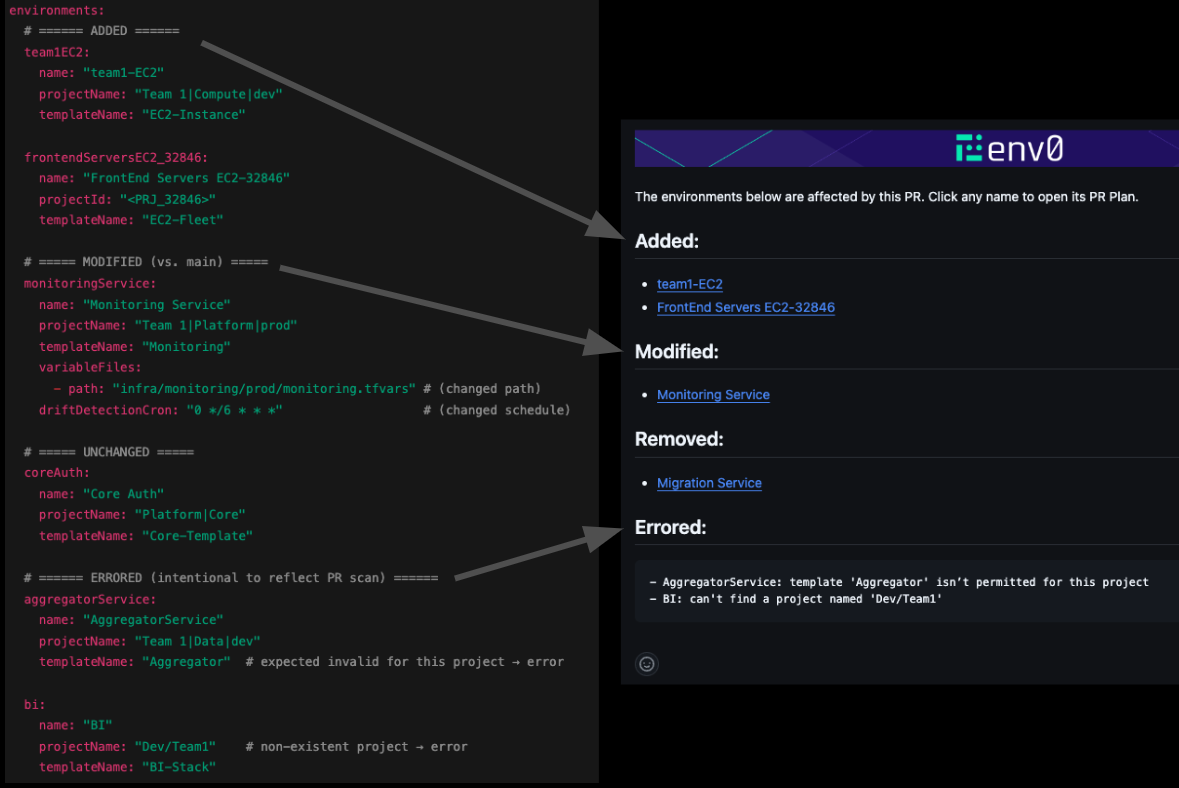
When you create or modify an `env0-discovery.yml` file in a pull request, env zero automatically runs a plan to preview the changes. The plan displays the infrastructure resources that will be created, modified, or destroyed based on your template, providing full visibility into the actual infrastructure impact.
The PR comment shows a summary of affected environments organized into sections:
* **Added**: New environments that will be created
* **Modified**: Existing environments with configuration changes
* **Removed**: Environments that will be deleted
* **Imported**: Environments that already exist and are being imported into the discovery file
* **Errored**: Environments with configuration errors (e.g., invalid template references or project names)
Click any environment name in the summary to view its detailed plan output.
PR plans provide full visibility into infrastructure changes before merging,
helping you catch issues early in the review process.
### Plan Triggers
Plans are automatically triggered when:
* A new `env0-discovery.yml` file is added
* An existing `env0-discovery.yml` file is modified
* Template references are changed
* Variable values are updated
* Variable file references are modified
## Managing Variables
Variables are defined in `.tfvars` files referenced by the `variableFiles` field in your `env0-discovery.yml` file. After an environment is created through Discovery by File, you can add additional variables through the env zero UI. This is particularly useful for secret values that shouldn't be stored in code repositories.
### Adding Variables After Creation
1. Navigate to the discovered environment in env zero
2. Go to the **Variables** tab
3. Add new variables as needed
4. Variables added via UI are merged with variables from `.tfvars` files referenced in `env0-discovery.yml`
**Variable Precedence**
Variables defined in `.tfvars` files take precedence over variables added through the UI. If you update a variable in the UI, that value will be overridden by the value from the variable files on the next deployment.
## Related
Learn more: [Environment Discovery overview](/guides/admin-guide/environment-discovery)
Learn more: [Automatic environment creation from pull requests](/guides/admin-guide/environment-discovery/automatic-environment-creation-from-pull-request)
Learn more: [Importing external environments](/guides/admin-guide/environment-discovery/onboarding-import-external-environments-into-env-zero)
## Next steps
* [Auto-Create Environments from Pull Requests](/guides/admin-guide/environment-discovery/automatic-environment-creation-from-pull-request) - Create ephemeral environments automatically from open pull requests.
* [Import External Environments into env zero](/guides/admin-guide/environment-discovery/onboarding-import-external-environments-into-env-zero) - Bulk-migrate existing environments into env zero management.
* [Template Overview](/guides/admin-guide/templates) - Understand the templates referenced in env0-discovery.yml files.
After merging the pull request, the environment is now managed through the discovery file. Future configuration changes should be made by updating the `env0-discovery.yml` file rather than through the env zero UI.
### Import Configuration Requirements
When importing an environment, the discovery file configuration must match the existing environment:
* **name**: Must exactly match the environment name in env zero
* **projectName** or **projectId**: Must match the project where the environment currently exists
* **templateName** or **templateId**: Must match the template currently used by the environment
* **workspaceName**: Must match if the environment uses a Terraform workspace
Use `templateId` and `projectId` rather than names for more reliable imports,
as IDs are guaranteed to be unique while names may change.
### After Import
Once an environment is imported, it becomes fully managed by the discovery file:
* Configuration changes should be made by updating the `env0-discovery.yml` file
* The environment will appear in pull request previews when changes affect it
* Removing the environment from the discovery file will trigger environment deletion (subject to your project's removal strategy)
Importing existing environments is useful when transitioning from manual
environment management to a code-first approach with Discovery by File.
## Using Variable Files
Variables must be defined in `.tfvars` files and referenced using the `variableFiles` field. This approach supports all variable types including primitives, maps, lists, and objects using full HCL syntax.
```yaml theme={null}
environments:
production-database:
name: production-database
templateName: EC2-Instance
variableFiles:
- path: variables/production.tfvars
- path: variables/common.tfvars
```
Each entry in `variableFiles` is an object with a `path` property. You can reference multiple variable files, similar to how Terraform and OpenTofu support multiple `-var-file` arguments. Files are processed in the order listed, with later files potentially overriding values from earlier files.
## Pull Request Preview
When you create or modify an `env0-discovery.yml` file in a pull request, env zero automatically runs a plan to preview the changes. The plan displays the infrastructure resources that will be created, modified, or destroyed based on your template, providing full visibility into the actual infrastructure impact.
The PR comment shows a summary of affected environments organized into sections:
* **Added**: New environments that will be created
* **Modified**: Existing environments with configuration changes
* **Removed**: Environments that will be deleted
* **Imported**: Environments that already exist and are being imported into the discovery file
* **Errored**: Environments with configuration errors (e.g., invalid template references or project names)
Click any environment name in the summary to view its detailed plan output.
PR plans provide full visibility into infrastructure changes before merging,
helping you catch issues early in the review process.
### Plan Triggers
Plans are automatically triggered when:
* A new `env0-discovery.yml` file is added
* An existing `env0-discovery.yml` file is modified
* Template references are changed
* Variable values are updated
* Variable file references are modified
## Managing Variables
Variables are defined in `.tfvars` files referenced by the `variableFiles` field in your `env0-discovery.yml` file. After an environment is created through Discovery by File, you can add additional variables through the env zero UI. This is particularly useful for secret values that shouldn't be stored in code repositories.
### Adding Variables After Creation
1. Navigate to the discovered environment in env zero
2. Go to the **Variables** tab
3. Add new variables as needed
4. Variables added via UI are merged with variables from `.tfvars` files referenced in `env0-discovery.yml`
**Variable Precedence**
Variables defined in `.tfvars` files take precedence over variables added through the UI. If you update a variable in the UI, that value will be overridden by the value from the variable files on the next deployment.
## Related
Learn more: [Environment Discovery overview](/guides/admin-guide/environment-discovery)
Learn more: [Automatic environment creation from pull requests](/guides/admin-guide/environment-discovery/automatic-environment-creation-from-pull-request)
Learn more: [Importing external environments](/guides/admin-guide/environment-discovery/onboarding-import-external-environments-into-env-zero)
## Next steps
* [Auto-Create Environments from Pull Requests](/guides/admin-guide/environment-discovery/automatic-environment-creation-from-pull-request) - Create ephemeral environments automatically from open pull requests.
* [Import External Environments into env zero](/guides/admin-guide/environment-discovery/onboarding-import-external-environments-into-env-zero) - Bulk-migrate existing environments into env zero management.
* [Template Overview](/guides/admin-guide/templates) - Understand the templates referenced in env0-discovery.yml files.