> ## Documentation Index
> Fetch the complete documentation index at: https://docs.envzero.com/llms.txt
> Use this file to discover all available pages before exploring further.
# Running Ad Hoc Tasks
> Run arbitrary bash commands on your env zero deployment container without committing to git using ad hoc tasks, with access to all environment variables.
Sometimes you may want to execute arbitrary commands on your deployment container - for example, manually altering the state or manipulating a local file. These commands can be run using [Custom Flows](/guides/admin-guide/custom-flows), but that requires committing the commands to your git repository, which doesn't always fit the use case. In these cases, it is possible to execute **Run a Task** on the deployment container.
**Permissions to run a one time tasks**
Ad hoc tasks allow you to run **any** command on the deployment container, so by default only [organization administrators](/guides/admin-guide/user-role-and-team-management/user-management) may run these tasks. You can use [custom roles](/guides/admin-guide/user-role-and-team-management/custom-roles) to grant this permission to other users.
## Executing a Run Task
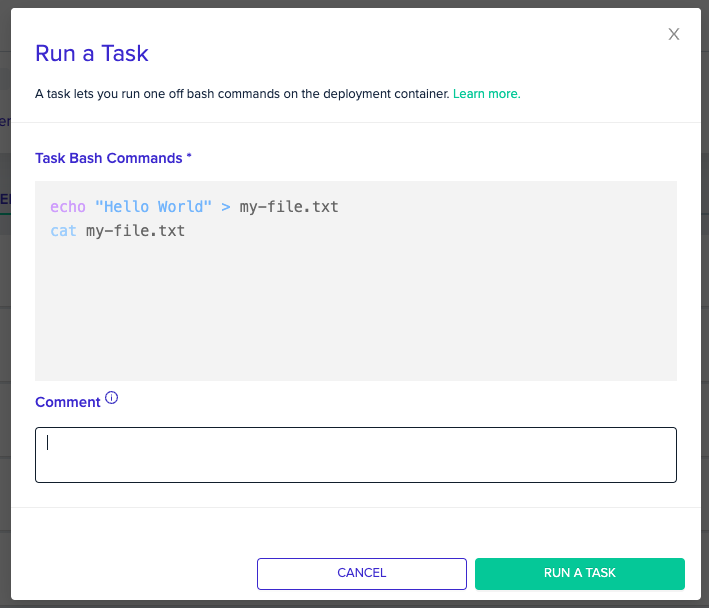
 From the environment's advanced context menu, click on `Run a Task`.\
It will prompt you to enter the commands you desire to execute.\
Enter the commands, as you would in a bash script. Separate commands with new lines.\
When you are ready to run your task - click the `RUN A TASK` button below.
From the environment's advanced context menu, click on `Run a Task`.\
It will prompt you to enter the commands you desire to execute.\
Enter the commands, as you would in a bash script. Separate commands with new lines.\
When you are ready to run your task - click the `RUN A TASK` button below.
 Task Timeouts
Tasks have a 30 minute timeout
Your task will be queued and executed on the deployment container, including the local cache env zero saves between deployments. You'll be able to see your commands execute in the Deployment Logs, like any other deployment.\
During the task execution, all the variables that are defined in the environment will be available for you to use.
Tasks also support [custom flows](/guides/admin-guide/custom-flows). You can read more about the available hooks [here](/guides/admin-guide/custom-flows/#hook-stages).
## Common Tasks
* [Migrate state](https://www.terraform.io/cli/commands/init#backend-initialization): `terraform init -migrate-state -force-copy` or `echo "yes" | terraform init -migrate-state`
* [Release state lock](https://www.terraform.io/cli/commands/force-unlock): `terraform force-unlock -force LOCK_ID [DIR]`
* [Retrieve output](https://www.terraform.io/cli/commands/output): `terraform output [options] [NAME]`
* [Taint a resource](https://www.terraform.io/cli/commands/taint) `terraform taint [options] `
* [Move state](https://www.terraform.io/cli/commands/state/mv): `terraform state mv [options] SOURCE DESTINATION`
The tools available for executing commands are the same ones that were available during your last deployment.
If you require additional tools, make sure to update the ENV0\_INSTALLED\_TOOLS variable and run the deployment again.
## Tasks and Terraform Init
Tasks always perform a git clone to retrieve your source code. However, if the working directory archive from your last deployment is no longer available (e.g., due to expiration), only state files will be retrieved. In this case, if your task requires Terraform providers or modules, add `terraform init` to your task script before running other Terraform commands.
## Task Comments
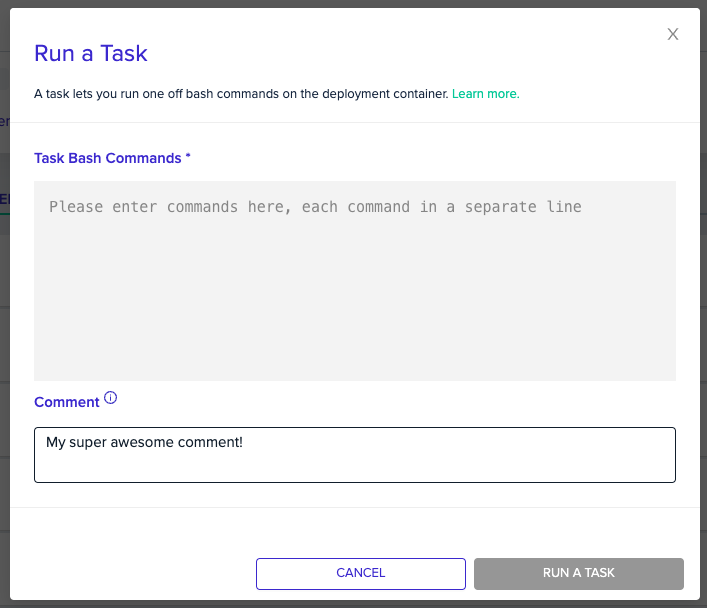
You can add a comment, to let your teammates know why the task was run.\
Add a comment, by filling in the *"Comment"* input down below the `bash` input.
Task Timeouts
Tasks have a 30 minute timeout
Your task will be queued and executed on the deployment container, including the local cache env zero saves between deployments. You'll be able to see your commands execute in the Deployment Logs, like any other deployment.\
During the task execution, all the variables that are defined in the environment will be available for you to use.
Tasks also support [custom flows](/guides/admin-guide/custom-flows). You can read more about the available hooks [here](/guides/admin-guide/custom-flows/#hook-stages).
## Common Tasks
* [Migrate state](https://www.terraform.io/cli/commands/init#backend-initialization): `terraform init -migrate-state -force-copy` or `echo "yes" | terraform init -migrate-state`
* [Release state lock](https://www.terraform.io/cli/commands/force-unlock): `terraform force-unlock -force LOCK_ID [DIR]`
* [Retrieve output](https://www.terraform.io/cli/commands/output): `terraform output [options] [NAME]`
* [Taint a resource](https://www.terraform.io/cli/commands/taint) `terraform taint [options] `
* [Move state](https://www.terraform.io/cli/commands/state/mv): `terraform state mv [options] SOURCE DESTINATION`
The tools available for executing commands are the same ones that were available during your last deployment.
If you require additional tools, make sure to update the ENV0\_INSTALLED\_TOOLS variable and run the deployment again.
## Tasks and Terraform Init
Tasks always perform a git clone to retrieve your source code. However, if the working directory archive from your last deployment is no longer available (e.g., due to expiration), only state files will be retrieved. In this case, if your task requires Terraform providers or modules, add `terraform init` to your task script before running other Terraform commands.
## Task Comments
You can add a comment, to let your teammates know why the task was run.\
Add a comment, by filling in the *"Comment"* input down below the `bash` input.
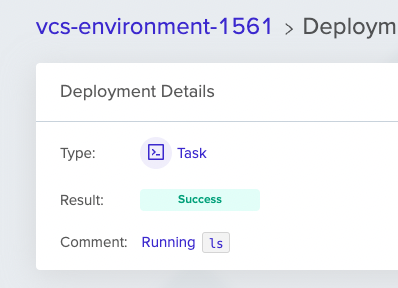
 The comment will be displayed in the Task page.\
Markdown syntax is supported.
The comment will be displayed in the Task page.\
Markdown syntax is supported.
 **Markdown Support**
The comment supports Markdown, so you would be able to generate even more context.
## Next steps
* [Custom Flows Overview](/guides/admin-guide/custom-flows) - Commit reusable command hooks to your git repository.
* [Managing Variables](/guides/admin-guide/variables) - Access and manage the variables available during task execution.
* [Environment Overview](/guides/admin-guide/environments) - Review the deployment container and state lifecycle.
**Markdown Support**
The comment supports Markdown, so you would be able to generate even more context.
## Next steps
* [Custom Flows Overview](/guides/admin-guide/custom-flows) - Commit reusable command hooks to your git repository.
* [Managing Variables](/guides/admin-guide/variables) - Access and manage the variables available during task execution.
* [Environment Overview](/guides/admin-guide/environments) - Review the deployment container and state lifecycle.