> ## Documentation Index
> Fetch the complete documentation index at: https://docs.envzero.com/llms.txt
> Use this file to discover all available pages before exploring further.
# Moving Environments
> Move env zero environments between projects to reorganize structures, with automatic updates to variables, policies, and state access control settings.
Moving environments between projects can be useful when reorganizing project structures, reallocating resources, or consolidating environments for more efficient management.
By moving environments, you can ensure that your infrastructure aligns with your team’s evolving needs and project goals.
1. Navigate to the Environment page of the environment you would like to move
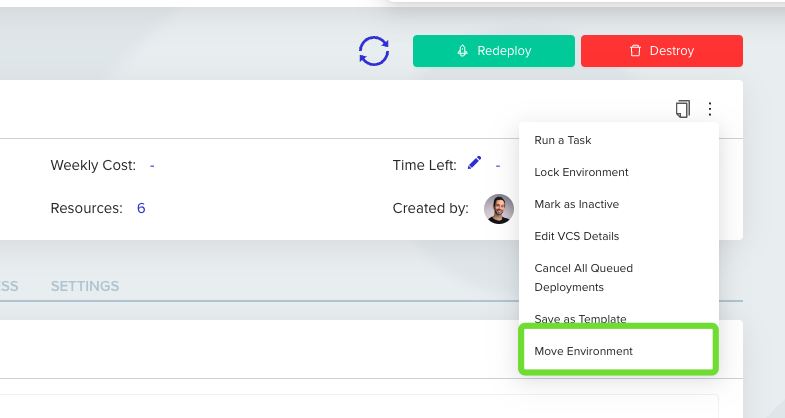
2. Open the menu at the top of the card
3. Click `Move Environment`
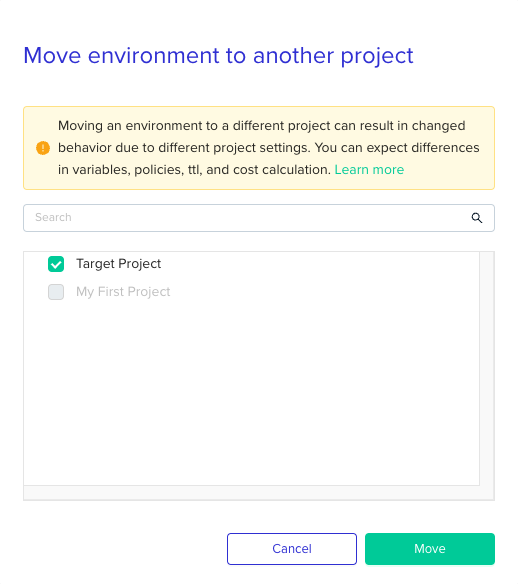
 3. Select your target project from the list and click `Move`
 4. You'll be redirected to the redeploy page to deploy the environment in the target project.
**Limitations**
When moving an environment, most of your environment settings will stay intact, however, project related settings may change. Here is a list of the settings that might change:
* Variables
* Project policies
* State access control
* Costs
From now on those settings will be part of the new project, however, this will only take affect after a successful deployment on the new project.
**We strongly encourage you to re-deploy your environment immediately after moving it**
## Next steps
* [Manage Projects](/guides/admin-guide/projects) - Understand the project structure environments are moved between.
* [Managing Variables](/guides/admin-guide/variables) - Review variable inheritance after moving to a new project.
* [Environment Overview](/guides/admin-guide/environments) - Redeploy and verify the environment in its new project.
4. You'll be redirected to the redeploy page to deploy the environment in the target project.
**Limitations**
When moving an environment, most of your environment settings will stay intact, however, project related settings may change. Here is a list of the settings that might change:
* Variables
* Project policies
* State access control
* Costs
From now on those settings will be part of the new project, however, this will only take affect after a successful deployment on the new project.
**We strongly encourage you to re-deploy your environment immediately after moving it**
## Next steps
* [Manage Projects](/guides/admin-guide/projects) - Understand the project structure environments are moved between.
* [Managing Variables](/guides/admin-guide/variables) - Review variable inheritance after moving to a new project.
* [Environment Overview](/guides/admin-guide/environments) - Redeploy and verify the environment in its new project.