> ## Documentation Index
> Fetch the complete documentation index at: https://docs.envzero.com/llms.txt
> Use this file to discover all available pages before exploring further.
# Plan And Apply via PR Comments
> Trigger env zero plan and apply from pull request comments in GitHub, GitLab, Bitbucket, Azure DevOps, and self-hosted VCS providers.
As software developers, we all use a Version Control System (VCS) as the main tool in our process. With env zero, you can also manage your Infrastructure as Code (IaC) deployments directly from your VCS provider.\
Commenting with env zero commands on a pull request makes it possible to interact with your env zero environments without having to log in to the env zero platform.
#### For an env zero environment to be actionable in a pull request comment, the following prerequisites must be met:
1. The environment needs to have originated from a VCS-integrated template, and its configured revision must be the same as the base branch (target) of the pull request
2. The environment has ‘Enable PR Comments Commands for this Environment’ enabled
3. (Optional) The environment has Alias set
## Configuration
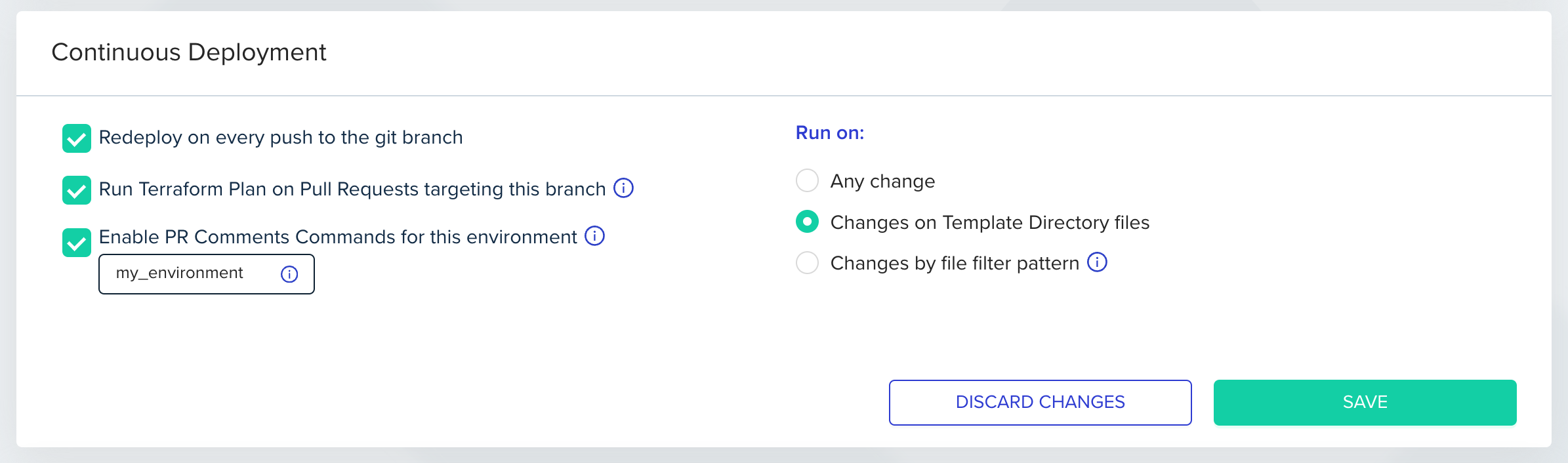
To configure this feature, enable the ‘Enable PR Comments Commands for this environment’ checkbox. Go to ‘Environments’, select ‘Settings’ and check ‘Enable PR Comments Commands for this environment’. Optional: Set an alias for each environment in which you would like to run individual commands using an `-e` flag. This alias will be used as a unique environment identifier when running a command from your VCS provider.\
**Environment aliases may only contain letters, numbers, \_, and -.**\
Even without setting an alias, the environment will still be included when using `--all` or `--path` flags.
 **Role Based Access**
When this feature is enabled, anyone who can comment on the pull request can trigger a plan or an apply command, regardless of their role and access level in env zero, making your VCS provider determine the RBAC in this case.
If you want to enforce PR commenter permissions based on env zero user permissions, jump to the [Enforce PR commenter permissions section](/guides/admin-guide/environments/plan-and-apply-from-pr-comments/#enforce-pr-commenter-permissions-on-env-zero).
**Self-hosted VCS provider support**
To enable this feature for GitHub Enterprise, Bitbucket Server and GitLab Enterprise, make sure your VCS Webhook is configured to send PR comments events.
## List of Affected Environments
Every PR push will generate a PR comment, indicating which environments are affected by changes to this PR. An environment must enable the 'Enable PR Comments Commands for this environment' to be detected as affected, as described in the [Configuration](/guides/admin-guide/environments/plan-and-apply-from-pr-comments/#configuration) above. Below is an example of a comment which lists three affected environments and their full paths:
**Role Based Access**
When this feature is enabled, anyone who can comment on the pull request can trigger a plan or an apply command, regardless of their role and access level in env zero, making your VCS provider determine the RBAC in this case.
If you want to enforce PR commenter permissions based on env zero user permissions, jump to the [Enforce PR commenter permissions section](/guides/admin-guide/environments/plan-and-apply-from-pr-comments/#enforce-pr-commenter-permissions-on-env-zero).
**Self-hosted VCS provider support**
To enable this feature for GitHub Enterprise, Bitbucket Server and GitLab Enterprise, make sure your VCS Webhook is configured to send PR comments events.
## List of Affected Environments
Every PR push will generate a PR comment, indicating which environments are affected by changes to this PR. An environment must enable the 'Enable PR Comments Commands for this environment' to be detected as affected, as described in the [Configuration](/guides/admin-guide/environments/plan-and-apply-from-pr-comments/#configuration) above. Below is an example of a comment which lists three affected environments and their full paths:
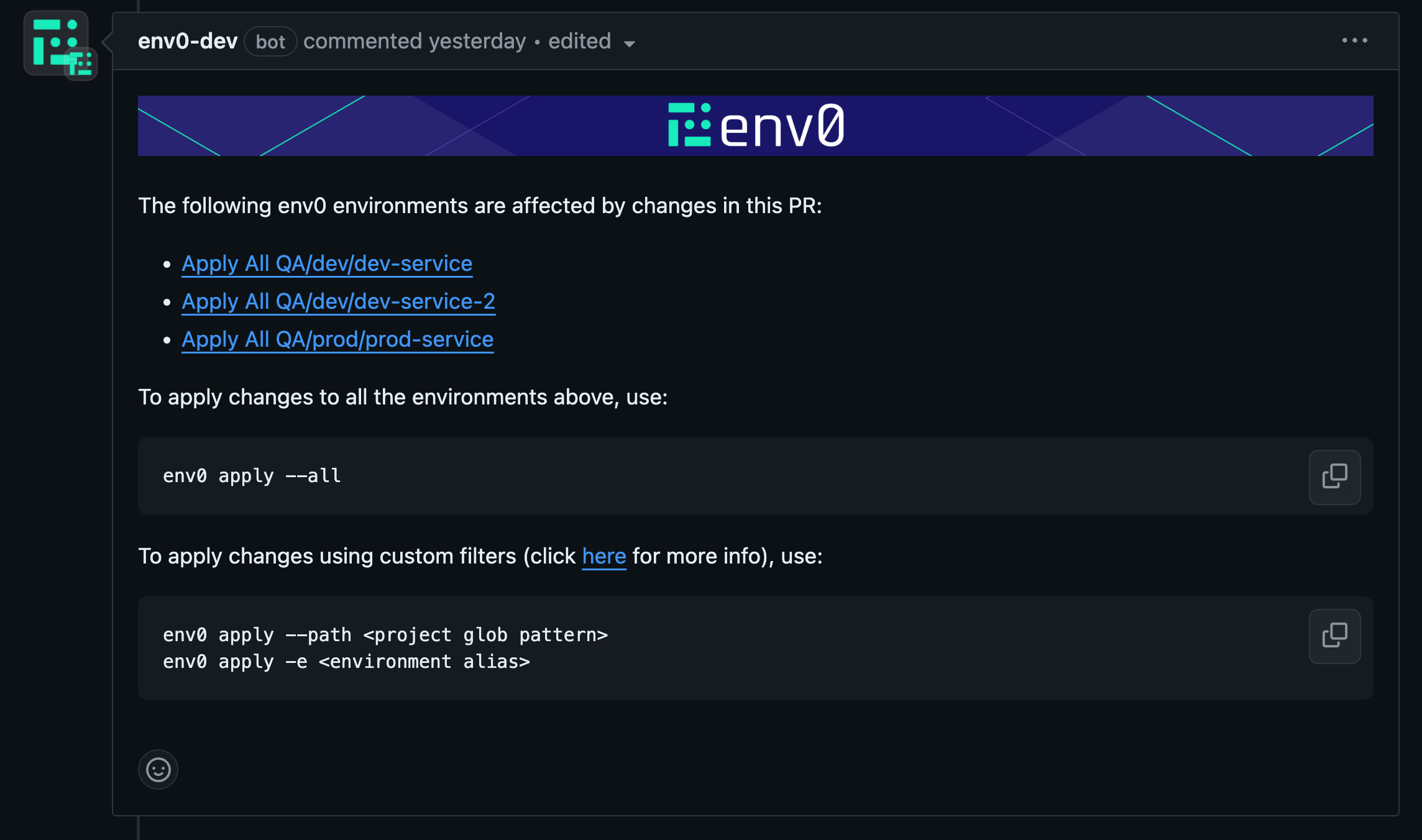 This comment is updated (edited) on every PR commit, so only a single comment will be shown in the PR.
## Supported env zero commands:
### env0 help command
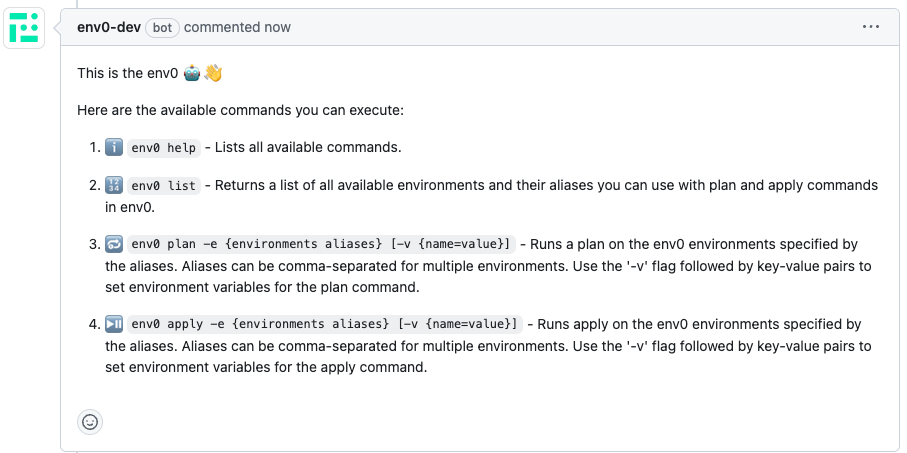
`env0 help` - Lists all available commands.
This comment is updated (edited) on every PR commit, so only a single comment will be shown in the PR.
## Supported env zero commands:
### env0 help command
`env0 help` - Lists all available commands.
 ### env0 list command
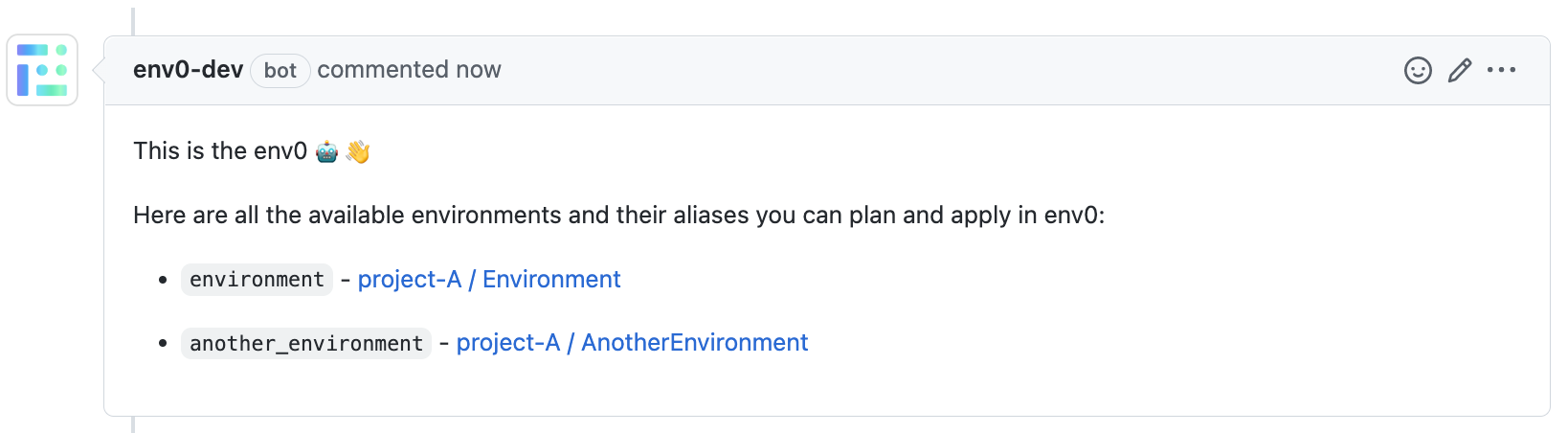
`env0 list` - Returns a list of all available environments and their aliases to plan and apply in env zero.
### env0 list command
`env0 list` - Returns a list of all available environments and their aliases to plan and apply in env zero.
 ### env0 plan command
`env0 plan --all [-v {name=value}]` - Runs `plan` on all the affected environments listed in the `affected environments` comment above.
`env0 plan --path "" [-v {name=value}]` - Runs `plan` on all the environments listed in the `affected environments` comment above whose full path matches the given [glob pattern path](https://en.wikipedia.org/wiki/Glob_\(programming\)). Use quotes `"` around the glob pattern if it contains spaces.
`env0 plan -e {environments aliases} [-v {name=value}]` - Runs `plan` on a set of provided env zero environment aliases (comma-separated).
### env0 plan command
`env0 plan --all [-v {name=value}]` - Runs `plan` on all the affected environments listed in the `affected environments` comment above.
`env0 plan --path "" [-v {name=value}]` - Runs `plan` on all the environments listed in the `affected environments` comment above whose full path matches the given [glob pattern path](https://en.wikipedia.org/wiki/Glob_\(programming\)). Use quotes `"` around the glob pattern if it contains spaces.
`env0 plan -e {environments aliases} [-v {name=value}]` - Runs `plan` on a set of provided env zero environment aliases (comma-separated).
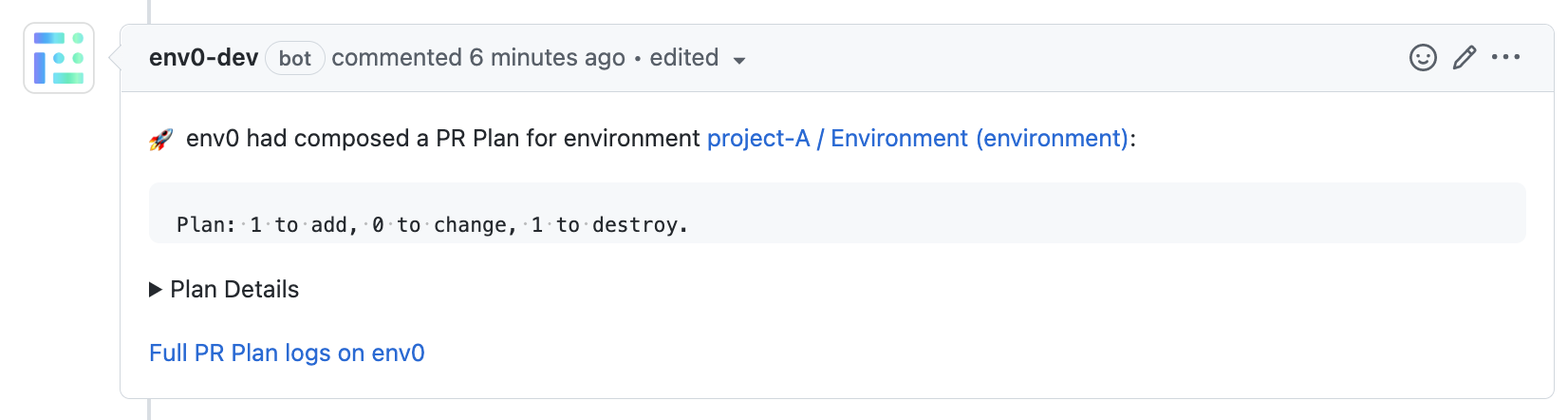 ### env0 apply command
`env0 apply --all [-v {name=value}]` - Runs `apply` on all the affected environments listed in the `affected environments `comment above.
`env0 apply --path "" [-v {name=value}]` - Runs `apply` on all the environments listed in the `affected environments` comment above whose full path matches the given [glob pattern path](https://en.wikipedia.org/wiki/Glob_\(programming\)) . Use quotes `"` around the glob pattern if it contains spaces.
`env0 apply -e {environments aliases} [-v {name=value}]` - Runs `apply` on a set of provided env zero environment aliases (comma-separated).
### env0 apply command
`env0 apply --all [-v {name=value}]` - Runs `apply` on all the affected environments listed in the `affected environments `comment above.
`env0 apply --path "" [-v {name=value}]` - Runs `apply` on all the environments listed in the `affected environments` comment above whose full path matches the given [glob pattern path](https://en.wikipedia.org/wiki/Glob_\(programming\)) . Use quotes `"` around the glob pattern if it contains spaces.
`env0 apply -e {environments aliases} [-v {name=value}]` - Runs `apply` on a set of provided env zero environment aliases (comma-separated).
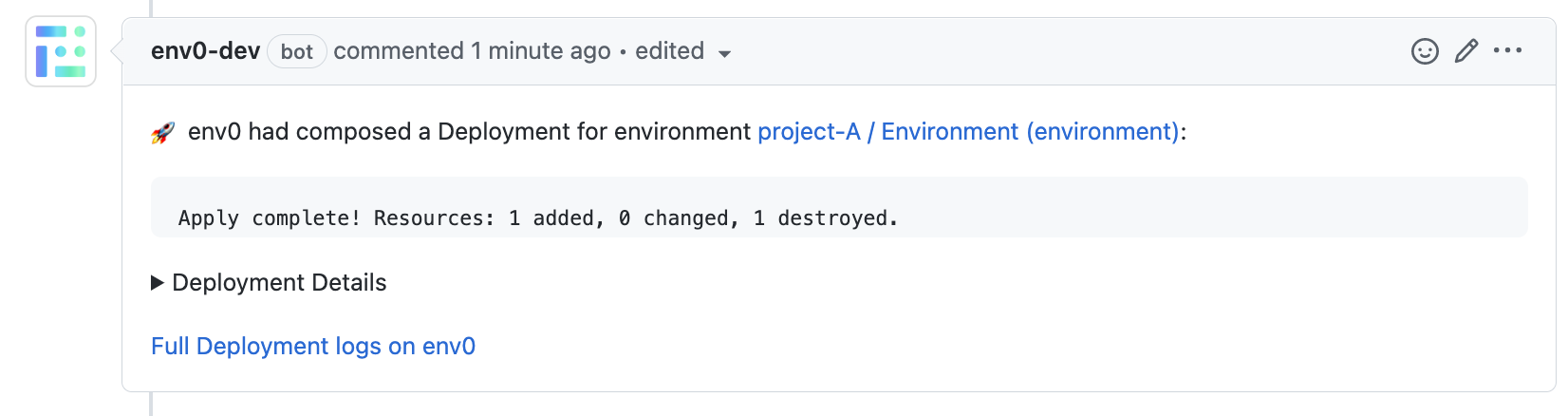 **Requires Approval Behavior in env zero Apply**
By default, applies triggered from PR comments are approved automatically.
**Why?**
When using apply via PR comments, we assume that users rely on their existing VCS governance methods, such as:
1. Status checks
2. PR approvals
3. Branch protection rules
You can override this behavior by enabling "Require approval for PR comment applies" in the `Organization Settings → Policies page`.
Learn more about it [here](/guides/admin-guide/environments/plan-and-apply-from-pr-comments#require-approval-for-pr-comment-applies)
**Specifying Environment Variables in plan and apply**
To include multiple variables, use the following format:
```bash theme={null}
-v {name=value} -v {name=value}
```
#### Use Case: Terraform Environment Variables
This approach is especially useful for setting [Terraform environment variables](https://developer.hashicorp.com/terraform/cli/config/environment-variables#environment-variables).
For example, you can utilize the `ENV0_TERRAFORM_TARGET` variable to perform [Target Resources](https://developer.hashicorp.com/terraform/tutorials/state/resource-targeting) deployments, as explained in the [Additional Controls](/guides/admin-guide/additional-controls/#terraform-partial-apply):
```bash theme={null}
-v ENV0_TERRAFORM_TARGET=module.example_resource
```
**Important Note on Persistent Variables**
When setting a variable using:
```bash theme={null}
-v {name=value}
```
This value will persist in the next deployment.
For example, if you set `ENV0_TERRAFORM_TARGET`, subsequent deployments will continue to use the same target, which may be opaque to users and could lead to unexpected behavior.
## Apply Requirements
The apply command also verifies that the pull request has the following requirements:
1. **GitHub** - We won't run the apply command if you have a protected branch in place and all the requirements are not met. You can read more about [protected branches here](https://docs.github.com/en/repositories/configuring-branches-and-merges-in-your-repository/defining-the-mergeability-of-pull-requests/about-protected-branches).
2. **Bitbucket / Bitbucket Server** - We verify that at least one person who isn't the author of the PR approved the pull request, and that none of the participants requested changes. You can learn more about [reviewing a pull request](https://support.atlassian.com/bitbucket-cloud/docs/review-code-in-a-pull-request/) in Bitbucket and [declining a pull request](https://support.atlassian.com/bitbucket-cloud/docs/decline-a-pull-request/).
3. **Azure DevOps** - We won't run the apply command if you have required [branch policies](https://learn.microsoft.com/en-us/azure/devops/repos/git/branch-policies) checks that failed.
**GitHub: Circular dependency with required `env0/Apply` status check**
If you set the `env0/Apply` status check as a required check in GitHub branch protection, the PR will appear non-mergeable before apply runs, preventing the apply from executing. To resolve this, enable the [Bypass Apply Mergeability Check](/guides/policies-governance/bypass-apply-mergeability-check) policy.
## env0/Apply Commit Check
When running `env0 apply --all` or `env0 apply --path `, a new `env0/Apply` commit check will be added on top of the individual deployment checks that you have per environment deployed.
If you want to make `env0/Apply` a required status check in GitHub branch protection, see [Bypass Apply Mergeability Check](/guides/policies-governance/bypass-apply-mergeability-check) to avoid a circular dependency with the apply mergeability requirement.
**Requires Approval Behavior in env zero Apply**
By default, applies triggered from PR comments are approved automatically.
**Why?**
When using apply via PR comments, we assume that users rely on their existing VCS governance methods, such as:
1. Status checks
2. PR approvals
3. Branch protection rules
You can override this behavior by enabling "Require approval for PR comment applies" in the `Organization Settings → Policies page`.
Learn more about it [here](/guides/admin-guide/environments/plan-and-apply-from-pr-comments#require-approval-for-pr-comment-applies)
**Specifying Environment Variables in plan and apply**
To include multiple variables, use the following format:
```bash theme={null}
-v {name=value} -v {name=value}
```
#### Use Case: Terraform Environment Variables
This approach is especially useful for setting [Terraform environment variables](https://developer.hashicorp.com/terraform/cli/config/environment-variables#environment-variables).
For example, you can utilize the `ENV0_TERRAFORM_TARGET` variable to perform [Target Resources](https://developer.hashicorp.com/terraform/tutorials/state/resource-targeting) deployments, as explained in the [Additional Controls](/guides/admin-guide/additional-controls/#terraform-partial-apply):
```bash theme={null}
-v ENV0_TERRAFORM_TARGET=module.example_resource
```
**Important Note on Persistent Variables**
When setting a variable using:
```bash theme={null}
-v {name=value}
```
This value will persist in the next deployment.
For example, if you set `ENV0_TERRAFORM_TARGET`, subsequent deployments will continue to use the same target, which may be opaque to users and could lead to unexpected behavior.
## Apply Requirements
The apply command also verifies that the pull request has the following requirements:
1. **GitHub** - We won't run the apply command if you have a protected branch in place and all the requirements are not met. You can read more about [protected branches here](https://docs.github.com/en/repositories/configuring-branches-and-merges-in-your-repository/defining-the-mergeability-of-pull-requests/about-protected-branches).
2. **Bitbucket / Bitbucket Server** - We verify that at least one person who isn't the author of the PR approved the pull request, and that none of the participants requested changes. You can learn more about [reviewing a pull request](https://support.atlassian.com/bitbucket-cloud/docs/review-code-in-a-pull-request/) in Bitbucket and [declining a pull request](https://support.atlassian.com/bitbucket-cloud/docs/decline-a-pull-request/).
3. **Azure DevOps** - We won't run the apply command if you have required [branch policies](https://learn.microsoft.com/en-us/azure/devops/repos/git/branch-policies) checks that failed.
**GitHub: Circular dependency with required `env0/Apply` status check**
If you set the `env0/Apply` status check as a required check in GitHub branch protection, the PR will appear non-mergeable before apply runs, preventing the apply from executing. To resolve this, enable the [Bypass Apply Mergeability Check](/guides/policies-governance/bypass-apply-mergeability-check) policy.
## env0/Apply Commit Check
When running `env0 apply --all` or `env0 apply --path `, a new `env0/Apply` commit check will be added on top of the individual deployment checks that you have per environment deployed.
If you want to make `env0/Apply` a required status check in GitHub branch protection, see [Bypass Apply Mergeability Check](/guides/policies-governance/bypass-apply-mergeability-check) to avoid a circular dependency with the apply mergeability requirement.
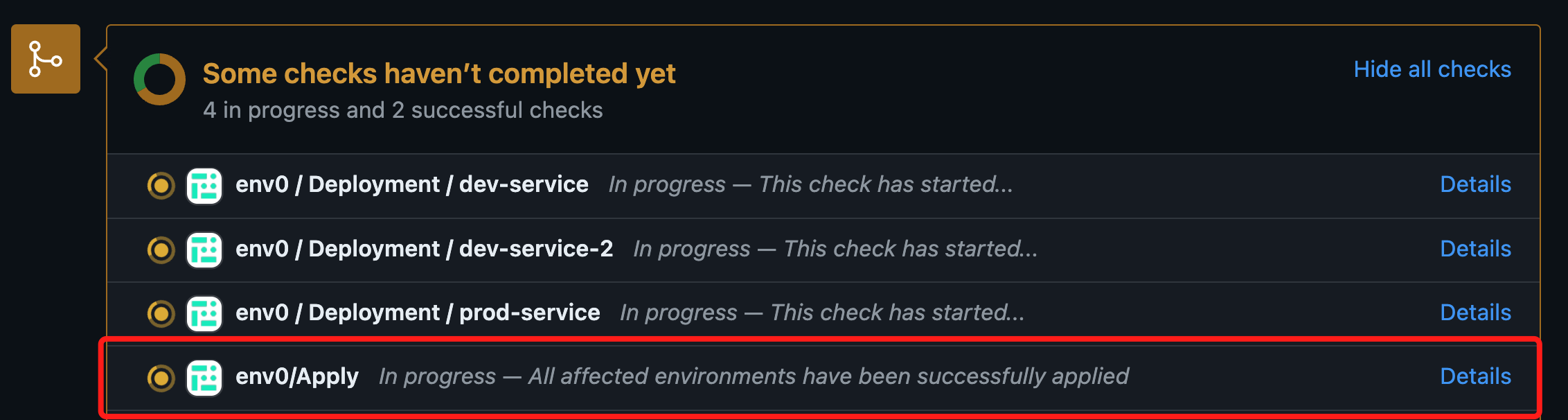 This commit check will show a `success` status once all the environments listed in the [affected environments comment](/guides/admin-guide/environments/plan-and-apply-from-pr-comments/#list-of-affected-environments) have been applied successfully. In case of failure in any of the deployments, the check's status will be set to `failure`.
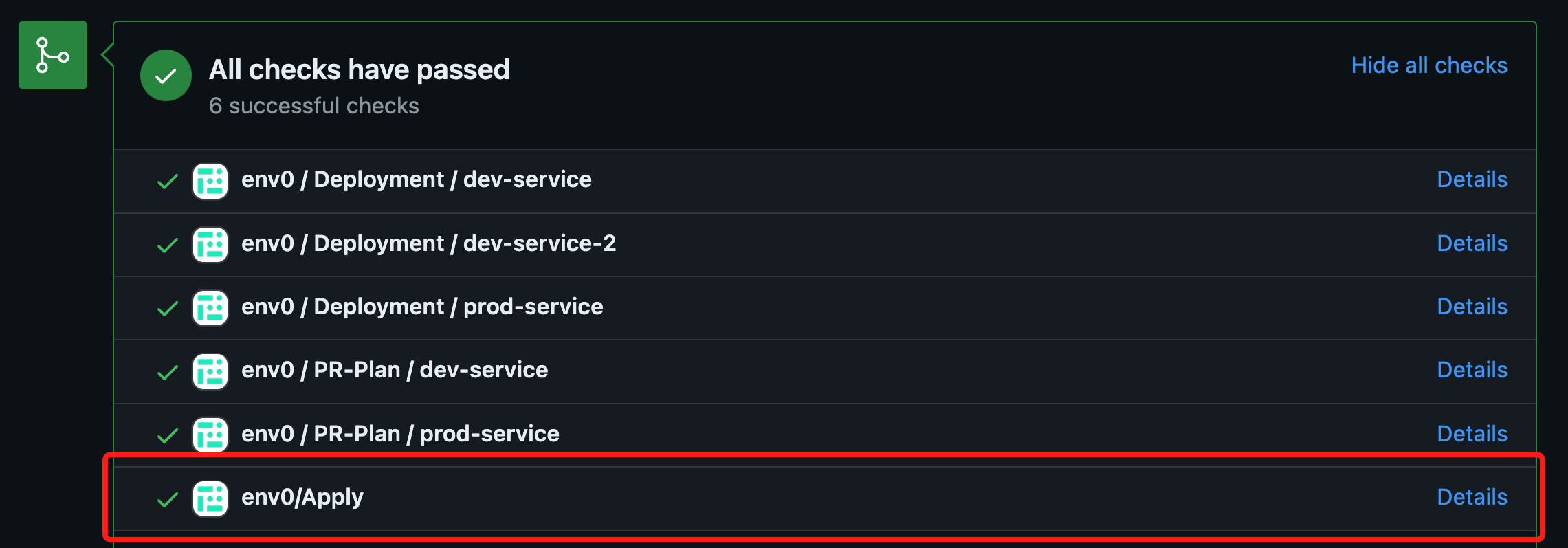 The check's status is calculated after every deployment of an environment listed in the affected environments comment.
## Enforce PR commenter permissions on env zero
With env zero, you can restrict your users' permissions through [role-based access controls](/guides/admin-guide/user-role-and-team-management/rbac). One drawback of using PR Comment Plan and Apply is that the VCS provider determines your users' permissions. By default, anyone with comment permission on your repository can run a Plan or an Apply on your environments.
Enforce PR commenter permissions on env zero is an organizational policy that lets you apply your env zero permissions to your VCS provider users. When turned on, env zero will validate that a user trying to run PR Comment Commands have adequate permissions.
### Turning on the policy for your organization
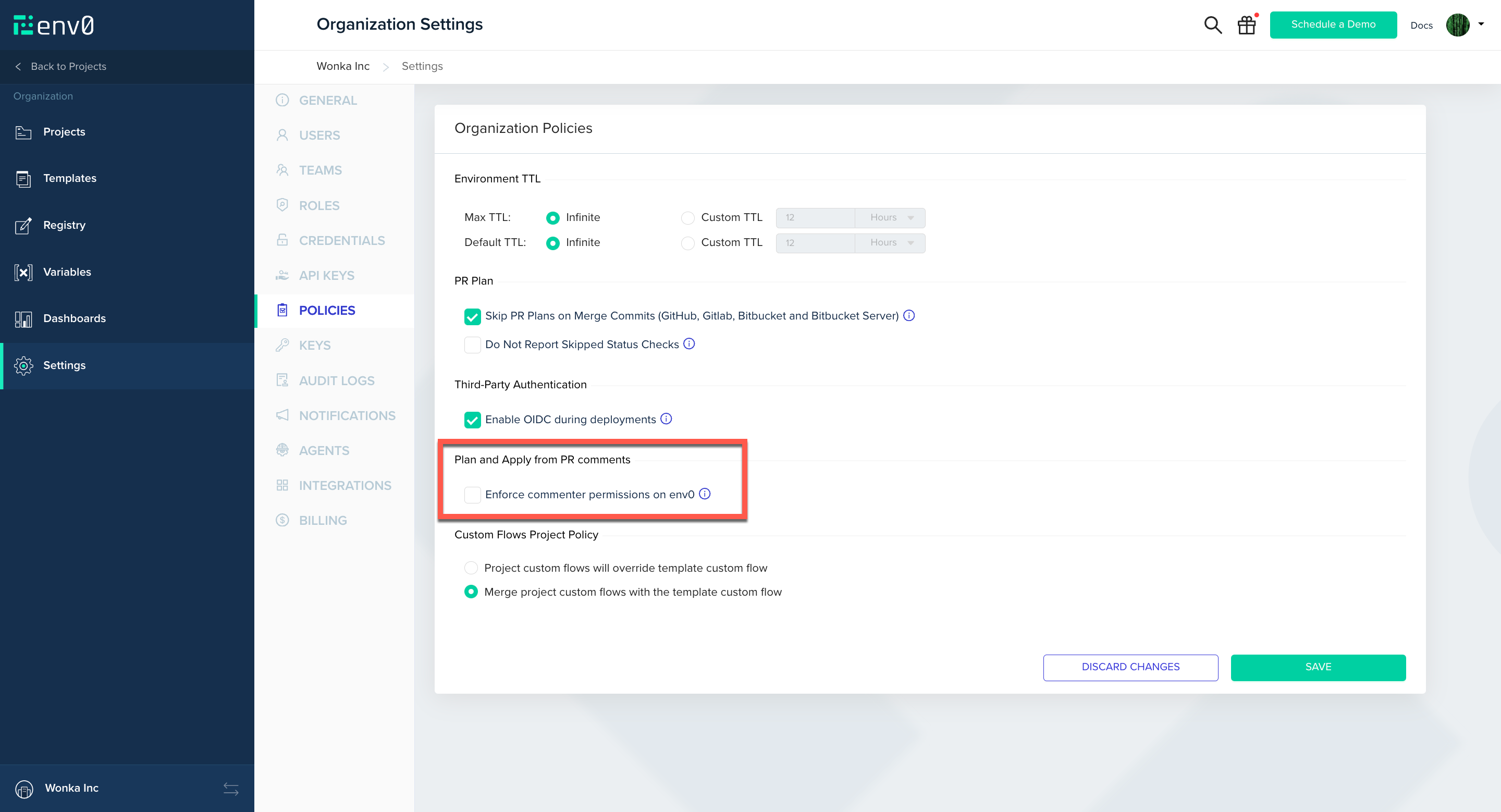
Navigate to 'Organization Settings' then go to 'Policies' and check 'Enforce commenter permissions on env zero'.
The check's status is calculated after every deployment of an environment listed in the affected environments comment.
## Enforce PR commenter permissions on env zero
With env zero, you can restrict your users' permissions through [role-based access controls](/guides/admin-guide/user-role-and-team-management/rbac). One drawback of using PR Comment Plan and Apply is that the VCS provider determines your users' permissions. By default, anyone with comment permission on your repository can run a Plan or an Apply on your environments.
Enforce PR commenter permissions on env zero is an organizational policy that lets you apply your env zero permissions to your VCS provider users. When turned on, env zero will validate that a user trying to run PR Comment Commands have adequate permissions.
### Turning on the policy for your organization
Navigate to 'Organization Settings' then go to 'Policies' and check 'Enforce commenter permissions on env zero'.
 ### Map VCS provider user
Now that the feature is turned on, every user across the organization who wishes to use the PR comments flow must set up a mapping of their VCS provider user.\
First you will need to get your VCS provider user ID from one of the supported VCS providers.
### Setting your VCS user in env zero
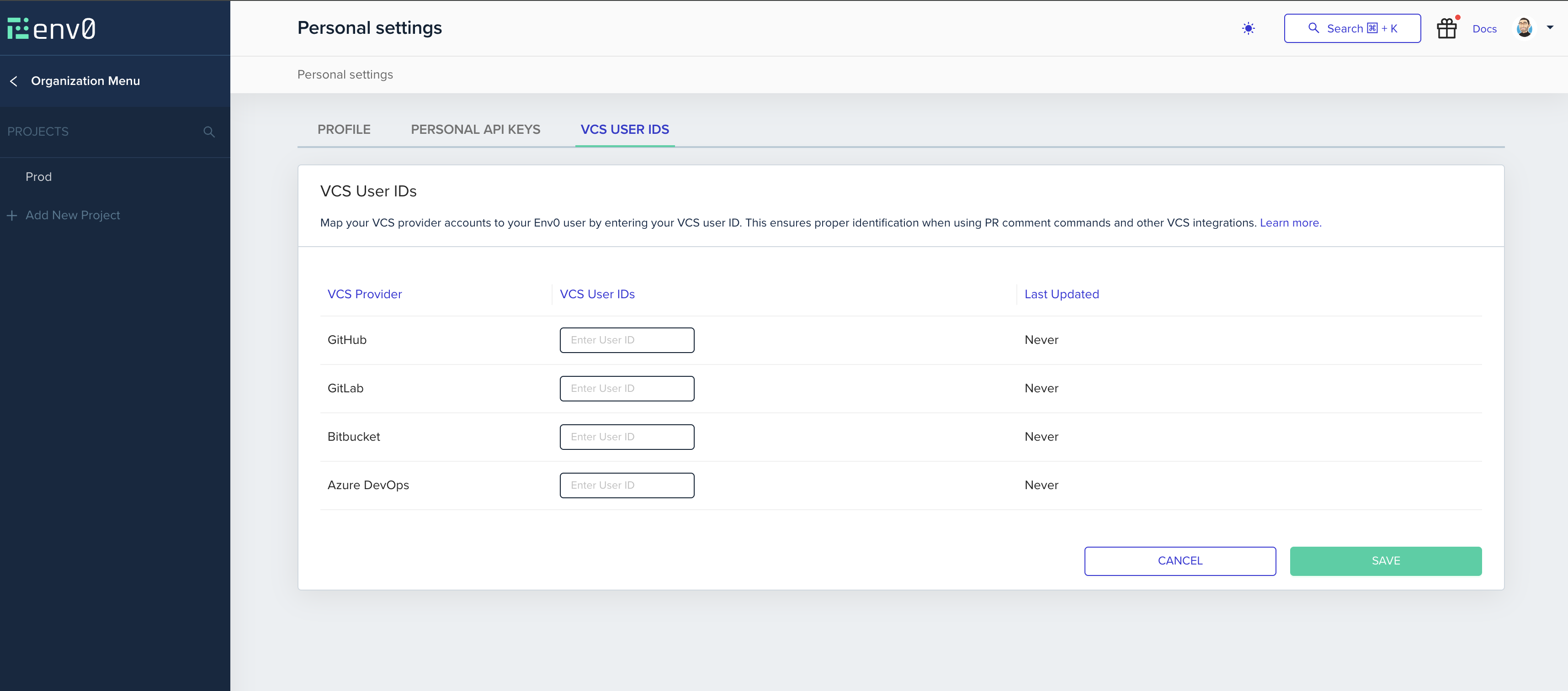
Now that you have your VCS provider user ID, head over to your env zero account, click on the avatar image in the top right corner, and click on 'Personal Settings' to enter your profile page.\
In the VCS user ids tab, enter the ID from the previous step in the VSC Provider User ID textbox and click on the ‘Save’ button.
### Map VCS provider user
Now that the feature is turned on, every user across the organization who wishes to use the PR comments flow must set up a mapping of their VCS provider user.\
First you will need to get your VCS provider user ID from one of the supported VCS providers.
### Setting your VCS user in env zero
Now that you have your VCS provider user ID, head over to your env zero account, click on the avatar image in the top right corner, and click on 'Personal Settings' to enter your profile page.\
In the VCS user ids tab, enter the ID from the previous step in the VSC Provider User ID textbox and click on the ‘Save’ button.
 ### GitHub
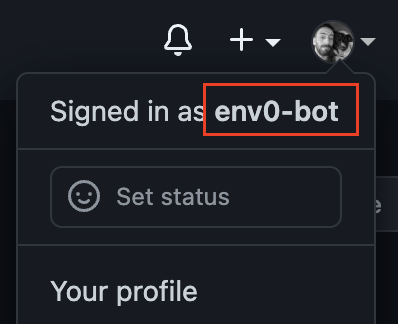
While logged in to your GitHub account, click on your profile image in the right top corner of the page and copy your username.
### GitHub
While logged in to your GitHub account, click on your profile image in the right top corner of the page and copy your username.
 ### Bitbucket
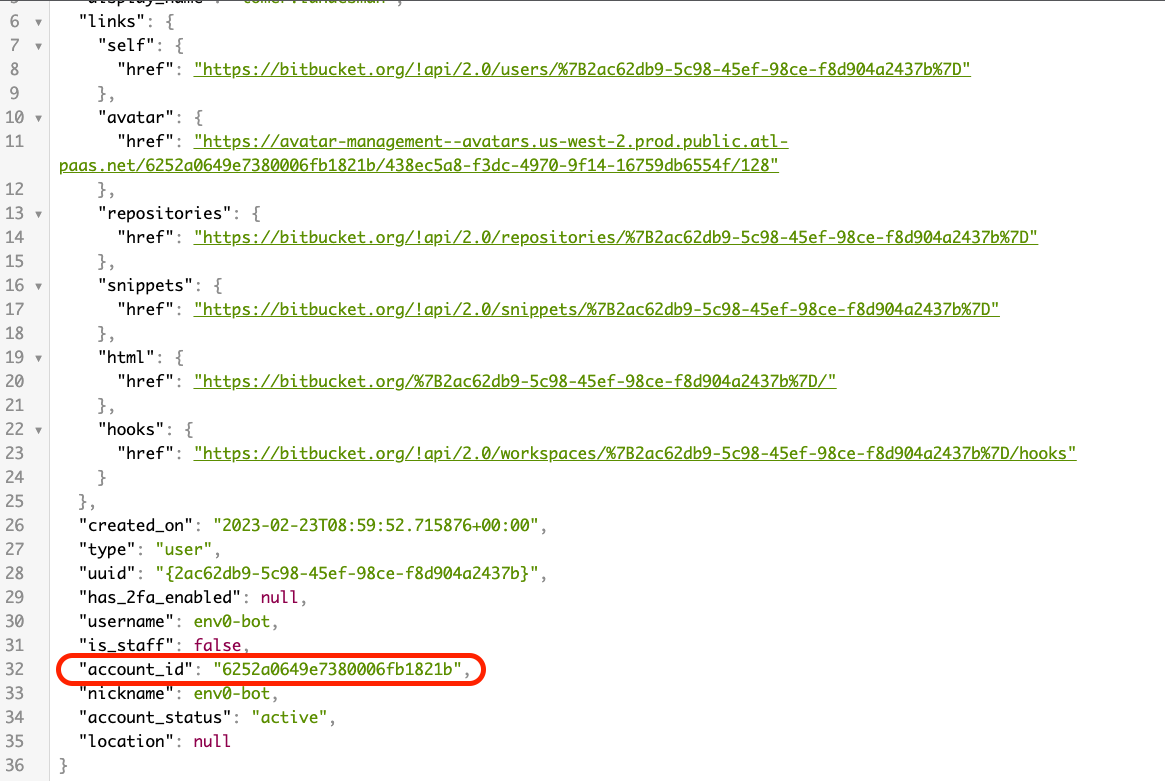
While logged in to your Bitbucket user, visit [this URL](https://bitbucket.org/!api/2.0/user) from your browser. You will receive a JSON from which you will need to extract the `accound_id` field.
### Bitbucket
While logged in to your Bitbucket user, visit [this URL](https://bitbucket.org/!api/2.0/user) from your browser. You will receive a JSON from which you will need to extract the `accound_id` field.
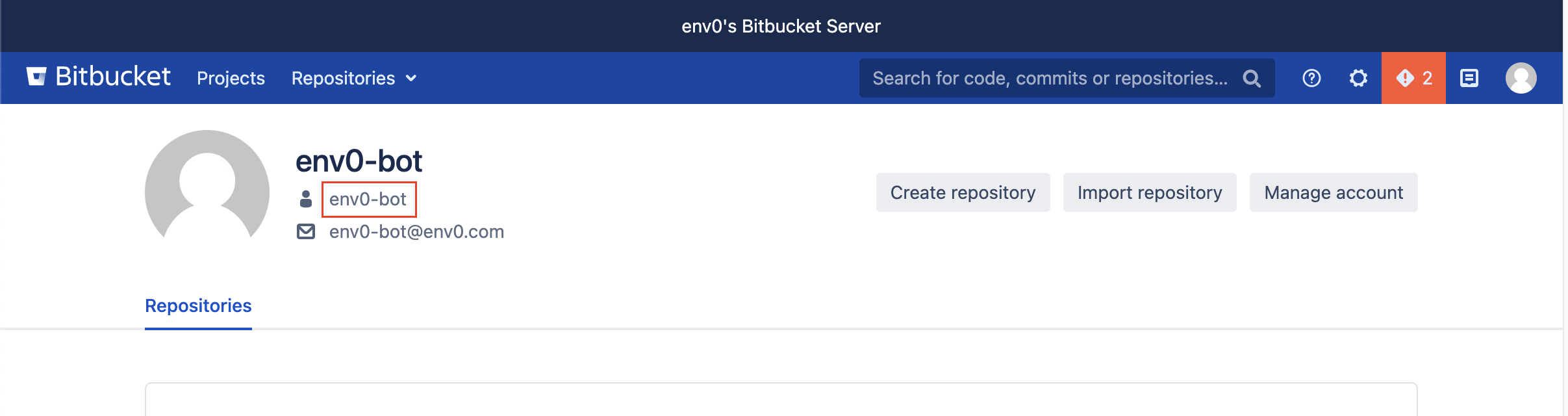
 ### Bitbucket Server
While logged into your Bitbucket Server account, go to your profile and locate the username by your avatar.
### Bitbucket Server
While logged into your Bitbucket Server account, go to your profile and locate the username by your avatar.
 ### GitLab / GitLab Enterprise Edition
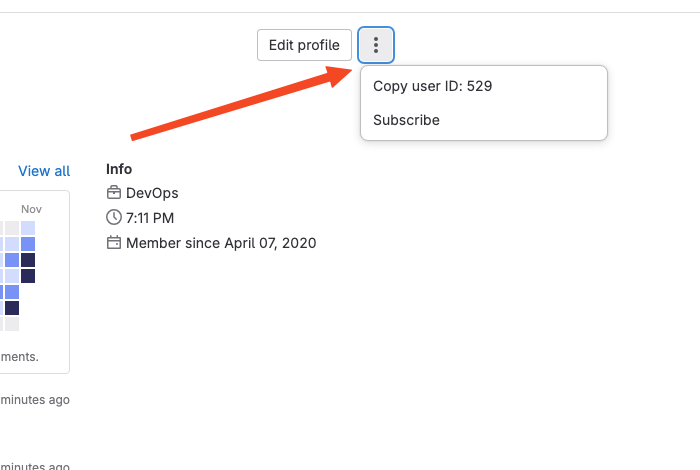
While logged into your GitLab account, navigate to the ‘Profile’ tab and ‘Edit Profile’ or "kebab" menu to find and copy your user ID.
### GitLab / GitLab Enterprise Edition
While logged into your GitLab account, navigate to the ‘Profile’ tab and ‘Edit Profile’ or "kebab" menu to find and copy your user ID.
 ### Azure DevOps
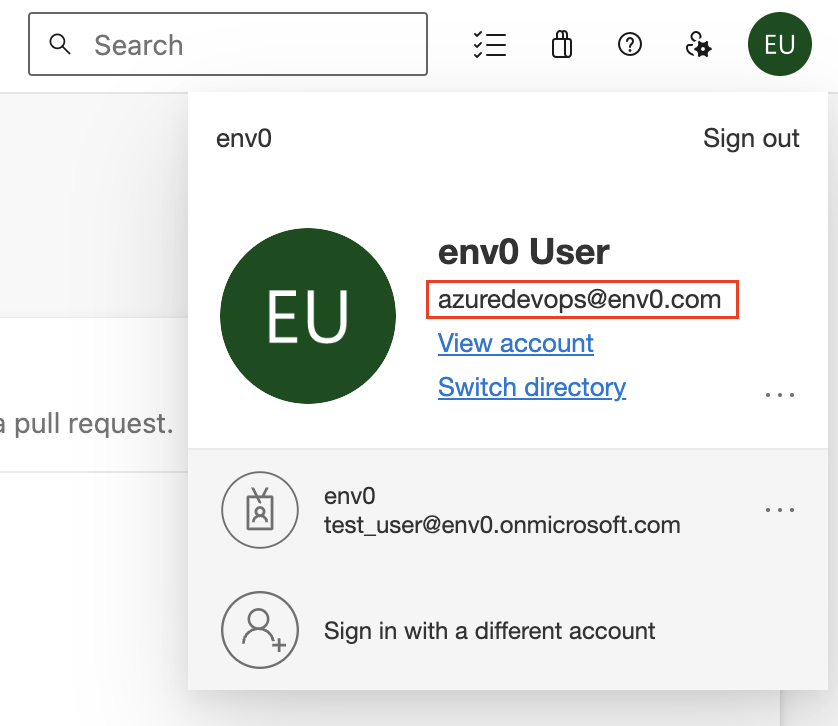
While logged in to your Azure DevOps account, click on your profile image in the right top corner of the page and copy your unique user ID.
### Azure DevOps
While logged in to your Azure DevOps account, click on your profile image in the right top corner of the page and copy your unique user ID.
 **Additional Content**
* [Alternative to Atlantis](https://www.env0.com/alternatives/atlantis-alternative)
* [Migrating from Atlantis to env zero](https://www.env0.com/blog/video-tutorial-how-to-migrate-from-atlantis-to-env0)
## Status Checks for PR Comments
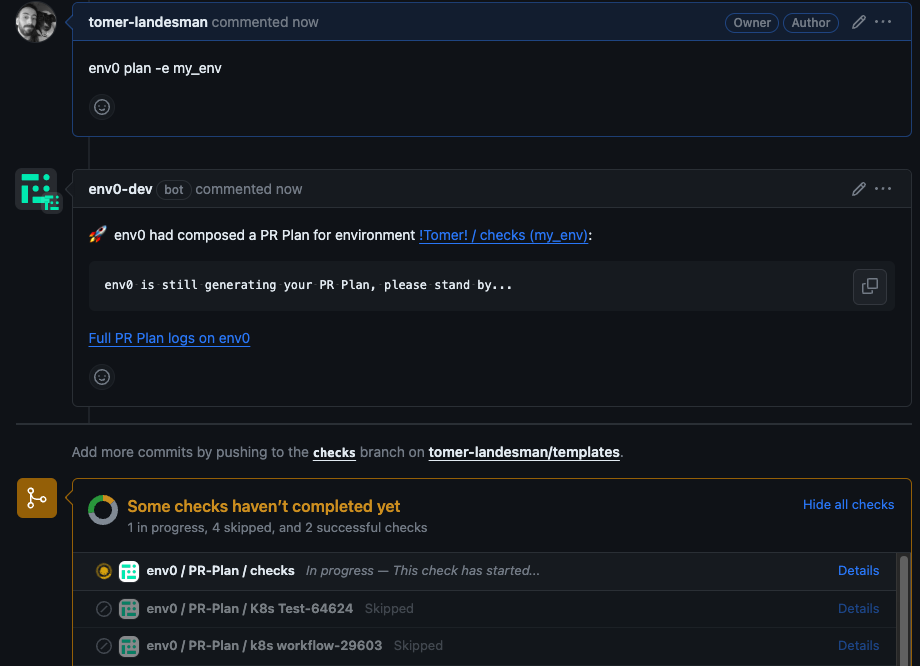
env zero tracks the deployment status of your PRs directly from your Git provider's interface. This gives you visibility into deployment statuses and allows you to use checks in your CI pipeline to enforce successful infrastructure deployments.
**Additional Content**
* [Alternative to Atlantis](https://www.env0.com/alternatives/atlantis-alternative)
* [Migrating from Atlantis to env zero](https://www.env0.com/blog/video-tutorial-how-to-migrate-from-atlantis-to-env0)
## Status Checks for PR Comments
env zero tracks the deployment status of your PRs directly from your Git provider's interface. This gives you visibility into deployment statuses and allows you to use checks in your CI pipeline to enforce successful infrastructure deployments.
 ## Require approval for PR comment applies
To require approval for applies triggered by PR comments, you must enable the "Require approval for PR comment applies" policy in Organization Settings → Policies.
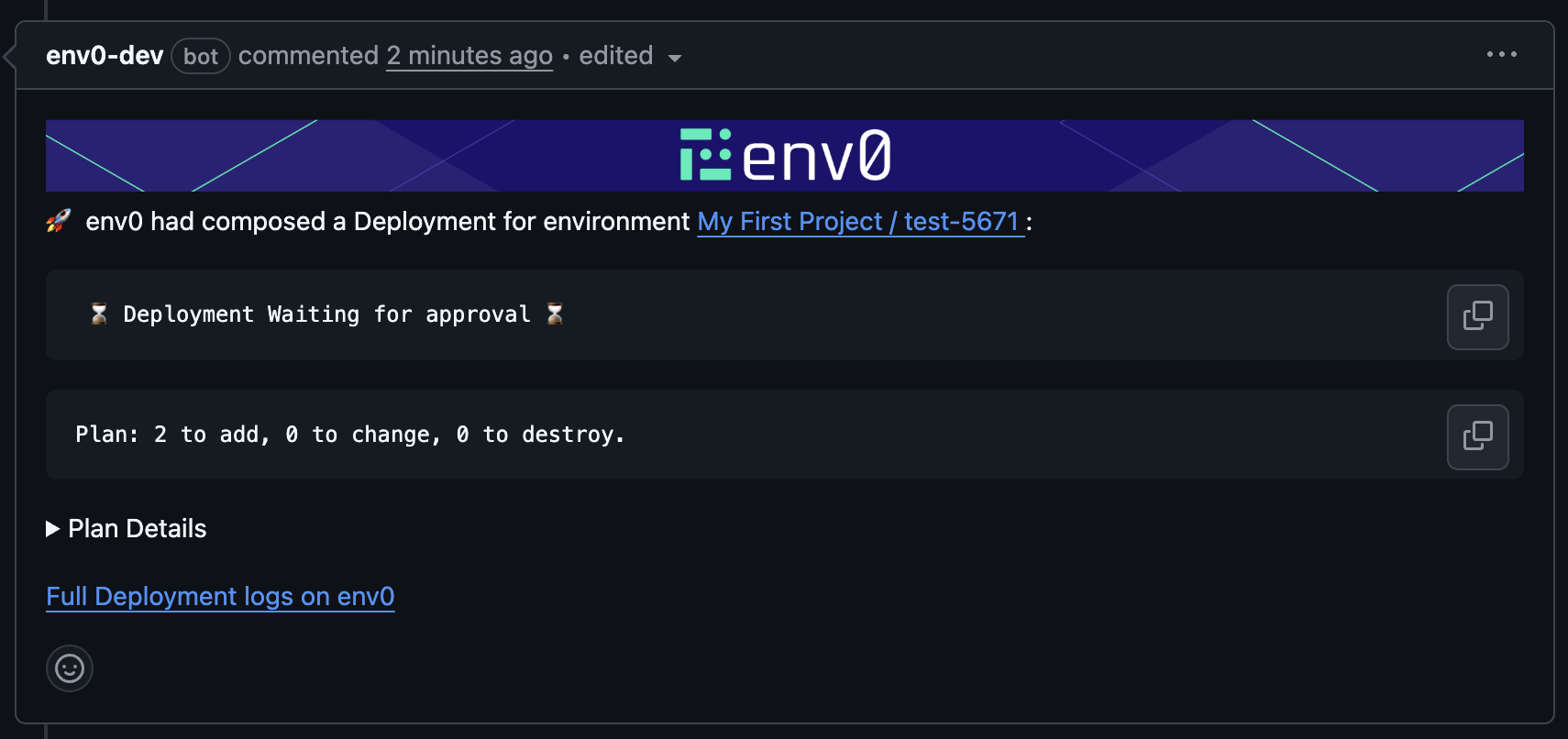
With this policy enabled, running env zero apply will trigger a deployment that will wait for manual approval.\
Once the plan step finishes, the plan results will be posted as a comment on the PR:
## Require approval for PR comment applies
To require approval for applies triggered by PR comments, you must enable the "Require approval for PR comment applies" policy in Organization Settings → Policies.
With this policy enabled, running env zero apply will trigger a deployment that will wait for manual approval.\
Once the plan step finishes, the plan results will be posted as a comment on the PR:
 The environment’s Apply Commit Check and the Apply All Commit Check will remain “In Progress” until the deployment is either approved or canceled.
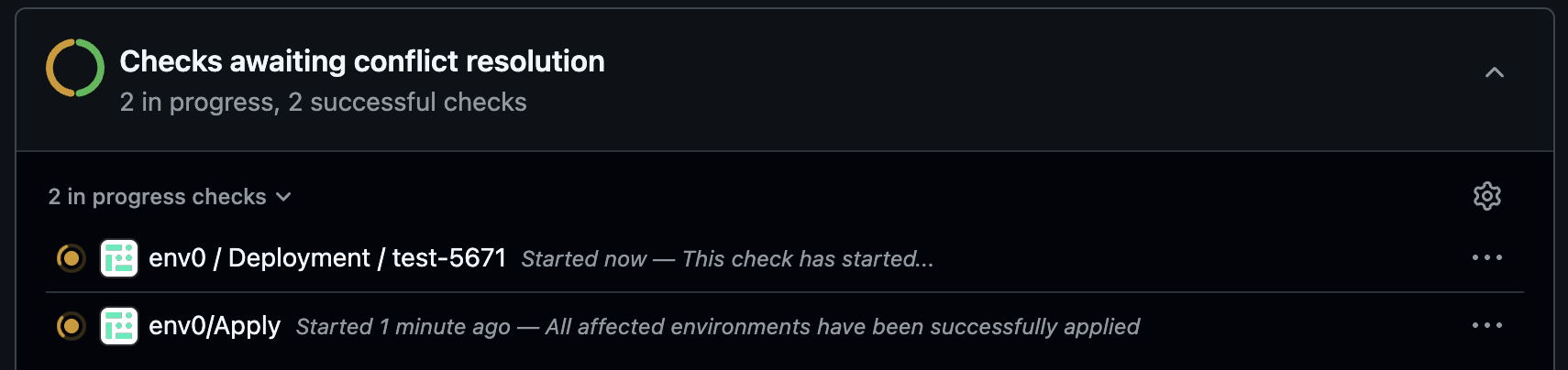 When running an apply that requires approval, we will not check if the PR is mergeable at this stage - that check happens when approving the apply.
Additional Supported Commands (when the policy is enabled):
### env0 approve command
`env0 approve --all [-v {name=value}]` - Runs `approve` on all the affected environments listed in the `affected environments` comment above.
`env0 approve --path "" [-v {name=value}]` - Runs `approve` on all the environments listed in the `affected environments` comment above whose full path matches the given [glob pattern path](https://en.wikipedia.org/wiki/Glob_\(programming\)). Use quotes `"` around the glob pattern if it contains spaces.
`env0 approve -e {environments aliases} [-v {name=value}]` - Runs `approve` on a set of provided env zero environment aliases (comma-separated).
### env0 cancel command
`env0 cancel --all [-v {name=value}]` - Runs `cancel` on all the affected environments listed in the `affected environments` comment above.
`env0 cancel --path "" [-v {name=value}]` - Runs `cancel` on all the environments listed in the `affected environments` comment above whose full path matches the given [glob pattern path](https://en.wikipedia.org/wiki/Glob_\(programming\)). Use quotes `"` around the glob pattern if it contains spaces.
`env0 cancel -e {environments aliases} [-v {name=value}]` - Runs `cancel` on a set of provided env zero environment aliases (comma-separated).
Both commands will only run for environments where the deployment awaiting approval was triggered from the same PR.
When approving, a deployment summary will be posted back to the PR, and commit checks will be marked as successful.
When running an apply that requires approval, we will not check if the PR is mergeable at this stage - that check happens when approving the apply.
Additional Supported Commands (when the policy is enabled):
### env0 approve command
`env0 approve --all [-v {name=value}]` - Runs `approve` on all the affected environments listed in the `affected environments` comment above.
`env0 approve --path "" [-v {name=value}]` - Runs `approve` on all the environments listed in the `affected environments` comment above whose full path matches the given [glob pattern path](https://en.wikipedia.org/wiki/Glob_\(programming\)). Use quotes `"` around the glob pattern if it contains spaces.
`env0 approve -e {environments aliases} [-v {name=value}]` - Runs `approve` on a set of provided env zero environment aliases (comma-separated).
### env0 cancel command
`env0 cancel --all [-v {name=value}]` - Runs `cancel` on all the affected environments listed in the `affected environments` comment above.
`env0 cancel --path "" [-v {name=value}]` - Runs `cancel` on all the environments listed in the `affected environments` comment above whose full path matches the given [glob pattern path](https://en.wikipedia.org/wiki/Glob_\(programming\)). Use quotes `"` around the glob pattern if it contains spaces.
`env0 cancel -e {environments aliases} [-v {name=value}]` - Runs `cancel` on a set of provided env zero environment aliases (comma-separated).
Both commands will only run for environments where the deployment awaiting approval was triggered from the same PR.
When approving, a deployment summary will be posted back to the PR, and commit checks will be marked as successful.
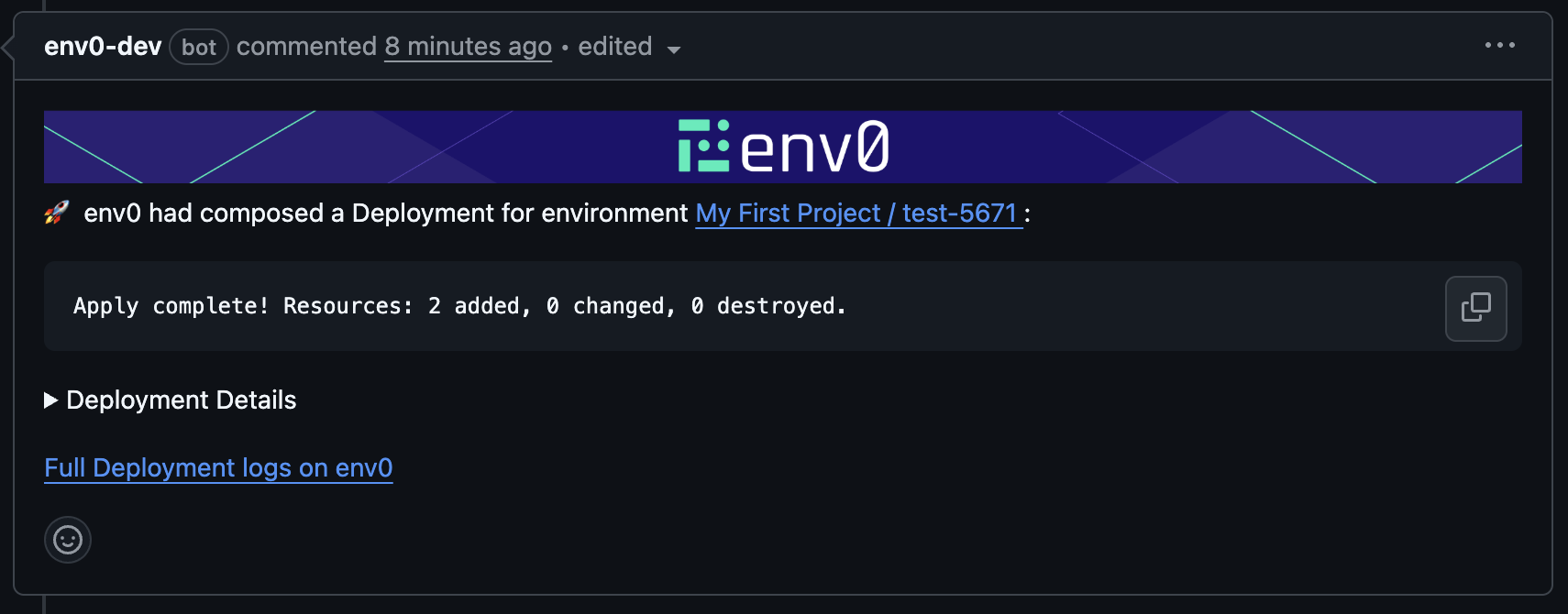
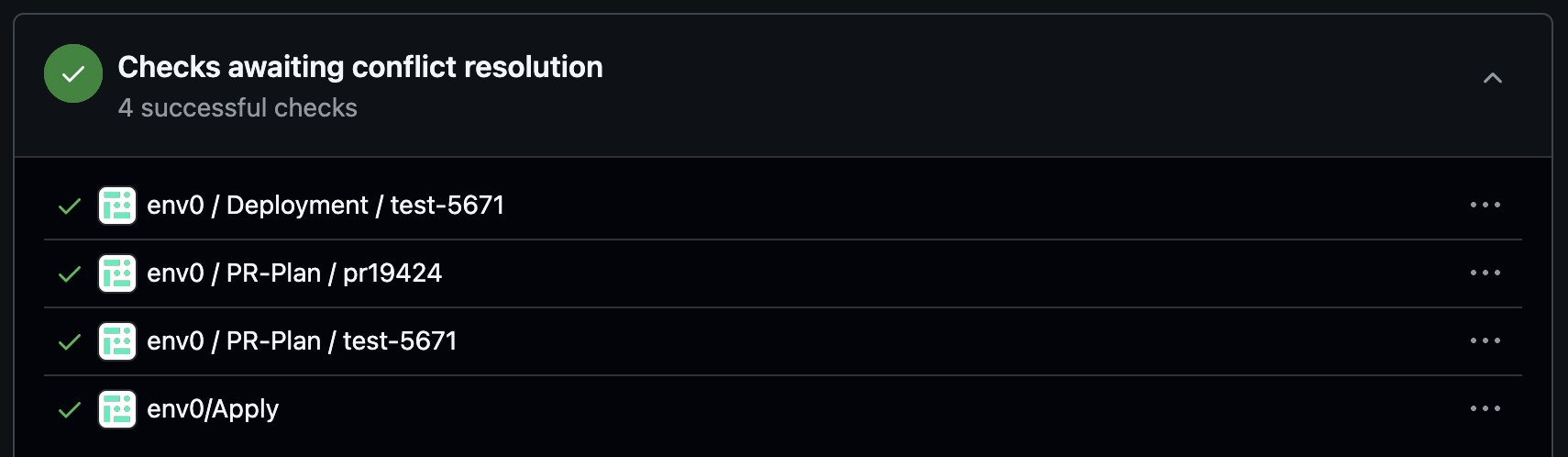 Attempting to approve a deployment triggered from another PR will fail and post an error comment to the PR.
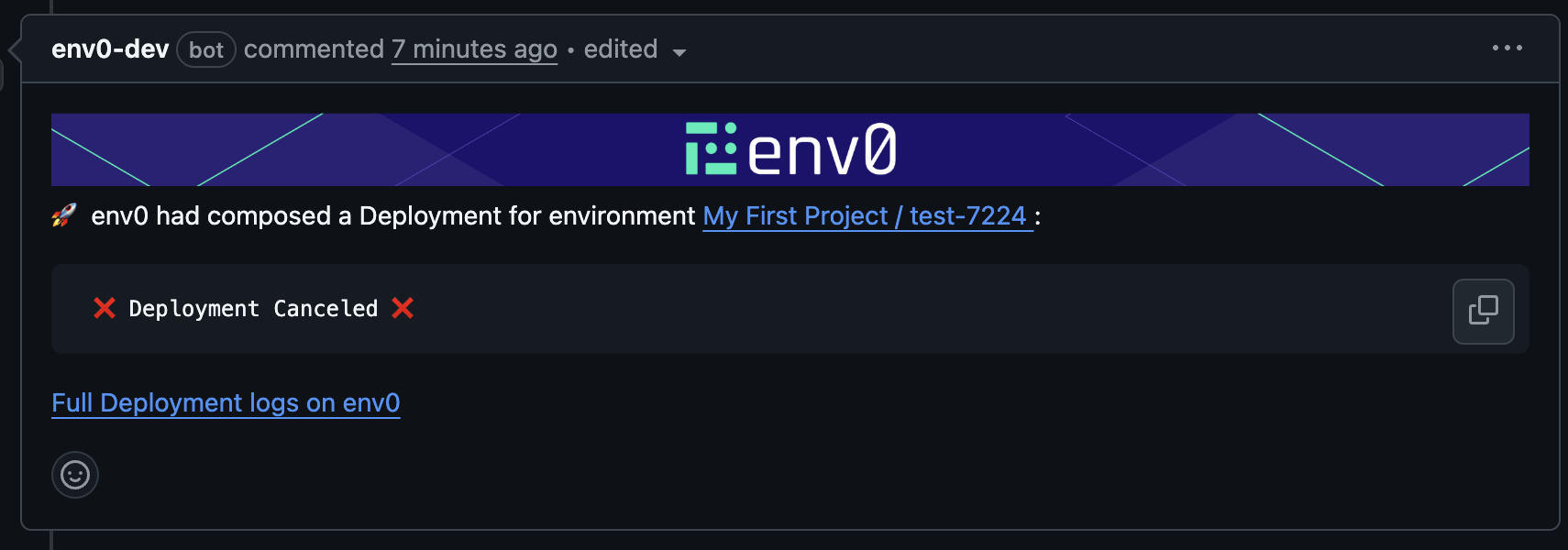
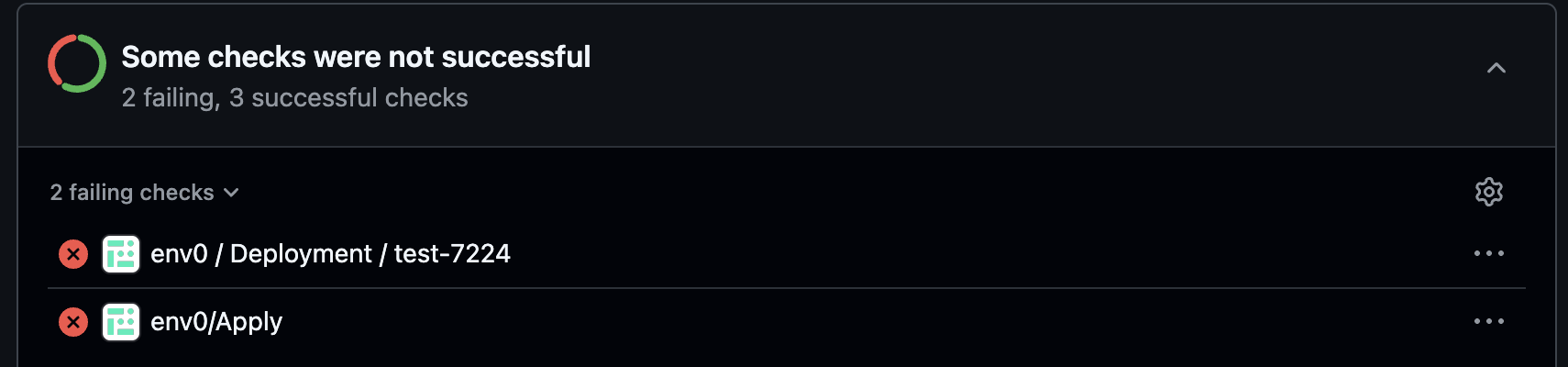
 When canceling, commit checks will fail, and a Deployment Canceled comment will be added to the PR.
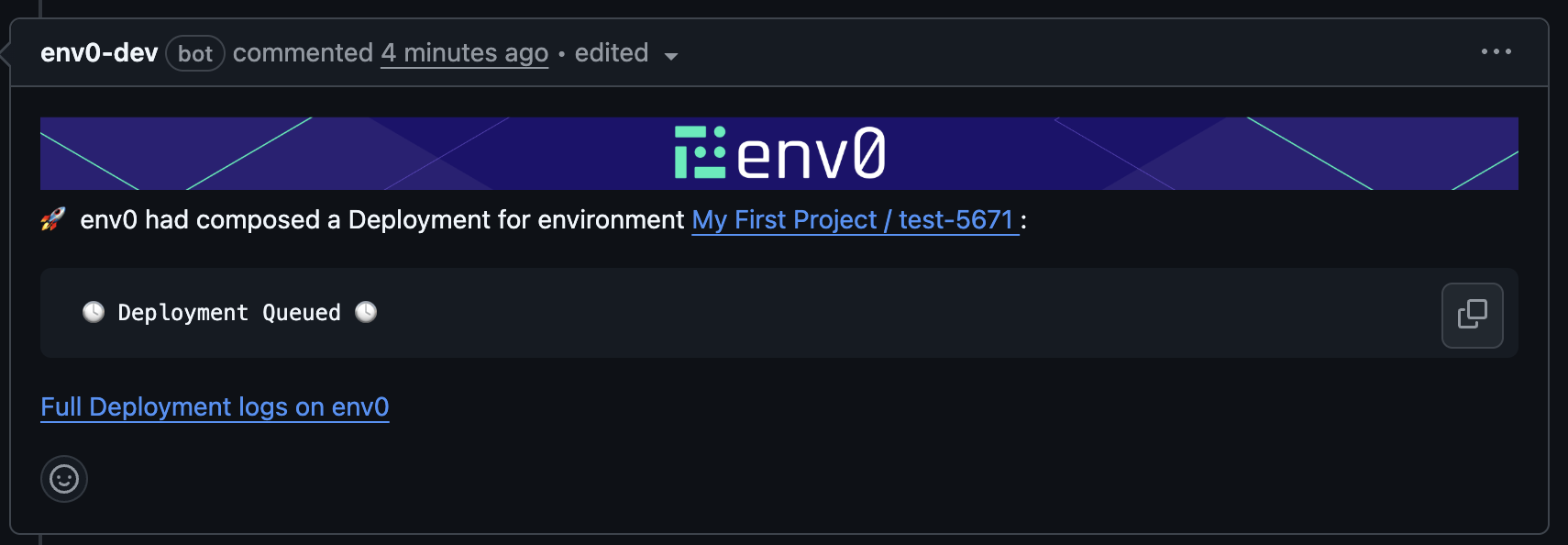
 If you try to run an apply while another apply is already waiting for approval, the new deployment will be queued, and a PR comment will indicate this.
 ## Next steps
* [Running Plan on Pull Requests](/guides/admin-guide/environments/plan-on-pull-request) - Automatically post plan results on every pull request push.
* [Bypass Apply Mergeability Check](/guides/policies-governance/bypass-apply-mergeability-check) - Resolve the circular dependency when env0/Apply is a required check.
* [Skipping PR Plans on Merge Commits](/guides/policies-governance/skip-pr-plan-on-merge-commits) - Avoid unnecessary plans triggered by merge commit file changes.
* [Git and VCS Integration](/guides/admin-guide/manage-vcs) - Connect GitHub, GitLab, Bitbucket, or Azure DevOps to enable PR comment commands.
## Next steps
* [Running Plan on Pull Requests](/guides/admin-guide/environments/plan-on-pull-request) - Automatically post plan results on every pull request push.
* [Bypass Apply Mergeability Check](/guides/policies-governance/bypass-apply-mergeability-check) - Resolve the circular dependency when env0/Apply is a required check.
* [Skipping PR Plans on Merge Commits](/guides/policies-governance/skip-pr-plan-on-merge-commits) - Avoid unnecessary plans triggered by merge commit file changes.
* [Git and VCS Integration](/guides/admin-guide/manage-vcs) - Connect GitHub, GitLab, Bitbucket, or Azure DevOps to enable PR comment commands.