> ## Documentation Index
> Fetch the complete documentation index at: https://docs.envzero.com/llms.txt
> Use this file to discover all available pages before exploring further.
# Running Plan on Pull Requests
> Automatically run a Terraform plan on every pull request to review infrastructure changes before merging, with results posted as a PR comment.
## Pull Request Plan in env zero
env zero allows you to control and monitor your infrastructure code changes with pull request automation. When setting Pull Request Plan (PR Plan), your environment will automatically run a deployment consisting of only the Plan phase (without applying any infrastructure changes) and share the results with you via a comment on your pull request. Pull Request Plan will run on every push to an open pull request.
### For a PR Plan to run automatically, the following prerequisites must be met:
1. The environment has Pull Request Plan enabled
2. The environment originated from a VCS-integrated template, and its configured revision is the same as the branch (target) of the pull request
* [GitHub Integration](/guides/admin-guide/templates/github-templates) - is the only VCS supporting forks (from private repositories only)
## Enable Pull Request Plan
Go to your existing Environment in env zero and head to the Settings tab.\
Under Continuous Deployment, enable Run Terraform Plan on Pull Requests targeting this branch.
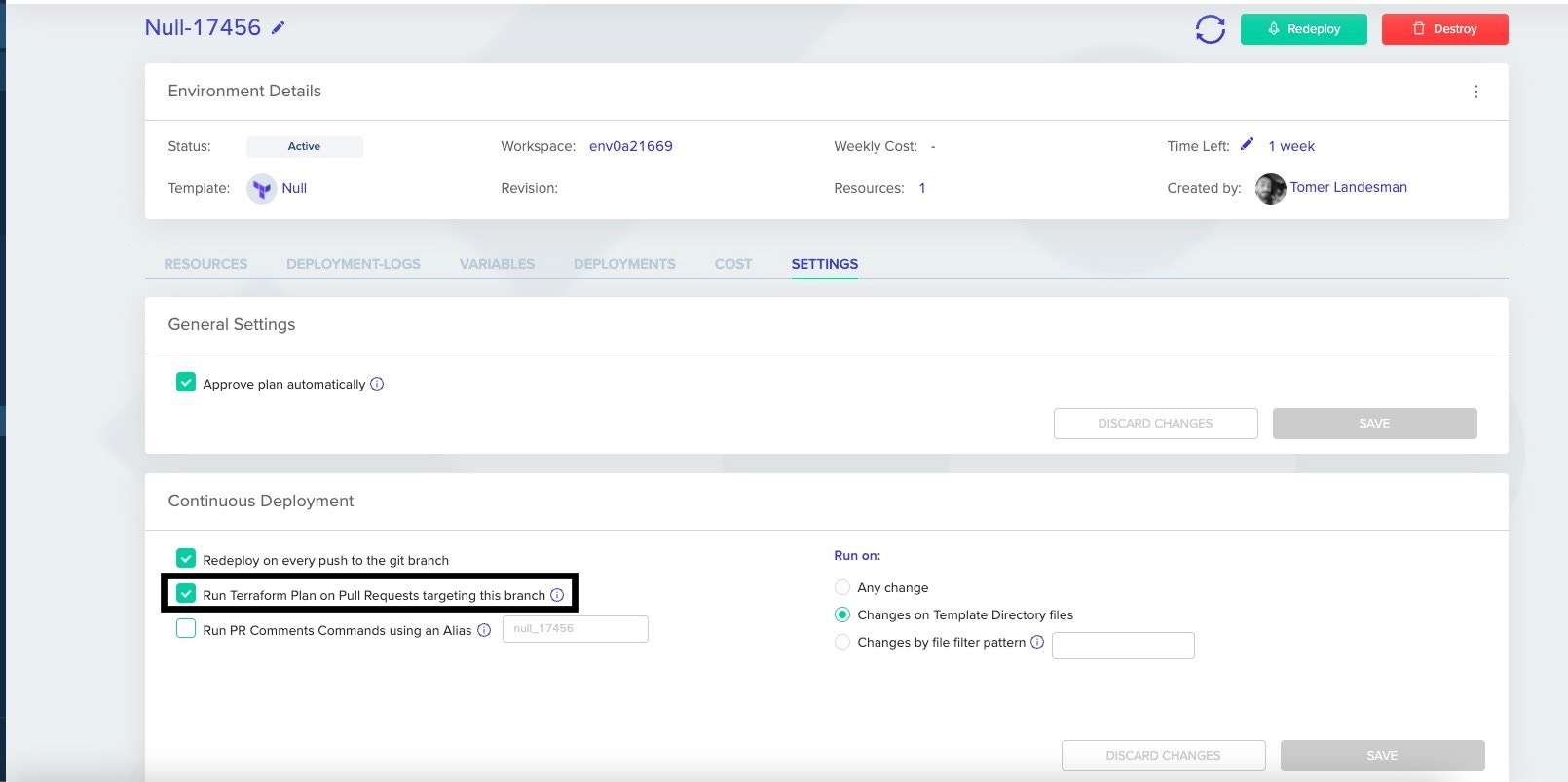 **You can choose to run by the following options:**
* Any change - your environment will receive a PR Plan on every push to the repository.
* Changes on Template Directory files - your environment will receive a PR Plan on every push that contains file changes under the Template folder
* Changes by file filter pattern - your environment will receive a PR Plan on every push containing file changes by matching them to the pattern. See below how to configure the glob pattern.
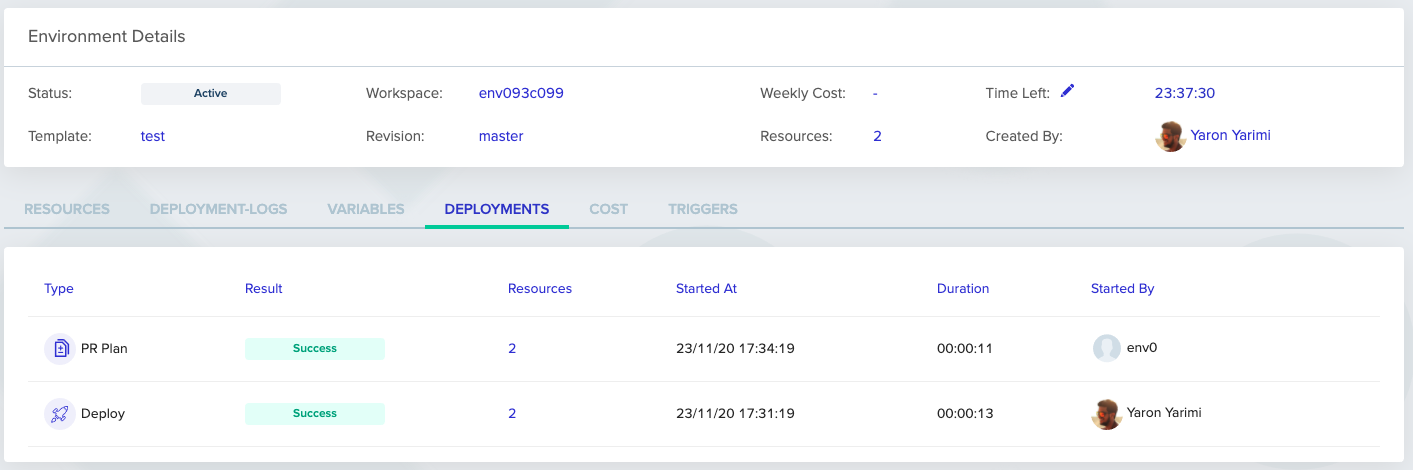
You can track the Deployment history for deployments by PR Plan type:
**You can choose to run by the following options:**
* Any change - your environment will receive a PR Plan on every push to the repository.
* Changes on Template Directory files - your environment will receive a PR Plan on every push that contains file changes under the Template folder
* Changes by file filter pattern - your environment will receive a PR Plan on every push containing file changes by matching them to the pattern. See below how to configure the glob pattern.
You can track the Deployment history for deployments by PR Plan type:
 **[Glob pattern](https://en.wikipedia.org/wiki/Glob_\(programming\))**
Glob patterns specify sets of filenames with wildcard characters. For example, \*.txt or my\_folder/\*\*
It means you can configure pattern by git repository which re-deploy environment only if the push contains files that change by free pattern.
You can configure patterns by Git repository which re-deploy an environment only if the push contains files that change by free pattern.
For example, to configure a pattern like src/project\_1/\*\*
you should re-deploy only if the push contains files that start with src/project\_1/...
env zero also supports [extglob](https://github.com/micromatch/extglob?tab=readme-ov-file#extglob-cheatsheet) patterns. These allow you to write a pattern that ignores files or uses a list of folders.
When using **OR/AND** statements with extglob, make sure to:
* Wrap each option in parentheses
* Avoid unnecessary spaces - do not add spaces between the different glob pattern options
Examples:
* `!(third/path/\*\*)+(first/path/**|second/path/myfile.txt)`
This means we will match any change in first/path and second/path/myfile.txt, and ignore changes under third/path. (It is recommended to add exclusions first)
* `+(Terraform/!(prod)**|Terragrunt/dev/**)`
Match any changes in `Terraform` or `Terragrunt/dev` but ignore any changes in `Terraform/prod`
**PR Plans Concurrency**
PR Plans do not lock the Terraform state, and can be in parallel. If a bunch of PR Plans are queued in sequence, they will all run simultaneously.
**Status Checks**
When the PR Plan completes, aside from commenting with the plan itself, your commit will be marked with a passing status check. In case the PR Plan failed, the commit status will be failure.
If the PR Plan doesn't run because the push didn't contain changed files, env zero will mark the latest commit as skipped ( if the Version Control supports it). Additional policy configuration can be found under [Do Not Report Skipped Status Check](/guides/policies-governance/do-not-report-skipped-status-check).
**PR Plans from Merge Commits**
In order to control whether Merge Commits will trigger PR Plans, see [Skip PR Plan on Merge Commits](/guides/policies-governance/skip-pr-plan-on-merge-commits)
## Pull Request Comments
env zero will make a comment on your pull request for three different reasons:
1. When a PR Plan has started:
**[Glob pattern](https://en.wikipedia.org/wiki/Glob_\(programming\))**
Glob patterns specify sets of filenames with wildcard characters. For example, \*.txt or my\_folder/\*\*
It means you can configure pattern by git repository which re-deploy environment only if the push contains files that change by free pattern.
You can configure patterns by Git repository which re-deploy an environment only if the push contains files that change by free pattern.
For example, to configure a pattern like src/project\_1/\*\*
you should re-deploy only if the push contains files that start with src/project\_1/...
env zero also supports [extglob](https://github.com/micromatch/extglob?tab=readme-ov-file#extglob-cheatsheet) patterns. These allow you to write a pattern that ignores files or uses a list of folders.
When using **OR/AND** statements with extglob, make sure to:
* Wrap each option in parentheses
* Avoid unnecessary spaces - do not add spaces between the different glob pattern options
Examples:
* `!(third/path/\*\*)+(first/path/**|second/path/myfile.txt)`
This means we will match any change in first/path and second/path/myfile.txt, and ignore changes under third/path. (It is recommended to add exclusions first)
* `+(Terraform/!(prod)**|Terragrunt/dev/**)`
Match any changes in `Terraform` or `Terragrunt/dev` but ignore any changes in `Terraform/prod`
**PR Plans Concurrency**
PR Plans do not lock the Terraform state, and can be in parallel. If a bunch of PR Plans are queued in sequence, they will all run simultaneously.
**Status Checks**
When the PR Plan completes, aside from commenting with the plan itself, your commit will be marked with a passing status check. In case the PR Plan failed, the commit status will be failure.
If the PR Plan doesn't run because the push didn't contain changed files, env zero will mark the latest commit as skipped ( if the Version Control supports it). Additional policy configuration can be found under [Do Not Report Skipped Status Check](/guides/policies-governance/do-not-report-skipped-status-check).
**PR Plans from Merge Commits**
In order to control whether Merge Commits will trigger PR Plans, see [Skip PR Plan on Merge Commits](/guides/policies-governance/skip-pr-plan-on-merge-commits)
## Pull Request Comments
env zero will make a comment on your pull request for three different reasons:
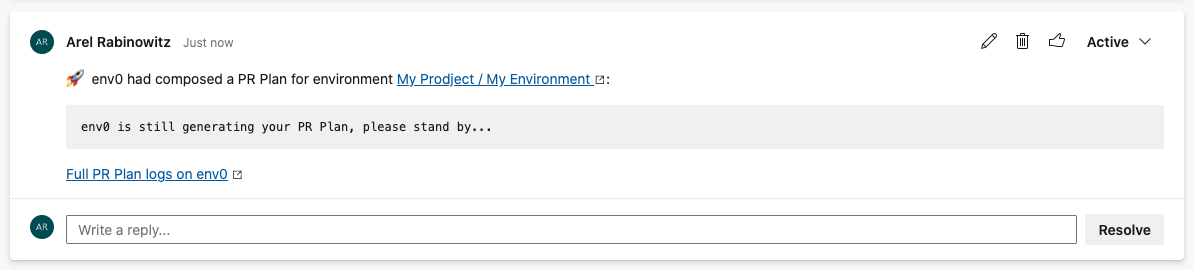
1. When a PR Plan has started:

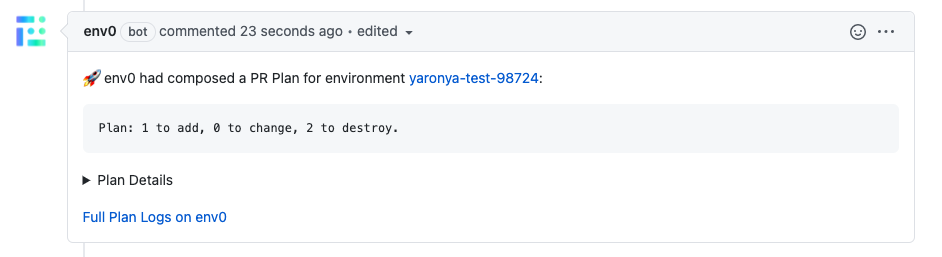
 2. When a PR Plan has finished successfully (full log is attached under Plan Details)
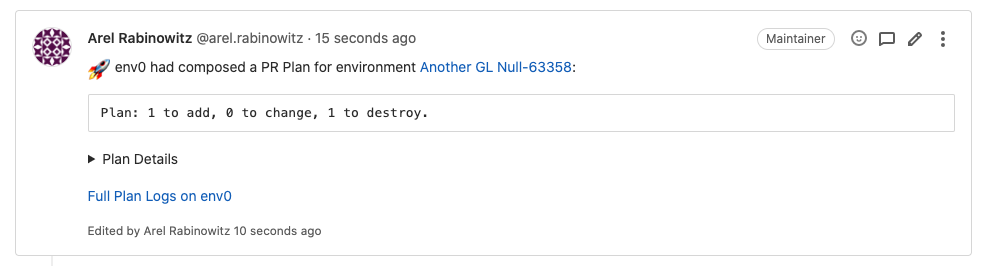

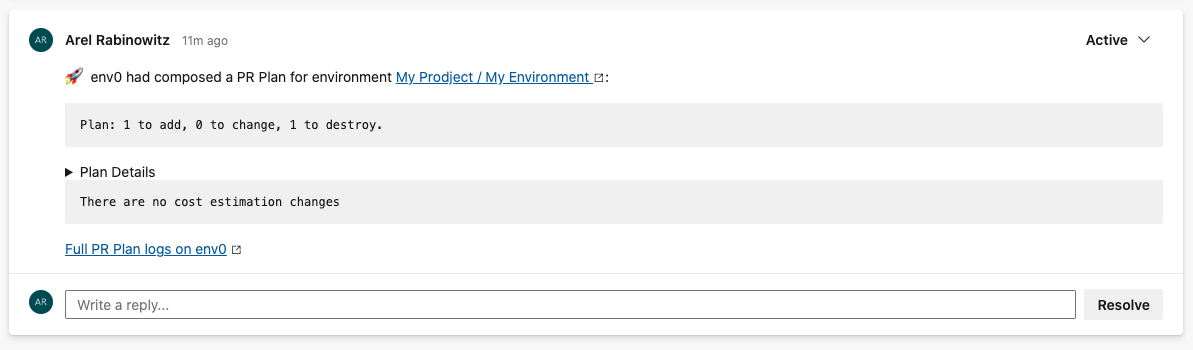 3. When a PR Plan has failed:
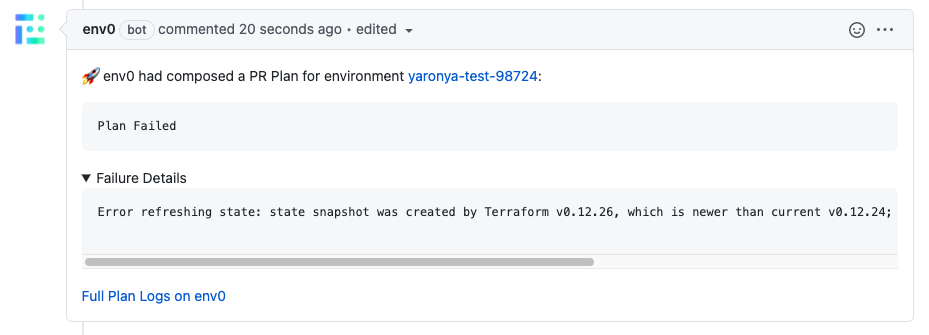
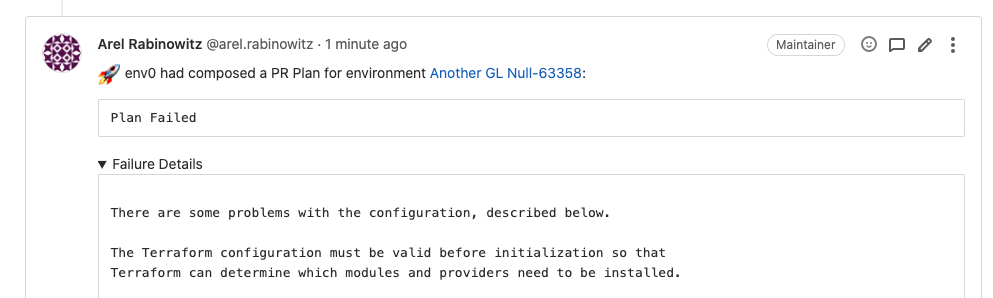
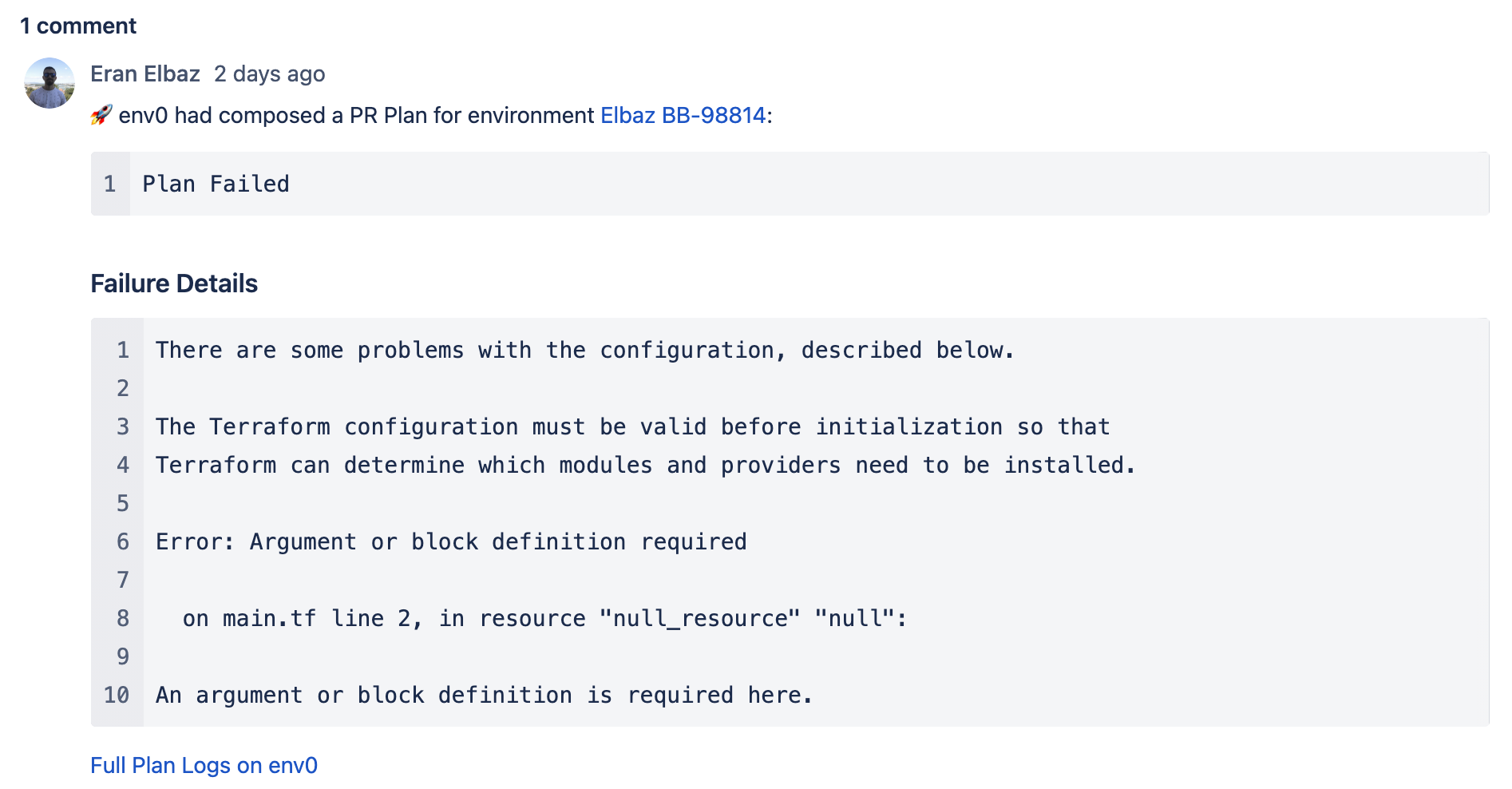
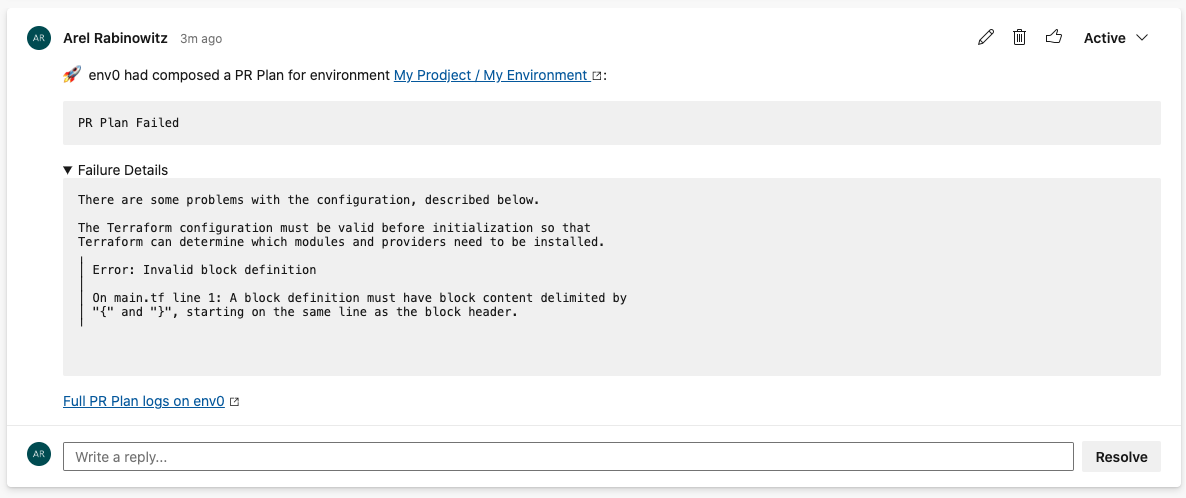 4. Rerun a PR Plan:
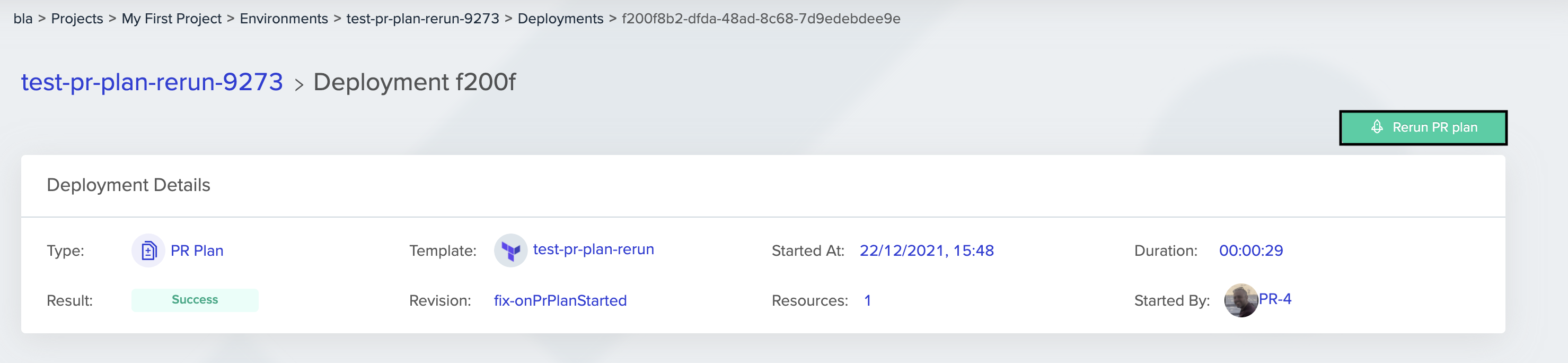
You can rerun a PR plan deployment. The newly created deployment will be an exact snapshot in terms of commits and code source of the original PR plan.
4. Rerun a PR Plan:
You can rerun a PR plan deployment. The newly created deployment will be an exact snapshot in terms of commits and code source of the original PR plan.
 ## GitHub Commit Status Checks
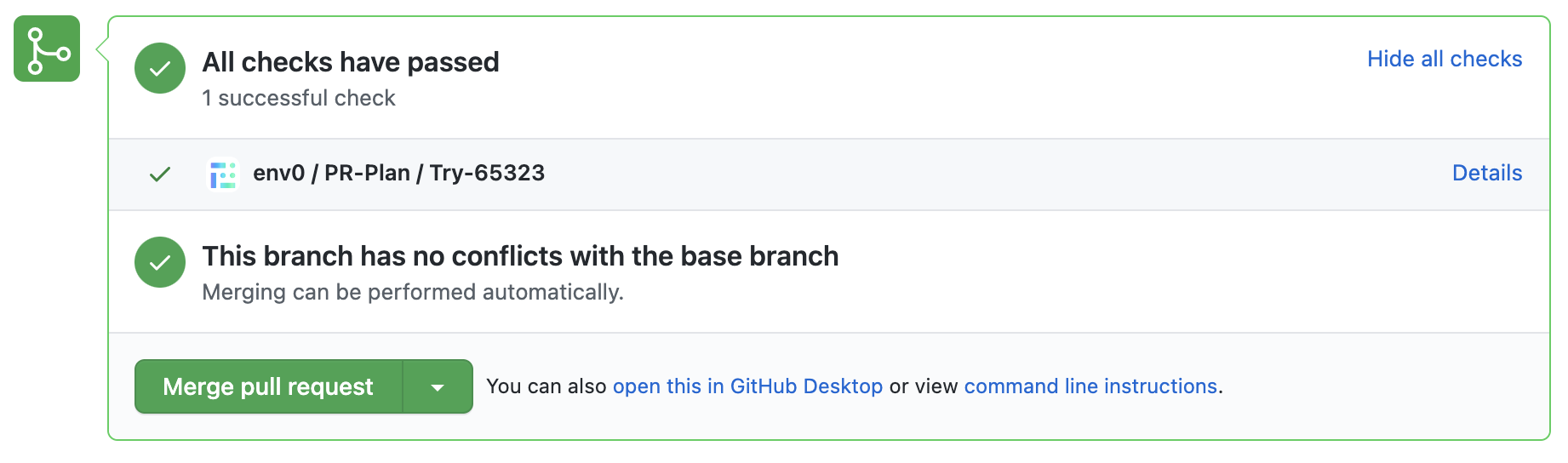
env zero will set a status check on the commit you want to merge in the pull request. The status will be changed to 'failed' when the run had failed to generate a Terraform plan, and 'successful' when a plan was generated.
1. When the PR plan is pushed to the queue:
## GitHub Commit Status Checks
env zero will set a status check on the commit you want to merge in the pull request. The status will be changed to 'failed' when the run had failed to generate a Terraform plan, and 'successful' when a plan was generated.
1. When the PR plan is pushed to the queue:
 2. When a PR Plan starts running (this will not happen [until you approve](/guides/admin-guide/environments/#approval-flow) the previous deployment):
 3. When a Terraform plan was generated:
 4. When the run was not able to generate a proper Terraform plan:
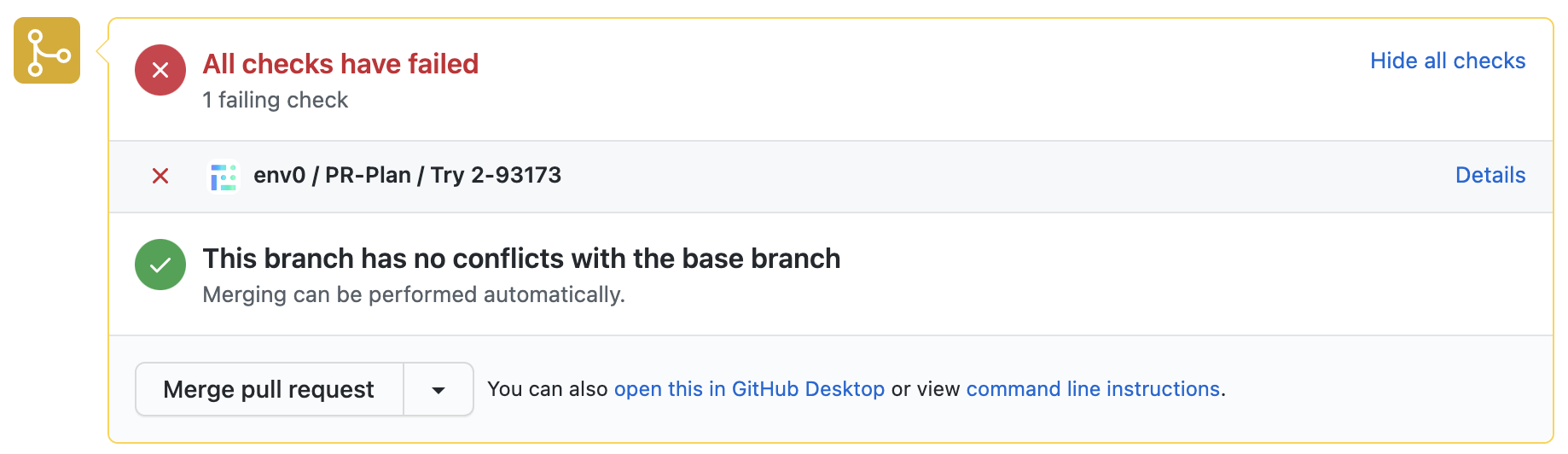 5. If you linked your PR to multiple environments you will get the summary of all the *PR Plans*
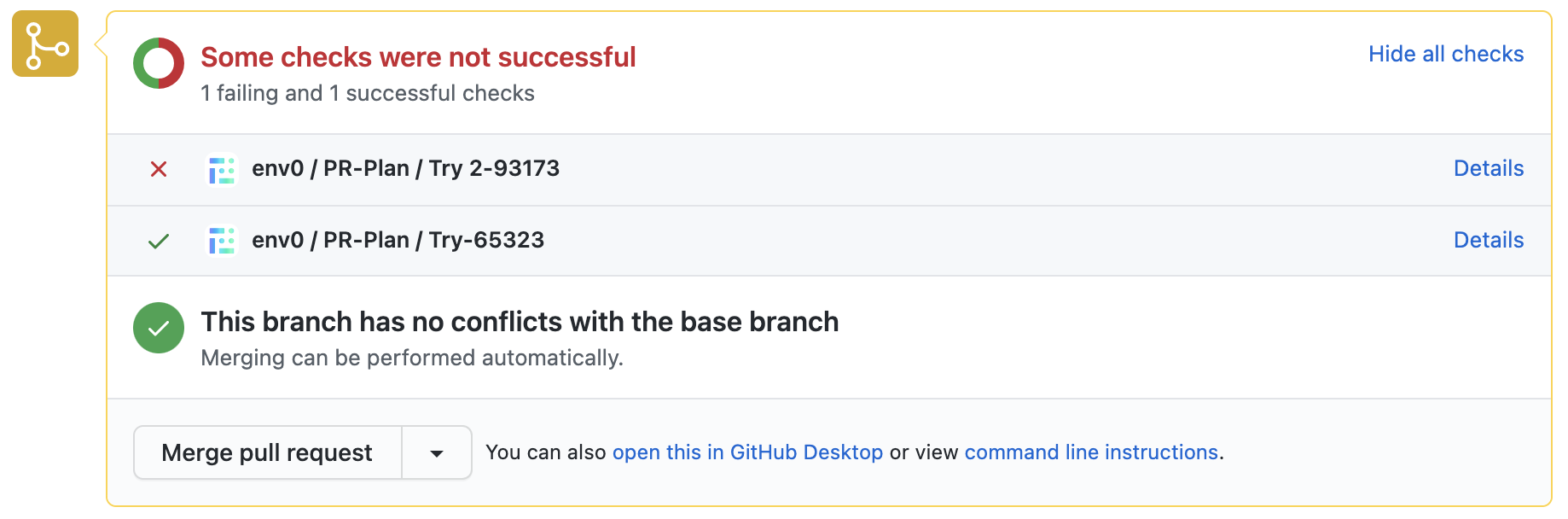 By clicking Details, GitHub will forward you to the Checks tab:
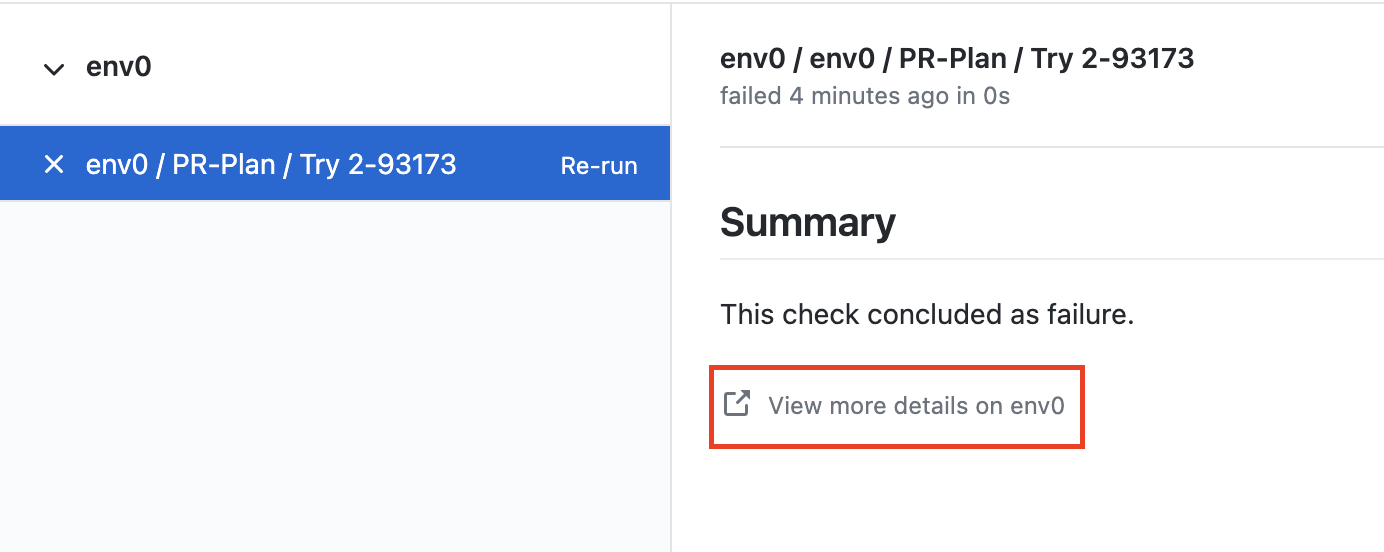 Clicking View more details on env zero will take you to your environment on env zero
## GitLab Pipelines
env zero will run set a GitLab pipeline and job status on the commit you want to merge in the merge request.\
The status will be shown as 'failed' when the run had failed to generate a Terraform plan, and 'successful' when a plan was generated.
Clicking View more details on env zero will take you to your environment on env zero
## GitLab Pipelines
env zero will run set a GitLab pipeline and job status on the commit you want to merge in the merge request.\
The status will be shown as 'failed' when the run had failed to generate a Terraform plan, and 'successful' when a plan was generated.
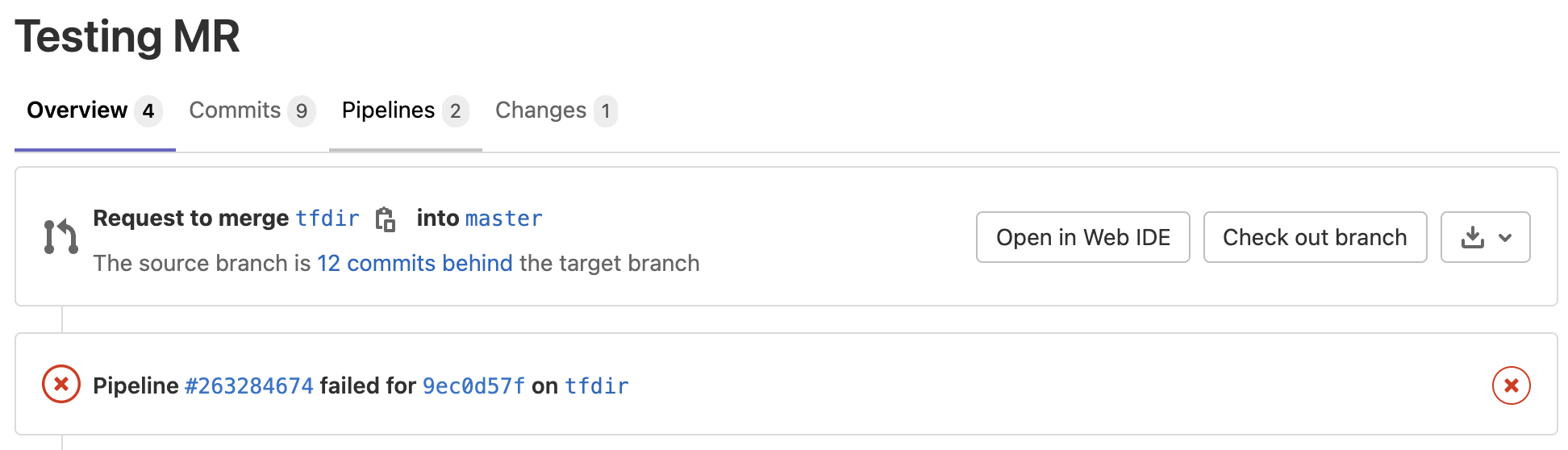 Clicking the pipeline on the Merge Request will reveal which env zero environment deployments were triggered and show their status.
Clicking the status will take you back to env zero, where you can see more details on this automatic plan run.
1. When a PR Plan starts running, the commit will be labeled ‘in progress’:
Clicking the pipeline on the Merge Request will reveal which env zero environment deployments were triggered and show their status.
Clicking the status will take you back to env zero, where you can see more details on this automatic plan run.
1. When a PR Plan starts running, the commit will be labeled ‘in progress’:
 2. When a Terraform plan was generated:
 3. When the run was not able to generate a proper Terraform plan:
## Bitbucket Commit Build Status
env zero will set a status check on the commit you want to merge in the pull request.
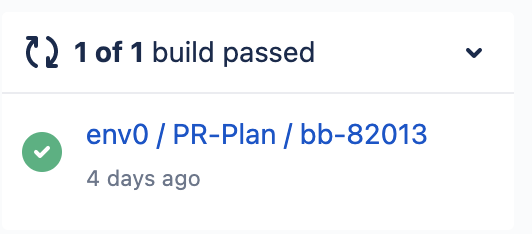
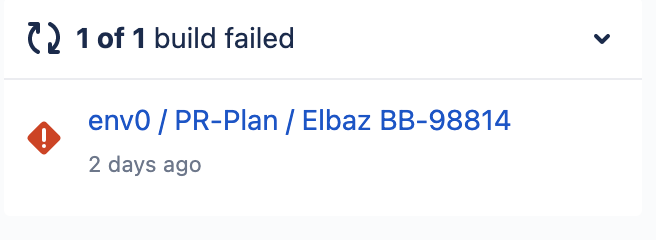
The status will be set to ‘failing’ when the run had failed to generate a Terraform plan, and ‘successful’ when a plan was generated.
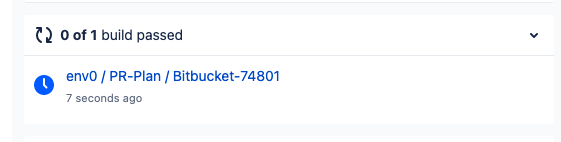
1. When the PR Plan starts running, the commit will be labeled as ‘in progress’:
3. When the run was not able to generate a proper Terraform plan:
## Bitbucket Commit Build Status
env zero will set a status check on the commit you want to merge in the pull request.
The status will be set to ‘failing’ when the run had failed to generate a Terraform plan, and ‘successful’ when a plan was generated.
1. When the PR Plan starts running, the commit will be labeled as ‘in progress’:
 2. When a Terraform plan was generated:
 3. When the run was not able to generate a proper Terraform plan:
 ## Azure DevOps PR Status
env zero will set a status check on your pull request.\
The status will be set to 'failing' when the run had failed to generate a Terraform plan, and 'successful' when a plan was generated.
1. When the PR Plan starts running, the PR status will be labeled ‘pending’.
## Azure DevOps PR Status
env zero will set a status check on your pull request.\
The status will be set to 'failing' when the run had failed to generate a Terraform plan, and 'successful' when a plan was generated.
1. When the PR Plan starts running, the PR status will be labeled ‘pending’.
 2. When a Terraform plan was generated:
 3. When the run was not able to generate a proper Terraform plan:
 ## Rerun a PR Plan
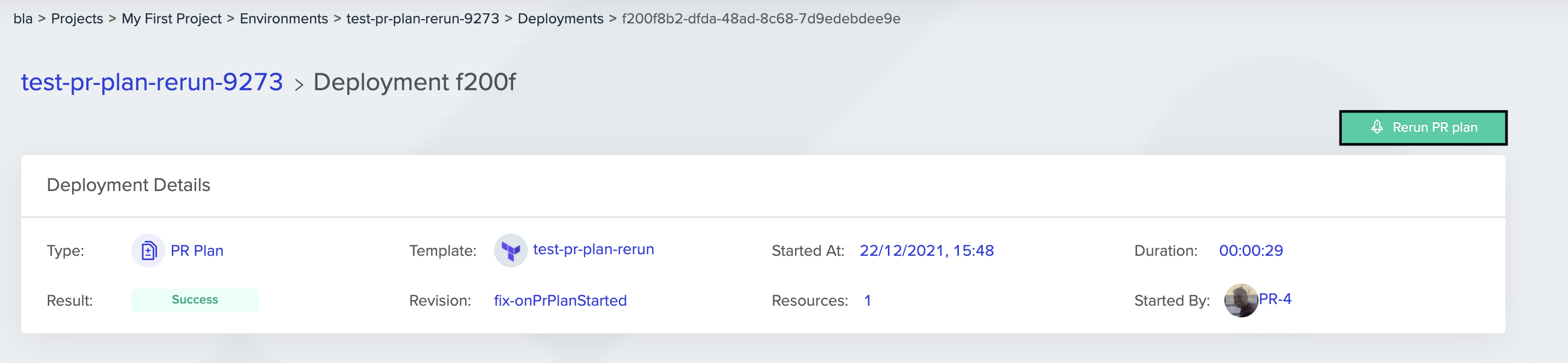
You can rerun a PR Plan deployment on the deployment page.\
The newly created deployment will be an exact snapshot of the commits and code source of the original PR Plan.\
This will recreate the comment on the PR and the status checks.
## Rerun a PR Plan
You can rerun a PR Plan deployment on the deployment page.\
The newly created deployment will be an exact snapshot of the commits and code source of the original PR Plan.\
This will recreate the comment on the PR and the status checks.
 ### Deployment Comment
When a PR Plan is triggered, a comment will be added in env zero, linking to the PR.
## Suggested Content
[Do Not Report Skipped Status Check](/guides/policies-governance/do-not-report-skipped-status-check)
[Skip PR Plan on Merge Commits](/guides/policies-governance/skip-pr-plan-on-merge-commits)
[Terraform Modules Guide](https://www.env0.com/blog/terraform-modules)
[Terraform Plan Examples](https://www.env0.com/blog/terraform-plan)
[Migrating from Atlantis to env0](https://www.env0.com/blog/video-tutorial-how-to-migrate-from-atlantis-to-env0)
[Alternative to Atlantis](https://www.env0.com/alternatives/atlantis-alternative)
## Next steps
* [Plan And Apply via PR Comments](/guides/admin-guide/environments/plan-and-apply-from-pr-comments) - Trigger deploys directly from pull request comments.
* [Skipping PR Plans on Merge Commits](/guides/policies-governance/skip-pr-plan-on-merge-commits) - Control whether merge commits trigger additional PR plans.
* [Omitting Skipped Status Checks](/guides/policies-governance/do-not-report-skipped-status-check) - Reduce noise by hiding skipped status checks in your VCS.
### Deployment Comment
When a PR Plan is triggered, a comment will be added in env zero, linking to the PR.
## Suggested Content
[Do Not Report Skipped Status Check](/guides/policies-governance/do-not-report-skipped-status-check)
[Skip PR Plan on Merge Commits](/guides/policies-governance/skip-pr-plan-on-merge-commits)
[Terraform Modules Guide](https://www.env0.com/blog/terraform-modules)
[Terraform Plan Examples](https://www.env0.com/blog/terraform-plan)
[Migrating from Atlantis to env0](https://www.env0.com/blog/video-tutorial-how-to-migrate-from-atlantis-to-env0)
[Alternative to Atlantis](https://www.env0.com/alternatives/atlantis-alternative)
## Next steps
* [Plan And Apply via PR Comments](/guides/admin-guide/environments/plan-and-apply-from-pr-comments) - Trigger deploys directly from pull request comments.
* [Skipping PR Plans on Merge Commits](/guides/policies-governance/skip-pr-plan-on-merge-commits) - Control whether merge commits trigger additional PR plans.
* [Omitting Skipped Status Checks](/guides/policies-governance/do-not-report-skipped-status-check) - Reduce noise by hiding skipped status checks in your VCS.