> ## Documentation Index
> Fetch the complete documentation index at: https://docs.envzero.com/llms.txt
> Use this file to discover all available pages before exploring further.
# Performing Targeted Deployments
> Deploy specific Terraform resources or modules in env zero using targeted deployments via the UI, API, or ENV0_TERRAFORM_TARGET environment variable.
Use Resource Targeting with Caution
Resource targeting (e.g., using `-target` during planning or applying) can lead to unintended consequences by modifying only a subset of your infrastructure, potentially leaving resources in an inconsistent state.
For more details, refer to the [OpenTofu documentation on resource targeting](https://opentofu.org/docs/cli/commands/plan/#resource-targeting).
Targeting resources and modules allows us to pinpoint exactly what needs to be changed instead of deploying a whole environment. Such selective deployments minimize risks associated with broader changes, ensuring that updates are precise and efficient.
This precision is useful for testing, enabling quicker iterations and focused debugging. With Targeted Deployments, teams can confidently experiment with changes, minimizing risks and streamlining development workflows.
## Supported versions
Targeted deployments are not supported on self-hosted agents prior to version `3.0.611`. However, the `ENV0_TERRAFORM_TARGET` environment variable can still be used.
## Using Resource Targeting
Below are all the different ways in which targets could be specified.
**Combining Target Inputs**
More than 1 option could be used at a time.
env zero will take into account all the different definitions of targets, and combine them.
### Using the UI
Whenever you deploy or re-deploy, you can open the `Targeted Resources` section.
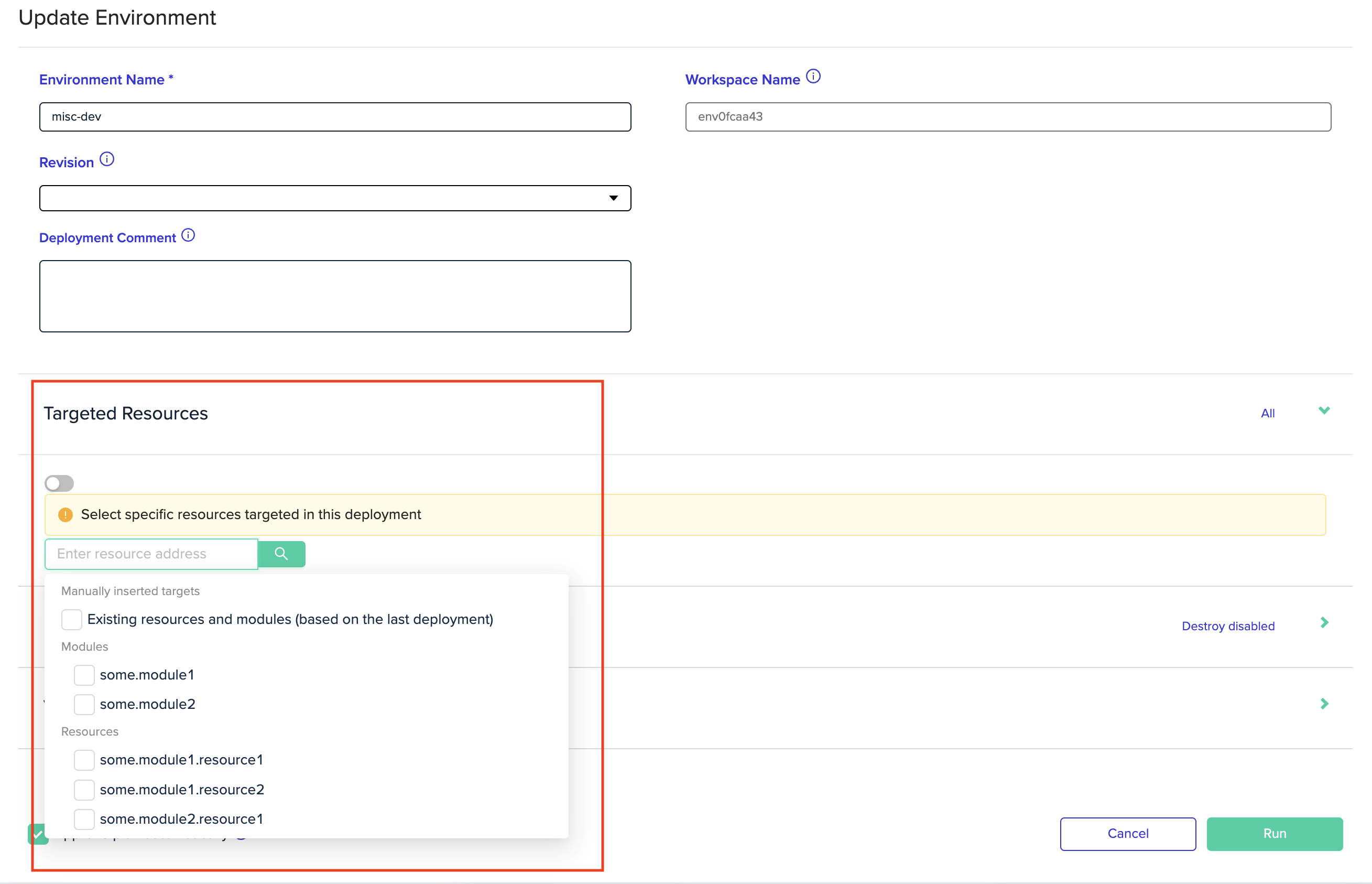 Then choose modules and resources using the autocomplete below.
**Adding a Custom Target**
The list of resources contains resources from the latest deployment.
So when adding new resources, they won't be present in the list - but only after they're deployed.
If you want to target new additions, you need to add them manually by typing their full address, and hitting `Enter`
### Using the ENV0\_TERRAFORM\_TARGET variable
Another option is to use the `ENV0_TERRAFORM_TARGET` [control variable](/guides/admin-guide/additional-controls).
Set the environment variable, separated with commas for multiple values, and it will be directly converted to `-target` flags.
```bash theme={null}
ENV0_TERRAFORM_TARGET="resource1,resource2"
```
Since this is an environment variable, targeting persists as long as the variable is defined.
### Using the TF\_CLI\_ARGS\_plan variable
The `TF_CLI_ARGS_plan` is nifty for forcing flags and arguments to commands.\
Providing a list of targets for `TF_CLI_ARGS_plan` would therefore take effect over deployments in env zero.
```bash theme={null}
TF_CLI_ARGS_plan="-target=resource1 -target=resource2"
```
TF\_CLI\_ARGS\_apply
Note - the `TF_CLI_ARGS_apply` will NOT take effect since env zero runs your plan behind the scenes. Hence, it is recommended to either be used with the same value as `TF_CLI_ARGS_plan`, or not be used at all.
Since this is an environment variable, targeting persists as long as the variable is defined.
# Viewing Targeted Resources
After executing a targeted deployment, you can go to the deployment page and click on the `Targeted Resources` field.
Then choose modules and resources using the autocomplete below.
**Adding a Custom Target**
The list of resources contains resources from the latest deployment.
So when adding new resources, they won't be present in the list - but only after they're deployed.
If you want to target new additions, you need to add them manually by typing their full address, and hitting `Enter`
### Using the ENV0\_TERRAFORM\_TARGET variable
Another option is to use the `ENV0_TERRAFORM_TARGET` [control variable](/guides/admin-guide/additional-controls).
Set the environment variable, separated with commas for multiple values, and it will be directly converted to `-target` flags.
```bash theme={null}
ENV0_TERRAFORM_TARGET="resource1,resource2"
```
Since this is an environment variable, targeting persists as long as the variable is defined.
### Using the TF\_CLI\_ARGS\_plan variable
The `TF_CLI_ARGS_plan` is nifty for forcing flags and arguments to commands.\
Providing a list of targets for `TF_CLI_ARGS_plan` would therefore take effect over deployments in env zero.
```bash theme={null}
TF_CLI_ARGS_plan="-target=resource1 -target=resource2"
```
TF\_CLI\_ARGS\_apply
Note - the `TF_CLI_ARGS_apply` will NOT take effect since env zero runs your plan behind the scenes. Hence, it is recommended to either be used with the same value as `TF_CLI_ARGS_plan`, or not be used at all.
Since this is an environment variable, targeting persists as long as the variable is defined.
# Viewing Targeted Resources
After executing a targeted deployment, you can go to the deployment page and click on the `Targeted Resources` field.
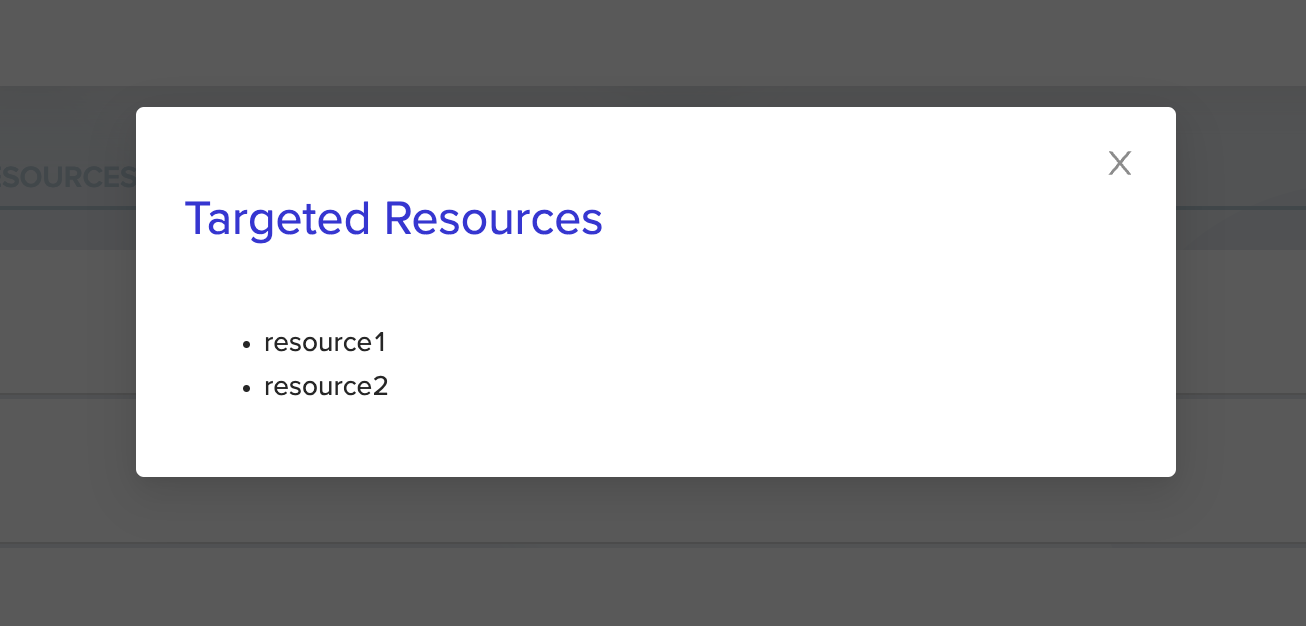
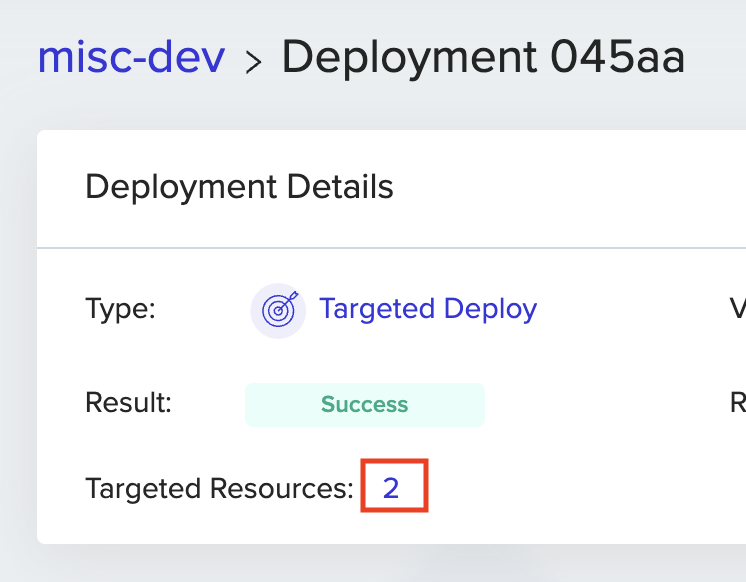 And the full list of targeted resources and modules will pop up
 ## Next steps
* [Additional Deployment Controls](/guides/admin-guide/additional-controls) - Learn about ENV0\_TERRAFORM\_TARGET and other control variables.
* [Environment Overview](/guides/admin-guide/environments) - Understand the full deploy and redeploy lifecycle.
* [Running Ad Hoc Tasks](/guides/admin-guide/environments/ad-hoc-tasks) - Run state manipulation commands without committing to git.
## Next steps
* [Additional Deployment Controls](/guides/admin-guide/additional-controls) - Learn about ENV0\_TERRAFORM\_TARGET and other control variables.
* [Environment Overview](/guides/admin-guide/environments) - Understand the full deploy and redeploy lifecycle.
* [Running Ad Hoc Tasks](/guides/admin-guide/environments/ad-hoc-tasks) - Run state manipulation commands without committing to git.