> ## Documentation Index
> Fetch the complete documentation index at: https://docs.envzero.com/llms.txt
> Use this file to discover all available pages before exploring further.
# Manage Organizations
> Set up and manage organizations as the top-level entity for projects, templates, variables, and policies in env zero, including SSO configuration.
## What is an organization?
An *Organization* is the highest level logical entity in env zero.
All *Projects*, *Templates*, *Variables*, *Policies*, and *Environments* are defined for a specific organization. Organizations are logically separate from each other, and do not share any entities.
Most users belong to a single organization, but they can be a member of several organizations, with different roles and permissions for each one.
An organization is the highest level scope for settings such as [Variables and Secrets](/guides/admin-guide/variables), and [Policies](/guides/policies-governance/policies).
Only users with *administrator* role in an organization, can change the settings or invite new users for that organization.
## Select the active organization
Users in env zero have one *Active Organization*. This is shown at the upper left of the screen.
To change the Active Organization, click the organization name, and then select an organization from the list.
## Join an organization
A user can join an organization in the following ways:
* When joining env zero the user is added to the env zero Demo Organization.
* By invitation, from an organization administrator.
* By creating a new organization, in which case the user becomes the first user and administrator for the new organization.
* Through Single Sign-On (SSO), if configured for the organization. Users authenticating via SSO are automatically provisioned with appropriate roles.
## Create an Organization
To create a new organization, click *Active Organization* at the upper right, and then click *Create Organization*.
Enter a name, description (optional), and URL for the organization logo (optional).\
You can edit these settings later.
Once the organization is created, it automatically becomes the *Active Organization*. You can add a user to the organization in the *Settings* tab.
## Organization Settings
*Organization* is the highest scope for configuration in env zero. All other entities inherit the organization's settings.
Only a user with the *administrator* role can view or edit the organization settings.
To edit the settings, select the *Settings* tab at the upper left.
Organization settings include name and logo, user management, SSO configuration, API Key management, and policies.
*Variables* configuration is accessed in the *Variables* tab and is accessible to non-administrator users as well.
## Finding my Organization ID
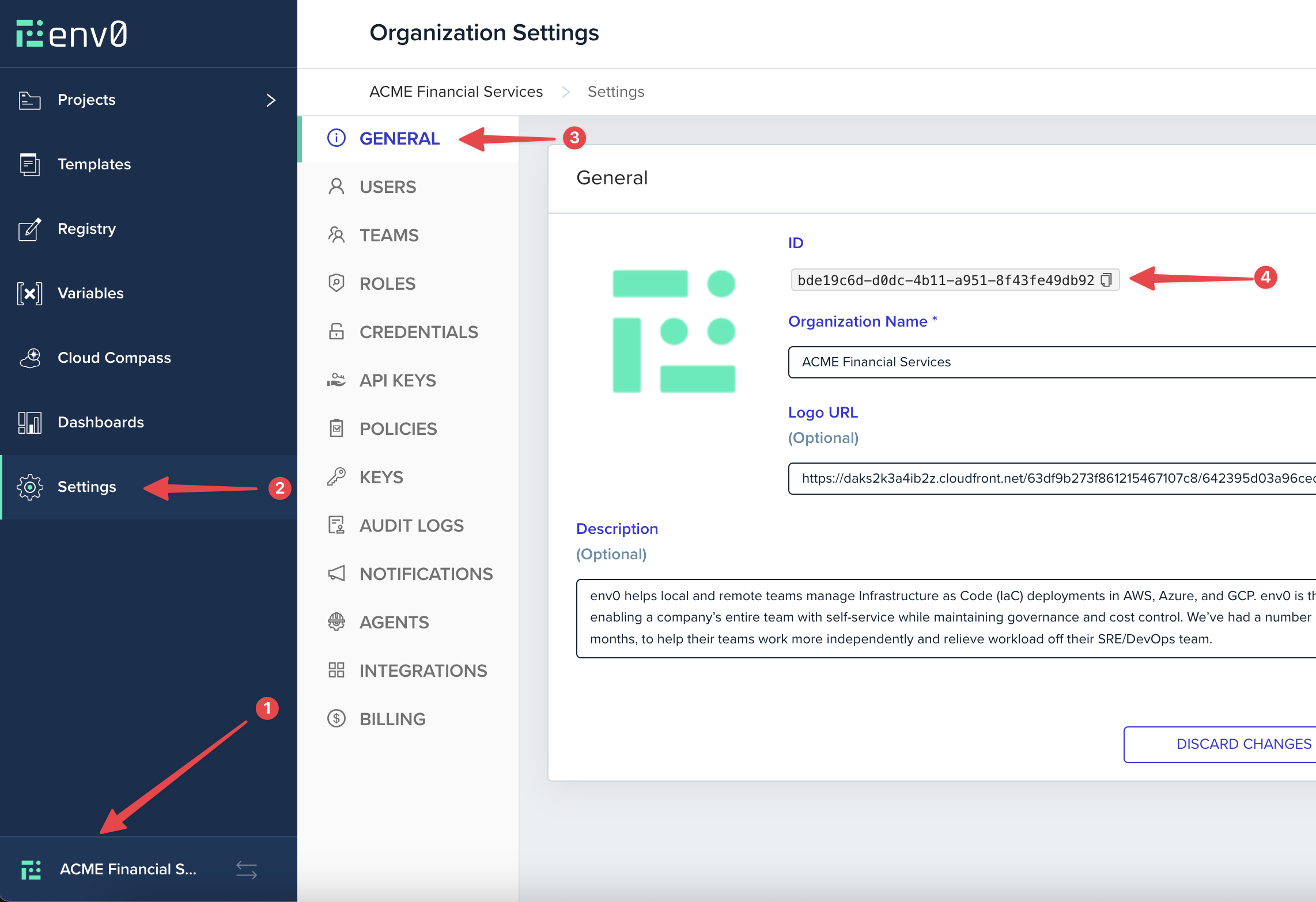
Sometimes you may need your organization ID for various reasons. Here's how you can find it:
1. Click on your organization icon in the bottom left corner
2. Select `Settings` from the left side panel
3. Go to the `General` tab under `Organization Settings`
4. Copy the Organization `ID` as shown in the screenshot below
 ## Single Sign-On (SSO)
Organizations can configure Single Sign-On to authenticate users through an external identity provider. This enables centralized user management, enforces your security policies, and meets enterprise compliance requirements.
SSO can be configured directly from Organization Settings > SSO tab. See [Self-Service SSO Integration](/guides/sso-integrations/self-service-sso) for setup instructions.
## Next steps
* [Manage Projects](/guides/admin-guide/projects) - Create and configure projects within your organization.
* [Manage Teams](/guides/admin-guide/user-role-and-team-management/teams) - Group users into teams for easier access control.
* [Self-Service SSO Integration](/guides/sso-integrations/self-service-sso) - Configure SSO for your organization.
## Single Sign-On (SSO)
Organizations can configure Single Sign-On to authenticate users through an external identity provider. This enables centralized user management, enforces your security policies, and meets enterprise compliance requirements.
SSO can be configured directly from Organization Settings > SSO tab. See [Self-Service SSO Integration](/guides/sso-integrations/self-service-sso) for setup instructions.
## Next steps
* [Manage Projects](/guides/admin-guide/projects) - Create and configure projects within your organization.
* [Manage Teams](/guides/admin-guide/user-role-and-team-management/teams) - Group users into teams for easier access control.
* [Self-Service SSO Integration](/guides/sso-integrations/self-service-sso) - Configure SSO for your organization.