> ## Documentation Index
> Fetch the complete documentation index at: https://docs.envzero.com/llms.txt
> Use this file to discover all available pages before exploring further.
# Providers Overview
> Publish and manage private Terraform providers in the env zero provider registry, with goreleaser version publishing and private registry authentication.
## env zero Provider Registry
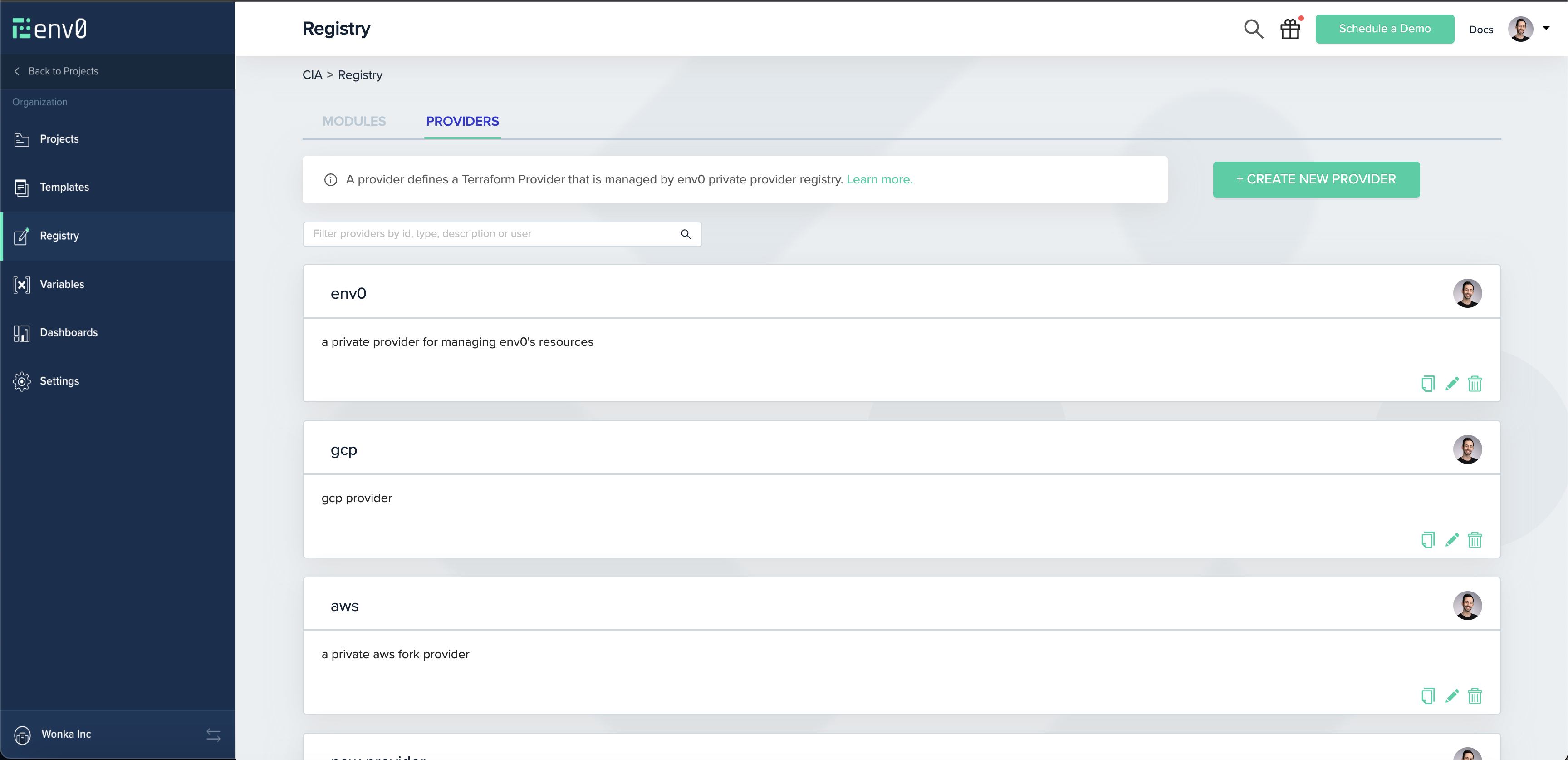
The **env zero Provider Registry** is a private registry for [Terraform providers](https://developer.hashicorp.com/terraform/language/providers), allowing you to privately share and reuse Terraform providers within your organization.
You can access your organization’s provider registry through the `Registry` link in the left sidebar, and choosing the `Providers` tab:
 # Publishing A Provider
NOTE
This guide assumes you already have a provider set up, preferably with `goreleaser`.
## Creating A Provider
As an env zero admin (or with a custom role with the `Create & Edit Providers` permission), you should have permission to create a provider.
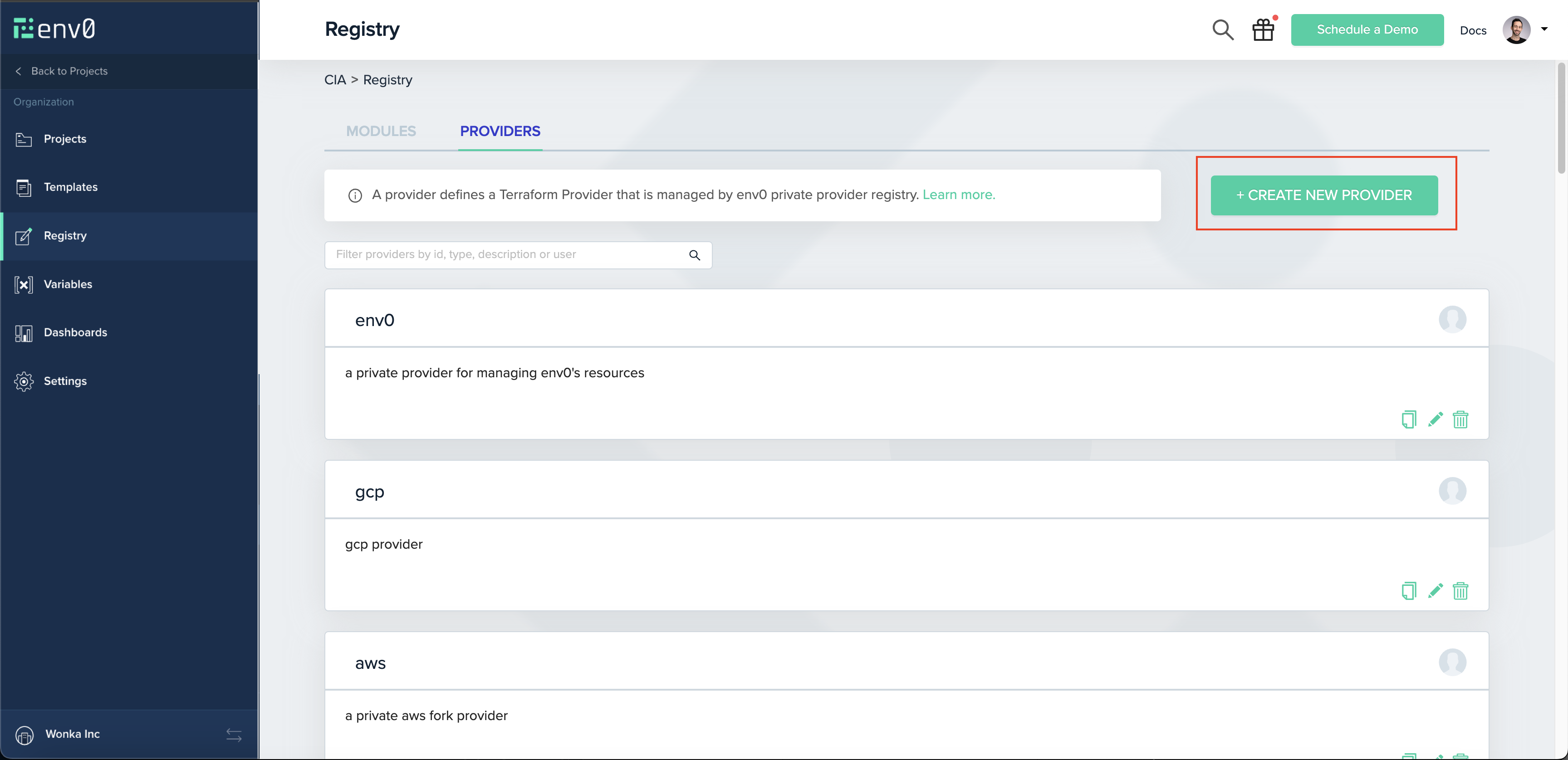
Navigate to `Registry` on the navigation bar, and click the `Providers` tab. There you will see the `Create New Provider` button:
# Publishing A Provider
NOTE
This guide assumes you already have a provider set up, preferably with `goreleaser`.
## Creating A Provider
As an env zero admin (or with a custom role with the `Create & Edit Providers` permission), you should have permission to create a provider.
Navigate to `Registry` on the navigation bar, and click the `Providers` tab. There you will see the `Create New Provider` button:
 **Provider's type**
Your provider’s type is essentially its name, and should match your provider’s files. For example, if your binaries look like `terraform-provider-aws_1.1.1_linux_amd64.zip`, then your provider’s type should be `aws`.
Note
Your binaries' names should match this format - `____.zip`, like the example above `terraform-provider-aws_1.1.1_linux_amd64.zip`
## Creating A GPG Key
Terraform uses GPG keys to authenticate the identity of the entity that compiled and signed the binaries of the provider.\
Normally, when creating a release, you should provide goreleaser with your GPG\_FINGERPRINT, which should also be set on env zero. For more information regarding how to generate your GPG Key, check out [GitHub's guide](https://docs.github.com/en/authentication/managing-commit-signature-verification/generating-a-new-gpg-key).
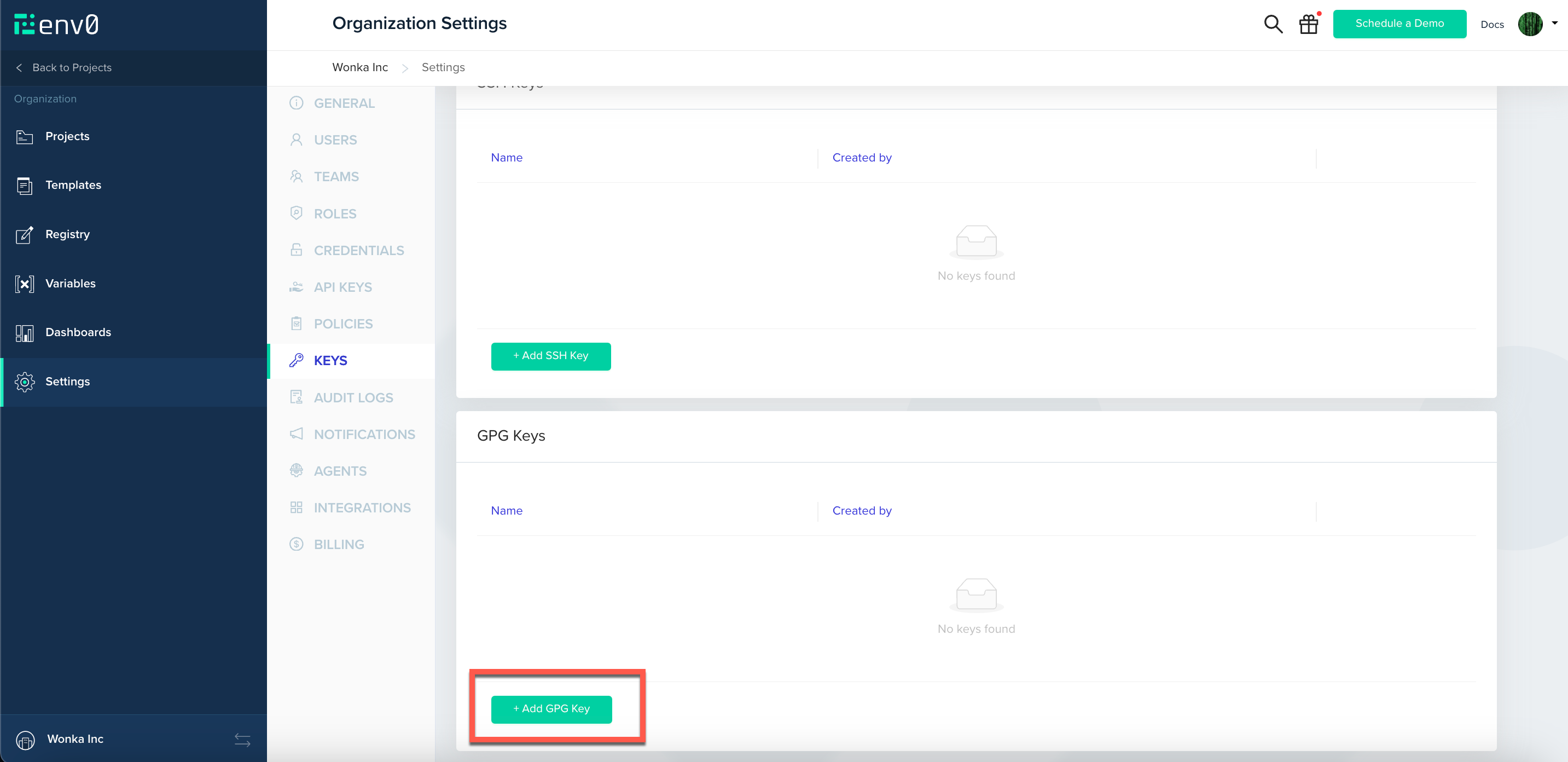
Once you have your key generated, you'll need to create it on env zero. Navigate to `Organization Settings > Keys` and scroll down to `GPG Keys`. You will see the `Add GPG Key` button:
**Provider's type**
Your provider’s type is essentially its name, and should match your provider’s files. For example, if your binaries look like `terraform-provider-aws_1.1.1_linux_amd64.zip`, then your provider’s type should be `aws`.
Note
Your binaries' names should match this format - `____.zip`, like the example above `terraform-provider-aws_1.1.1_linux_amd64.zip`
## Creating A GPG Key
Terraform uses GPG keys to authenticate the identity of the entity that compiled and signed the binaries of the provider.\
Normally, when creating a release, you should provide goreleaser with your GPG\_FINGERPRINT, which should also be set on env zero. For more information regarding how to generate your GPG Key, check out [GitHub's guide](https://docs.github.com/en/authentication/managing-commit-signature-verification/generating-a-new-gpg-key).
Once you have your key generated, you'll need to create it on env zero. Navigate to `Organization Settings > Keys` and scroll down to `GPG Keys`. You will see the `Add GPG Key` button:
 **GPG Key ID**
GPG Key ID is referring to the GPG\_FINGERPRINT, the same one you provided `goreleaser` with. its a 16 charecters hexadecimal string, that is calculated by summerizing your key content, and it should be unique per key.
## Releasing A Version
As part of your CI you should have a version releaser setup.
Terraform recommends using `goreleaser`, and so do we. You can make sure your `.goreleaser` file is configured correctly following [this guide by Terraform](https://developer.hashicorp.com/terraform/tutorials/providers-plugin-framework/providers-plugin-framework-release-publish#add-goreleaser-configuration)
Assuming you have a version complied and ready to ship, you will need to upload the binaries you wish to support.
### Creating A Version
The first step on the release is creating a version in env zero, following the [Version API Reference](/api-reference/provider-registry/create-a-new-provider-version).
### Uploading A Version
If creating a version was done correctly, you will receive a URL (valid for 1 hour) to which you can upload your `zip`, `SHA256SUMS` and `SHA256SUMS.sig` files. For each file type you will need a specific `content-type` header:
* `zip` - `application/zip`
* `SHA256SUMS` - `application/octet-stream`
* `SHA256SUMS.sig` - `application/pgp-signature`
and then with a simple `cURL` request:
```bash theme={null}
curl --request PUT \
--header "Content-Type: $CONTENT_TYPE" \
--upload-file "$FILEPATH" \
"$UPLOAD_URL"
```
To ease the process we suggest using the following script to **create and upload all the binaries at once**:
```bash theme={null}
#!/bin/bash
# usage: upload-provider-versions.sh
# required environment variables:
# 1. ENV0_API_KEY - env zero's api key. you can create one at
# 2. ENV0_API_SECRET - env zero's api secretd
# 3. PROVIDER_ID - your provider's ID as created by env zero
# 4. GPG_KEY_ID - your GPG key's fingerprint (16 hexadecimal charecters)
# The folder containing the files to upload
FOLDER=$1
# Assert FOLDER argument is passed
if [[ -z "$FOLDER" ]]; then
echo "Usage: upload-provider-versions.sh "
exit 1
fi
AUTH_HEADER="Authorization: Basic $(echo -n "$ENV0_API_KEY:$ENV0_API_SECRET" | base64)"
ENV0_API_ENDPOINT=${ENV0_API_ENDPOINT:-"https://api.env0.com"}
function upload_file {
FILEPATH="$1"
# Get the filename without the path
FILENAME=$(basename "$FILEPATH")
# Determine the content type based on the file extension
if [[ $FILENAME == *.zip ]]; then
CONTENT_TYPE="application/zip"
elif [[ $FILENAME == *_SHA256SUMS ]]; then
CONTENT_TYPE="application/octet-stream"
elif [[ $FILENAME == *_SHA256SUMS.sig ]]; then
CONTENT_TYPE="application/pgp-signature"
else
continue
fi
# Make the POST request to create a new version
RESPONSE=$(curl --fail --silent --show-error --request POST \
--header "Content-Type: application/json" \
--header "$AUTH_HEADER" \
--data "{\"filename\":\"$FILENAME\",\"gpgKeyId\":\"$GPG_KEY_ID\"}" \
"$ENV0_API_ENDPOINT/providers/$PROVIDER_ID/versions")
# Check for errors
if [ $? -ne 0 ]; then
echo "Error creating new version for $FILENAME"
continue
fi
# Parse the response for the upload URL
UPLOAD_URL=$(echo "$RESPONSE" | sed -n 's/.*"url":[[:space:]]*"\([^"]*\)".*/\1/p')
# Make the PUT request to upload the file
curl --fail --silent --show-error --request PUT \
--header "Content-Type: $CONTENT_TYPE" \
--upload-file "$FILEPATH" \
"$UPLOAD_URL"
# Check for errors
if [ $? -ne 0 ]; then
echo "Error uploading $FILENAME"
continue
fi
echo "Uploaded $FILENAME"
}
# Find all files in the folder and run the upload_file function for each one in the background
for FILEPATH in "$FOLDER"/*; do
upload_file "$FILEPATH" &
done
# Wait for all background processes to finish
wait
```
Your first version should be released.\
To watch your provider's versions, navigate to its page on env zero by clicking its card.
**GPG Key ID**
GPG Key ID is referring to the GPG\_FINGERPRINT, the same one you provided `goreleaser` with. its a 16 charecters hexadecimal string, that is calculated by summerizing your key content, and it should be unique per key.
## Releasing A Version
As part of your CI you should have a version releaser setup.
Terraform recommends using `goreleaser`, and so do we. You can make sure your `.goreleaser` file is configured correctly following [this guide by Terraform](https://developer.hashicorp.com/terraform/tutorials/providers-plugin-framework/providers-plugin-framework-release-publish#add-goreleaser-configuration)
Assuming you have a version complied and ready to ship, you will need to upload the binaries you wish to support.
### Creating A Version
The first step on the release is creating a version in env zero, following the [Version API Reference](/api-reference/provider-registry/create-a-new-provider-version).
### Uploading A Version
If creating a version was done correctly, you will receive a URL (valid for 1 hour) to which you can upload your `zip`, `SHA256SUMS` and `SHA256SUMS.sig` files. For each file type you will need a specific `content-type` header:
* `zip` - `application/zip`
* `SHA256SUMS` - `application/octet-stream`
* `SHA256SUMS.sig` - `application/pgp-signature`
and then with a simple `cURL` request:
```bash theme={null}
curl --request PUT \
--header "Content-Type: $CONTENT_TYPE" \
--upload-file "$FILEPATH" \
"$UPLOAD_URL"
```
To ease the process we suggest using the following script to **create and upload all the binaries at once**:
```bash theme={null}
#!/bin/bash
# usage: upload-provider-versions.sh
# required environment variables:
# 1. ENV0_API_KEY - env zero's api key. you can create one at
# 2. ENV0_API_SECRET - env zero's api secretd
# 3. PROVIDER_ID - your provider's ID as created by env zero
# 4. GPG_KEY_ID - your GPG key's fingerprint (16 hexadecimal charecters)
# The folder containing the files to upload
FOLDER=$1
# Assert FOLDER argument is passed
if [[ -z "$FOLDER" ]]; then
echo "Usage: upload-provider-versions.sh "
exit 1
fi
AUTH_HEADER="Authorization: Basic $(echo -n "$ENV0_API_KEY:$ENV0_API_SECRET" | base64)"
ENV0_API_ENDPOINT=${ENV0_API_ENDPOINT:-"https://api.env0.com"}
function upload_file {
FILEPATH="$1"
# Get the filename without the path
FILENAME=$(basename "$FILEPATH")
# Determine the content type based on the file extension
if [[ $FILENAME == *.zip ]]; then
CONTENT_TYPE="application/zip"
elif [[ $FILENAME == *_SHA256SUMS ]]; then
CONTENT_TYPE="application/octet-stream"
elif [[ $FILENAME == *_SHA256SUMS.sig ]]; then
CONTENT_TYPE="application/pgp-signature"
else
continue
fi
# Make the POST request to create a new version
RESPONSE=$(curl --fail --silent --show-error --request POST \
--header "Content-Type: application/json" \
--header "$AUTH_HEADER" \
--data "{\"filename\":\"$FILENAME\",\"gpgKeyId\":\"$GPG_KEY_ID\"}" \
"$ENV0_API_ENDPOINT/providers/$PROVIDER_ID/versions")
# Check for errors
if [ $? -ne 0 ]; then
echo "Error creating new version for $FILENAME"
continue
fi
# Parse the response for the upload URL
UPLOAD_URL=$(echo "$RESPONSE" | sed -n 's/.*"url":[[:space:]]*"\([^"]*\)".*/\1/p')
# Make the PUT request to upload the file
curl --fail --silent --show-error --request PUT \
--header "Content-Type: $CONTENT_TYPE" \
--upload-file "$FILEPATH" \
"$UPLOAD_URL"
# Check for errors
if [ $? -ne 0 ]; then
echo "Error uploading $FILENAME"
continue
fi
echo "Uploaded $FILENAME"
}
# Find all files in the folder and run the upload_file function for each one in the background
for FILEPATH in "$FOLDER"/*; do
upload_file "$FILEPATH" &
done
# Wait for all background processes to finish
wait
```
Your first version should be released.\
To watch your provider's versions, navigate to its page on env zero by clicking its card.
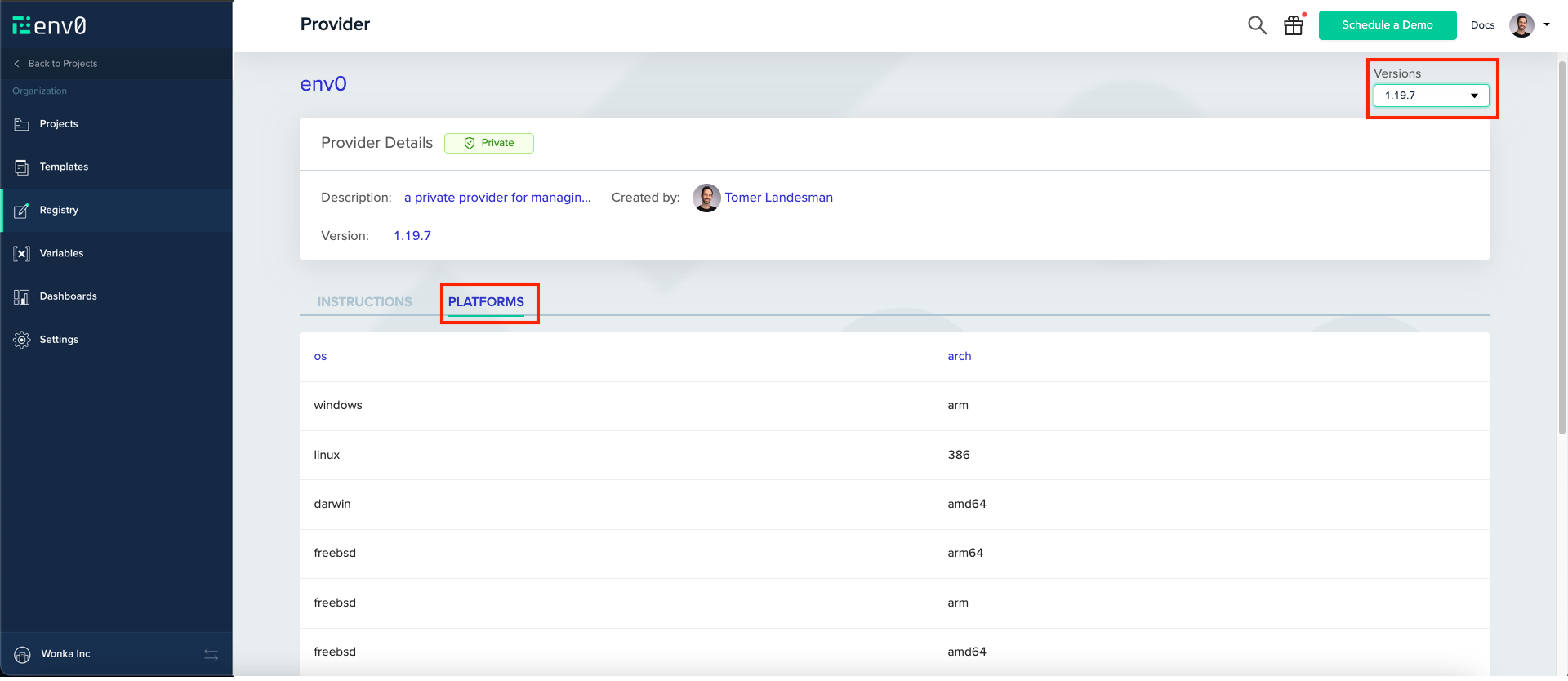
 On the top right, you can see your uploaded versions. Clicking on versions then navigating to `Platforms` tab will show you the supported binaries.
 ## Using A Provider
Now that your provider is set up every user in your organization with the `View Providers` permission (available by default to organization user) can start using it from within env zero, or outside of it.
Set up the provider in your Terraform file by copying and pasting the following block.
```hcl theme={null}
terraform {
required_providers {
= {
source = "api.env0.com//"
version = ""
}
}
}
```
You can now deploy your Terraform code through env zero and it will deploy as expected.
### Outside env zero
If you would like to use your provider outside env zero, you will have to set up Terraform's authorization. Follow the guide on [how to authorize when using a private registry](/guides/admin-guide/private-registry/#authorization) for more info.
## Using env zero as a Terraform Provider Mirror
Set `ENV0_USE_MIRROR=true` as an environment variable in your template or environment to route Terraform provider downloads through env zero's hosted provider mirror rather than directly from registry.terraform.io.
This is useful when your deployment agent has restricted outbound internet access or when you want consistent, cached provider downloads.
Add this as an environment variable in your env zero template or environment settings:
| Name | Value |
| ----------------- | ------ |
| `ENV0_USE_MIRROR` | `true` |
When enabled, env zero configures Terraform to use the env zero provider registry as a [network mirror](https://developer.hashicorp.com/terraform/cli/config/config-file#provider-installation), so providers are fetched from env zero's infrastructure rather than the public registry.
## Next steps
* [Private Registry](/guides/admin-guide/private-registry) - Configure credentials for local registry access.
* [Module Overview](/guides/admin-guide/private-registry/modules) - Manage shared Terraform modules alongside providers.
* [Managing Variables](/guides/admin-guide/variables) - Store API keys and secrets used during deployments.
## Using A Provider
Now that your provider is set up every user in your organization with the `View Providers` permission (available by default to organization user) can start using it from within env zero, or outside of it.
Set up the provider in your Terraform file by copying and pasting the following block.
```hcl theme={null}
terraform {
required_providers {
= {
source = "api.env0.com//"
version = ""
}
}
}
```
You can now deploy your Terraform code through env zero and it will deploy as expected.
### Outside env zero
If you would like to use your provider outside env zero, you will have to set up Terraform's authorization. Follow the guide on [how to authorize when using a private registry](/guides/admin-guide/private-registry/#authorization) for more info.
## Using env zero as a Terraform Provider Mirror
Set `ENV0_USE_MIRROR=true` as an environment variable in your template or environment to route Terraform provider downloads through env zero's hosted provider mirror rather than directly from registry.terraform.io.
This is useful when your deployment agent has restricted outbound internet access or when you want consistent, cached provider downloads.
Add this as an environment variable in your env zero template or environment settings:
| Name | Value |
| ----------------- | ------ |
| `ENV0_USE_MIRROR` | `true` |
When enabled, env zero configures Terraform to use the env zero provider registry as a [network mirror](https://developer.hashicorp.com/terraform/cli/config/config-file#provider-installation), so providers are fetched from env zero's infrastructure rather than the public registry.
## Next steps
* [Private Registry](/guides/admin-guide/private-registry) - Configure credentials for local registry access.
* [Module Overview](/guides/admin-guide/private-registry/modules) - Manage shared Terraform modules alongside providers.
* [Managing Variables](/guides/admin-guide/variables) - Store API keys and secrets used during deployments.