> ## Documentation Index
> Fetch the complete documentation index at: https://docs.envzero.com/llms.txt
> Use this file to discover all available pages before exploring further.
# Running Remote Apply
> Run terraform apply locally while executing remotely on env zero with shared state, variables, cost estimation, and an auditable deployment record.
Remote Backend allows applying your Terraform locally by triggering a **remote apply** in env zero.\
The remote apply uses your local Terraform files but actually runs it remotely in env zero while using the shared state and variables set for the env zero environment. Each remote apply creates a deployment in env zero so you will have an audit for each deployment.\
By running a remote apply you can build your IaC faster, and test your changes locally before committing them.
Additional benefits are the rest of the env zero features that are automatically integrated into your plan logs. It includes:
* [Role Based Access](/guides/admin-guide/user-role-and-team-management/user-management)
* [Custom Flows](/guides/admin-guide/custom-flows)
* [Cost Estimation](/guides/policies-governance/cost-estimation)
* [Variables and Secrets](/guides/admin-guide/variables)
* [Policies](/guides/policies-governance/policies)
* [Plugins](/guides/integrations/plugins)
Warning
Remote apply is not recommended for production environments as it lets you apply local code that is not VCS controlled, which can cause a drift in your infrastructure. Use this feature with caution.
## Before You Start
There are some prerequisites you need to be aware of before starting to use remote apply.
### Permissions
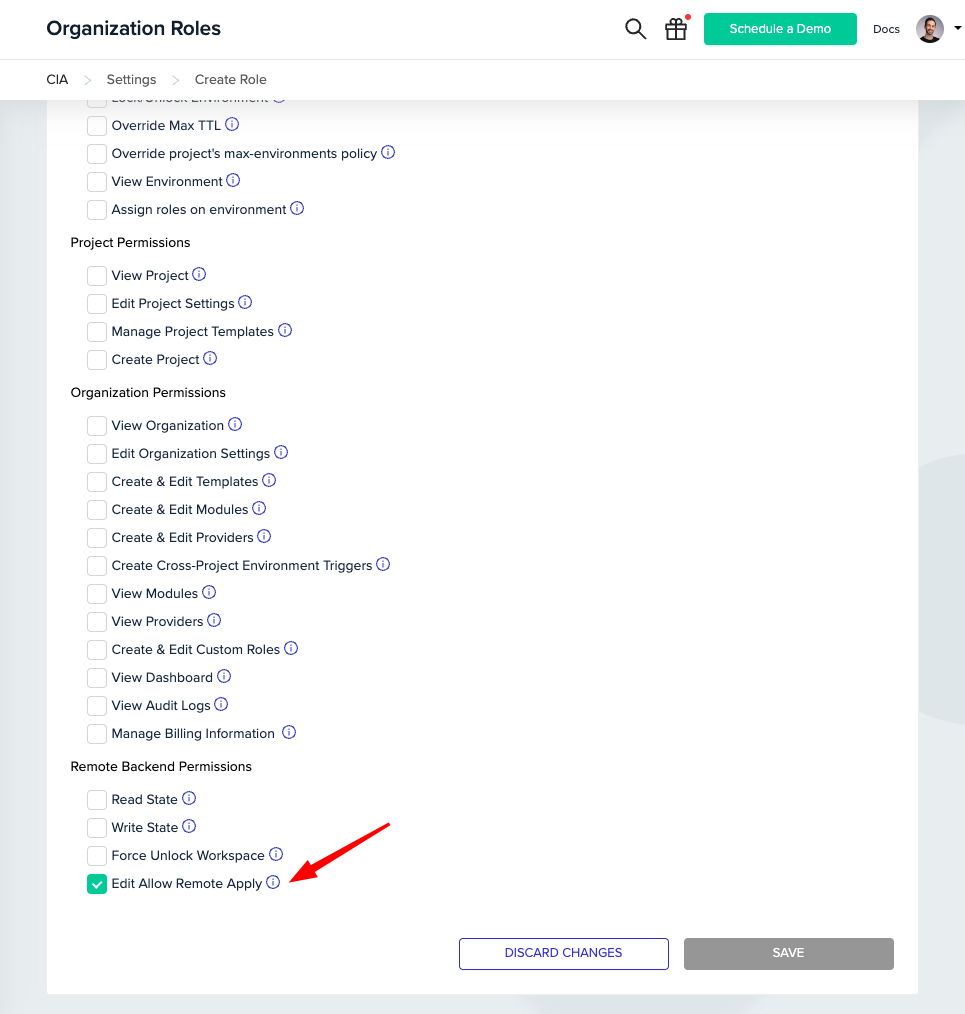
To enable Remote Apply within an environment, you must have the "Allow Edit Remote Apply" permission. As an admin, you can create a custom role with this permission, or use the Admin role, which have it enabled by default.
 ### Opting In for Remote Apply
Within your environment's settings, navigate to `General Settings` > `Remote State` to find the *Allow Remote Apply* option.
### Opting In for Remote Apply
Within your environment's settings, navigate to `General Settings` > `Remote State` to find the *Allow Remote Apply* option.
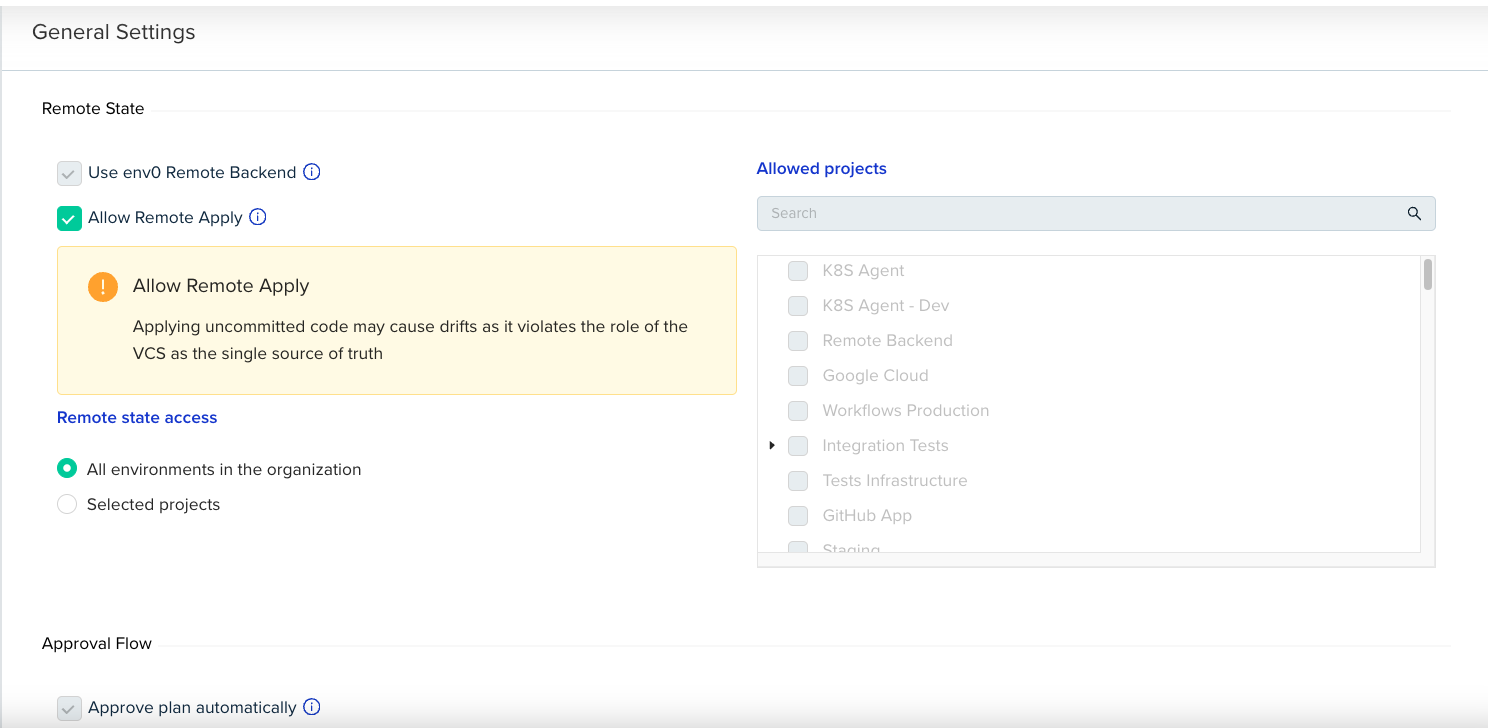 To activate this feature, your environment must meet certain prerequisites:
1. The Remote Backend must be enabled.
2. *Approve plan automatically* must be enabled.
3. There are no [approval policies](/guides/policies-governance/approval-policies) configured on this project.
## Usage
1. First, you have to have your Terraform configuration defined with the `cloud` block.
```hcl theme={null}
terraform {
cloud {
hostname = "backend.api.env0.com"
organization = "."
workspaces {
name = "my-first-remote-apply"
}
}
}
```
**Cloud Configuration Support**
Terraform's cloud block is only available from version 1.1.0. To use remote apply, you have to use the cloud block configuration, and not the old remote "backend" configuration.
2. To login, follow [this guide](/guides/admin-guide/remote-backend/login)
3. Next, run
```bash theme={null}
terraform init
terraform apply -auto-approve
```
`-auto-approve` flag
the `-auto-approve` flag is mandatory to execute remote apply on env zero.
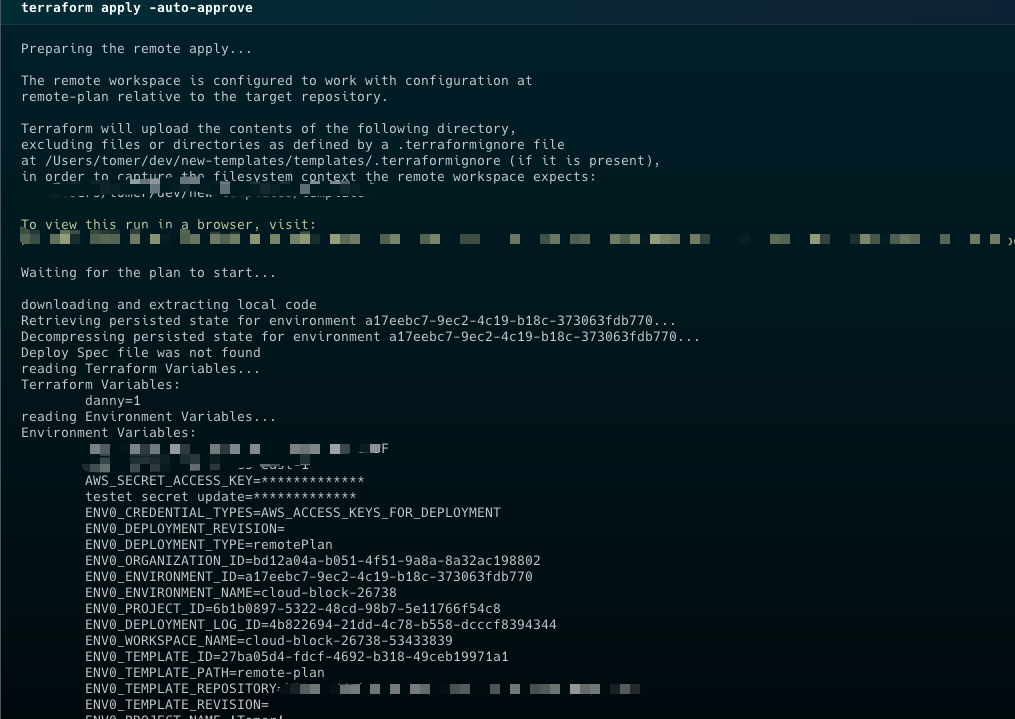
A remote apply will start an logs will start appearing on the terminal.
To activate this feature, your environment must meet certain prerequisites:
1. The Remote Backend must be enabled.
2. *Approve plan automatically* must be enabled.
3. There are no [approval policies](/guides/policies-governance/approval-policies) configured on this project.
## Usage
1. First, you have to have your Terraform configuration defined with the `cloud` block.
```hcl theme={null}
terraform {
cloud {
hostname = "backend.api.env0.com"
organization = "."
workspaces {
name = "my-first-remote-apply"
}
}
}
```
**Cloud Configuration Support**
Terraform's cloud block is only available from version 1.1.0. To use remote apply, you have to use the cloud block configuration, and not the old remote "backend" configuration.
2. To login, follow [this guide](/guides/admin-guide/remote-backend/login)
3. Next, run
```bash theme={null}
terraform init
terraform apply -auto-approve
```
`-auto-approve` flag
the `-auto-approve` flag is mandatory to execute remote apply on env zero.
A remote apply will start an logs will start appearing on the terminal.
 Tip
You can see the deployment in env zero by clicking the yellow link.
## Next steps
* [Running Remote Plan](/guides/admin-guide/remote-backend/remote-plan) - Test local Terraform changes remotely before applying.
* [Configuring State Access Control](/guides/admin-guide/remote-backend/state-access-control) - Restrict which environments can read each other's state.
* [Manage Approval Policies](/guides/policies-governance/approval-policies) - Understand why approval policies block remote apply from being enabled.
Tip
You can see the deployment in env zero by clicking the yellow link.
## Next steps
* [Running Remote Plan](/guides/admin-guide/remote-backend/remote-plan) - Test local Terraform changes remotely before applying.
* [Configuring State Access Control](/guides/admin-guide/remote-backend/state-access-control) - Restrict which environments can read each other's state.
* [Manage Approval Policies](/guides/policies-governance/approval-policies) - Understand why approval policies block remote apply from being enabled.