> ## Documentation Index
> Fetch the complete documentation index at: https://docs.envzero.com/llms.txt
> Use this file to discover all available pages before exploring further.
# Running Remote Plan
> Run terraform plan locally while executing remotely on env zero with shared state, RBAC, cost estimation, and custom flows, with auditable results.
## Remote Plan
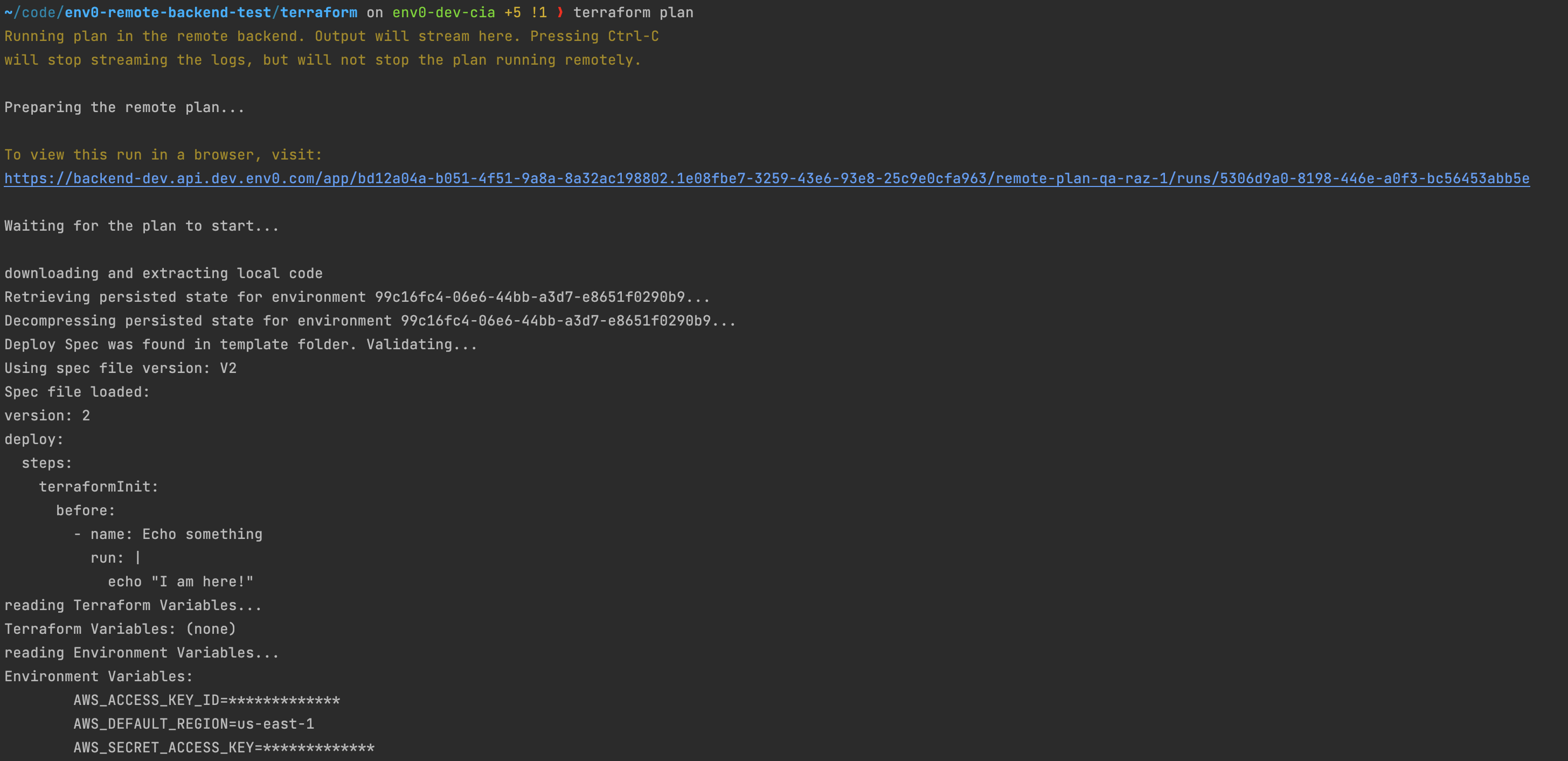
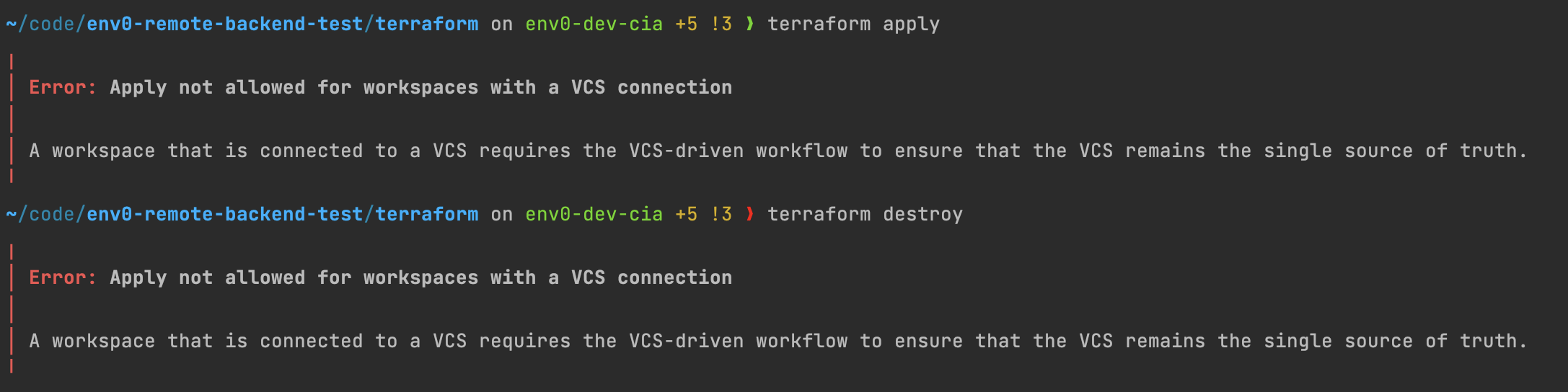
Remote Backend allows running your Terraform plan locally by triggering a remote plan in env zero.\
The remote plan uses your local Terraform files but actually runs it remotely in env zero while using the shared state and variables set for the env zero environment. Each remote plan creates a deployment in env zero so you will have an audit for each deployment.\
By running a remote plan you can build your IaC faster, and test your changes locally **before committing** them.
Additional benefits are the rest of the env zero features that are automatically integrated into your plan logs. It includes:
* [Role Based Access](/guides/admin-guide/user-role-and-team-management/user-management)
* [Custom Flows](/guides/admin-guide/custom-flows)
* [Cost Estimation](/guides/cost-monitoring/cost-monitoring/#cost-estimation)
* [Variables and Secrets](/guides/admin-guide/variables)
* [Policies](/guides/policies-governance/policies)
* [Plugins](/guides/integrations/plugins)
 ## .terraformignore
If cases where your gitrepo is particularly large, this will cause the remote plan to take a longer time to process (due to compressing and decompressing the gitrepo). You can save time on the remote plan by adding a [`.terraformignore`](https://opentofu.org/docs/cli/cloud/settings/#excluding-files-from-upload-with-terraformignore) to the root of the repo.
```.terraformignore theme={null}
/**
!my-working-dir/
my-working-dir/.terraform
my-working-dir/.terraform/**
```
ignore the local `.terraform` folder
If you have a local `.terraform` folder, please add it to the ignore list (like in the example above), otherwise you may get some errors such as `workspace not supported`
## Auditing
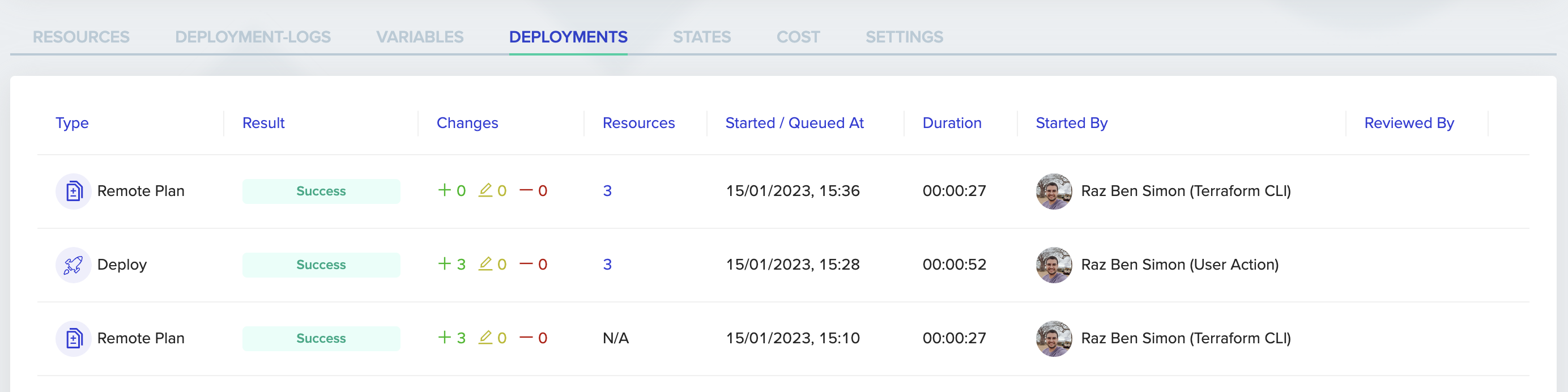
env zero UI can show you each remote plan deployment that has occurred, accesses its plan logs, and gives you visibility and audit on who actually trigged it from their local environment.
## .terraformignore
If cases where your gitrepo is particularly large, this will cause the remote plan to take a longer time to process (due to compressing and decompressing the gitrepo). You can save time on the remote plan by adding a [`.terraformignore`](https://opentofu.org/docs/cli/cloud/settings/#excluding-files-from-upload-with-terraformignore) to the root of the repo.
```.terraformignore theme={null}
/**
!my-working-dir/
my-working-dir/.terraform
my-working-dir/.terraform/**
```
ignore the local `.terraform` folder
If you have a local `.terraform` folder, please add it to the ignore list (like in the example above), otherwise you may get some errors such as `workspace not supported`
## Auditing
env zero UI can show you each remote plan deployment that has occurred, accesses its plan logs, and gives you visibility and audit on who actually trigged it from their local environment.
 ## Local Executions
If you still wish to run a `plan` or `apply` locally, without a remote execution by env zero - you can do it by enabling terraform's `TF_FORCE_LOCAL_BACKEND` environment variable.
```shell theme={null}
TF_FORCE_LOCAL_BACKEND=1 terraform apply
```
Local Execution
When running `plan` or `apply` locally, those deployments are not audited in env zero and RBAC and policy control are not enforced. In addition since the code you are running is not commited, we can't attach that deployment to a certain commit or a branch.
You should avoid using Local Execution as much as possible.
## Next steps
* [Running Remote Apply](/guides/admin-guide/remote-backend/remote-apply) - Apply local Terraform changes remotely with full auditing.
* [Integrate With Terraform Cloud Remote Backend](/guides/admin-guide/remote-backend/working-with-terraform-cloud-remote-backend) - Use env zero alongside an existing Terraform Cloud state backend.
* [Using Self-Hosted Remote State](/guides/admin-guide/remote-backend/self-hosted-remote-state) - Configure a self-hosted backend for state storage.
## Local Executions
If you still wish to run a `plan` or `apply` locally, without a remote execution by env zero - you can do it by enabling terraform's `TF_FORCE_LOCAL_BACKEND` environment variable.
```shell theme={null}
TF_FORCE_LOCAL_BACKEND=1 terraform apply
```
Local Execution
When running `plan` or `apply` locally, those deployments are not audited in env zero and RBAC and policy control are not enforced. In addition since the code you are running is not commited, we can't attach that deployment to a certain commit or a branch.
You should avoid using Local Execution as much as possible.
## Next steps
* [Running Remote Apply](/guides/admin-guide/remote-backend/remote-apply) - Apply local Terraform changes remotely with full auditing.
* [Integrate With Terraform Cloud Remote Backend](/guides/admin-guide/remote-backend/working-with-terraform-cloud-remote-backend) - Use env zero alongside an existing Terraform Cloud state backend.
* [Using Self-Hosted Remote State](/guides/admin-guide/remote-backend/self-hosted-remote-state) - Configure a self-hosted backend for state storage.