> ## Documentation Index
> Fetch the complete documentation index at: https://docs.envzero.com/llms.txt
> Use this file to discover all available pages before exploring further.
# Configuring State Access Control
> Control which environments can access env zero remote state, restricting terraform_remote_state access to specific projects for secure state sharing.
## State Access Control
Terraform allows accessing states stored on remote backends using its built in [terraform\_remote\_state](https://developer.hashicorp.com/terraform/language/state/remote-state-data) data resource, env zero allows specifying which environments would be allowed to access an environment's state on env zero triggered deployments.
## Setting Your Environment State Access
To set your environment's state access, go to the Environment -> Settings tab and select which projects are allowed to access the environment's state. You can choose to allow access to all environments in your organization or limit access to specific projects or their subprojects.
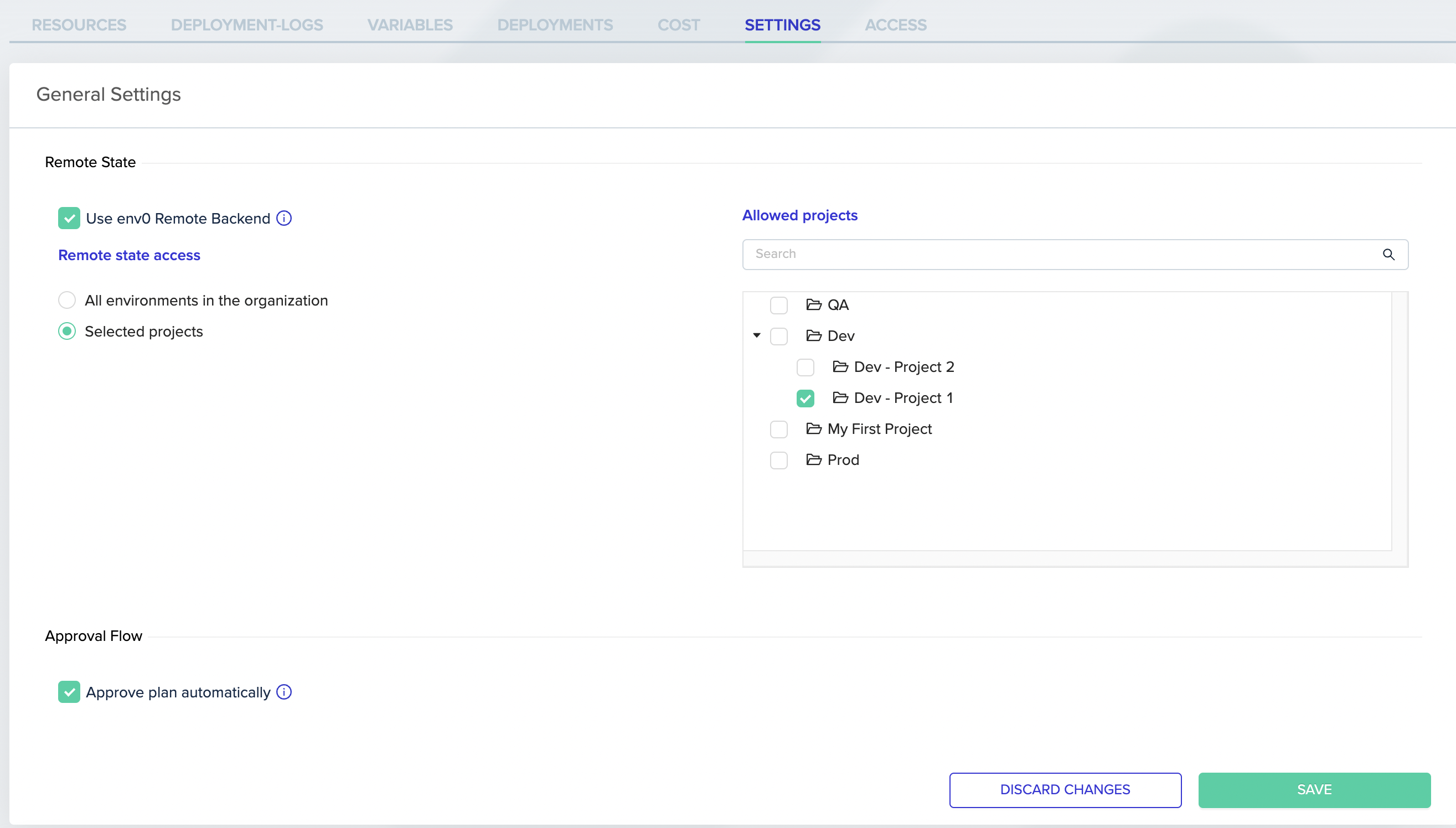 After saving these settings only environments in the selected projects or their subprojects will be allowed to fetch that environment's state.
**Note:**
These settings will only affect deployments that are running inside env zero, for local runs or state access that is from outside env zero the logged-in API key / User personal key permissions will determine if they can access the state or not.
## Next steps
* [Remote State Data Source](/guides/admin-guide/remote-backend/remote-state-data-source) - Use remote state outputs as data sources in other stacks.
* [Using Self-Hosted Remote State](/guides/admin-guide/remote-backend/self-hosted-remote-state) - Store state in your own AWS S3 bucket.
* [Working with Environment Outputs](/guides/admin-guide/variables/environment-outputs) - Share outputs across environments without direct state access.
After saving these settings only environments in the selected projects or their subprojects will be allowed to fetch that environment's state.
**Note:**
These settings will only affect deployments that are running inside env zero, for local runs or state access that is from outside env zero the logged-in API key / User personal key permissions will determine if they can access the state or not.
## Next steps
* [Remote State Data Source](/guides/admin-guide/remote-backend/remote-state-data-source) - Use remote state outputs as data sources in other stacks.
* [Using Self-Hosted Remote State](/guides/admin-guide/remote-backend/self-hosted-remote-state) - Store state in your own AWS S3 bucket.
* [Working with Environment Outputs](/guides/admin-guide/variables/environment-outputs) - Share outputs across environments without direct state access.