> ## Documentation Index
> Fetch the complete documentation index at: https://docs.envzero.com/llms.txt
> Use this file to discover all available pages before exploring further.
# Self-Hosted Agents Overview
> Create and manage self-hosted agent pools, authentication secrets, and project assignments in env zero for Kubernetes and Docker agents.
## What Are Self-Hosted Agents
Self-hosted agents run env zero deployment workloads on your own infrastructure.
* Execution is contained within your own servers and infrastructure.
* The agent requires an internet connection but no inbound network access.
* Secrets are stored on your own infrastructure.
Self-hosted agents are available to Enterprise customers only. See [pricing](https://www.env0.com/pricing) for details.
env zero supports two agent types:
* **Kubernetes agent** - Runs on your Kubernetes cluster using a Helm chart. See [Kubernetes Agent Installation](/guides/admin-guide/self-hosted-kubernetes-agent/self-hosted-kubernetes-agent).
* **Docker agent** - Runs as a standalone Docker container. See [Docker Agent Installation](/guides/admin-guide/self-hosted-kubernetes-agent/standalone-docker-agent).
## Agent Pools
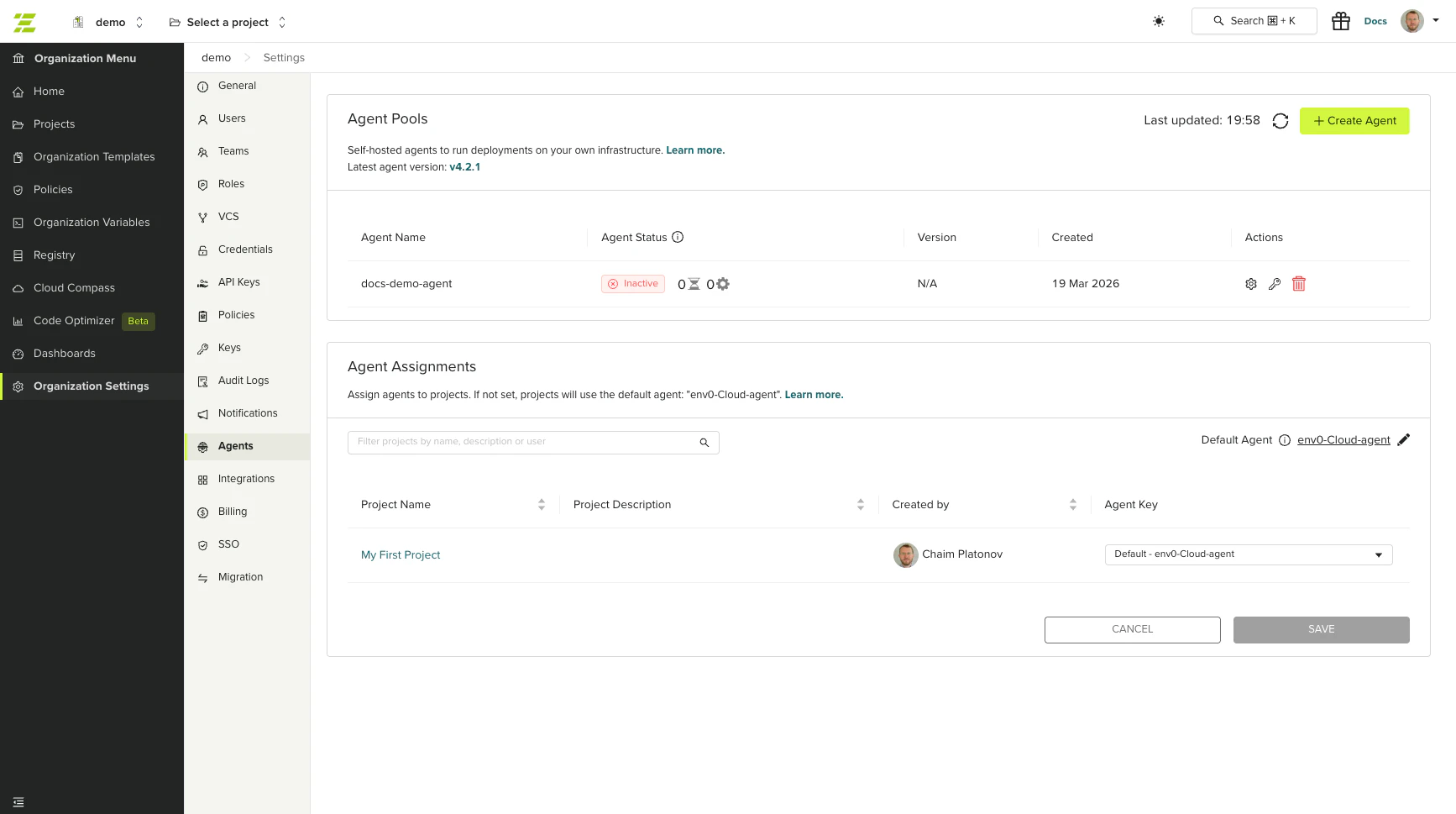
An agent pool is a logical grouping of one or more agent instances that share the same configuration and authentication. You can create and manage agent pools in the env zero UI.
Each agent pool has:
* A unique name within your organization
* Up to two authentication secrets
* Optional log hosting configuration
 ## Permissions
Managing agent pools requires the **Edit Organization Settings** permission.
This permission is required to:
* Create, edit, and delete agent pools
* Create and revoke agent secrets
* Assign agents to projects
## Creating an Agent Pool
Go to **Organization Settings** > **Agents**.
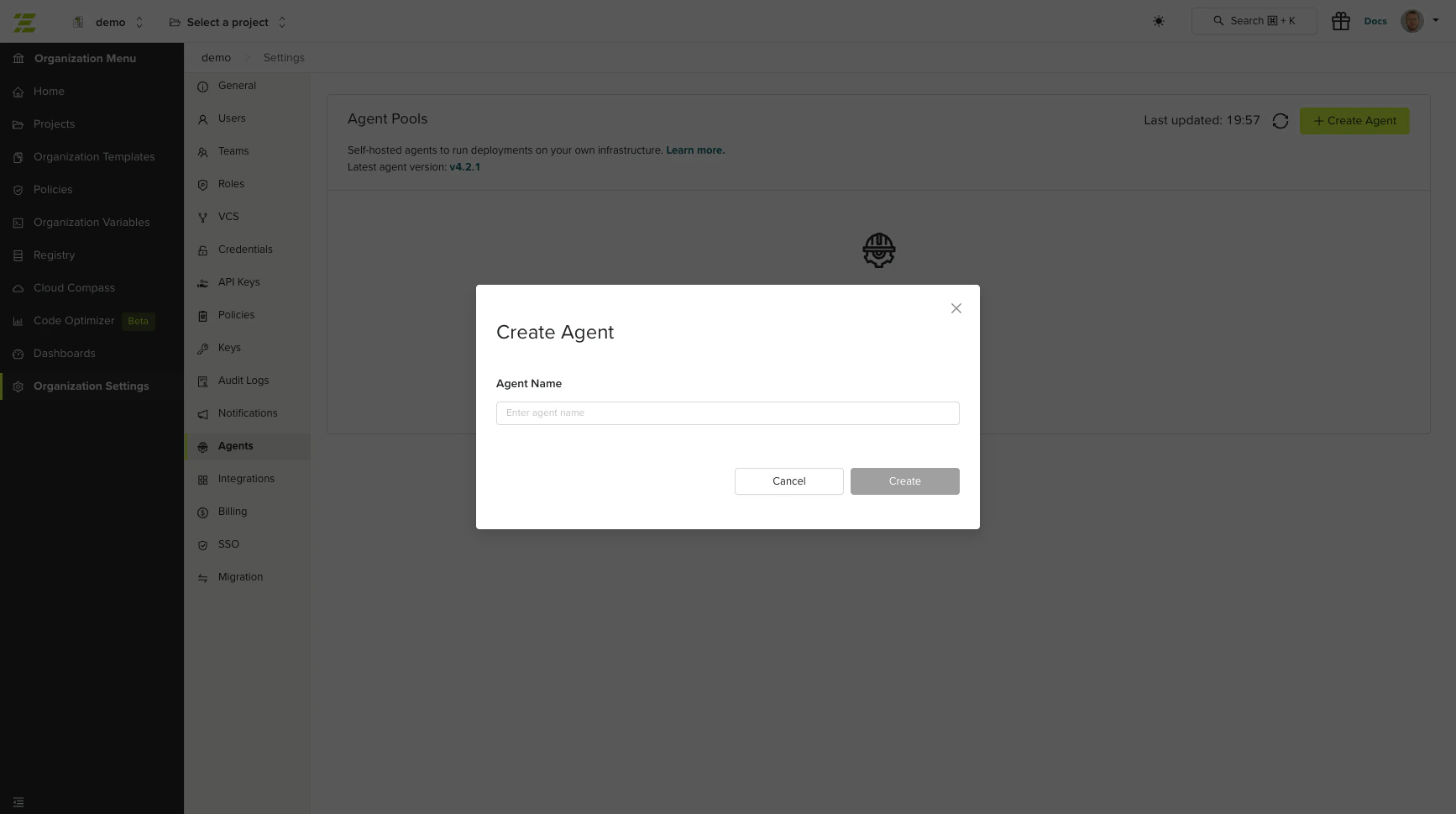
Click **Create Agent**. Enter a name for the agent pool (required, must be unique within your organization).
After creating the agent pool, the secrets modal opens automatically. Click **Create Secret** to generate an authentication token. See [Managing Agent Secrets](#managing-agent-secrets) for details.
## Permissions
Managing agent pools requires the **Edit Organization Settings** permission.
This permission is required to:
* Create, edit, and delete agent pools
* Create and revoke agent secrets
* Assign agents to projects
## Creating an Agent Pool
Go to **Organization Settings** > **Agents**.
Click **Create Agent**. Enter a name for the agent pool (required, must be unique within your organization).
After creating the agent pool, the secrets modal opens automatically. Click **Create Secret** to generate an authentication token. See [Managing Agent Secrets](#managing-agent-secrets) for details.
 ## Managing Agent Secrets
Agent secrets are authentication tokens used to connect agent instances to env zero. Each agent pool supports up to two secrets, allowing you to rotate credentials without downtime.
### Creating a Secret
From the Agents list, click **Manage Secrets** on the agent pool.
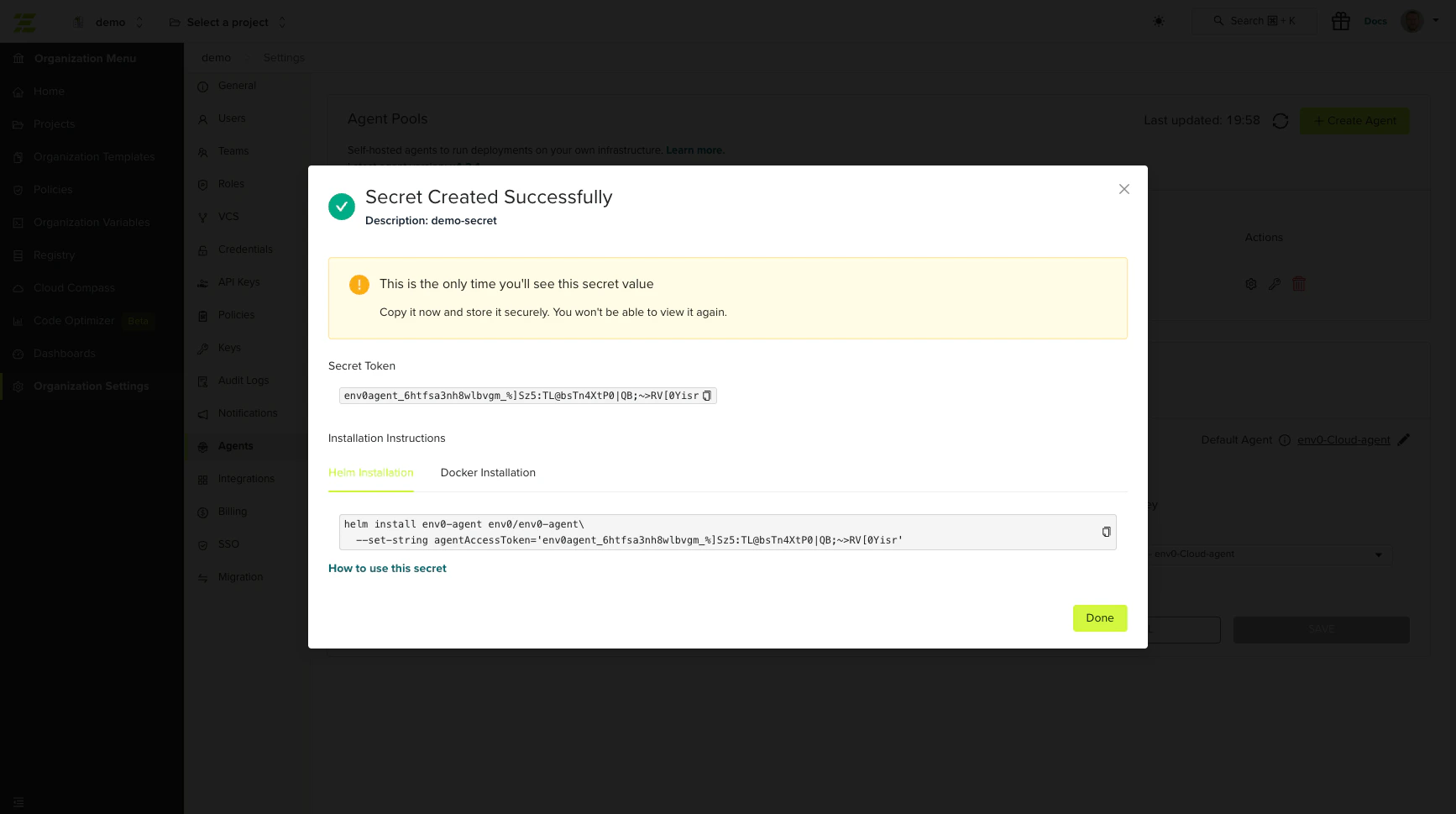
Click **Create Secret** and enter a name. The secret value is displayed once. Copy it immediately.
The modal displays ready-to-use install commands:
**Helm (Kubernetes):**
```shell theme={null}
helm install --create-namespace env0-agent env0/env0-agent --namespace env0-agent --set-string agentAccessToken=''
```
**Docker:**
```shell theme={null}
docker run -e AGENT_ACCESS_TOKEN='' ghcr.io/env0/deployment-agent:latest
```
The secret value is shown only once at creation time. If you lose it, revoke the secret and create a new one.
## Managing Agent Secrets
Agent secrets are authentication tokens used to connect agent instances to env zero. Each agent pool supports up to two secrets, allowing you to rotate credentials without downtime.
### Creating a Secret
From the Agents list, click **Manage Secrets** on the agent pool.
Click **Create Secret** and enter a name. The secret value is displayed once. Copy it immediately.
The modal displays ready-to-use install commands:
**Helm (Kubernetes):**
```shell theme={null}
helm install --create-namespace env0-agent env0/env0-agent --namespace env0-agent --set-string agentAccessToken=''
```
**Docker:**
```shell theme={null}
docker run -e AGENT_ACCESS_TOKEN='' ghcr.io/env0/deployment-agent:latest
```
The secret value is shown only once at creation time. If you lose it, revoke the secret and create a new one.
 ### Revoking a Secret
To revoke a secret, open the secrets modal and click **Revoke** next to the secret. Revocation is immediate and irreversible.
Revoked secrets may remain valid for up to 60 minutes due to authentication caching. Plan secret rotations accordingly.
## Editing an Agent Pool
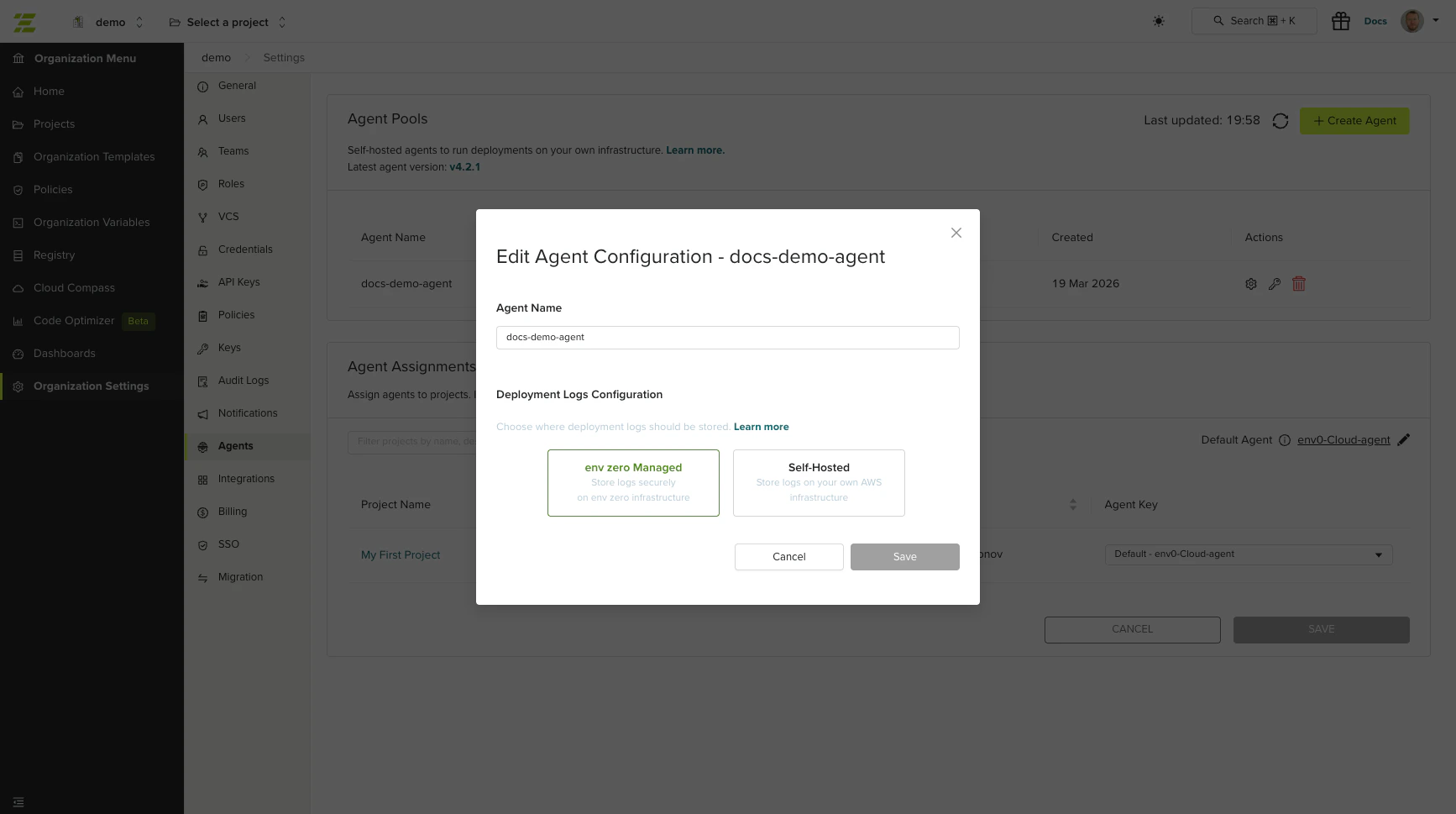
To edit an agent pool, click **Edit** on the agent row in the Agents list. You can modify:
* **Name** - The display name of the agent pool.
* **Log configuration** - You can switch between env zero hosted and self-hosted deployment log storage. See [Hosting Deployment Logs](/guides/admin-guide/self-hosted-kubernetes-agent/hosting-the-deployment-logs) for details.
### Revoking a Secret
To revoke a secret, open the secrets modal and click **Revoke** next to the secret. Revocation is immediate and irreversible.
Revoked secrets may remain valid for up to 60 minutes due to authentication caching. Plan secret rotations accordingly.
## Editing an Agent Pool
To edit an agent pool, click **Edit** on the agent row in the Agents list. You can modify:
* **Name** - The display name of the agent pool.
* **Log configuration** - You can switch between env zero hosted and self-hosted deployment log storage. See [Hosting Deployment Logs](/guides/admin-guide/self-hosted-kubernetes-agent/hosting-the-deployment-logs) for details.
 ## Deleting an Agent Pool
To delete an agent pool, click **Delete** on the agent row. You must type the agent name to confirm deletion.
You cannot delete an agent pool that is set as the organization default or is assigned to any projects. Reassign or remove the agent from all projects before deleting.
## Assigning Agents to Projects
You can assign specific agent pools to individual projects. Projects not assigned to a specific agent use the organization's default agent.
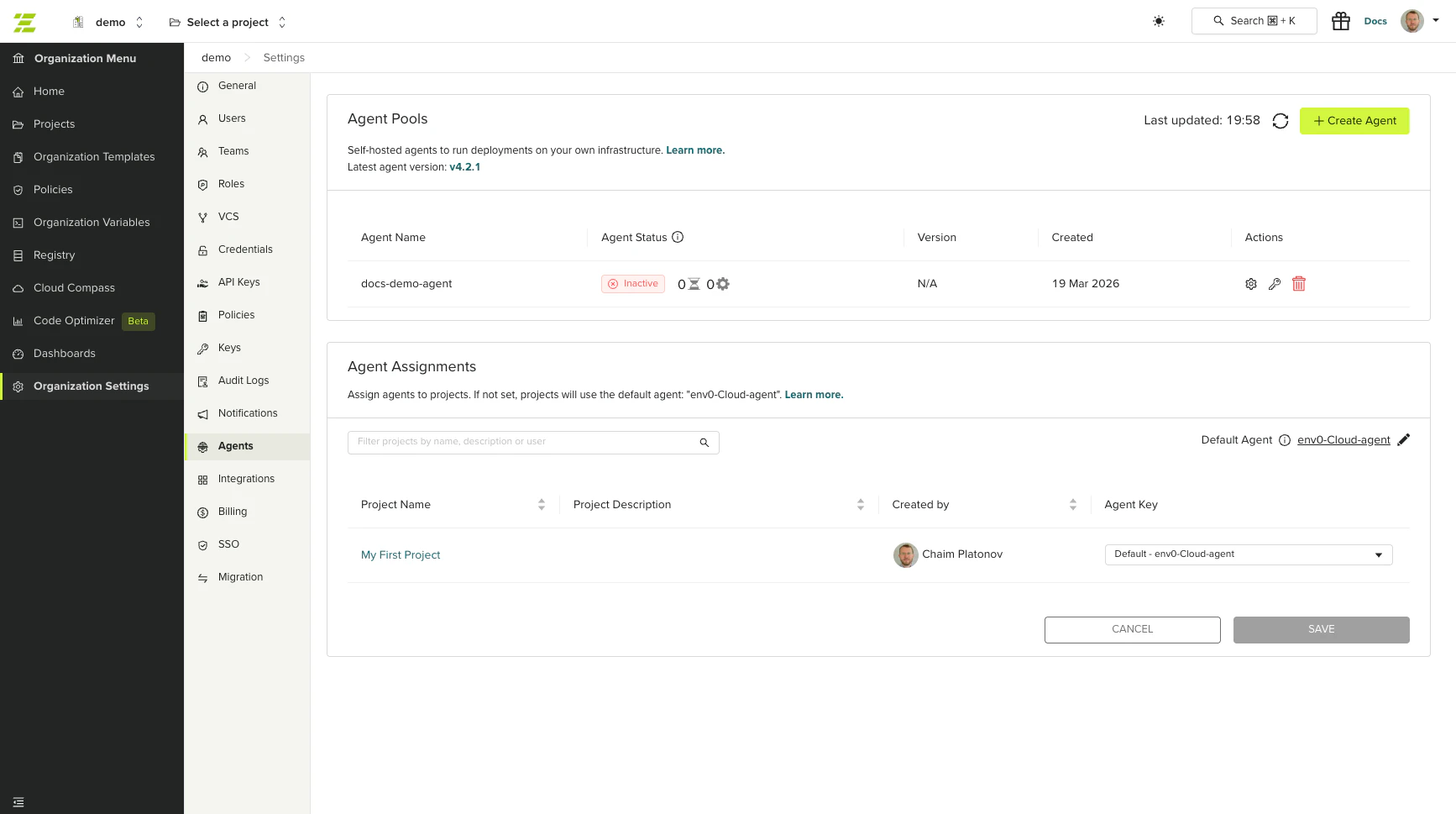
To assign agents to projects, go to **Organization Settings** > **Agents**. The agent assignment table shows each project and its assigned agent. Select an agent pool from the dropdown to change the assignment.
## Deleting an Agent Pool
To delete an agent pool, click **Delete** on the agent row. You must type the agent name to confirm deletion.
You cannot delete an agent pool that is set as the organization default or is assigned to any projects. Reassign or remove the agent from all projects before deleting.
## Assigning Agents to Projects
You can assign specific agent pools to individual projects. Projects not assigned to a specific agent use the organization's default agent.
To assign agents to projects, go to **Organization Settings** > **Agents**. The agent assignment table shows each project and its assigned agent. Select an agent pool from the dropdown to change the assignment.
 For more information about running multiple agents, including hybrid setups with both self-hosted and SaaS agents, see [Running Multiple Self-Hosted Agents](/guides/admin-guide/self-hosted-kubernetes-agent/multiple-self-hosted-agents).
## Next steps
* [Install the Kubernetes Agent](/guides/admin-guide/self-hosted-kubernetes-agent/self-hosted-kubernetes-agent) - Set up the agent on your Kubernetes cluster.
* [Install the Docker Agent](/guides/admin-guide/self-hosted-kubernetes-agent/standalone-docker-agent) - Run the agent as a standalone Docker container.
* [Custom/Optional Configuration](/guides/admin-guide/self-hosted-kubernetes-agent/custom-optional-configuration) - Configure advanced Helm chart values.
* [Terraform Templates](/guides/admin-guide/templates/terraform) - Configure Terraform version and settings for deployments running on this agent.
* [Git and VCS Integration](/guides/admin-guide/manage-vcs) - Connect your source repository to trigger deployments through this agent.
For more information about running multiple agents, including hybrid setups with both self-hosted and SaaS agents, see [Running Multiple Self-Hosted Agents](/guides/admin-guide/self-hosted-kubernetes-agent/multiple-self-hosted-agents).
## Next steps
* [Install the Kubernetes Agent](/guides/admin-guide/self-hosted-kubernetes-agent/self-hosted-kubernetes-agent) - Set up the agent on your Kubernetes cluster.
* [Install the Docker Agent](/guides/admin-guide/self-hosted-kubernetes-agent/standalone-docker-agent) - Run the agent as a standalone Docker container.
* [Custom/Optional Configuration](/guides/admin-guide/self-hosted-kubernetes-agent/custom-optional-configuration) - Configure advanced Helm chart values.
* [Terraform Templates](/guides/admin-guide/templates/terraform) - Configure Terraform version and settings for deployments running on this agent.
* [Git and VCS Integration](/guides/admin-guide/manage-vcs) - Connect your source repository to trigger deployments through this agent.