> ## Documentation Index
> Fetch the complete documentation index at: https://docs.envzero.com/llms.txt
> Use this file to discover all available pages before exploring further.
# GitHub Enterprise Integration
> Integrate GitHub Enterprise Server with env zero using a self-hosted agent and a custom GitHub App for code cloning and PR plan status posting.
[GitHub Enterprise Server](https://docs.github.com/en/enterprise-server) allows you to host GitHub on your own infrastructure, giving you full control over your version control system (VCS). [By integrating GHE with env zero](/guides/admin-guide/templates/self-hosted-vcs), you can use all of env zero's capabilities, including infrastructure as code (IaC) automation, governance, and cost management, while maintaining a self-hosted and secure environment for your repositories.
This integration ensures that teams using GHE can manage and automate their cloud infrastructure with env zero, without compromising security or compliance requirements.
**Note**
GitHub Enterprise is only supported on env zero Organizations signed up for our [Self-Hosted Agent](/guides/overview/security-overview/#self-hosted-agents).
Supported GitHub Enterprise Server versions are:
* 2.21.13 and above
* 3.x
## GitHub Enterprise Setup
For env zero to be able to clone your code and post back commit statuses when running [Plan on Pull Request](/guides/admin-guide/environments/plan-on-pull-request) you need to create and install a personal env zero GitHub App on your organization.
This only needs to be done once per GitHub Server.
1. [Create GitHub App](https://docs.github.com/en/developers/apps/building-github-apps/creating-a-github-app)
1. Name your GitHub app env zero
2. Set Homepage URL to [https://env0.com](https://env0.com)
3. Skip ahead to the **Webhooks section**
* Make sure **Active** is checked
* You will now need to set the Webhook URL and Secret.
* To fetch these, go to the [VCS Create Connection](/guides/admin-guide/templates/self-hosted-vcs/#configure-webhook-integration).
4. Skip ahead to the **Repository permissions section** and grant the following permissions:
* Checks - Read and write
* Contents - Read-only (For "Code Write", select Read and Write. If you changed this after the initial installation, you must reinstall the GitHub application).
* Deployments - Read and Write
* Metadata - Read-only
* Pull requests - Read and Write
5. Skip ahead to the **Subscribe to events section** and check the following:
* Push
* Pull Request
* Pull request review comment - In case you want to enable [Plan and Apply from PR comments](/guides/admin-guide/environments/plan-and-apply-from-pr-comments)
6. On "Where can this GitHub App be installed?" Check "Any account - Allow this GitHub App to be installed by any user or organization.". **Note however - currently you may only install the app on a single organization of your choice on your GitHub Enterprise instance**
7. Click "Create GitHub App"
8. Make a note of the App ID
9. Scroll all the way down and "Click the Generate a private key". A pem file will be downloaded and saved on your computer. You'll need it later.
10. Under the "Display information", click the "Upload a logo..." button and upload a logo (Optional)
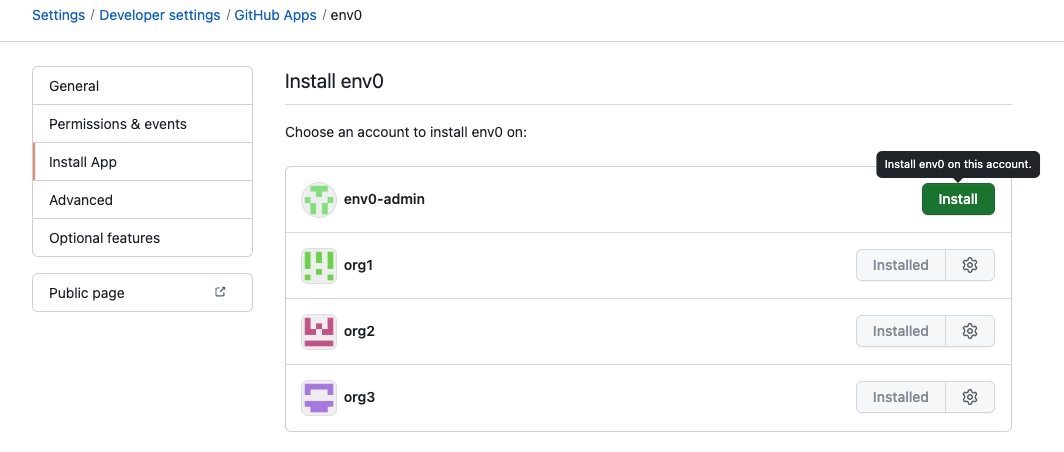
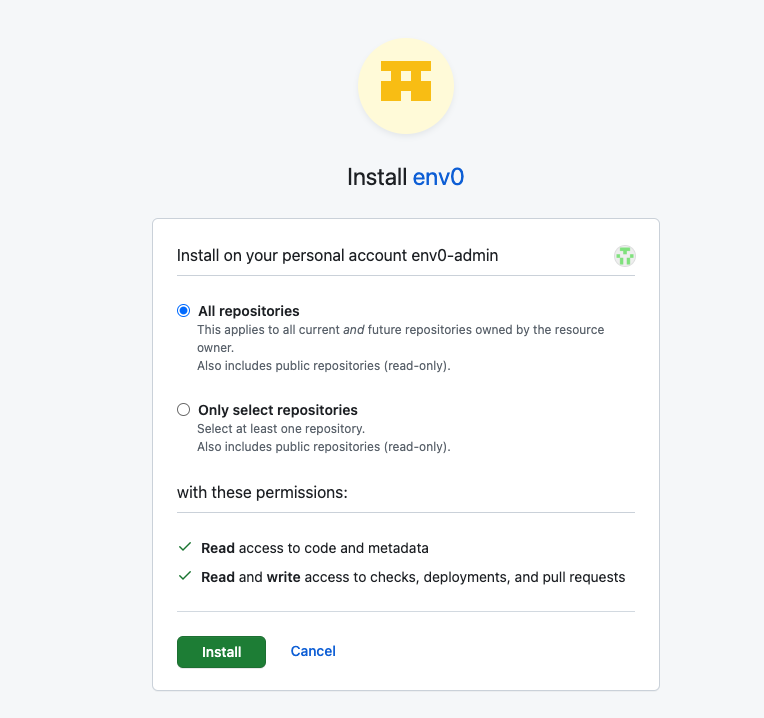
2. On the lefthand side menu, click on Install App to install the app on any organization of your choice
1. Grant env zero access to all or selected repositories in the organization.
2. Ensure you have granted permission for any organization's repository you need access to. If permission is not granted for a specific repository, you may encounter a 'Not Found' error at certain points.
 3. You'll need the following set as Helm values when installing the env zero agent:
* `githubEnterpriseAppId` - The App ID from step 1.8
* `githubEnterpriseAppPrivateKeyEncoded` - The content of the pem file downloaded in step 1.9 **Please base64 encode it before setting it**
* `githubEnterpriseAppInstallationId` - (Optional) You can restrict permissions to a single installation ID through this configuration.
**Note**
If deploying via Docker, **DO NOT** base64 encode the following keys:
* `githubEnterpriseAppClientSecretEncoded`
* `githubEnterpriseAppPrivateKeyEncoded`
**Encode to Base64**
You can open browser Dev Tools - go to console and use
```javascript theme={null}
btoa("secret")
```
to encode the string to base 64
**On Mac**
```bash theme={null}
base64 -i private.pem
```
```yaml values.yml theme={null}
githubEnterpriseAppId: 111
githubEnterpriseAppPrivateKeyEncoded: aa==
githubEnterpriseAppInstallationId: 222 # Optional
```
```yaml .env theme={null}
GITHUB_ENTERPRISE_APP_ID=111
GITHUB_ENTERPRISE_APP_PRIVATE_KEY=aa==
# optional
GITHUB_ENTERPRISE_APP_INSTALLATION_ID=222
```
4. [Install the agent](/guides/admin-guide/self-hosted-kubernetes-agent/self-hosted-kubernetes-agent#installation)
Now you can create templates for **GitHub Enterprise**
## Next steps
* [Standard GitHub Integration](/guides/admin-guide/templates/github-templates) - Connect cloud-hosted GitHub repositories.
* [Managing VCS](/guides/admin-guide/manage-vcs) - Manage all VCS provider connections in one place.
* [Self-Hosted Kubernetes Agent](/guides/admin-guide/self-hosted-kubernetes-agent/self-hosted-kubernetes-agent) - Deploy the agent required for self-hosted VCS.
3. You'll need the following set as Helm values when installing the env zero agent:
* `githubEnterpriseAppId` - The App ID from step 1.8
* `githubEnterpriseAppPrivateKeyEncoded` - The content of the pem file downloaded in step 1.9 **Please base64 encode it before setting it**
* `githubEnterpriseAppInstallationId` - (Optional) You can restrict permissions to a single installation ID through this configuration.
**Note**
If deploying via Docker, **DO NOT** base64 encode the following keys:
* `githubEnterpriseAppClientSecretEncoded`
* `githubEnterpriseAppPrivateKeyEncoded`
**Encode to Base64**
You can open browser Dev Tools - go to console and use
```javascript theme={null}
btoa("secret")
```
to encode the string to base 64
**On Mac**
```bash theme={null}
base64 -i private.pem
```
```yaml values.yml theme={null}
githubEnterpriseAppId: 111
githubEnterpriseAppPrivateKeyEncoded: aa==
githubEnterpriseAppInstallationId: 222 # Optional
```
```yaml .env theme={null}
GITHUB_ENTERPRISE_APP_ID=111
GITHUB_ENTERPRISE_APP_PRIVATE_KEY=aa==
# optional
GITHUB_ENTERPRISE_APP_INSTALLATION_ID=222
```
4. [Install the agent](/guides/admin-guide/self-hosted-kubernetes-agent/self-hosted-kubernetes-agent#installation)
Now you can create templates for **GitHub Enterprise**
## Next steps
* [Standard GitHub Integration](/guides/admin-guide/templates/github-templates) - Connect cloud-hosted GitHub repositories.
* [Managing VCS](/guides/admin-guide/manage-vcs) - Manage all VCS provider connections in one place.
* [Self-Hosted Kubernetes Agent](/guides/admin-guide/self-hosted-kubernetes-agent/self-hosted-kubernetes-agent) - Deploy the agent required for self-hosted VCS.