> ## Documentation Index
> Fetch the complete documentation index at: https://docs.envzero.com/llms.txt
> Use this file to discover all available pages before exploring further.
# Helm Integration
> Deploy Helm charts with env zero from Git, Helm repositories, OCI registries, or S3, with helm diff and upgrade support for private chart repos.
Helm is a popular package manager for Kubernetes, an open-source container orchestration platform. It simplifies the deployment and management of applications in Kubernetes clusters by providing a templating system and a standardized way to package, distribute, and deploy software. With Helm, developers can define their application's configuration and dependencies using "charts," which are essentially packages that contain all the necessary files, templates, and metadata. These charts can be versioned and shared, allowing for easy collaboration and reuse across different projects.
## Helm Chart Source
env zero supports using Helm with different chart sources:
1. `git`/`local` - Use charts that are defined in your code and are not hosted in a Helm Repo.
2. `Helm Repo` - both [regular chart repositories](https://helm.sh/docs/topics/chart_repository/) and [OCI-based registries](https://helm.sh/docs/topics/registries/). If the repository requires authentication you can provide the username and password in `ENV0_HELM_REPO_USERNAME` and `ENV0_HELM_REPO_PASSWORD` environment variables.
3. `S3` - Hosted directly on S3, similar to `Helm Repo` these charts are hosted remotely but they follow a different protocol.
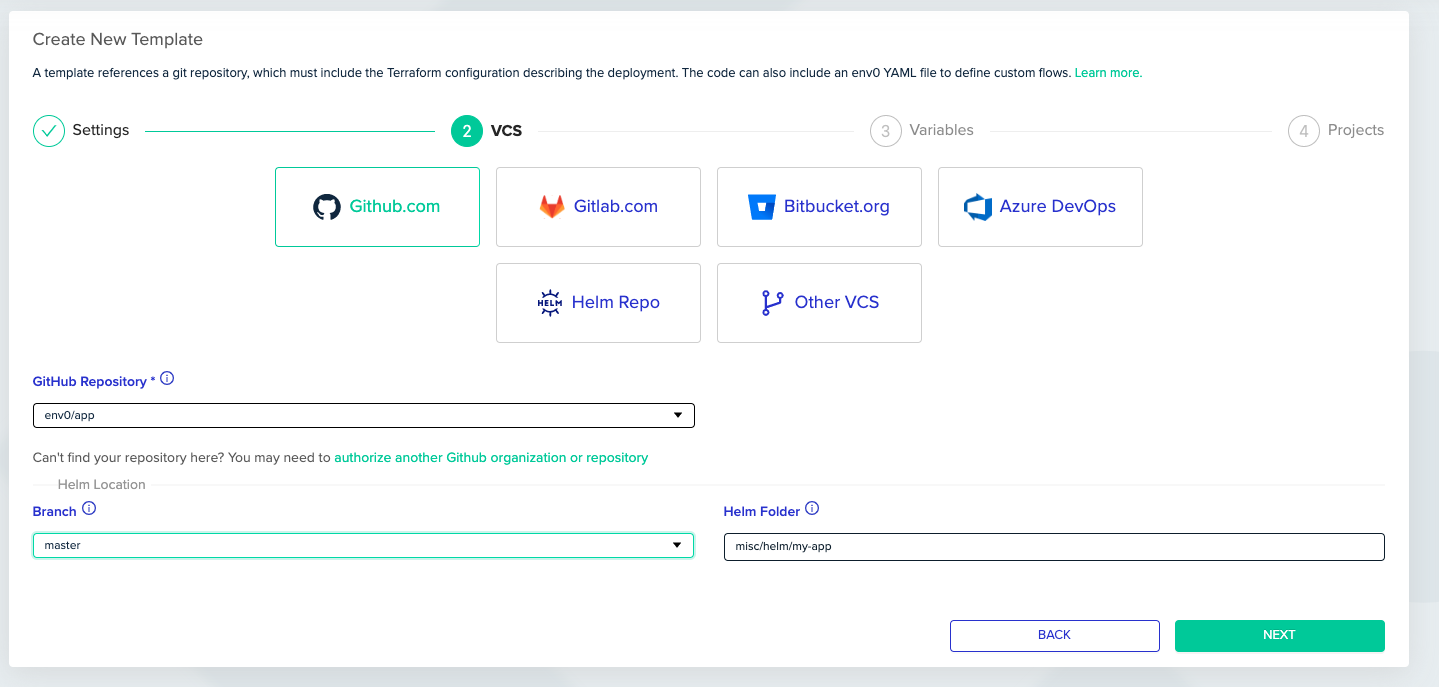
To use a chart that is defined directly in your `git` select the appropriate VCS provider and provide the path to your Helm chart code:
 To use a chart hosted in a `Helm Repo` / `S3` select the Helm Repo option in your template:
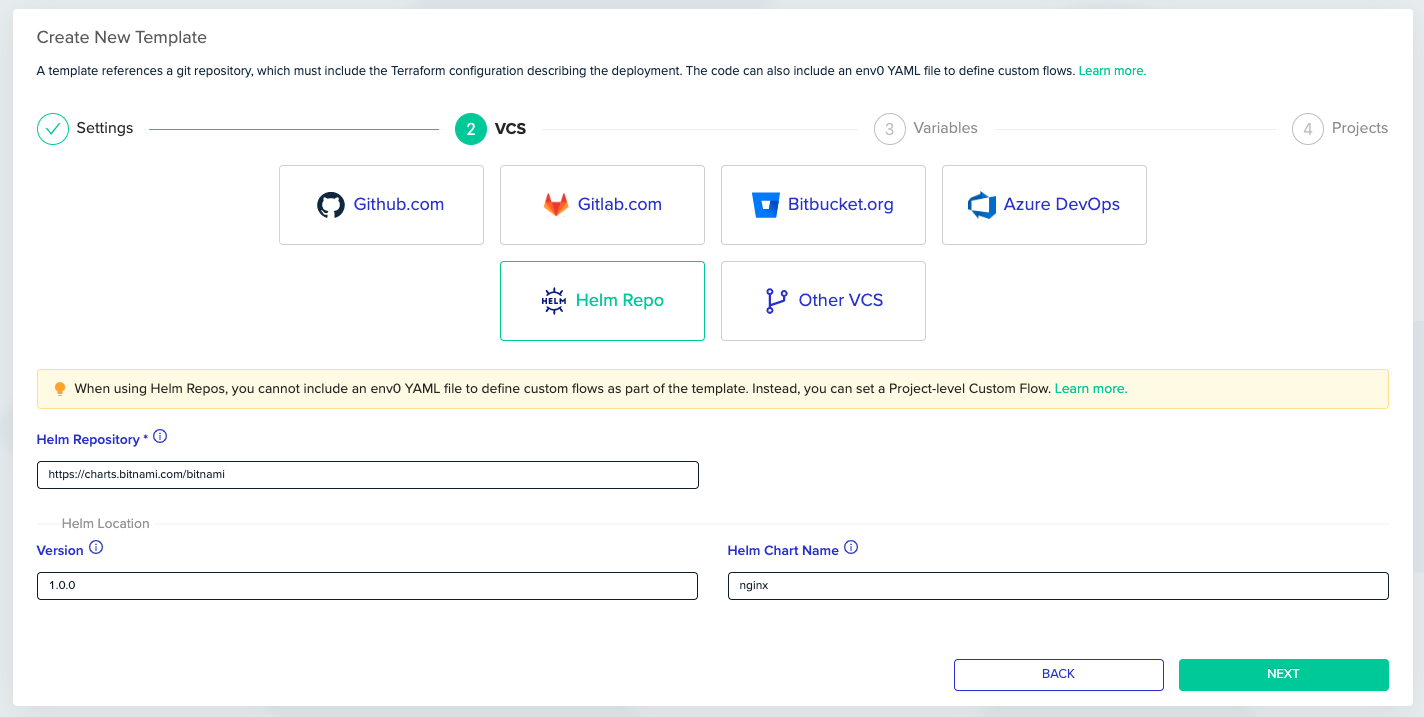 **Custom Flow For Helm Repo Deployments**
Helm Repo deployments do not require git clone since the chart is not stored in git, therefore there is no custom flow for a Helm Repo template.
In order to use custom flows (for cluster authentication or other usages) in Helm Repo you must configure a [Project-level Custom Flow](/guides/admin-guide/custom-flows/project-level-custom-flow).
## Environment Deployment
1. Create a Helm [Template](/guides/admin-guide/templates).
2. Follow our guide to [Connect Your Kubernetes Cluster](/guides/getting-started/connect-your-cloud-account/#kubernetes).
3. Create an [Environment](/guides/admin-guide/environments/setting-up-a-new-environment)
1. The provided namespace is automatically injected with [HELM\_NAMESPACE](https://helm.sh/docs/helm/helm/#helm) env var
2. If the provided namespace does not exist, make sure to add `--create-namespace` flag in the `upgrade` step. (See the section below for the instructions)
**Cluster Authentication**
Cluster authentication varies from one provider to another. Please refer to the [Connect Your Kubernetes Cluster](/guides/getting-started/connect-your-cloud-account/#kubernetes) guide to learn more.
## Environment Variables For Enhanced Customization
env zero supports a more customized usage by providing unique environment variables which will be passed to Helm:
1. `ENV0_HELM_SET_` - set an environment variable with the `ENV0_HELM_SET` prefix and the variable name as the suffix will be passed to Helm using the `--set` flag. E.g. `ENV0_HELM_SET_servers[0].port=80` will pass `--set server[0].port=80` to helm command. (see below for additional examples for inputting more complex types)
2. `ENV0_HELM_VALUES_FILES` - set this environment variable to provide Helm with your configuration which is stored in a values file(s), and will be passed to Helm using the `--values (-f)` flag.
3. `ENV0_HELM_CLI_ARGS` - this variable's value will be added to every Helm command execution, it can be used to pass additional custom arguments to Helm. For example it can be set to `--create-namespace --no-hooks`. `ENV0_HELM_CLI_ARGS_diff`, `ENV0_HELM_CLI_ARGS_upgrade`, and `ENV0_HELM_CLI_ARGS_uninstall` are similar, but only added to corresponding helm commands.
## Execution Steps
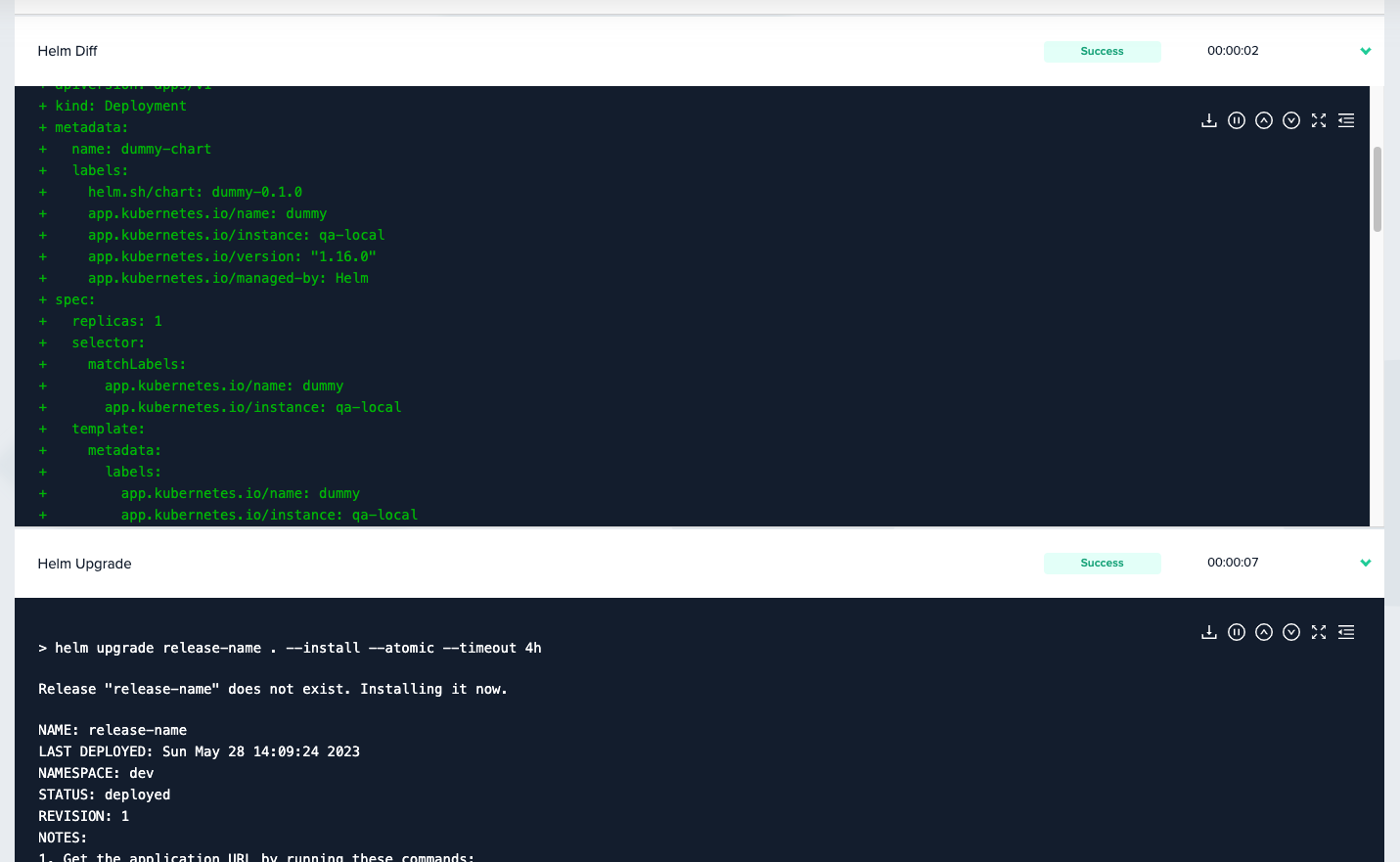
Beyond the common steps such as Clone, Loading variables, etc. Deploy/Destroy Helm deployments contain the following steps:
1. Helm Diff - `helm diff upgrade --install --allow-unreleased --color --detailed-exitcode`
2. Helm Upgrade - `helm upgrade . --install --atomic --timeout 4h`
3. Helm Uninstall - `helm uninstall --wait --timeout 4h`
**Custom Flow For Helm Repo Deployments**
Helm Repo deployments do not require git clone since the chart is not stored in git, therefore there is no custom flow for a Helm Repo template.
In order to use custom flows (for cluster authentication or other usages) in Helm Repo you must configure a [Project-level Custom Flow](/guides/admin-guide/custom-flows/project-level-custom-flow).
## Environment Deployment
1. Create a Helm [Template](/guides/admin-guide/templates).
2. Follow our guide to [Connect Your Kubernetes Cluster](/guides/getting-started/connect-your-cloud-account/#kubernetes).
3. Create an [Environment](/guides/admin-guide/environments/setting-up-a-new-environment)
1. The provided namespace is automatically injected with [HELM\_NAMESPACE](https://helm.sh/docs/helm/helm/#helm) env var
2. If the provided namespace does not exist, make sure to add `--create-namespace` flag in the `upgrade` step. (See the section below for the instructions)
**Cluster Authentication**
Cluster authentication varies from one provider to another. Please refer to the [Connect Your Kubernetes Cluster](/guides/getting-started/connect-your-cloud-account/#kubernetes) guide to learn more.
## Environment Variables For Enhanced Customization
env zero supports a more customized usage by providing unique environment variables which will be passed to Helm:
1. `ENV0_HELM_SET_` - set an environment variable with the `ENV0_HELM_SET` prefix and the variable name as the suffix will be passed to Helm using the `--set` flag. E.g. `ENV0_HELM_SET_servers[0].port=80` will pass `--set server[0].port=80` to helm command. (see below for additional examples for inputting more complex types)
2. `ENV0_HELM_VALUES_FILES` - set this environment variable to provide Helm with your configuration which is stored in a values file(s), and will be passed to Helm using the `--values (-f)` flag.
3. `ENV0_HELM_CLI_ARGS` - this variable's value will be added to every Helm command execution, it can be used to pass additional custom arguments to Helm. For example it can be set to `--create-namespace --no-hooks`. `ENV0_HELM_CLI_ARGS_diff`, `ENV0_HELM_CLI_ARGS_upgrade`, and `ENV0_HELM_CLI_ARGS_uninstall` are similar, but only added to corresponding helm commands.
## Execution Steps
Beyond the common steps such as Clone, Loading variables, etc. Deploy/Destroy Helm deployments contain the following steps:
1. Helm Diff - `helm diff upgrade --install --allow-unreleased --color --detailed-exitcode`
2. Helm Upgrade - `helm upgrade . --install --atomic --timeout 4h`
3. Helm Uninstall - `helm uninstall --wait --timeout 4h`
 **What Counts as a "diff"**
env zero calculates diff between deployments using `helm` and the [helm diff plugin](https://github.com/databus23/helm-diff).
The Helm diff plugin finds the exact difference between Helm executions, changes to your Kubernetes resources that were not done by Helm are left unnoticed.
For example, A Drift Detection run would result as successful (meaning no drift was found) if a change was done manually inside the cluster without using Helm (such as increasing the `replicas` from 1 to 2).
## Complex Input Value Examples
| Desired Helm Value | env zero HELM SET Input | Examples |
| :----------------- | :-------------------------------------------------------------------------------------------------------------------------------------- | :---------------------------------------------------------------------------------------------------------------------------------------------------------------------------------- |
| **annotations** | **general rule:**
**What Counts as a "diff"**
env zero calculates diff between deployments using `helm` and the [helm diff plugin](https://github.com/databus23/helm-diff).
The Helm diff plugin finds the exact difference between Helm executions, changes to your Kubernetes resources that were not done by Helm are left unnoticed.
For example, A Drift Detection run would result as successful (meaning no drift was found) if a change was done manually inside the cluster without using Helm (such as increasing the `replicas` from 1 to 2).
## Complex Input Value Examples
| Desired Helm Value | env zero HELM SET Input | Examples |
| :----------------- | :-------------------------------------------------------------------------------------------------------------------------------------- | :---------------------------------------------------------------------------------------------------------------------------------------------------------------------------------- |
| **annotations** | **general rule:**
- use quotes to encapsulate the "key" of annotation.
- escape . (period) and / (slashes) with a (backslash) | `ENV0_HELM_SET_annotations ."nginx\.ingress\.kubernets\.io\/backend-protocol"=HTTPS`
`ENV0_HELM_SET_server.ingress.annotations."cert-manager\.io\/cluster-issuer"=letsencrypt` |
| **labels** | **general rule:**
- use quotes to encapsulate the "key" of label.
- escape . (period) and / (slashes) with a (backslash) | `ENV0_HELM_SET_labels."app\.kubernetes\.io\/name"=my-deployment` |
| **complex values** | **general rule:**
- escape spaces with a (backslash) | `ENV0_HELM_SET_map={"foo:\ bar"}` |
## Next steps
* [Kubernetes (K8s) Integration](/guides/admin-guide/templates/k8s) - Deploy raw Kubernetes manifests with kubectl.
* [Template Overview](/guides/admin-guide/templates) - Learn how templates are structured and configured.
* [Managing VCS](/guides/admin-guide/manage-vcs) - Connect a VCS provider for GitOps deployments.