> ## Documentation Index
> Fetch the complete documentation index at: https://docs.envzero.com/llms.txt
> Use this file to discover all available pages before exploring further.
# Terraform
> Configure and deploy Terraform templates with env zero for infrastructure provisioning, state management, and drift detection using HashiCorp Terraform.
Terraform is HashiCorp's Infrastructure-as-Code (IaC) tool that enables you to define and provision infrastructure using a declarative configuration language. env zero provides comprehensive support for Terraform deployments across all major cloud providers and services.
## Terraform in env zero
env zero supports Terraform as an alternative to OpenTofu, allowing you to use HashiCorp's official Terraform binary for your infrastructure deployments. While OpenTofu is the default, you can switch to Terraform when needed.
## Configuration options
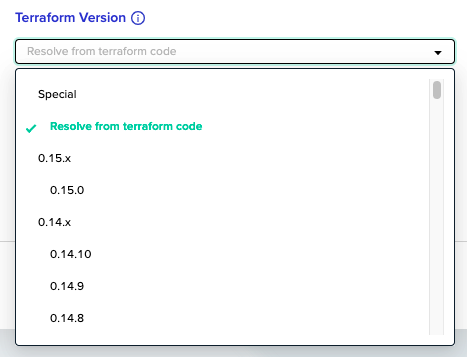
### Terraform version selection
To use Terraform instead of OpenTofu:
1. Navigate to your template settings
2. Open the **Advanced** settings section
3. Select **Terraform** from the TF binary dropdown
4. Choose your preferred Terraform version
 ### Working directory
Configure the working directory where your Terraform configuration files are located:
* **Root directory**: Use the repository root (default)
* **Subdirectory**: Specify a path relative to the repository root
If your Terraform files are in a subdirectory, specify the path in the **Working Directory** field under **Advanced** settings.
## Terraform-specific features
### State management
Terraform uses state files to track infrastructure resources:
* **Local state**: Stored temporarily during deployment
* **Remote state**: Recommended for production environments using backends
* **State locking**: Prevents concurrent modifications using DynamoDB or similar
**State persistence**
env zero stores the local state between deployments by default. For production environments, configure a remote backend in your Terraform configuration to ensure state persistence and team collaboration.
### Variable handling
Terraform supports multiple variable input methods with clear precedence:
1. **Command-line variables**: `-var` flags (highest precedence)
2. **Environment variables**: `TF_VAR_*` prefixed variables
3. **Variable files**: `.tfvars` files
4. **Default values**: Defined in variable blocks (lowest precedence)
### Provider configuration
Configure Terraform providers in your configuration files:
```hcl main.tf theme={null}
terraform {
required_providers {
aws = {
source = "hashicorp/aws"
version = "~> 5.0"
}
}
required_version = ">= 1.0"
}
provider "aws" {
region = var.aws_region
}
```
## Deployment workflow
env zero follows Terraform's standard deployment workflow:
1. **Initialize**: `terraform init` - Download providers and modules
2. **Plan**: `terraform plan` - Generate execution plan
3. **Apply**: `terraform apply` - Execute the planned changes
4. **Destroy**: `terraform destroy` - Remove resources (when needed)
### Plan and apply process
The plan step generates a detailed execution plan showing what changes will be made. The apply step uses this plan to make the actual changes to your infrastructure.
env zero stores plan files between the plan and apply steps to ensure consistency and allow for review and approval workflows.
## Best practices
### Remote backend configuration
Configure a remote backend for state management:
```hcl backend.tf theme={null}
terraform {
backend "s3" {
bucket = "your-terraform-state-bucket"
key = "path/to/your/state.tfstate"
region = "us-west-2"
encrypt = true
dynamodb_table = "terraform-state-lock"
}
}
```
### Module usage
Organize your infrastructure using Terraform modules:
```hcl main.tf theme={null}
module "vpc" {
source = "terraform-aws-modules/vpc/aws"
version = "~> 5.0"
name = "my-vpc"
cidr = "10.0.0.0/16"
azs = ["us-west-2a", "us-west-2b"]
private_subnets = ["10.0.1.0/24", "10.0.2.0/24"]
public_subnets = ["10.0.101.0/24", "10.0.102.0/24"]
}
```
### Dependency lock file
Terraform generates a `.terraform.lock.hcl` file that records the exact provider versions selected during `terraform init`. Committing this file to your repository ensures that every env zero deployment uses the same provider versions, regardless of which versions are published at run time.
When env zero runs `terraform init`, it reads the lock file and downloads the pinned providers. If a provider constraint in your configuration matches the lock file entry, Terraform uses that version. If the lock file is absent, Terraform selects the newest version that satisfies your constraints, which can cause unexpected differences between runs.
To update a pinned provider version, run `terraform init -upgrade` locally and commit the updated `.terraform.lock.hcl`.
Add `.terraform.lock.hcl` to version control. Exclude `.terraform/` (the local working-directory data, including downloaded providers and init artifacts) from version control by adding it to `.gitignore`.
### Variable management
Use consistent variable naming and types:
```hcl variables.tf theme={null}
variable "environment" {
description = "Environment name"
type = string
validation {
condition = contains(["dev", "staging", "prod"], var.environment)
error_message = "Environment must be dev, staging, or prod."
}
}
variable "instance_count" {
description = "Number of instances to create"
type = number
default = 1
validation {
condition = var.instance_count > 0
error_message = "Instance count must be greater than 0."
}
}
```
## Advanced features
### Workspaces
Terraform workspaces allow you to manage multiple environments:
```bash theme={null}
# Create a new workspace
terraform workspace new production
# List workspaces
terraform workspace list
# Switch workspaces
terraform workspace select production
```
env zero automatically manages Terraform workspaces based on your environment configuration.
### Data sources
Use data sources to fetch information about existing resources:
```hcl data.tf theme={null}
data "aws_ami" "latest_amazon_linux" {
most_recent = true
owners = ["amazon"]
filter {
name = "name"
values = ["amzn2-ami-hvm-*-x86_64-gp2"]
}
}
```
### Outputs
Define outputs to expose important resource information:
```hcl outputs.tf theme={null}
output "vpc_id" {
description = "ID of the VPC"
value = module.vpc.vpc_id
}
output "private_subnets" {
description = "List of IDs of private subnets"
value = module.vpc.private_subnets
}
```
## Troubleshooting
### Common issues
**Provider version conflicts**
* Ensure provider versions are compatible with your Terraform version
* Check the [Terraform provider compatibility matrix](https://www.terraform.io/docs/language/providers/requirements.html)
**State file issues**
* Use remote backends for production environments
* Enable state locking to prevent concurrent modifications
* Regularly backup your state files
**Variable resolution**
* Check variable precedence order
* Verify environment variables are set correctly in env zero
* Use `terraform console` to debug variable values
### Debugging deployments
Enable detailed logging by setting the `TF_LOG` environment variable:
* `TF_LOG=DEBUG` - Most verbose logging
* `TF_LOG=INFO` - Standard information level
* `TF_LOG=WARN` - Warning and error messages only
Set the `TF_LOG` environment variable in your template's environment variables section for detailed Terraform execution logs.
### Common error messages
**"Error: No such file or directory"**
* Verify the working directory path is correct
* Check that Terraform files exist in the specified location
**"Error: Failed to get existing workspaces"**
* Ensure proper backend configuration
* Check backend credentials and permissions
**"Error: Provider configuration not present"**
* Verify required providers are declared
* Check provider version constraints
## Migration considerations
### From OpenTofu to Terraform
If migrating from OpenTofu to Terraform:
1. **Configuration compatibility**: Most configurations work without changes
2. **State files**: Compatible format, but consider backing up first
3. **Provider versions**: Verify compatibility with Terraform version
4. **Testing**: Test in a non-production environment first
**Migration planning**
Always test migrations in a development environment before applying to production infrastructure.
## Additional resources
* [Terraform Documentation](https://www.terraform.io/docs/)
* [Terraform Registry](https://registry.terraform.io/)
* [Terraform Cloud](https://www.terraform.io/cloud)
* [Terraform Best Practices](https://developer.hashicorp.com/terraform/cloud-docs/recommended-practices)
## Next steps
* [OpenTofu](/guides/admin-guide/templates/opentofu) - Use OpenTofu as an open-source Terraform alternative.
* [Managing IaC Binaries Versions](/guides/admin-guide/templates/iac-binaries-versions) - Pin and manage Terraform version across templates.
* [Managing VCS](/guides/admin-guide/manage-vcs) - Connect a VCS provider for GitOps deployments.
### Working directory
Configure the working directory where your Terraform configuration files are located:
* **Root directory**: Use the repository root (default)
* **Subdirectory**: Specify a path relative to the repository root
If your Terraform files are in a subdirectory, specify the path in the **Working Directory** field under **Advanced** settings.
## Terraform-specific features
### State management
Terraform uses state files to track infrastructure resources:
* **Local state**: Stored temporarily during deployment
* **Remote state**: Recommended for production environments using backends
* **State locking**: Prevents concurrent modifications using DynamoDB or similar
**State persistence**
env zero stores the local state between deployments by default. For production environments, configure a remote backend in your Terraform configuration to ensure state persistence and team collaboration.
### Variable handling
Terraform supports multiple variable input methods with clear precedence:
1. **Command-line variables**: `-var` flags (highest precedence)
2. **Environment variables**: `TF_VAR_*` prefixed variables
3. **Variable files**: `.tfvars` files
4. **Default values**: Defined in variable blocks (lowest precedence)
### Provider configuration
Configure Terraform providers in your configuration files:
```hcl main.tf theme={null}
terraform {
required_providers {
aws = {
source = "hashicorp/aws"
version = "~> 5.0"
}
}
required_version = ">= 1.0"
}
provider "aws" {
region = var.aws_region
}
```
## Deployment workflow
env zero follows Terraform's standard deployment workflow:
1. **Initialize**: `terraform init` - Download providers and modules
2. **Plan**: `terraform plan` - Generate execution plan
3. **Apply**: `terraform apply` - Execute the planned changes
4. **Destroy**: `terraform destroy` - Remove resources (when needed)
### Plan and apply process
The plan step generates a detailed execution plan showing what changes will be made. The apply step uses this plan to make the actual changes to your infrastructure.
env zero stores plan files between the plan and apply steps to ensure consistency and allow for review and approval workflows.
## Best practices
### Remote backend configuration
Configure a remote backend for state management:
```hcl backend.tf theme={null}
terraform {
backend "s3" {
bucket = "your-terraform-state-bucket"
key = "path/to/your/state.tfstate"
region = "us-west-2"
encrypt = true
dynamodb_table = "terraform-state-lock"
}
}
```
### Module usage
Organize your infrastructure using Terraform modules:
```hcl main.tf theme={null}
module "vpc" {
source = "terraform-aws-modules/vpc/aws"
version = "~> 5.0"
name = "my-vpc"
cidr = "10.0.0.0/16"
azs = ["us-west-2a", "us-west-2b"]
private_subnets = ["10.0.1.0/24", "10.0.2.0/24"]
public_subnets = ["10.0.101.0/24", "10.0.102.0/24"]
}
```
### Dependency lock file
Terraform generates a `.terraform.lock.hcl` file that records the exact provider versions selected during `terraform init`. Committing this file to your repository ensures that every env zero deployment uses the same provider versions, regardless of which versions are published at run time.
When env zero runs `terraform init`, it reads the lock file and downloads the pinned providers. If a provider constraint in your configuration matches the lock file entry, Terraform uses that version. If the lock file is absent, Terraform selects the newest version that satisfies your constraints, which can cause unexpected differences between runs.
To update a pinned provider version, run `terraform init -upgrade` locally and commit the updated `.terraform.lock.hcl`.
Add `.terraform.lock.hcl` to version control. Exclude `.terraform/` (the local working-directory data, including downloaded providers and init artifacts) from version control by adding it to `.gitignore`.
### Variable management
Use consistent variable naming and types:
```hcl variables.tf theme={null}
variable "environment" {
description = "Environment name"
type = string
validation {
condition = contains(["dev", "staging", "prod"], var.environment)
error_message = "Environment must be dev, staging, or prod."
}
}
variable "instance_count" {
description = "Number of instances to create"
type = number
default = 1
validation {
condition = var.instance_count > 0
error_message = "Instance count must be greater than 0."
}
}
```
## Advanced features
### Workspaces
Terraform workspaces allow you to manage multiple environments:
```bash theme={null}
# Create a new workspace
terraform workspace new production
# List workspaces
terraform workspace list
# Switch workspaces
terraform workspace select production
```
env zero automatically manages Terraform workspaces based on your environment configuration.
### Data sources
Use data sources to fetch information about existing resources:
```hcl data.tf theme={null}
data "aws_ami" "latest_amazon_linux" {
most_recent = true
owners = ["amazon"]
filter {
name = "name"
values = ["amzn2-ami-hvm-*-x86_64-gp2"]
}
}
```
### Outputs
Define outputs to expose important resource information:
```hcl outputs.tf theme={null}
output "vpc_id" {
description = "ID of the VPC"
value = module.vpc.vpc_id
}
output "private_subnets" {
description = "List of IDs of private subnets"
value = module.vpc.private_subnets
}
```
## Troubleshooting
### Common issues
**Provider version conflicts**
* Ensure provider versions are compatible with your Terraform version
* Check the [Terraform provider compatibility matrix](https://www.terraform.io/docs/language/providers/requirements.html)
**State file issues**
* Use remote backends for production environments
* Enable state locking to prevent concurrent modifications
* Regularly backup your state files
**Variable resolution**
* Check variable precedence order
* Verify environment variables are set correctly in env zero
* Use `terraform console` to debug variable values
### Debugging deployments
Enable detailed logging by setting the `TF_LOG` environment variable:
* `TF_LOG=DEBUG` - Most verbose logging
* `TF_LOG=INFO` - Standard information level
* `TF_LOG=WARN` - Warning and error messages only
Set the `TF_LOG` environment variable in your template's environment variables section for detailed Terraform execution logs.
### Common error messages
**"Error: No such file or directory"**
* Verify the working directory path is correct
* Check that Terraform files exist in the specified location
**"Error: Failed to get existing workspaces"**
* Ensure proper backend configuration
* Check backend credentials and permissions
**"Error: Provider configuration not present"**
* Verify required providers are declared
* Check provider version constraints
## Migration considerations
### From OpenTofu to Terraform
If migrating from OpenTofu to Terraform:
1. **Configuration compatibility**: Most configurations work without changes
2. **State files**: Compatible format, but consider backing up first
3. **Provider versions**: Verify compatibility with Terraform version
4. **Testing**: Test in a non-production environment first
**Migration planning**
Always test migrations in a development environment before applying to production infrastructure.
## Additional resources
* [Terraform Documentation](https://www.terraform.io/docs/)
* [Terraform Registry](https://registry.terraform.io/)
* [Terraform Cloud](https://www.terraform.io/cloud)
* [Terraform Best Practices](https://developer.hashicorp.com/terraform/cloud-docs/recommended-practices)
## Next steps
* [OpenTofu](/guides/admin-guide/templates/opentofu) - Use OpenTofu as an open-source Terraform alternative.
* [Managing IaC Binaries Versions](/guides/admin-guide/templates/iac-binaries-versions) - Pin and manage Terraform version across templates.
* [Managing VCS](/guides/admin-guide/manage-vcs) - Connect a VCS provider for GitOps deployments.