> ## Documentation Index
> Fetch the complete documentation index at: https://docs.envzero.com/llms.txt
> Use this file to discover all available pages before exploring further.
# Terragrunt Integration
> Set up Terragrunt templates in env zero with run-all support, configurable binary selection, and module targeting for DRY infrastructure configurations.
Terragrunt is a thin wrapper that provides extra tools for keeping your configurations “Don’t Repeat Yourself” (DRY), working with multiple Terraform modules, and managing remote states.
## Running Terragrunt with OpenTofu / Terraform
The env zero platform supports running Terragrunt with either OpenTofu or Terraform.
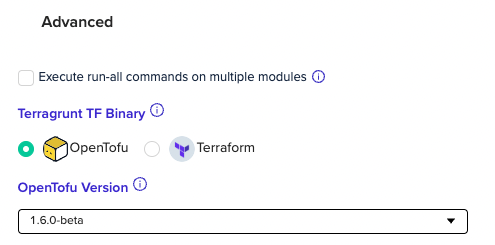
By default the selected TF binary is OpenTofu. To change that, you should open the `Advanced` settings and select which TF binary to use:
 You can check Terragrunt's Terraform and OpenTofu version compatibility table [here](https://terragrunt.gruntwork.io/docs/reference/supported-versions/).
## Run-all Terragrunt command checkbox
Within Terragrunt template configuration, under `Advanced` settings - check `Execute run-all commands on multiple modules`
* Adds `run-all` to each command, read more [here](https://terragrunt.gruntwork.io/docs/reference/supported-versions/).
* Supported from version 0.28.1.
**Local Terraform State**
By default, env zero stores the local state for next deployments.
In some cases, we will not be able to store the local state for your Terragrunt modules. Please configure a remote backend with your Terragrunt code [Remote terraform code](https://terragrunt.gruntwork.io/docs/reference/config-blocks-and-attributes/#terraform), otherwise your Terragrunt code may not work properly with env zero.
**Cross-Module Dependencies**
env zero's Terraform deployment flow includes a `plan` step and an `apply` step that uses the plan's results (plan file/s) to ensure every change is aligned between both steps.
According to the official [docs](https://terragrunt.gruntwork.io/docs/reference/cli-options/#run-all), the `run-all plan -out=/path/to/plan-file` command we use will fail if there are yet-to-be-applied dependencies between modules. It will only output some of the expected plan files. This leads to the failure of the `run-all apply /path/to/plan-file` command that is being executed next, since it expects all modules to have plan files.
As a workaround, we expose the `ENV0_TERRAGRUNT_RUN_ALL_SKIP_PLAN` environment variable. Set its value to `true` and deploy. The `run-all apply` command will be executed without running the plan. This is risky and should only be done on initial deployment. On success, remove this environment variable to keep the `plan` and `apply` steps in-sync.
Enabling ENV0\_TERRAGRUNT\_RUN\_ALL\_SKIP\_PLAN requires the deployment to be configured with auto-approval. When this variable is set to true, both the plan and cost estimation steps are skipped, and their statuses will be marked as "warning" to indicate reduced visibility and governance. The deployment will proceed directly to apply. If this flag is used in a deployment that requires approval, the step - and consequently the entire deployment - will fail.
### Target modules
env zero supports [terragrunt include dir ](https://terragrunt.gruntwork.io/docs/reference/cli-options/#terragrunt-include-dir), which is a CLI Arg for Terragrunt environment that runs in a `run-all` mode by using environment variable `ENV0_TERRAGRUNT_RUN_ALL_INCLUDE_DIRS`. Terragrunt will plan and apply only those modules and their dependencies when you use this variable.
#### Example:
**ENV0\_TERRAGRUNT\_RUN\_ALL\_INCLUDE\_DIRS=module1,path\_to\_module/module2**
#### Smart detect Terragrunt modules changes
If you use `Terragrunt run all` [PR Plan](/guides/admin-guide/environments/plan-on-pull-request) feature you can use our [plugin](https://github.com/env0/env0-terragrunt-modules-detection-plugin) for running plan only for changed modules in the PR
### Troubleshooting
There is a known issue with `terragrunt run-all plan -destroy -out=.tf-plan` generating an incorrectly ordered graph. Thus, if you have dependency issues with run-all destroy, please use `ENV0_TERRAGRUNT_RUN_ALL_SKIP_PLAN=true` in your pipeline to skip the plan step. Make sure to enable "Approve Plan Automatically".
## Suggested Blog Content
[Terraform Modules Guide](https://www.env0.com/blog/terraform-modules)
[Terraform Plan Examples](https://www.env0.com/blog/terraform-plan)
[Managing Terraform Variable Hierarchy](https://www.env0.com/blog/managing-terraform-variable-hierarchy)
[ Manage Terraform Remote State with a Remote Backend](https://www.env0.com/blog/terraform-remote-state-using-a-remote-backend)
## Next steps
* [Terragrunt Module Detection](/guides/integrations/plugins/terragrunt-modules-detection) - Run plans only for changed modules in a PR.
* [Managing IaC Binaries Versions](/guides/admin-guide/templates/iac-binaries-versions) - Pin Terraform or OpenTofu versions for Terragrunt.
* [Managing VCS](/guides/admin-guide/manage-vcs) - Connect a VCS provider for GitOps deployments.
You can check Terragrunt's Terraform and OpenTofu version compatibility table [here](https://terragrunt.gruntwork.io/docs/reference/supported-versions/).
## Run-all Terragrunt command checkbox
Within Terragrunt template configuration, under `Advanced` settings - check `Execute run-all commands on multiple modules`
* Adds `run-all` to each command, read more [here](https://terragrunt.gruntwork.io/docs/reference/supported-versions/).
* Supported from version 0.28.1.
**Local Terraform State**
By default, env zero stores the local state for next deployments.
In some cases, we will not be able to store the local state for your Terragrunt modules. Please configure a remote backend with your Terragrunt code [Remote terraform code](https://terragrunt.gruntwork.io/docs/reference/config-blocks-and-attributes/#terraform), otherwise your Terragrunt code may not work properly with env zero.
**Cross-Module Dependencies**
env zero's Terraform deployment flow includes a `plan` step and an `apply` step that uses the plan's results (plan file/s) to ensure every change is aligned between both steps.
According to the official [docs](https://terragrunt.gruntwork.io/docs/reference/cli-options/#run-all), the `run-all plan -out=/path/to/plan-file` command we use will fail if there are yet-to-be-applied dependencies between modules. It will only output some of the expected plan files. This leads to the failure of the `run-all apply /path/to/plan-file` command that is being executed next, since it expects all modules to have plan files.
As a workaround, we expose the `ENV0_TERRAGRUNT_RUN_ALL_SKIP_PLAN` environment variable. Set its value to `true` and deploy. The `run-all apply` command will be executed without running the plan. This is risky and should only be done on initial deployment. On success, remove this environment variable to keep the `plan` and `apply` steps in-sync.
Enabling ENV0\_TERRAGRUNT\_RUN\_ALL\_SKIP\_PLAN requires the deployment to be configured with auto-approval. When this variable is set to true, both the plan and cost estimation steps are skipped, and their statuses will be marked as "warning" to indicate reduced visibility and governance. The deployment will proceed directly to apply. If this flag is used in a deployment that requires approval, the step - and consequently the entire deployment - will fail.
### Target modules
env zero supports [terragrunt include dir ](https://terragrunt.gruntwork.io/docs/reference/cli-options/#terragrunt-include-dir), which is a CLI Arg for Terragrunt environment that runs in a `run-all` mode by using environment variable `ENV0_TERRAGRUNT_RUN_ALL_INCLUDE_DIRS`. Terragrunt will plan and apply only those modules and their dependencies when you use this variable.
#### Example:
**ENV0\_TERRAGRUNT\_RUN\_ALL\_INCLUDE\_DIRS=module1,path\_to\_module/module2**
#### Smart detect Terragrunt modules changes
If you use `Terragrunt run all` [PR Plan](/guides/admin-guide/environments/plan-on-pull-request) feature you can use our [plugin](https://github.com/env0/env0-terragrunt-modules-detection-plugin) for running plan only for changed modules in the PR
### Troubleshooting
There is a known issue with `terragrunt run-all plan -destroy -out=.tf-plan` generating an incorrectly ordered graph. Thus, if you have dependency issues with run-all destroy, please use `ENV0_TERRAGRUNT_RUN_ALL_SKIP_PLAN=true` in your pipeline to skip the plan step. Make sure to enable "Approve Plan Automatically".
## Suggested Blog Content
[Terraform Modules Guide](https://www.env0.com/blog/terraform-modules)
[Terraform Plan Examples](https://www.env0.com/blog/terraform-plan)
[Managing Terraform Variable Hierarchy](https://www.env0.com/blog/managing-terraform-variable-hierarchy)
[ Manage Terraform Remote State with a Remote Backend](https://www.env0.com/blog/terraform-remote-state-using-a-remote-backend)
## Next steps
* [Terragrunt Module Detection](/guides/integrations/plugins/terragrunt-modules-detection) - Run plans only for changed modules in a PR.
* [Managing IaC Binaries Versions](/guides/admin-guide/templates/iac-binaries-versions) - Pin Terraform or OpenTofu versions for Terragrunt.
* [Managing VCS](/guides/admin-guide/manage-vcs) - Connect a VCS provider for GitOps deployments.