> ## Documentation Index
> Fetch the complete documentation index at: https://docs.envzero.com/llms.txt
> Use this file to discover all available pages before exploring further.
# Connect and Scan
> Connect your Terraform Cloud or Terraform Enterprise organization to env zero and automatically discover all workspaces, variables, and variable sets.
The first step connects env zero to your Terraform Cloud (TFC) or Terraform Enterprise (TFE) organization and automatically discovers all workspaces, variables, and variable sets. Provide your API token and env zero scans your organization automatically.
## Connect your TFC organization
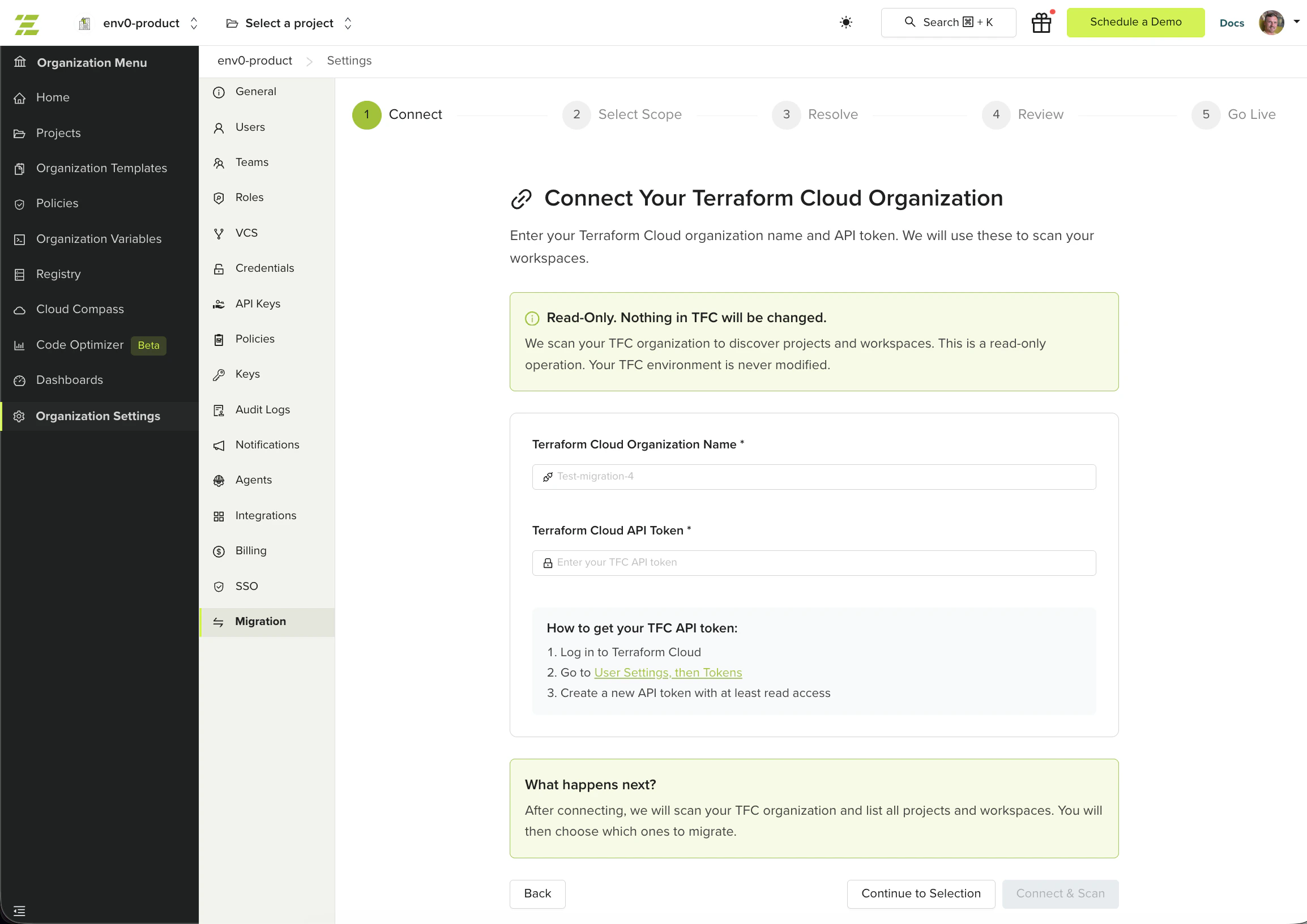
Navigate to **Organization Settings > Migration** and click **Start Migration**.
Provide two fields:
* **Terraform Cloud Organization Name** - the exact name of your TFC/TFE organization (for example, `acme-corp`)
* **Terraform Cloud API Token** - a user or team token with read permissions and permissions to lock/unlock workspaces
env zero validates your credentials and begins scanning your TFC organization. This is a read-only operation, nothing in TFC is modified.
 If you previously started a migration for this TFC organization, the wizard resumes your existing session.
## Scan progress
After connecting, the wizard scans your TFC organization in three phases:
1. **Workspaces** - discovers all workspaces and their variables
2. **Variable Sets** - discovers variable sets and their variables
3. **Projects** - maps TFC projects to env zero projects
A progress bar shows the number of workspaces and variable sets scanned. You can safely leave the page during scanning and return later.
## Select scope
Once scanning completes, the wizard displays all discovered workspaces organized by TFC project.
The tree view shows your TFC projects and their workspaces. Each workspace displays its current status:
* **Migrated** - already migrated in a previous session
* **Live** - already live in env zero
* **Excluded** - manually excluded from this migration round; click the chip to include it again
* **Unsupported VCS provider** - the workspace uses a VCS provider not supported by the wizard (supported providers: GitHub, GitLab, Bitbucket, and Azure DevOps including self-hosted). These workspaces cannot be migrated with the wizard.
Check the workspaces you want to migrate in this round. You can select entire projects or individual workspaces. Use the search bar to filter by workspace name. You do not need to select all workspaces at once. Migrate a subset now and return later to continue with the rest.
The wizard checks your selection for issues that need resolution before migration can proceed.
If you previously started a migration for this TFC organization, the wizard resumes your existing session.
## Scan progress
After connecting, the wizard scans your TFC organization in three phases:
1. **Workspaces** - discovers all workspaces and their variables
2. **Variable Sets** - discovers variable sets and their variables
3. **Projects** - maps TFC projects to env zero projects
A progress bar shows the number of workspaces and variable sets scanned. You can safely leave the page during scanning and return later.
## Select scope
Once scanning completes, the wizard displays all discovered workspaces organized by TFC project.
The tree view shows your TFC projects and their workspaces. Each workspace displays its current status:
* **Migrated** - already migrated in a previous session
* **Live** - already live in env zero
* **Excluded** - manually excluded from this migration round; click the chip to include it again
* **Unsupported VCS provider** - the workspace uses a VCS provider not supported by the wizard (supported providers: GitHub, GitLab, Bitbucket, and Azure DevOps including self-hosted). These workspaces cannot be migrated with the wizard.
Check the workspaces you want to migrate in this round. You can select entire projects or individual workspaces. Use the search bar to filter by workspace name. You do not need to select all workspaces at once. Migrate a subset now and return later to continue with the rest.
The wizard checks your selection for issues that need resolution before migration can proceed.
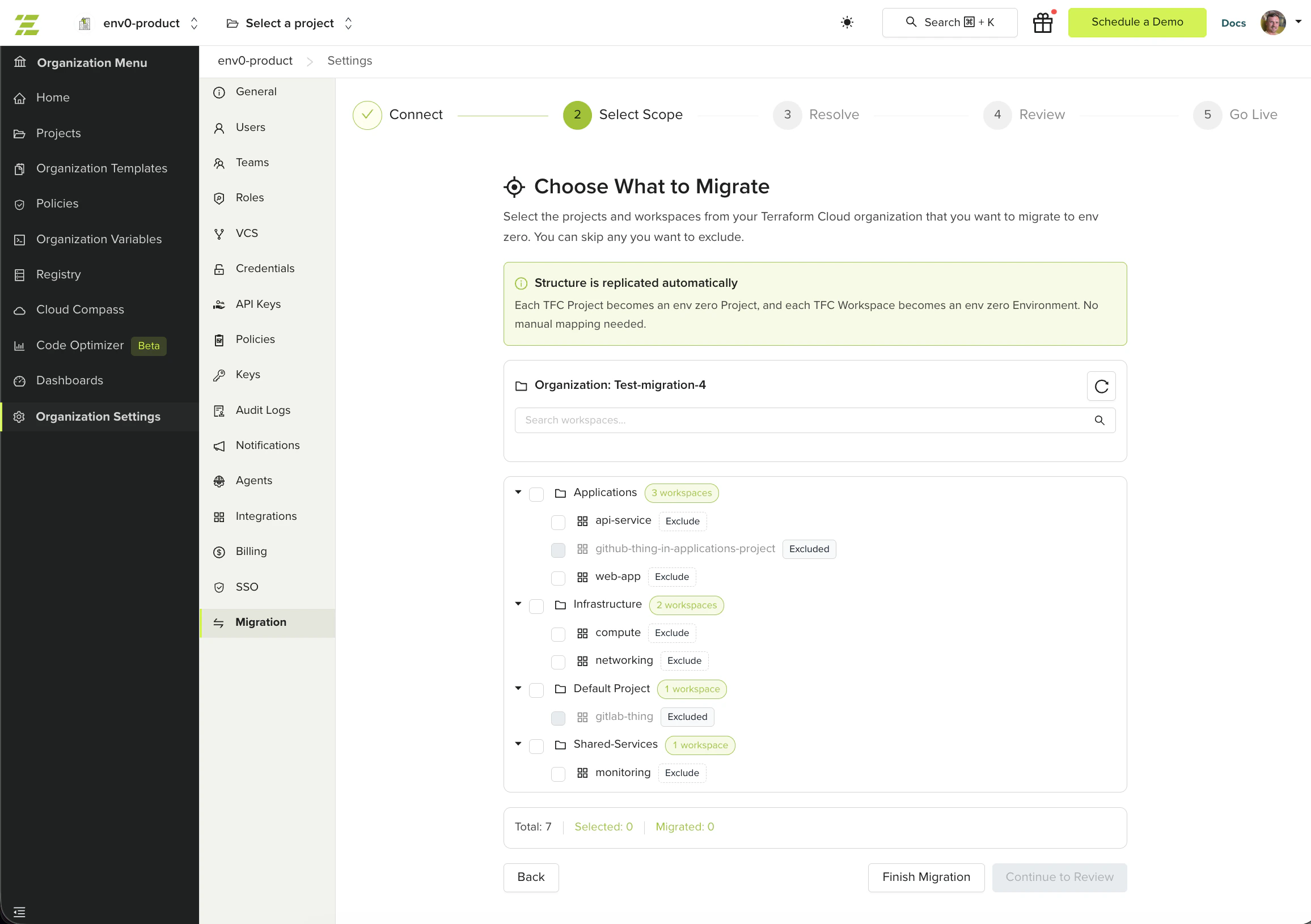 The summary at the bottom shows your total workspace count, selected count, and already-migrated count. Workspaces migrated in previous rounds are marked as **Migrated** and cannot be selected again.
## Re-scanning
If your TFC organization has changed since the initial scan, click the **Re-scan** button next to the organization name to refresh the workspace list.
## Next steps
* [Resolve Issues](/guides/admin-guide/tfc-migration/resolve-issues) - Provide missing secrets and fix VCS connection gaps.
* [Migrate from Terraform Cloud](/guides/admin-guide/tfc-migration) - Return to the migration overview for the full process.
* [Troubleshooting](/guides/admin-guide/tfc-migration/troubleshooting) - Fix credential errors and scan failures.
The summary at the bottom shows your total workspace count, selected count, and already-migrated count. Workspaces migrated in previous rounds are marked as **Migrated** and cannot be selected again.
## Re-scanning
If your TFC organization has changed since the initial scan, click the **Re-scan** button next to the organization name to refresh the workspace list.
## Next steps
* [Resolve Issues](/guides/admin-guide/tfc-migration/resolve-issues) - Provide missing secrets and fix VCS connection gaps.
* [Migrate from Terraform Cloud](/guides/admin-guide/tfc-migration) - Return to the migration overview for the full process.
* [Troubleshooting](/guides/admin-guide/tfc-migration/troubleshooting) - Fix credential errors and scan failures.