> ## Documentation Index
> Fetch the complete documentation index at: https://docs.envzero.com/llms.txt
> Use this file to discover all available pages before exploring further.
# Go Live
> Complete the Terraform Cloud migration with a controlled cutover that locks TFC workspaces and activates the corresponding env zero environments.
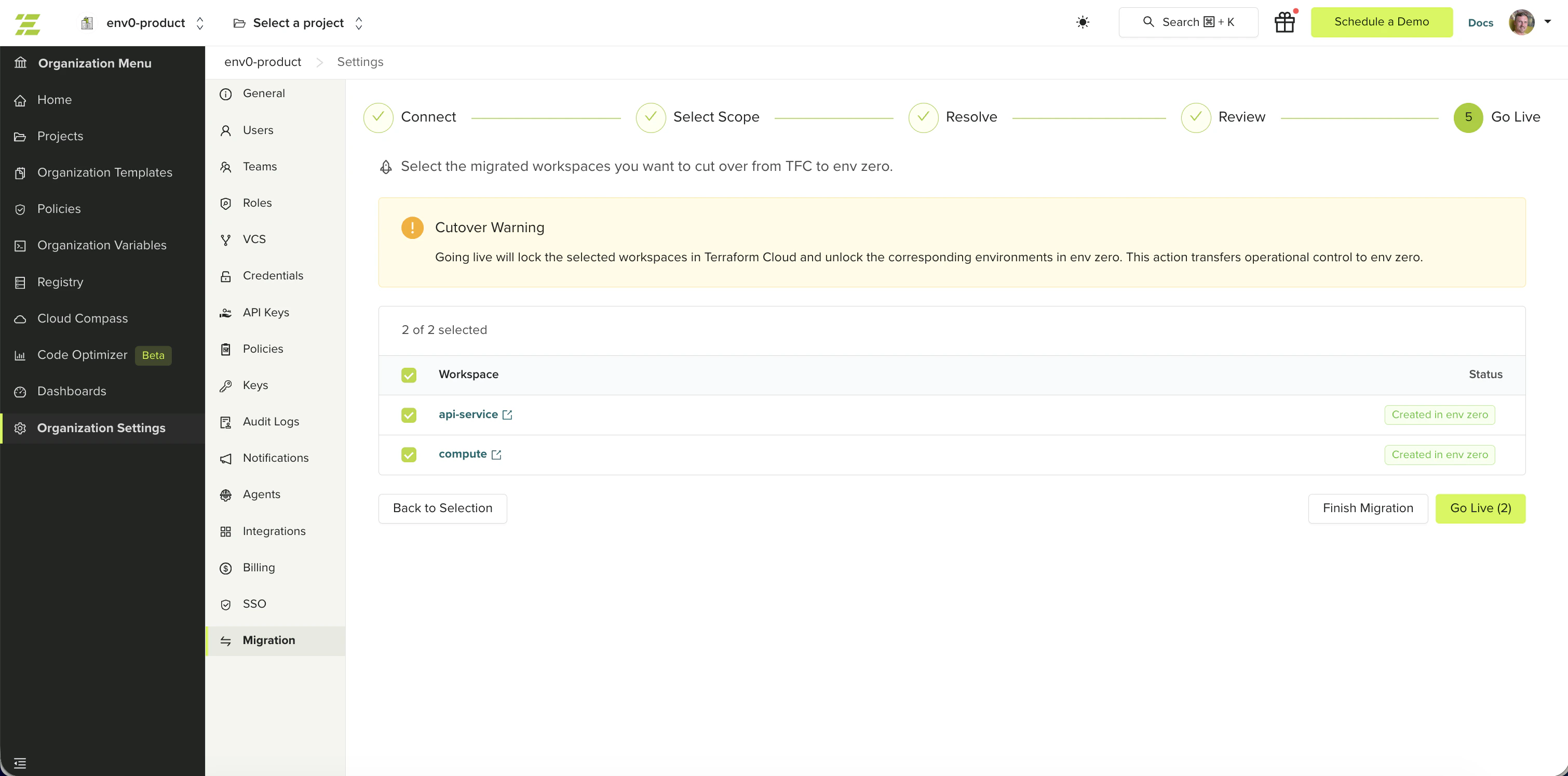
The final step transfers operational control from TFC to env zero. You choose which workspaces to cut over and when. Your TFC workspaces stay untouched until you explicitly trigger this step.
## What Go Live does
For each workspace you select:
1. **Locks the TFC workspace permanently** - the lock is intentional and stays in place after go-live. The wizard does not unlock TFC.
2. **Unlocks the env zero environment** - allows deployments from env zero
**Go-live is irreversible.** Once complete, the TFC workspace is permanently locked and the env zero environment is active. There is no undo in the wizard. To revert, you would need to manually unlock the TFC workspace and lock the env zero environment yourself.
Going live transfers operational control to env zero. Make sure your team is aware before cutting over production workspaces.
## Cut over workspaces
The Go Live table lists all successfully migrated workspaces. Skipped workspaces are not shown. Each workspace displays its current status and drift detection result:
* **Migrated** - migrated and ready to go live
* **Live** - already cut over; cannot be re-selected
* **Failed** - migration failed; cannot be selected
Each workspace also shows a drift detection status from the empty-plan check run after migration. An **error** status means the state transfer may have issues — investigate before going live with that workspace. This status is informational; it does not block go-live.
The button label shows the count of selected workspaces (for example, **Go Live (5)**). env zero locks the TFC workspaces and unlocks the corresponding env zero environments. If unlocking an env zero environment fails after TFC is locked, the TFC lock is automatically rolled back — no manual cleanup is needed.
The results screen shows the success or failure status for each workspace. Failed workspaces can be retried without affecting already-live workspaces.
 You do not need to go live with all workspaces at once. Go live with a group, then return to the Select Scope step to pick the next group of workspaces to migrate. Start with non-production workspaces to build confidence before cutting over critical infrastructure.
## Migration complete
Once all workspaces are live or skipped, the wizard shows a completion screen confirming that env zero is now your source of truth for the migrated environments.
From this screen you can:
* Click **Done** to finish the migration session
* Click **Back to Home** to return to the homepage
## Post-migration checklist
After going live, complete the following to fully replicate your TFC setup in env zero:
* Verify plan output shows no unexpected infrastructure changes for each migrated environment
* Confirm all variables (including sensitive ones) are present and scoped correctly
* Configure [SSO/SAML integration](/guides/sso-integrations/self-service-sso) in env zero to manage team access and roles via your identity provider
* Recreate any Sentinel or OPA policies as env zero [custom flows](/guides/admin-guide/custom-flows) or policy rules
* Configure [notification](/guides/integrations/notifications) integrations (Slack, email, webhooks)
* Set up [workflow triggers](/guides/admin-guide/environments/workflow-triggers) to replace any TFC run triggers or workspace dependencies
* Re-publish private modules in the env zero [module registry](/guides/admin-guide/private-registry/modules)
* Add any [SSH keys](/guides/admin-guide/variables/ssh-keys) needed for private repository access
* Verify [VCS](/guides/admin-guide/manage-vcs) webhooks and deployment triggers work as expected
* Archive or delete the migrated workspaces in TFC once you are confident the migration is complete
## Finishing the session
Once all workspaces are either live or skipped, click **Finish Migration** to close the session. The wizard blocks finishing while any workspace is in a migrated-but-not-live state — you must either go live or skip each migrated workspace before the session can be closed. You can start a new migration session at any time to migrate remaining workspaces.
## Next steps
* [Migrate from Terraform Cloud](/guides/admin-guide/tfc-migration) - Return to the migration overview or start a new session.
* [Managing Environments](/guides/admin-guide/env-zero-environments) - Explore your migrated environments and their lifecycle.
* [Troubleshooting](/guides/admin-guide/tfc-migration/troubleshooting) - Resolve go-live failures and post-migration drift.
You do not need to go live with all workspaces at once. Go live with a group, then return to the Select Scope step to pick the next group of workspaces to migrate. Start with non-production workspaces to build confidence before cutting over critical infrastructure.
## Migration complete
Once all workspaces are live or skipped, the wizard shows a completion screen confirming that env zero is now your source of truth for the migrated environments.
From this screen you can:
* Click **Done** to finish the migration session
* Click **Back to Home** to return to the homepage
## Post-migration checklist
After going live, complete the following to fully replicate your TFC setup in env zero:
* Verify plan output shows no unexpected infrastructure changes for each migrated environment
* Confirm all variables (including sensitive ones) are present and scoped correctly
* Configure [SSO/SAML integration](/guides/sso-integrations/self-service-sso) in env zero to manage team access and roles via your identity provider
* Recreate any Sentinel or OPA policies as env zero [custom flows](/guides/admin-guide/custom-flows) or policy rules
* Configure [notification](/guides/integrations/notifications) integrations (Slack, email, webhooks)
* Set up [workflow triggers](/guides/admin-guide/environments/workflow-triggers) to replace any TFC run triggers or workspace dependencies
* Re-publish private modules in the env zero [module registry](/guides/admin-guide/private-registry/modules)
* Add any [SSH keys](/guides/admin-guide/variables/ssh-keys) needed for private repository access
* Verify [VCS](/guides/admin-guide/manage-vcs) webhooks and deployment triggers work as expected
* Archive or delete the migrated workspaces in TFC once you are confident the migration is complete
## Finishing the session
Once all workspaces are either live or skipped, click **Finish Migration** to close the session. The wizard blocks finishing while any workspace is in a migrated-but-not-live state — you must either go live or skip each migrated workspace before the session can be closed. You can start a new migration session at any time to migrate remaining workspaces.
## Next steps
* [Migrate from Terraform Cloud](/guides/admin-guide/tfc-migration) - Return to the migration overview or start a new session.
* [Managing Environments](/guides/admin-guide/env-zero-environments) - Explore your migrated environments and their lifecycle.
* [Troubleshooting](/guides/admin-guide/tfc-migration/troubleshooting) - Resolve go-live failures and post-migration drift.