> ## Documentation Index
> Fetch the complete documentation index at: https://docs.envzero.com/llms.txt
> Use this file to discover all available pages before exploring further.
# Review and Migrate
> Review your selected Terraform Cloud workspaces and trigger one-click migration to create matching environments, variables, and state in env zero.
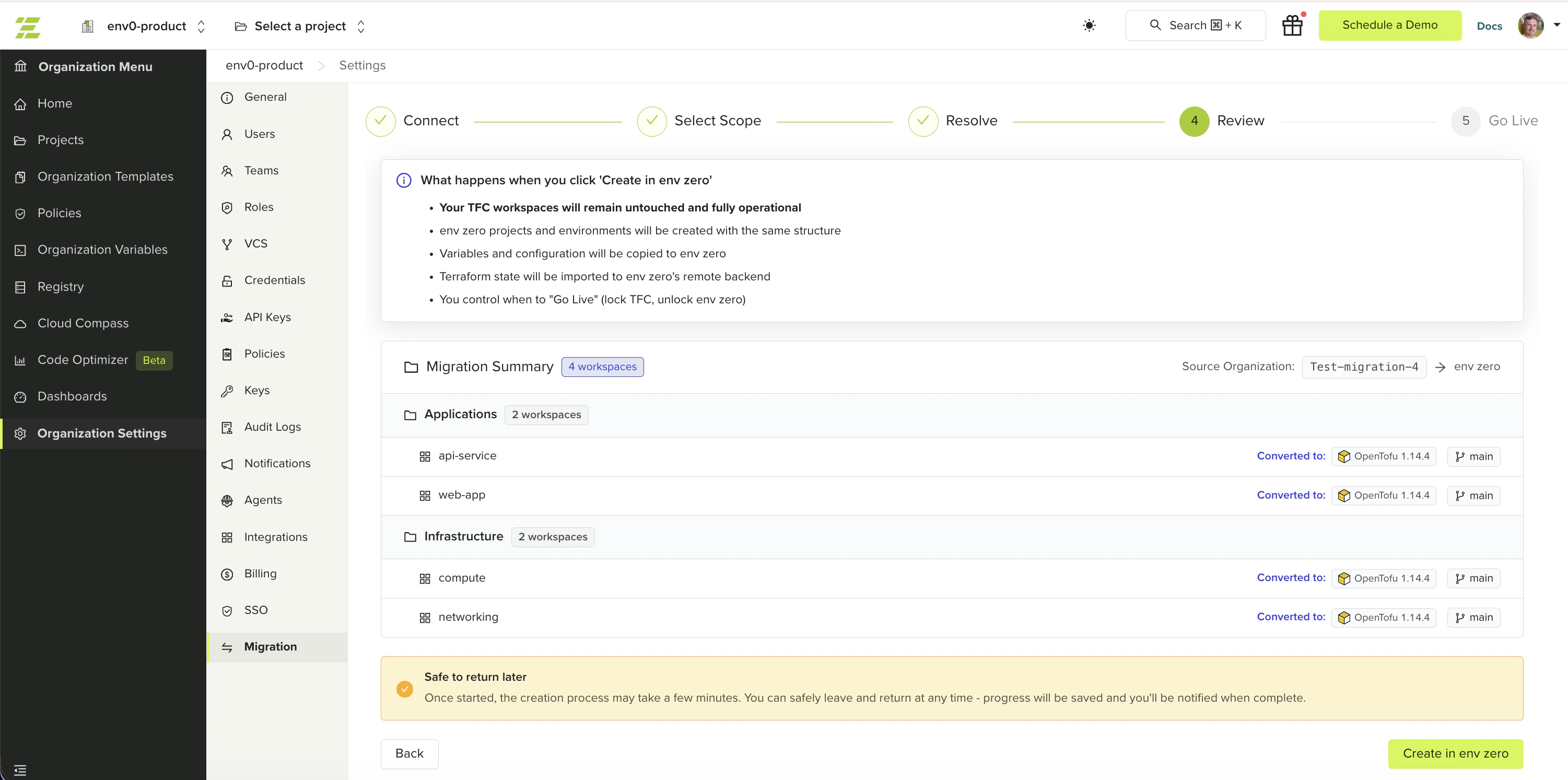
The Review step shows a summary of what will be created in env zero and lets you trigger the migration with a single click.
## What happens during migration
When you click **Create in env zero**, the wizard:
1. Creates env zero projects matching your TFC project structure
2. Creates env zero environments for each selected workspace, in a **locked** state to prevent accidental deployments
3. Copies variables and configuration sets to the new environments
4. Locks the TFC workspace briefly, copies the Terraform state to the env zero remote backend, then unlocks the TFC workspace
5. Triggers a drift detection plan to verify the imported state is valid
State migration temporarily locks each TFC workspace during the copy. The lock is released automatically once the state transfer completes. If you see a workspace locked in TFC during migration, this is expected.
**Terraform 1.6+ workspaces are migrated as OpenTofu environments.** env zero does not support Terraform 1.6 or later (BSL license). Any workspace running Terraform 1.6+ is automatically created as an OpenTofu environment in env zero. Verify your IaC code is compatible with OpenTofu before going live.
## Review your selection
The summary displays your selected workspaces organized by TFC project. For each workspace you can see the Terraform version, VCS repository branch, and variable count. You can uncheck individual workspaces on this screen to defer them to a later migration round before triggering the migration.
 ## Start the migration
Verify the workspaces and projects listed match your expectations. Uncheck any workspaces you want to defer.
The migration begins. Each workspace shows its status inline as migration progresses.
Migration time depends on the number of workspaces and the size of their state files. You can safely leave the page and return later. Progress is saved automatically.
## Migration results
When migration completes, the wizard shows a success count and a failure count with error details for any workspace that failed.
* **Successfully migrated workspaces are not rolled back if others fail.** Partial success is a valid outcome — already-migrated workspaces are marked and cannot be re-selected in future sessions.
* **Drift detection runs asynchronously** after migration reports completion. The plan results appear on each environment once finished. Migration success does not mean drift detection has completed.
* If any workspaces failed, click **Retry** to attempt them again. Only the failed workspaces are retried.
## Next steps
* [Go Live](/guides/admin-guide/tfc-migration/go-live) - Lock TFC workspaces and activate env zero environments.
* [Migrate from Terraform Cloud](/guides/admin-guide/tfc-migration) - Return to the migration overview for the full process.
* [Troubleshooting](/guides/admin-guide/tfc-migration/troubleshooting) - Diagnose state migration failures and retry errors.
## Start the migration
Verify the workspaces and projects listed match your expectations. Uncheck any workspaces you want to defer.
The migration begins. Each workspace shows its status inline as migration progresses.
Migration time depends on the number of workspaces and the size of their state files. You can safely leave the page and return later. Progress is saved automatically.
## Migration results
When migration completes, the wizard shows a success count and a failure count with error details for any workspace that failed.
* **Successfully migrated workspaces are not rolled back if others fail.** Partial success is a valid outcome — already-migrated workspaces are marked and cannot be re-selected in future sessions.
* **Drift detection runs asynchronously** after migration reports completion. The plan results appear on each environment once finished. Migration success does not mean drift detection has completed.
* If any workspaces failed, click **Retry** to attempt them again. Only the failed workspaces are retried.
## Next steps
* [Go Live](/guides/admin-guide/tfc-migration/go-live) - Lock TFC workspaces and activate env zero environments.
* [Migrate from Terraform Cloud](/guides/admin-guide/tfc-migration) - Return to the migration overview for the full process.
* [Troubleshooting](/guides/admin-guide/tfc-migration/troubleshooting) - Diagnose state migration failures and retry errors.