> ## Documentation Index
> Fetch the complete documentation index at: https://docs.envzero.com/llms.txt
> Use this file to discover all available pages before exploring further.
# Set Budget Notifications
> Configure project budget thresholds and notifications in env zero by enabling cost monitoring, setting timeframes and amounts, and alerting on breaches.
Budgets make it simple to track spending for each project. When spending goes beyond thresholds of your choice, you'll get a notification, helping you stay in control of you finances.
# Setup a Project Budget
1. Enable [cost monitoring](/guides/cost-monitoring/cost-monitoring) and configure [notifications](/guides/integrations/notifications) for your project with "Budget Exceeded" event enabled.
2. Navigate to the project page and click **Project Costs**.
3. Select the **Budget** tab.
4. Tick the "Enable budget for this project" box, select your preferred timeframe and budget amount, set your thresholds, and then hit "Save".
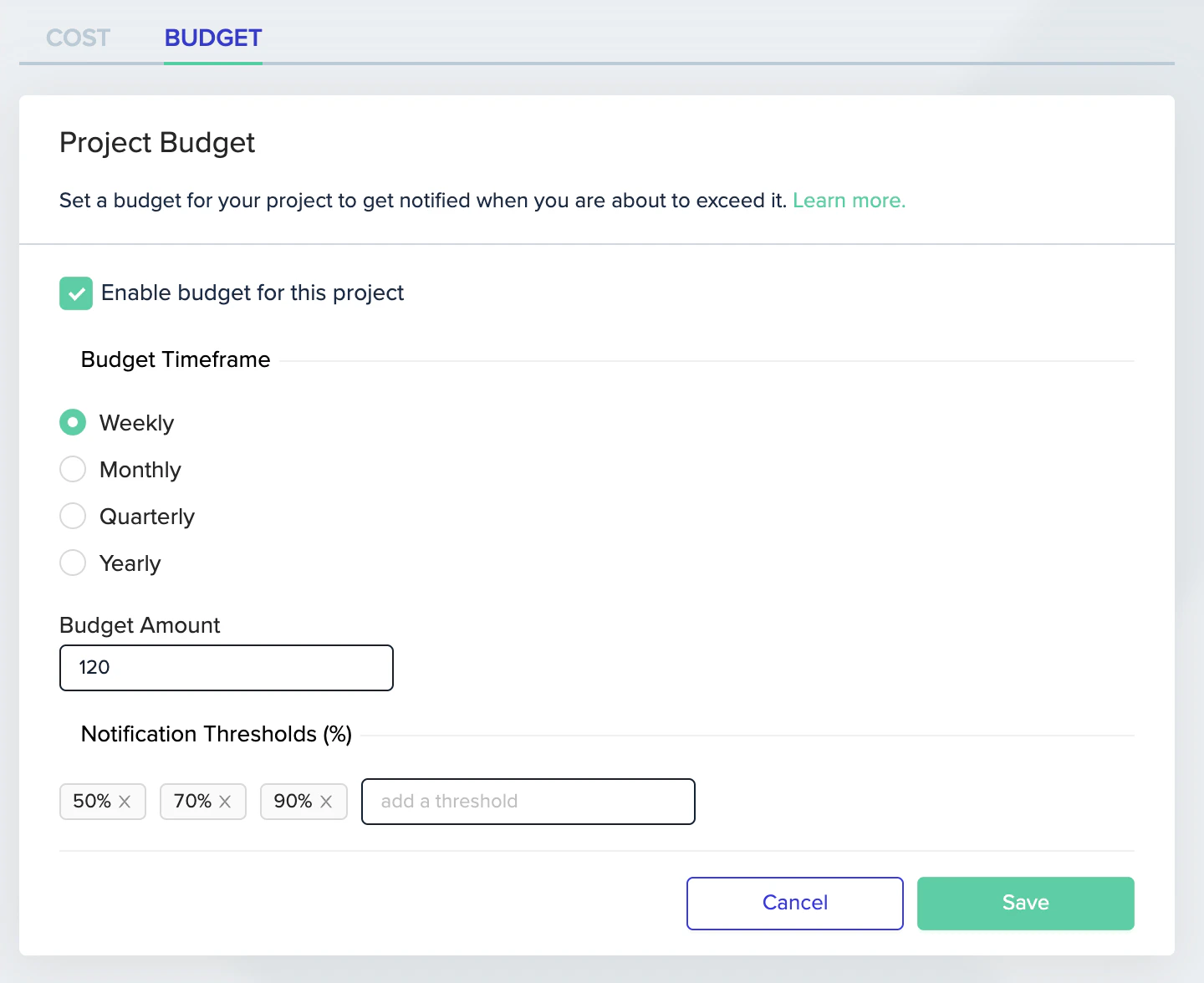 You will now be notified when the budget threshold is exceeded.
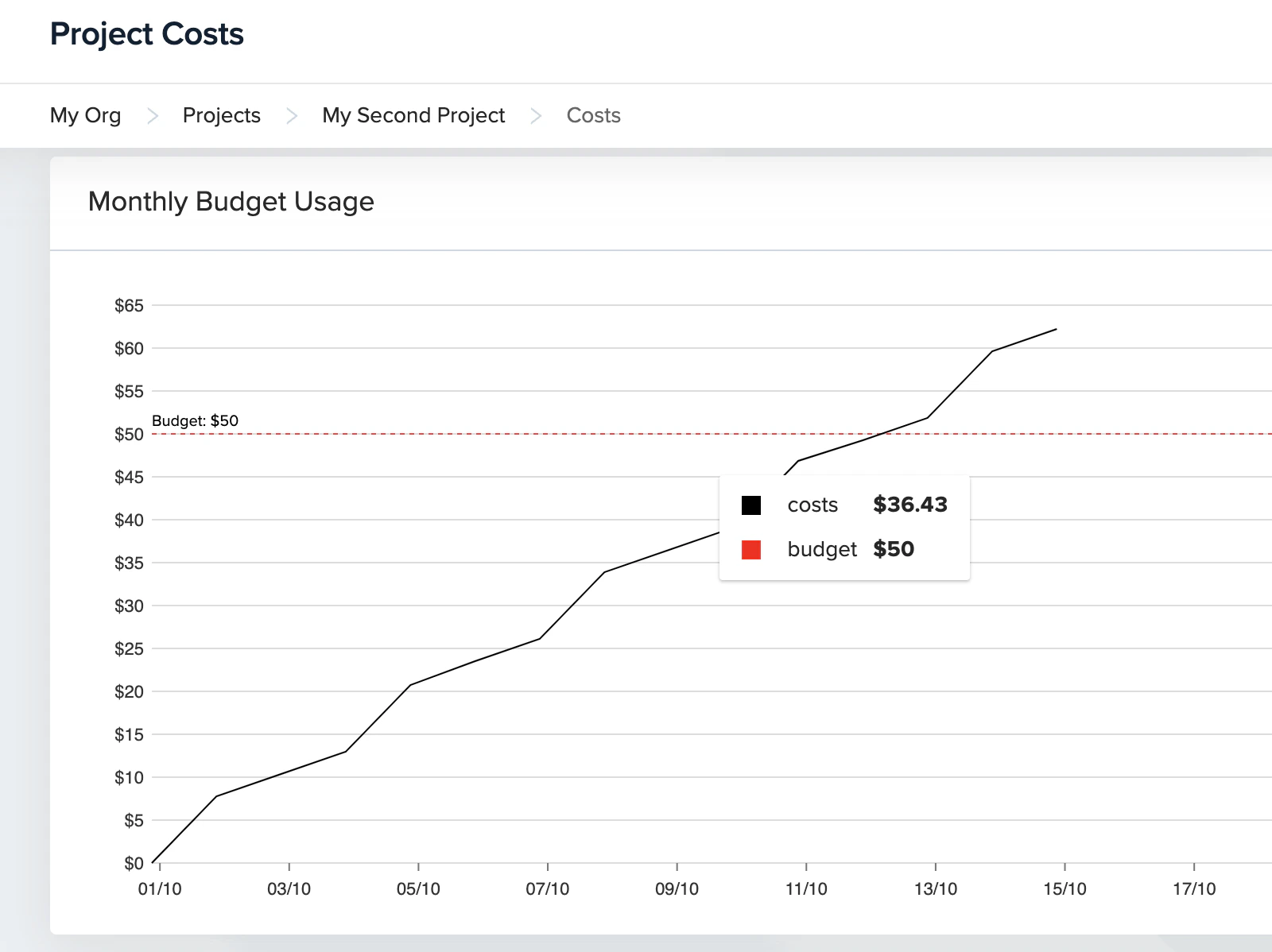
 Clicking the link on the notification will lead you to the env zero app in the 'Project Costs' page where you can see the projects budget usage over time:
 Note
It may take up to a day for a notification to fire after a threshold was exceeded.
## Behind The Scenes
To calculate costs, env zero fetches data from the cloud provider (AWS/GCP/Azure) every 24 hours.
For every project with cost credentials, env zero fetches cost data regarding all of its environments, relying on the tags they have. This can incur additional cloud costs.
Additional Cloud Costs
Setting a budget notification can increase cloud costs depending on the cloud provider.
Additional information on each cloud provider costs:
1. [AWS](https://aws.amazon.com/aws-cost-management/aws-cost-explorer/pricing/) - 0.01\$ per request
2. [GCP](https://cloud.google.com/bigquery/pricing#overview_of_pricing) - depends on the amount of cost data
3. [Azure](https://azure.microsoft.com/en-us/pricing/details/cost-management/) - no additional cost
## Next steps
* [Set Cost Monitoring](/guides/cost-monitoring/cost-monitoring) - Enable cloud cost tracking across environments.
* [Cloud Analyst](/guides/cloud-analyst/cloud-analyst) - Explore AI-powered cloud cost insights and dashboards.
* [Estimate Costs](/guides/policies-governance/cost-estimation) - Preview deployment costs before applying changes.
Note
It may take up to a day for a notification to fire after a threshold was exceeded.
## Behind The Scenes
To calculate costs, env zero fetches data from the cloud provider (AWS/GCP/Azure) every 24 hours.
For every project with cost credentials, env zero fetches cost data regarding all of its environments, relying on the tags they have. This can incur additional cloud costs.
Additional Cloud Costs
Setting a budget notification can increase cloud costs depending on the cloud provider.
Additional information on each cloud provider costs:
1. [AWS](https://aws.amazon.com/aws-cost-management/aws-cost-explorer/pricing/) - 0.01\$ per request
2. [GCP](https://cloud.google.com/bigquery/pricing#overview_of_pricing) - depends on the amount of cost data
3. [Azure](https://azure.microsoft.com/en-us/pricing/details/cost-management/) - no additional cost
## Next steps
* [Set Cost Monitoring](/guides/cost-monitoring/cost-monitoring) - Enable cloud cost tracking across environments.
* [Cloud Analyst](/guides/cloud-analyst/cloud-analyst) - Explore AI-powered cloud cost insights and dashboards.
* [Estimate Costs](/guides/policies-governance/cost-estimation) - Preview deployment costs before applying changes.