> ## Documentation Index
> Fetch the complete documentation index at: https://docs.envzero.com/llms.txt
> Use this file to discover all available pages before exploring further.
# Getting Started with env zero
> Get started with env zero, an IaC platform for Terraform, OpenTofu, and Pulumi. Connect your VCS and cloud account, then deploy your first environment.
env zero is an IaC automation platform for deploying and managing cloud infrastructure using Terraform, OpenTofu, Pulumi, Terragrunt, Helm, and Kubernetes, with built-in governance, cost controls, and team access management.
**Migrating from Terraform Cloud?** env zero has a step-by-step migration wizard that connects to your Terraform Cloud organization, imports your workspaces, resolves variable conflicts, and lets you go live without downtime. [Start the TFC migration](/guides/admin-guide/tfc-migration).
**Before you start**
* A cloud account (AWS, GCP, or Azure) with permission to create IAM roles or service principals
* A GitHub, GitLab, Bitbucket, or Azure DevOps account with a repository to deploy from
* Admin access to your GitHub organization if using GitHub (required to install the env zero GitHub App)
If you don't have IaC code yet, fork [env0/templates](https://github.com/env0/templates). It has working examples for every supported provider.
## How env zero runs your code
When a deployment starts, env zero provisions a container (either cloud-hosted or your own [self-hosted agent](/guides/admin-guide/self-hosted-kubernetes-agent)), clones your VCS repository at the specified branch and folder, injects your credentials and variables, and runs the IaC tool. No code is stored by env zero. It reads your repository, executes the deploy, and writes state back to the remote backend. Credentials are used only for the duration of the deployment.
## Core concepts
Three objects you will use throughout env zero:
* **[Template](/guides/getting-started/glossary#template)** - A reusable configuration that points to a folder in your VCS repository and defines the IaC type, variables, and deployment settings. Multiple teams and projects can deploy from the same template.
* **[Environment](/guides/getting-started/glossary#environment)** - A live deployment of a template. Each environment has its own state, variables, and deployment history.
* **[Project](/guides/getting-started/glossary#project)** - A container for related environments with scoped credentials and access control. env zero creates a Default Organization Project when you first sign up.
There are two ways to get started, depending on what you want to accomplish.
## Option A: Deploy a sample
If you want to see env zero work before connecting your own infrastructure, start here.
Cloud provider credentials are required to complete this path. If you haven't set them up yet, follow [Connect Your Cloud Account](/guides/getting-started/connect-your-cloud-account) first.
1. Fork [env0/templates](https://github.com/env0/templates) on GitHub. It contains ready-to-run examples for AWS, GCP, Azure, Terraform, OpenTofu, Pulumi, and more. Each example folder has a `README` that lists what it deploys and which variables it requires.
2. Log in to [app.env0.com](https://app.env0.com) and create your organization.
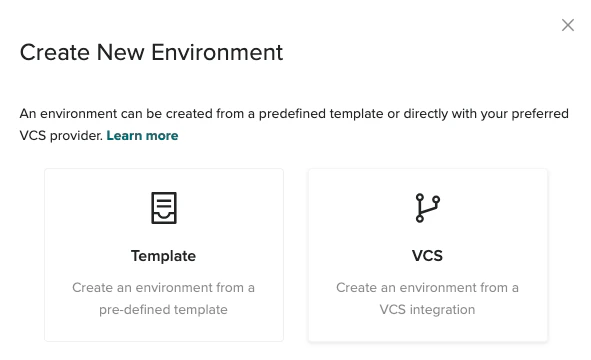
3. From your project, click **Create New Environment** and choose **VCS** to deploy directly from your repository.
 4. Work through the four wizard steps:
* **IaC type**: Select the framework that matches the example you want to run (Terraform, OpenTofu, Pulumi, etc.).
* **VCS**: Click **GitHub.com** and install the env zero GitHub App when prompted. Select your forked `templates` repository and set the branch (usually `master`). Set the folder path to the example you want to deploy, such as `aws/simple-ec2`.
* **Variables**: Check the `README` for the example you chose to find required variables. Add them here. Leave optional variables blank to use the defaults.
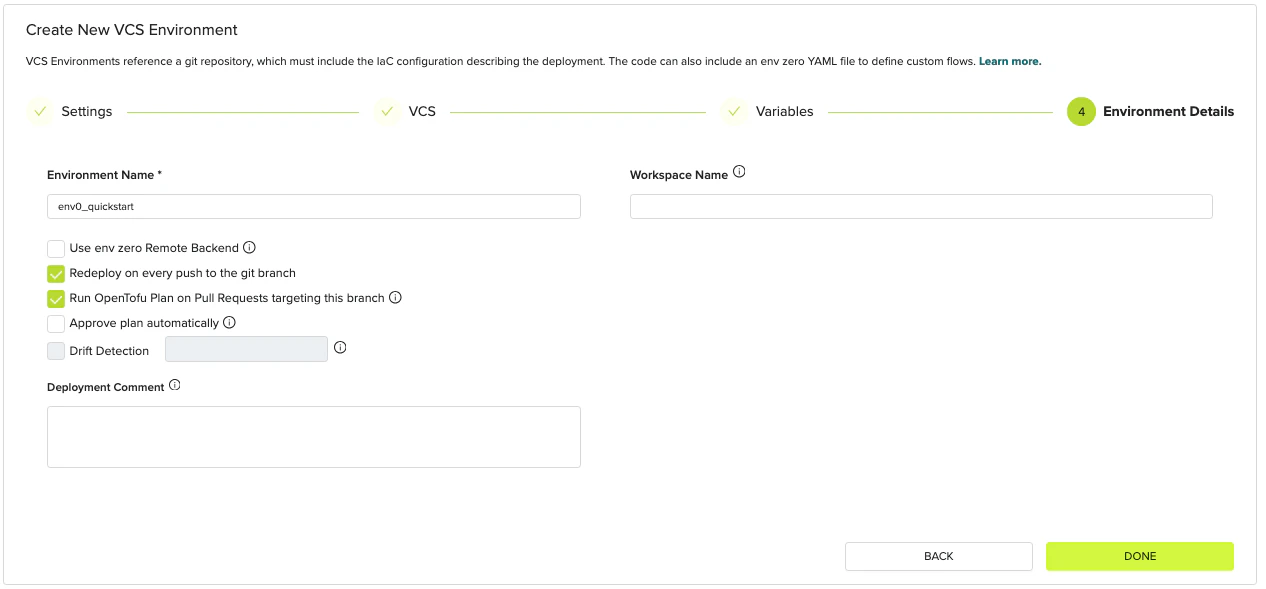
* **Environment Details**: Give your environment a name, leave the other settings at their defaults, and click **Done**.
4. Work through the four wizard steps:
* **IaC type**: Select the framework that matches the example you want to run (Terraform, OpenTofu, Pulumi, etc.).
* **VCS**: Click **GitHub.com** and install the env zero GitHub App when prompted. Select your forked `templates` repository and set the branch (usually `master`). Set the folder path to the example you want to deploy, such as `aws/simple-ec2`.
* **Variables**: Check the `README` for the example you chose to find required variables. Add them here. Leave optional variables blank to use the defaults.
* **Environment Details**: Give your environment a name, leave the other settings at their defaults, and click **Done**.
 5. Watch the deployment run. The **Environments** page shows a live log. When the status changes to **Active**, the deployment succeeded. When you are done testing, open the environment and click **Destroy** to remove the resources.
A **VCS environment** deploys directly from a git branch without a reusable template, which is useful for quick testing. You can have something running in under 10 minutes.
## Option B: Set up env zero for your team
If you are setting up env zero for real infrastructure, or want the full governance model with reusable templates, project structure, and access control, follow these tutorials in order. The full path takes about 30 minutes.
1. [Create Your Organization](/guides/getting-started/create-your-organization) (\~2 min)
2. [Connect Your Git Repository](/guides/getting-started/connect-your-vcs) (\~5 min, optional for public repos)
3. [Connect Your Cloud Account](/guides/getting-started/connect-your-cloud-account) (\~15 min)
4. [Create Your First Template](/guides/getting-started/create-your-first-template) (\~5 min)
5. [Deploy Your First Environment](/guides/getting-started/running-your-first-environment) (\~5 min)
This path creates a reusable **template** that multiple projects and teams can deploy from, with variables, approval policies, and cost controls applied consistently.
## Where to go from here
Once your first environment is running, env zero has three areas worth exploring next.
**Enforce governance:** Add [Approval Policies](/guides/policies-governance/approval-policies) to require a reviewer before any apply runs. Enable [Cost Estimation](/guides/policies-governance/cost-estimation) to see cloud spend in every plan. Set up [Drift Detection](/guides/admin-guide/environments/drift-detection) to catch infrastructure changes that happen outside env zero.
**Scale to your team:** [Invite teammates](/guides/admin-guide/user-role-and-team-management/user-management) and assign roles. Build a [template library](/guides/admin-guide/env-zero-templates) so other teams can deploy without writing IaC. Use [projects](/guides/admin-guide/env-zero-projects) to organize environments with scoped credentials and access control.
**Automate the pipeline:** Enable [Continuous Deployment](/guides/admin-guide/environments/continuous-deployment) to deploy on push and plan on pull request. Use [scheduling](/guides/admin-guide/environments/scheduling) to reduce cloud spend. Connect [Slack or email notifications](/guides/integrations/notifications) for deployment events.
5. Watch the deployment run. The **Environments** page shows a live log. When the status changes to **Active**, the deployment succeeded. When you are done testing, open the environment and click **Destroy** to remove the resources.
A **VCS environment** deploys directly from a git branch without a reusable template, which is useful for quick testing. You can have something running in under 10 minutes.
## Option B: Set up env zero for your team
If you are setting up env zero for real infrastructure, or want the full governance model with reusable templates, project structure, and access control, follow these tutorials in order. The full path takes about 30 minutes.
1. [Create Your Organization](/guides/getting-started/create-your-organization) (\~2 min)
2. [Connect Your Git Repository](/guides/getting-started/connect-your-vcs) (\~5 min, optional for public repos)
3. [Connect Your Cloud Account](/guides/getting-started/connect-your-cloud-account) (\~15 min)
4. [Create Your First Template](/guides/getting-started/create-your-first-template) (\~5 min)
5. [Deploy Your First Environment](/guides/getting-started/running-your-first-environment) (\~5 min)
This path creates a reusable **template** that multiple projects and teams can deploy from, with variables, approval policies, and cost controls applied consistently.
## Where to go from here
Once your first environment is running, env zero has three areas worth exploring next.
**Enforce governance:** Add [Approval Policies](/guides/policies-governance/approval-policies) to require a reviewer before any apply runs. Enable [Cost Estimation](/guides/policies-governance/cost-estimation) to see cloud spend in every plan. Set up [Drift Detection](/guides/admin-guide/environments/drift-detection) to catch infrastructure changes that happen outside env zero.
**Scale to your team:** [Invite teammates](/guides/admin-guide/user-role-and-team-management/user-management) and assign roles. Build a [template library](/guides/admin-guide/env-zero-templates) so other teams can deploy without writing IaC. Use [projects](/guides/admin-guide/env-zero-projects) to organize environments with scoped credentials and access control.
**Automate the pipeline:** Enable [Continuous Deployment](/guides/admin-guide/environments/continuous-deployment) to deploy on push and plan on pull request. Use [scheduling](/guides/admin-guide/environments/scheduling) to reduce cloud spend. Connect [Slack or email notifications](/guides/integrations/notifications) for deployment events.