> ## Documentation Index
> Fetch the complete documentation index at: https://docs.envzero.com/llms.txt
> Use this file to discover all available pages before exploring further.
# Deploy Your First Environment
> Deploy your first IaC environment in env zero by selecting a template from your project, reviewing variables, clicking Run, and watching it deploy.
This step assumes you have already [created a template](/guides/getting-started/create-your-first-template).
After connecting your VCS and cloud account, deploy your infrastructure code.
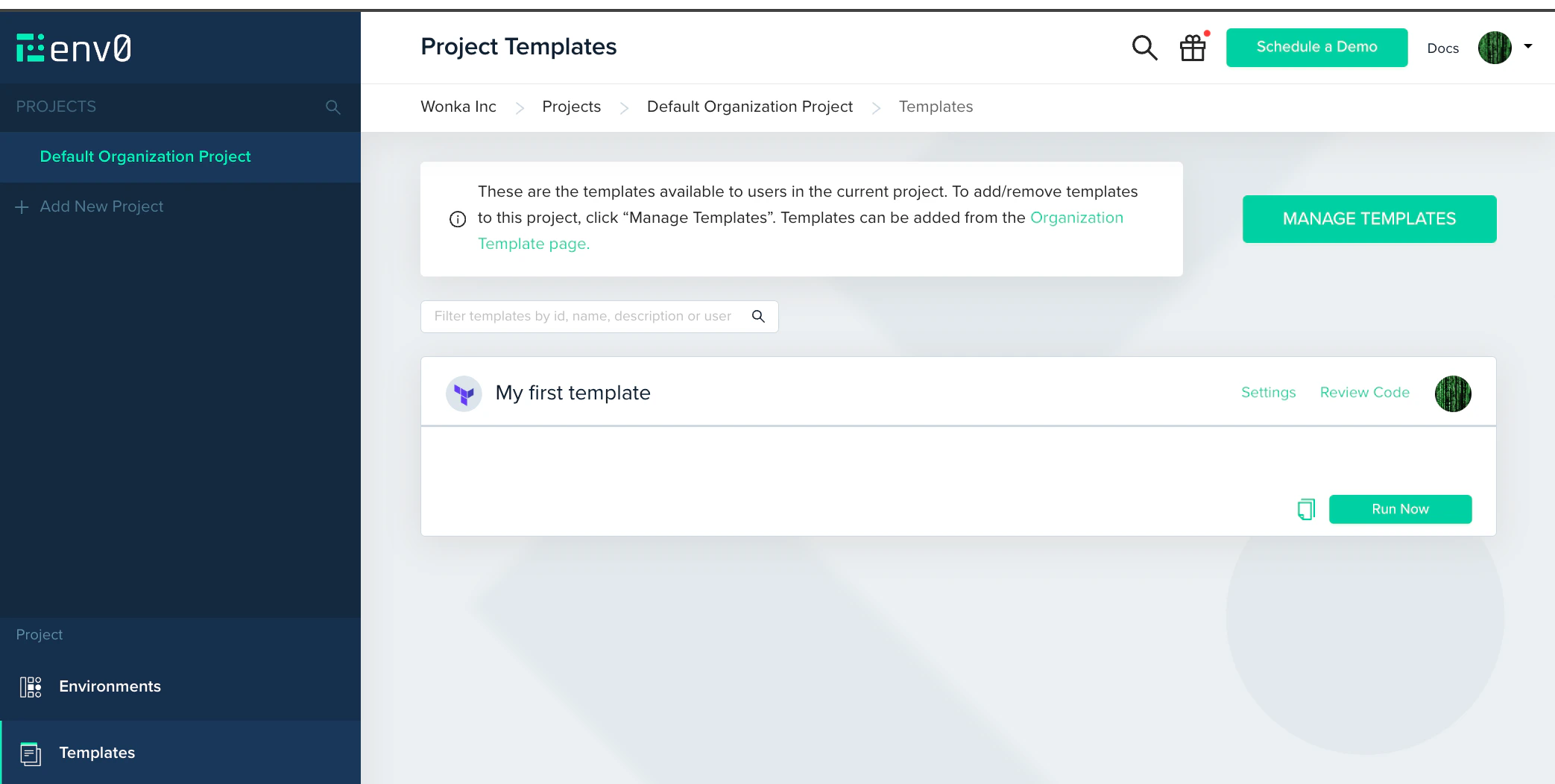
1. In the left sidebar, click **Projects**, then click **Default Organization Project**. Open the **Project Templates** page.
2. Find the template you added and click **Run Now**.
3. Review the settings for this environment. If it requires any additional variables, add them here.
4. Click **Run**.
 The **Environments** page shows the deployment status. When the status changes to **Active**, the deployment succeeded. Click the environment name to open the full deployment log and see the list of resources created. If the deployment fails, the log shows the exact error.
**Clean up when you're done**
The resources you deployed are real and accumulate cloud costs. When you no longer need this environment, open it and click **Destroy** to remove all resources. To automate cleanup, set a TTL on the environment. It will self-destroy after a set period.
**Enable Plan on Pull Request**
In your environment settings, turn on **Plan on Pull Request**. env zero will run a [plan](/guides/getting-started/glossary#plan) and post the output as a PR comment whenever you open or update a pull request against the template's branch. Your team sees exactly what infrastructure changes a PR introduces before it merges.
**Try the plan-and-apply workflow**
Update a variable in your template or environment settings, then click **Redeploy**. env zero runs a plan first so you can review exactly what changes before anything applies.
To require a human reviewer before any apply runs, add an [Approval Policy](/guides/policies-governance/approval-policies) to your template. The next deployment pauses after the plan step and waits for explicit approval. This is how env zero enforces change control in practice.
## Troubleshooting
**Credential not assigned.** If the log shows a permissions or access error, the cloud credential may not be attached to this project. Go to **Project Settings > Credentials** and confirm your credential is checked.
**Apply fails with a permissions error.** The IAM role or service principal has insufficient permissions for a resource being created. The apply log shows the specific resource and action that was denied. Update the IAM policy to add the required permission and redeploy.
**Init fails: module not found.** If your IaC code references a private git module using `ssh://` or `https://`, env zero needs an SSH key or Git token to clone it. Attach the relevant credential to the template under [SSH Keys](/guides/admin-guide/variables/ssh-keys).
**Deployment stays Queued.** Queued deployments are processed in order. If it stays queued for more than a minute, check whether the environment is locked or another deployment for the same environment is already running.
## Next steps
You have a working deployment. Here is the natural progression from here.
**Enforce governance**
* [Approval Policies](/guides/policies-governance/approval-policies) - Require a human reviewer before any apply runs. The standard way to protect production environments.
* [Cost Estimation](/guides/policies-governance/cost-estimation) - See estimated cloud costs in every plan output before anything deploys.
* [Drift Detection](/guides/admin-guide/environments/drift-detection) - Get alerted when live infrastructure [drifts](/guides/getting-started/glossary#drift) from your code.
**Scale to your team**
* [User Management](/guides/admin-guide/user-role-and-team-management/user-management) - Invite teammates and assign organization and project roles.
* [Using env zero Templates](/guides/admin-guide/env-zero-templates) - Build a template library that other teams can deploy from without writing IaC.
* [Managing Projects](/guides/admin-guide/env-zero-projects) - Organize environments by team, workload, or lifecycle stage with scoped access control.
* [Variables](/guides/admin-guide/variables) - Share variables across projects and environments using scoped inheritance.
**Automate the pipeline**
* [Continuous Deployment](/guides/admin-guide/environments/continuous-deployment) - Deploy automatically on git push and run a plan on every pull request.
* [Scheduling](/guides/admin-guide/environments/scheduling) - Spin environments up and down on a schedule to reduce cloud spend.
* [Notifications](/guides/integrations/notifications) - Send Slack or email alerts when deployments complete or fail.
* [API reference](/api-reference) - Trigger deployments, manage environments, and integrate env zero into your own tooling.
The **Environments** page shows the deployment status. When the status changes to **Active**, the deployment succeeded. Click the environment name to open the full deployment log and see the list of resources created. If the deployment fails, the log shows the exact error.
**Clean up when you're done**
The resources you deployed are real and accumulate cloud costs. When you no longer need this environment, open it and click **Destroy** to remove all resources. To automate cleanup, set a TTL on the environment. It will self-destroy after a set period.
**Enable Plan on Pull Request**
In your environment settings, turn on **Plan on Pull Request**. env zero will run a [plan](/guides/getting-started/glossary#plan) and post the output as a PR comment whenever you open or update a pull request against the template's branch. Your team sees exactly what infrastructure changes a PR introduces before it merges.
**Try the plan-and-apply workflow**
Update a variable in your template or environment settings, then click **Redeploy**. env zero runs a plan first so you can review exactly what changes before anything applies.
To require a human reviewer before any apply runs, add an [Approval Policy](/guides/policies-governance/approval-policies) to your template. The next deployment pauses after the plan step and waits for explicit approval. This is how env zero enforces change control in practice.
## Troubleshooting
**Credential not assigned.** If the log shows a permissions or access error, the cloud credential may not be attached to this project. Go to **Project Settings > Credentials** and confirm your credential is checked.
**Apply fails with a permissions error.** The IAM role or service principal has insufficient permissions for a resource being created. The apply log shows the specific resource and action that was denied. Update the IAM policy to add the required permission and redeploy.
**Init fails: module not found.** If your IaC code references a private git module using `ssh://` or `https://`, env zero needs an SSH key or Git token to clone it. Attach the relevant credential to the template under [SSH Keys](/guides/admin-guide/variables/ssh-keys).
**Deployment stays Queued.** Queued deployments are processed in order. If it stays queued for more than a minute, check whether the environment is locked or another deployment for the same environment is already running.
## Next steps
You have a working deployment. Here is the natural progression from here.
**Enforce governance**
* [Approval Policies](/guides/policies-governance/approval-policies) - Require a human reviewer before any apply runs. The standard way to protect production environments.
* [Cost Estimation](/guides/policies-governance/cost-estimation) - See estimated cloud costs in every plan output before anything deploys.
* [Drift Detection](/guides/admin-guide/environments/drift-detection) - Get alerted when live infrastructure [drifts](/guides/getting-started/glossary#drift) from your code.
**Scale to your team**
* [User Management](/guides/admin-guide/user-role-and-team-management/user-management) - Invite teammates and assign organization and project roles.
* [Using env zero Templates](/guides/admin-guide/env-zero-templates) - Build a template library that other teams can deploy from without writing IaC.
* [Managing Projects](/guides/admin-guide/env-zero-projects) - Organize environments by team, workload, or lifecycle stage with scoped access control.
* [Variables](/guides/admin-guide/variables) - Share variables across projects and environments using scoped inheritance.
**Automate the pipeline**
* [Continuous Deployment](/guides/admin-guide/environments/continuous-deployment) - Deploy automatically on git push and run a plan on every pull request.
* [Scheduling](/guides/admin-guide/environments/scheduling) - Spin environments up and down on a schedule to reduce cloud spend.
* [Notifications](/guides/integrations/notifications) - Send Slack or email alerts when deployments complete or fail.
* [API reference](/api-reference) - Trigger deployments, manage environments, and integrate env zero into your own tooling.