> ## Documentation Index
> Fetch the complete documentation index at: https://docs.envzero.com/llms.txt
> Use this file to discover all available pages before exploring further.
# Coralogix Logs
> Send env zero deployment and audit logs to Coralogix using a Send-Your-Data API key and cluster URL, configured via the UI or environment variables.
 Coralogix is a SaaS platform that analyzes log, metric, and security data in real-time and uses machine learning to streamline delivery and maintenance processes for software providers.\
env zero has the ability to send all of your deployment logs and audit logs directly to your Coralogix account.
## Setup
For this setup, you'll need 2 things from Coralogix - an API key, and your cluster URL.
To get your API Key - follow [this documentation](https://coralogix.com/docs/user-guides/account-management/api-keys/api-keys/#send-your-data-api-keys) to obtain one. Make sure you create a "Send-Your-Data" API key.
To find out your cluster url - log into Coralogix, and note your address's top-level domain (the suffix), then - match it using the following table ([reference](https://coralogix.com/docs/integrations/coralogix-endpoints/#coralogix-rest-api-singles)):
| Coralogix Domain | Coralogix AWS Region | Cluster URL |
| :------------------ | :--------------------------------- | :-------------------------- |
| coralogix.com | eu-west-1 \[EU1 - Ireland] | ingress.coralogix.com |
| coralogix.us | us-east2 \[US1 - Ohio] | ingress.coralogix.us |
| coralogix.in | ap-south1 \[AP1 - India] | ingress.coralogix.in |
| eu2.coralogix.com | eu-north-1 \[EU2 - Stockholm] | ingress.eu2.coralogix.com |
| coralogixsg.com | ap-southeast-1 \[AP2 - Singapore] | ingress.coralogixsg.com |
| cx498.coralogix.com | us-west-2 \[US2 - Oregon] | ingress.cx498.coralogix.com |
| ap3.coralogix.com | ap-southeast-3 \[AP3 - Jakarta] | ingress.ap3.coralogix.com |
There are two ways to configure the integrations:
1. ### In the env zero app
In the organization's integrations page, click on Coralogix and fill the form's fields:
Coralogix is a SaaS platform that analyzes log, metric, and security data in real-time and uses machine learning to streamline delivery and maintenance processes for software providers.\
env zero has the ability to send all of your deployment logs and audit logs directly to your Coralogix account.
## Setup
For this setup, you'll need 2 things from Coralogix - an API key, and your cluster URL.
To get your API Key - follow [this documentation](https://coralogix.com/docs/user-guides/account-management/api-keys/api-keys/#send-your-data-api-keys) to obtain one. Make sure you create a "Send-Your-Data" API key.
To find out your cluster url - log into Coralogix, and note your address's top-level domain (the suffix), then - match it using the following table ([reference](https://coralogix.com/docs/integrations/coralogix-endpoints/#coralogix-rest-api-singles)):
| Coralogix Domain | Coralogix AWS Region | Cluster URL |
| :------------------ | :--------------------------------- | :-------------------------- |
| coralogix.com | eu-west-1 \[EU1 - Ireland] | ingress.coralogix.com |
| coralogix.us | us-east2 \[US1 - Ohio] | ingress.coralogix.us |
| coralogix.in | ap-south1 \[AP1 - India] | ingress.coralogix.in |
| eu2.coralogix.com | eu-north-1 \[EU2 - Stockholm] | ingress.eu2.coralogix.com |
| coralogixsg.com | ap-southeast-1 \[AP2 - Singapore] | ingress.coralogixsg.com |
| cx498.coralogix.com | us-west-2 \[US2 - Oregon] | ingress.cx498.coralogix.com |
| ap3.coralogix.com | ap-southeast-3 \[AP3 - Jakarta] | ingress.ap3.coralogix.com |
There are two ways to configure the integrations:
1. ### In the env zero app
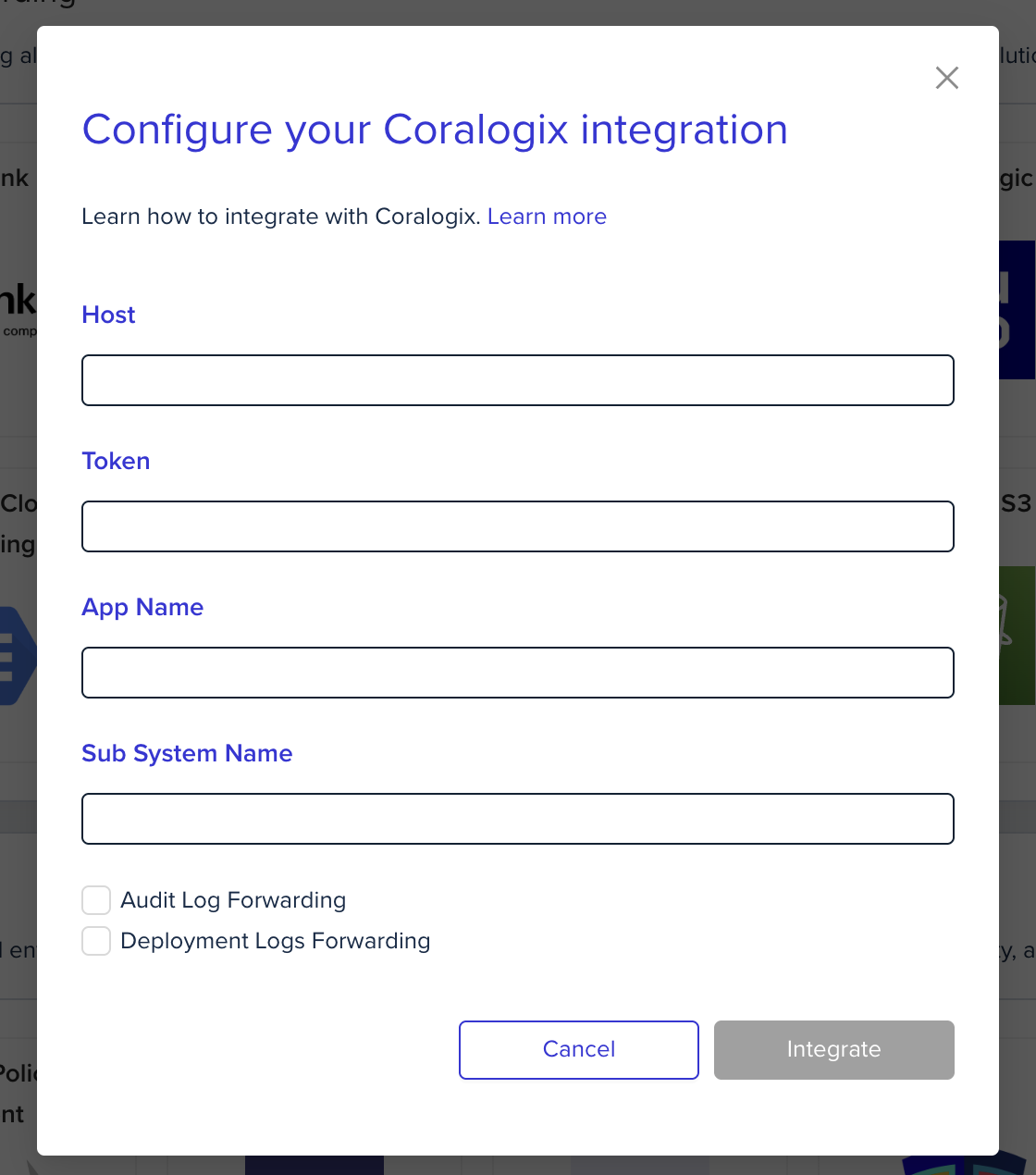
In the organization's integrations page, click on Coralogix and fill the form's fields:
 2. ### Using environment variables
In the env zero platform you will need to configure the following environment variables in [any scope](/guides/admin-guide/variables/#variables-and-scopes-in-env0) you would like to have them
| Environment variable name | Description | Mandatory |
| :------------------------------- | :--------------------------------------------------------------------------------------------------------------------------------------------------------------------------------------------------------------------- | :-------- |
| ENV0\_CORALOGIX\_TOKEN | Your Coralogix private key. A unique ID that represents your company. The private key can be found under 'settings' -> 'send your logs'. It is located in the upper right corner | Yes |
| ENV0\_CORALOGIX\_HOST | Your cluster URL (According to the table above) | Yes |
| ENV0\_CORALOGIX\_APP\_NAME | The name of your environment, for example, a company named “SuperData” would probably insert the “SuperData” string parameter or if they want to debug their test environment they might insert the “SuperData– Test”. | Yes |
| ENV0\_CORALOGIX\_SUBSYSTEM\_NAME | Your application probably has multiple components, for example: Backend servers, Middleware, Frontend servers etc. To help you examine the data you need, inserting the subsystem parameter is vital. | Yes |
## Next steps
* [Logs Forwarding Overview](/guides/integrations/logs-forwarding) - See all supported log forwarding destinations.
* [Datadog Logs](/guides/integrations/logs-forwarding/datadog) - Alternative: forward logs to Datadog.
* [Grafana Loki Logs](/guides/integrations/logs-forwarding/grafana-loki) - Alternative: forward logs to Grafana Loki.
2. ### Using environment variables
In the env zero platform you will need to configure the following environment variables in [any scope](/guides/admin-guide/variables/#variables-and-scopes-in-env0) you would like to have them
| Environment variable name | Description | Mandatory |
| :------------------------------- | :--------------------------------------------------------------------------------------------------------------------------------------------------------------------------------------------------------------------- | :-------- |
| ENV0\_CORALOGIX\_TOKEN | Your Coralogix private key. A unique ID that represents your company. The private key can be found under 'settings' -> 'send your logs'. It is located in the upper right corner | Yes |
| ENV0\_CORALOGIX\_HOST | Your cluster URL (According to the table above) | Yes |
| ENV0\_CORALOGIX\_APP\_NAME | The name of your environment, for example, a company named “SuperData” would probably insert the “SuperData” string parameter or if they want to debug their test environment they might insert the “SuperData– Test”. | Yes |
| ENV0\_CORALOGIX\_SUBSYSTEM\_NAME | Your application probably has multiple components, for example: Backend servers, Middleware, Frontend servers etc. To help you examine the data you need, inserting the subsystem parameter is vital. | Yes |
## Next steps
* [Logs Forwarding Overview](/guides/integrations/logs-forwarding) - See all supported log forwarding destinations.
* [Datadog Logs](/guides/integrations/logs-forwarding/datadog) - Alternative: forward logs to Datadog.
* [Grafana Loki Logs](/guides/integrations/logs-forwarding/grafana-loki) - Alternative: forward logs to Grafana Loki.