> ## Documentation Index
> Fetch the complete documentation index at: https://docs.envzero.com/llms.txt
> Use this file to discover all available pages before exploring further.
# Datadog Logs
> Forward env zero deployment and audit logs to Datadog using an API key and TCP over TLS endpoint, with separate service tags for audits and deployments.
 Datadog Log Management provides tools for teams to transform disparate, unstructured streams of raw log data into centralized, structured datasets.\
env zero can send all of your deployment logs and audit logs directly to your Datadog account.
## Setup
Here are the steps to configure it:
1. Generate an API key in your Datadog account using [this guide](https://docs.datadoghq.com/account_management/api-app-keys/#api-keys)
2. There are two ways to configure the integrations:
1. ### In the env zero app
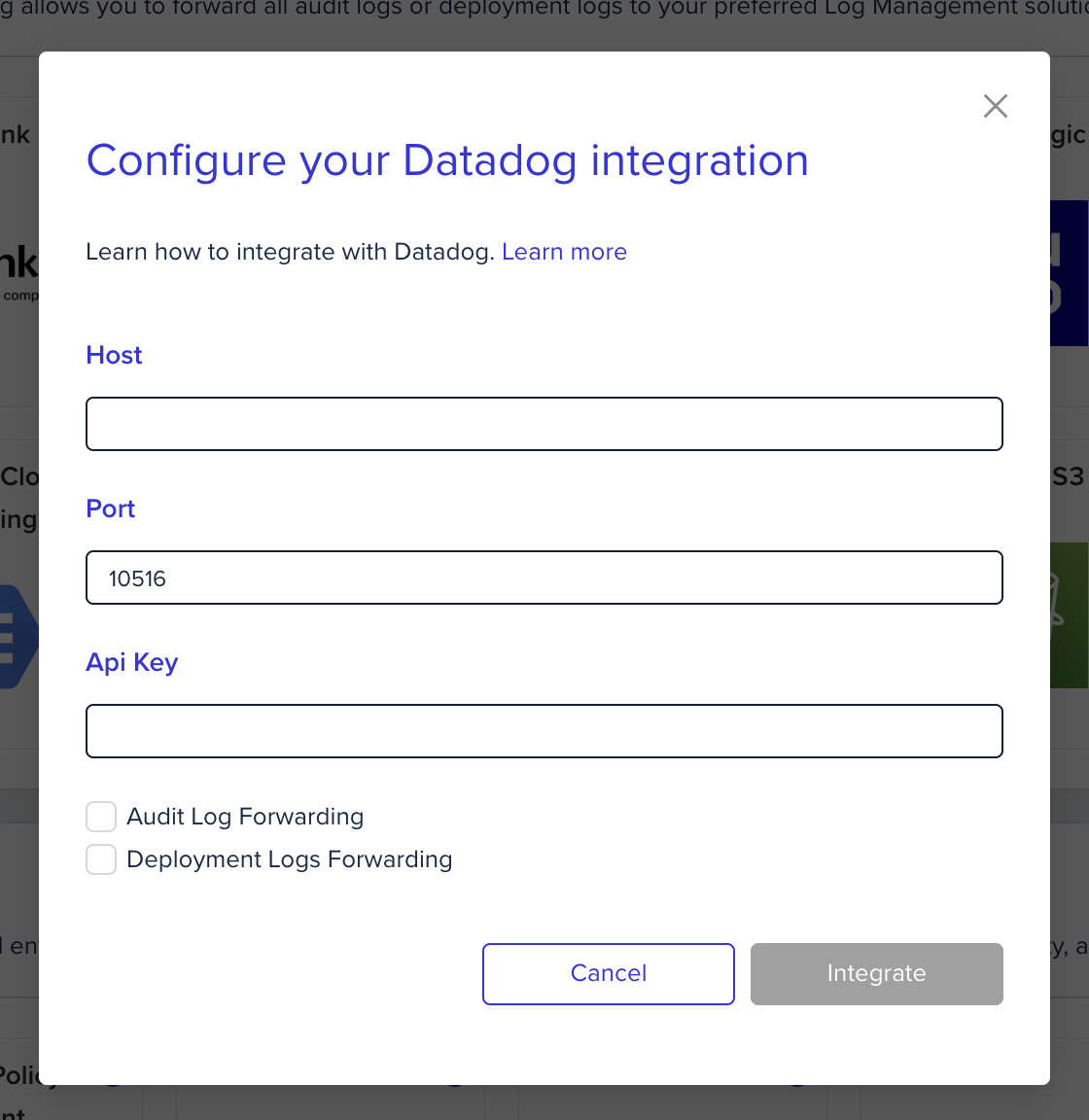
In the organization's integrations page, click on Datadog and fill the form's fields:
Datadog Log Management provides tools for teams to transform disparate, unstructured streams of raw log data into centralized, structured datasets.\
env zero can send all of your deployment logs and audit logs directly to your Datadog account.
## Setup
Here are the steps to configure it:
1. Generate an API key in your Datadog account using [this guide](https://docs.datadoghq.com/account_management/api-app-keys/#api-keys)
2. There are two ways to configure the integrations:
1. ### In the env zero app
In the organization's integrations page, click on Datadog and fill the form's fields:
 2. ### Using environment variables
In the env zero platform you will need to configure the following environment variables in [any scope](/guides/admin-guide/variables/#variables-and-scopes-in-env0) you would like to have them:
| Environment variable name | Description | Mandatory |
| :------------------------ | :--------------------------------------------------------------------------------------------------------------------------------------------------------------------------------------------------------------------------------------------------------------------------------------------------------------------------------------------------------- | :----------------------------------------------- |
| `ENV0_DATADOG_API_KEY` | The API key value you've created. This is for authentication against your Datadog account | Yes |
| `ENV0_DATADOG_HOST` | Specify a Datadog host. **You should put only the host and not the full url** Recommended hosts - `lambda-intake.logs.datadoghq.com` for US, `lambda-intake.logs.datadoghq.eu` for EU You can read more [here](https://docs.datadoghq.com/logs/log_collection/?tab=host#logging-endpoints). | Yes |
| `ENV0_DATADOG_PORT` | Specify the port endpoint for your Datadog host. Datadog log forwarding in env0 uses TCP over TLS endpoints. If you are using the `lambda-intake.logs.datadoghq.com` or `lambda-intake.logs.datadoghq.eu` hosts, use the `443` port. You can read more [here](https://docs.datadoghq.com/logs/log_collection/?tab=host#logging-endpoints).Default: `10516` | No, but it is recommended to provide explicitly. |
env zero adds metadata according to the log type:
1. ### Audit Logs:
* `service` - `env0-audits`
* `ddsource` - `env0-audit-logs`
2. ### Deployment Logs:
* `service` - `env0-deployments`
* `ddsource` - `env0-deployment-logs`
## Next steps
* [Logs Forwarding Overview](/guides/integrations/logs-forwarding) - See all supported log forwarding destinations.
* [Amazon CloudWatch](/guides/integrations/logs-forwarding/cloudwatch) - Alternative: forward logs to CloudWatch.
* [New Relic Logs](/guides/integrations/logs-forwarding/new-relic) - Alternative: forward logs to New Relic.
2. ### Using environment variables
In the env zero platform you will need to configure the following environment variables in [any scope](/guides/admin-guide/variables/#variables-and-scopes-in-env0) you would like to have them:
| Environment variable name | Description | Mandatory |
| :------------------------ | :--------------------------------------------------------------------------------------------------------------------------------------------------------------------------------------------------------------------------------------------------------------------------------------------------------------------------------------------------------- | :----------------------------------------------- |
| `ENV0_DATADOG_API_KEY` | The API key value you've created. This is for authentication against your Datadog account | Yes |
| `ENV0_DATADOG_HOST` | Specify a Datadog host. **You should put only the host and not the full url** Recommended hosts - `lambda-intake.logs.datadoghq.com` for US, `lambda-intake.logs.datadoghq.eu` for EU You can read more [here](https://docs.datadoghq.com/logs/log_collection/?tab=host#logging-endpoints). | Yes |
| `ENV0_DATADOG_PORT` | Specify the port endpoint for your Datadog host. Datadog log forwarding in env0 uses TCP over TLS endpoints. If you are using the `lambda-intake.logs.datadoghq.com` or `lambda-intake.logs.datadoghq.eu` hosts, use the `443` port. You can read more [here](https://docs.datadoghq.com/logs/log_collection/?tab=host#logging-endpoints).Default: `10516` | No, but it is recommended to provide explicitly. |
env zero adds metadata according to the log type:
1. ### Audit Logs:
* `service` - `env0-audits`
* `ddsource` - `env0-audit-logs`
2. ### Deployment Logs:
* `service` - `env0-deployments`
* `ddsource` - `env0-deployment-logs`
## Next steps
* [Logs Forwarding Overview](/guides/integrations/logs-forwarding) - See all supported log forwarding destinations.
* [Amazon CloudWatch](/guides/integrations/logs-forwarding/cloudwatch) - Alternative: forward logs to CloudWatch.
* [New Relic Logs](/guides/integrations/logs-forwarding/new-relic) - Alternative: forward logs to New Relic.