> ## Documentation Index
> Fetch the complete documentation index at: https://docs.envzero.com/llms.txt
> Use this file to discover all available pages before exploring further.
# Grafana Loki Logs
> Forward env zero deployment and audit logs to Grafana Loki using a host URL and Access Policy token, supporting both Grafana Cloud and self-hosted Loki.
 [Grafana Loki](https://grafana.com/oss/loki/) is a log aggregation system designed to store and query logs from all your applications and infrastructure.\
env zero has the ability to send all of your deployment logs and audit logs directly to Grafana Loki.
## Setup
To set up Grafana Loki you will need to get the following data:
1. The Host URL
2. Authorization username and password
### Grafana Cloud
If you're using Grafana Cloud follow these steps to get the relevant data:
1. On the left side menu, go to the `Connections` tab
2. Search for `Hosted logs` and click on it.
3. In the `Configuration Details` tab under the `Configure promtail to send logs to your Grafana Cloud` section create a new `Access Policy token`
4. In the YAML section see the `url` under the `client` section
5. The URL consists of `https://{Number}:{Token}@{URL}`
6. The number is the `ENV0_LOKI_USERNAME` you will need to enter below in the environment variables section - for example: `875656`
7. The token is the `ENV0_LOKI_PASSWORD` you will need to enter below in the environment variables section.
8. The URL should be the `ENV0_LOKI_HOST` - Make sure you only take the Host part, and make sure you add an `https://` at the beginning. For example, a valid URL is `https://logs-prod-006.grafana.net`
### Self Installation of Grafana
1. The URL should be the URL where `Loki` is deployed e.g `http://localhost:3100`
2. The username and password of the Loki server if it requires basic authentication.
There are two ways to configure the integrations:
1. ### In the env zero app
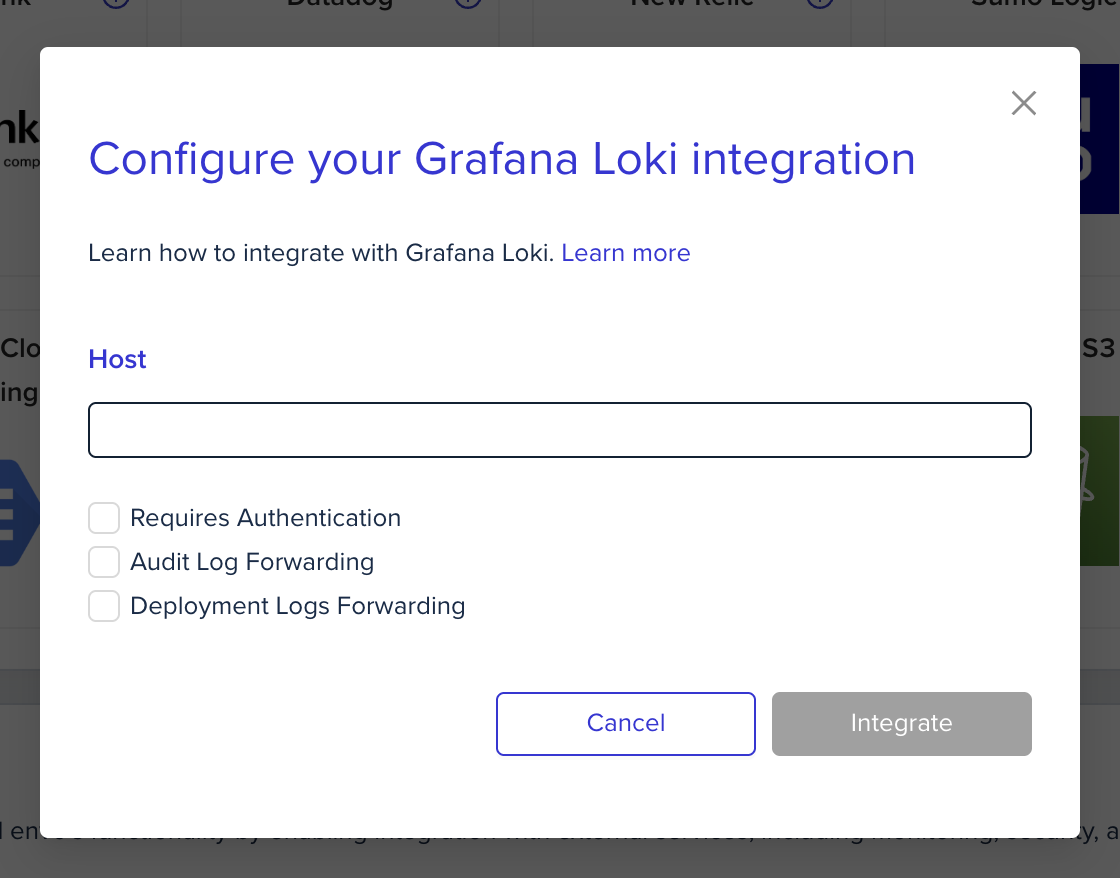
In the organization's integrations page, click on Grafana Loki and fill the form's fields:
[Grafana Loki](https://grafana.com/oss/loki/) is a log aggregation system designed to store and query logs from all your applications and infrastructure.\
env zero has the ability to send all of your deployment logs and audit logs directly to Grafana Loki.
## Setup
To set up Grafana Loki you will need to get the following data:
1. The Host URL
2. Authorization username and password
### Grafana Cloud
If you're using Grafana Cloud follow these steps to get the relevant data:
1. On the left side menu, go to the `Connections` tab
2. Search for `Hosted logs` and click on it.
3. In the `Configuration Details` tab under the `Configure promtail to send logs to your Grafana Cloud` section create a new `Access Policy token`
4. In the YAML section see the `url` under the `client` section
5. The URL consists of `https://{Number}:{Token}@{URL}`
6. The number is the `ENV0_LOKI_USERNAME` you will need to enter below in the environment variables section - for example: `875656`
7. The token is the `ENV0_LOKI_PASSWORD` you will need to enter below in the environment variables section.
8. The URL should be the `ENV0_LOKI_HOST` - Make sure you only take the Host part, and make sure you add an `https://` at the beginning. For example, a valid URL is `https://logs-prod-006.grafana.net`
### Self Installation of Grafana
1. The URL should be the URL where `Loki` is deployed e.g `http://localhost:3100`
2. The username and password of the Loki server if it requires basic authentication.
There are two ways to configure the integrations:
1. ### In the env zero app
In the organization's integrations page, click on Grafana Loki and fill the form's fields:
 2. ### Using environment variables
In the env zero platform you will need to configure the following environment variables in [any scope](/guides/admin-guide/variables/#variables-and-scopes-in-env0) you would like to have them:
| Environment variable name | Description | Mandatory |
| :------------------------ | :----------------------------------------------------------------------------------------------------------------------------------------------------------------------- | :-------- |
| `ENV0_LOKI_HOST` | The URL where Loki is located - Should start with `http`or `https`and should not contain the full URL, just the domain. For example: `https://logs-prod-006.grafana.net` | Yes |
| `ENV0_LOKI_USERNAME` | The Username for authentication | No |
| `ENV0_LOKI_PASSWORD` | The Password for authentication | No |
**Labels**
By default we are adding a label called `app` with a value of `env0`
## Next steps
* [Logs Forwarding Overview](/guides/integrations/logs-forwarding) - See all supported log forwarding destinations.
* [Datadog Logs](/guides/integrations/logs-forwarding/datadog) - Alternative: forward logs to Datadog.
* [Coralogix Logs](/guides/integrations/logs-forwarding/coralogix) - Alternative: forward logs to Coralogix.
2. ### Using environment variables
In the env zero platform you will need to configure the following environment variables in [any scope](/guides/admin-guide/variables/#variables-and-scopes-in-env0) you would like to have them:
| Environment variable name | Description | Mandatory |
| :------------------------ | :----------------------------------------------------------------------------------------------------------------------------------------------------------------------- | :-------- |
| `ENV0_LOKI_HOST` | The URL where Loki is located - Should start with `http`or `https`and should not contain the full URL, just the domain. For example: `https://logs-prod-006.grafana.net` | Yes |
| `ENV0_LOKI_USERNAME` | The Username for authentication | No |
| `ENV0_LOKI_PASSWORD` | The Password for authentication | No |
**Labels**
By default we are adding a label called `app` with a value of `env0`
## Next steps
* [Logs Forwarding Overview](/guides/integrations/logs-forwarding) - See all supported log forwarding destinations.
* [Datadog Logs](/guides/integrations/logs-forwarding/datadog) - Alternative: forward logs to Datadog.
* [Coralogix Logs](/guides/integrations/logs-forwarding/coralogix) - Alternative: forward logs to Coralogix.