> ## Documentation Index
> Fetch the complete documentation index at: https://docs.envzero.com/llms.txt
> Use this file to discover all available pages before exploring further.
# Logz.io Logs
> Send env zero deployment and audit logs to Logz.io using a data shipping token and listener URL, configurable via the UI or environment variables.
 Logz.io is an end to end cloud monitoring tool for unified log, metric, and trace analytics for any stack.\
env zero has the ability to send all of your deployment logs and audit logs directly to your Logz.io account.
## Setup
Here are the steps to configure it:
1. In your Logz.io account, navigate to `Settings` > `Manage Tokens` > `Data shipping tokens` and click on the `Logs` tab.
2. Copy the Listener URL (You can also verify your Logz.io account region and get the listener hostname using [this guide](https://docs.logz.io/user-guide/accounts/account-region.html)).
3. Copy the Logs token.
4. There are two ways to configure the integrations:
1. ### In the env zero app
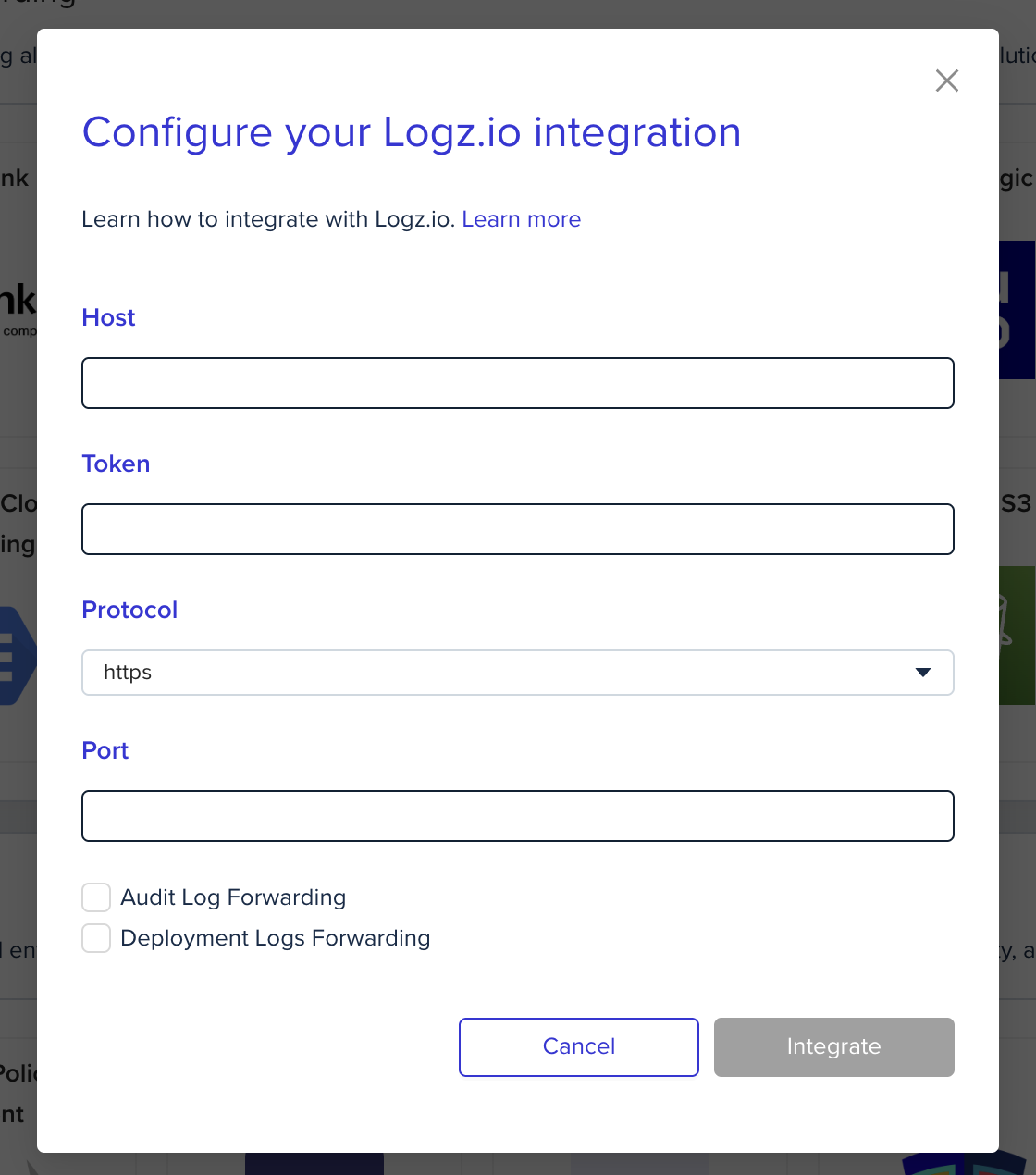
In the organization's integrations page, click on Logz.io and fill the form's fields:
Logz.io is an end to end cloud monitoring tool for unified log, metric, and trace analytics for any stack.\
env zero has the ability to send all of your deployment logs and audit logs directly to your Logz.io account.
## Setup
Here are the steps to configure it:
1. In your Logz.io account, navigate to `Settings` > `Manage Tokens` > `Data shipping tokens` and click on the `Logs` tab.
2. Copy the Listener URL (You can also verify your Logz.io account region and get the listener hostname using [this guide](https://docs.logz.io/user-guide/accounts/account-region.html)).
3. Copy the Logs token.
4. There are two ways to configure the integrations:
1. ### In the env zero app
In the organization's integrations page, click on Logz.io and fill the form's fields:
 2. ### Using environment variables
In the env zero platform you will need to configure the following environment variables in [any scope](/guides/admin-guide/variables/#variables-and-scopes-in-env0) you would like to have them:
| Environment variable name | Description | Mandatory |
| :------------------------ | :----------------------------------------------------------------------------------------------------------------------------------------------------- | :------------------------------------------------- |
| `ENV0_LOGZIO_HOST` | The Listener URL, this includes only the hostname and not a full URL - for example `listener.logz.io` | Yes |
| `ENV0_LOGZIO_TOKEN` | The Logs token - you can read more about that [here](https://docs.logz.io/user-guide/tokens/log-shipping-tokens/) | Yes |
| `ENV0_LOGZIO_PROTOCOL` | The shipment protocol, Logz.io supports HTTP and HTTPS - for more details see [this](https://docs.logz.io/shipping/log-sources/nodejs.html#parameters) | No - Default: HTTPS |
| `ENV0_LOGZIO_PORT` | Destination port. Read more [here](https://docs.logz.io/shipping/log-sources/nodejs.html#parameters) | No - Default: 8070 (for HTTP) or 8071 (for HTTPS) |
env zero sets the log name according to the log type:
1. ### Audit Logs:
* `name` - `env0-audit-logs`
2. ### Deployment Logs:
* `name` - `env0-deployment-logs`
## Next steps
* [Logs Forwarding Overview](/guides/integrations/logs-forwarding) - See all supported log forwarding destinations.
* [Datadog Logs](/guides/integrations/logs-forwarding/datadog) - Alternative: forward logs to Datadog.
* [New Relic Logs](/guides/integrations/logs-forwarding/new-relic) - Alternative: forward logs to New Relic.
2. ### Using environment variables
In the env zero platform you will need to configure the following environment variables in [any scope](/guides/admin-guide/variables/#variables-and-scopes-in-env0) you would like to have them:
| Environment variable name | Description | Mandatory |
| :------------------------ | :----------------------------------------------------------------------------------------------------------------------------------------------------- | :------------------------------------------------- |
| `ENV0_LOGZIO_HOST` | The Listener URL, this includes only the hostname and not a full URL - for example `listener.logz.io` | Yes |
| `ENV0_LOGZIO_TOKEN` | The Logs token - you can read more about that [here](https://docs.logz.io/user-guide/tokens/log-shipping-tokens/) | Yes |
| `ENV0_LOGZIO_PROTOCOL` | The shipment protocol, Logz.io supports HTTP and HTTPS - for more details see [this](https://docs.logz.io/shipping/log-sources/nodejs.html#parameters) | No - Default: HTTPS |
| `ENV0_LOGZIO_PORT` | Destination port. Read more [here](https://docs.logz.io/shipping/log-sources/nodejs.html#parameters) | No - Default: 8070 (for HTTP) or 8071 (for HTTPS) |
env zero sets the log name according to the log type:
1. ### Audit Logs:
* `name` - `env0-audit-logs`
2. ### Deployment Logs:
* `name` - `env0-deployment-logs`
## Next steps
* [Logs Forwarding Overview](/guides/integrations/logs-forwarding) - See all supported log forwarding destinations.
* [Datadog Logs](/guides/integrations/logs-forwarding/datadog) - Alternative: forward logs to Datadog.
* [New Relic Logs](/guides/integrations/logs-forwarding/new-relic) - Alternative: forward logs to New Relic.