> ## Documentation Index
> Fetch the complete documentation index at: https://docs.envzero.com/llms.txt
> Use this file to discover all available pages before exploring further.
# Enable env zero Secrets
> Control whether users can store sensitive data such as variables, SSH keys, and deployment credentials in env zero, using an organization-level policy.
Sensitive data storage within the env zero platform is governed by organizational policies, allowing administrators to disable this feature to prevent users from storing sensitive information if required.
This policy applies to variables, SSH keys, and deployment credentials.
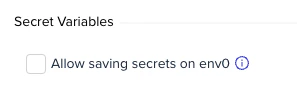 To modify the policy, navigate to **Organization Settings** and then select **Policies**.
At this stage, only organizations using self-hosted agents can modify this policy.
## Next steps
* [Managing Variables](/guides/admin-guide/variables) - Manage environment and Terraform variables securely.
* [Managing SSH Keys](/guides/admin-guide/variables/ssh-keys) - Store and manage SSH keys in env zero.
* [Manage Policies](/guides/policies-governance/policies) - Review all organization-level policy controls.
To modify the policy, navigate to **Organization Settings** and then select **Policies**.
At this stage, only organizations using self-hosted agents can modify this policy.
## Next steps
* [Managing Variables](/guides/admin-guide/variables) - Manage environment and Terraform variables securely.
* [Managing SSH Keys](/guides/admin-guide/variables/ssh-keys) - Store and manage SSH keys in env zero.
* [Manage Policies](/guides/policies-governance/policies) - Review all organization-level policy controls.