> ## Documentation Index
> Fetch the complete documentation index at: https://docs.envzero.com/llms.txt
> Use this file to discover all available pages before exploring further.
# Deployment controls
> Reference for env zero deployment controls: skip apply, state refresh, redundant deployments, PR plan policies, skipped status checks, and apply mergeability.
Deployment controls are toggles that adjust how env zero executes plans, applies, and PR plans. Some are configured per project; others are organization-wide.
| Control | Configured in | Scope |
| :---------------------------------- | :------------------------------- | :------------------------------ |
| Skip apply when plan has no changes | Project Settings > Policies | Per project |
| Skip state refresh | Environment destroy dialog | Per destroy operation |
| Skip redundant deployments | Project Settings > Policies | Per project |
| Skip PR plans on merge commits | Organization Settings > Policies | Organization-wide |
| Do not report skipped status checks | Organization Settings > Policies | Organization-wide |
| Bypass apply mergeability check | Organization Settings > Policies | Organization-wide (GitHub only) |
***
## Skip apply when plan has no changes
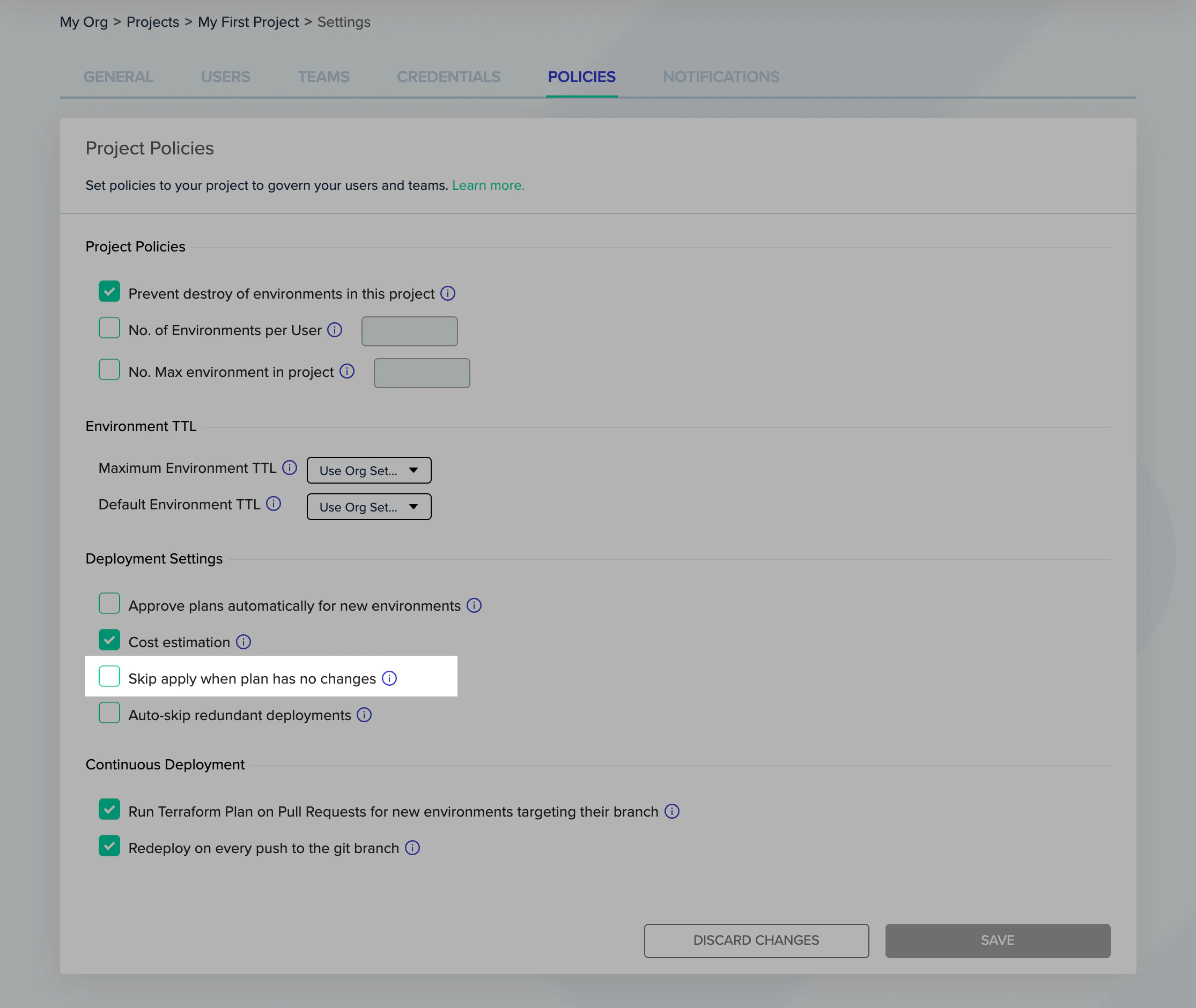
If you mark "Skip apply when plan has no changes" under **Project Settings** > **Policies**, the apply step is skipped when there are no pending resource changes in the Terraform plan.
This is useful for automated deploys when you want continuous deployment or scheduled environments to require user approval only for plans that have actual resource changes.
 ### Interaction with other approval settings
This policy also covers approvals forced from a custom flow with [`ENV0_REQUIRES_APPROVAL=true`](/guides/admin-guide/custom-flows#forcing-manual-approvals). When the plan reports no resource changes, the deployment finishes without waiting for approval, even if a custom flow set that variable.
An [approval policy](/guides/policies-governance/approval-policies) that returns a pending result is the exception. It holds the deployment for approval whether or not the plan has changes.
The policy is set per project, so it governs the sub-environments of any [workflow](/guides/admin-guide/workflows/create-a-new-workflow) in that project as well.
***
## Skip state refresh
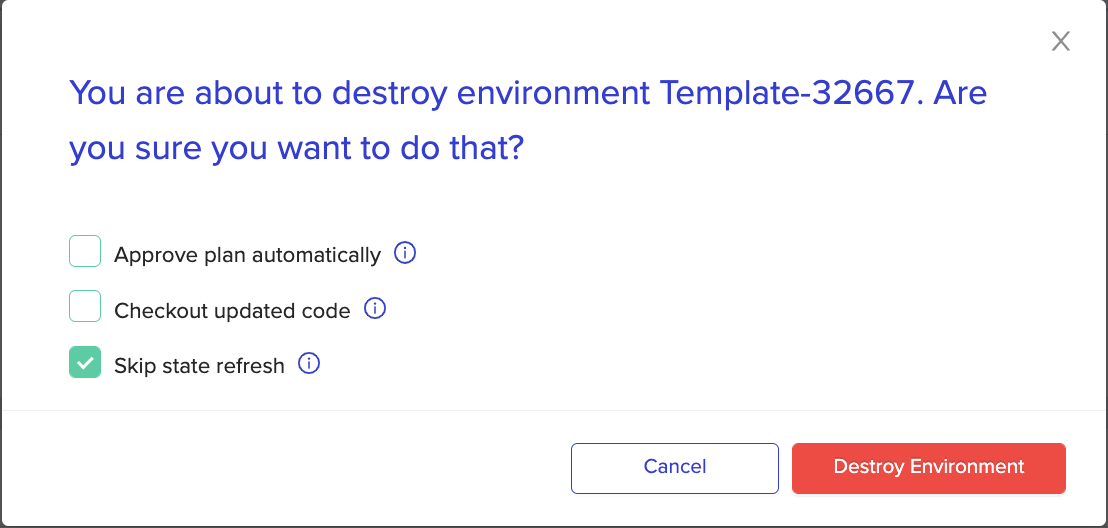
Skip state refresh is a last resort for state mismatches that cause the Terraform plan to fail. It is equivalent to `terraform plan -refresh=false` and is available only when destroying environments.
To skip state refresh during deployment (not destroy), set the `TF_CLI_ARGS_plan` environment variable to `-refresh=false`.
While destroying an environment, check the `skip state refresh` checkbox. The destruction process then ignores state mismatches and removes resources that match the current state.
### Interaction with other approval settings
This policy also covers approvals forced from a custom flow with [`ENV0_REQUIRES_APPROVAL=true`](/guides/admin-guide/custom-flows#forcing-manual-approvals). When the plan reports no resource changes, the deployment finishes without waiting for approval, even if a custom flow set that variable.
An [approval policy](/guides/policies-governance/approval-policies) that returns a pending result is the exception. It holds the deployment for approval whether or not the plan has changes.
The policy is set per project, so it governs the sub-environments of any [workflow](/guides/admin-guide/workflows/create-a-new-workflow) in that project as well.
***
## Skip state refresh
Skip state refresh is a last resort for state mismatches that cause the Terraform plan to fail. It is equivalent to `terraform plan -refresh=false` and is available only when destroying environments.
To skip state refresh during deployment (not destroy), set the `TF_CLI_ARGS_plan` environment variable to `-refresh=false`.
While destroying an environment, check the `skip state refresh` checkbox. The destruction process then ignores state mismatches and removes resources that match the current state.
 ### Common errors addressed by this policy
| Error message | Description |
| :------------------------------------------------------------------------------------------------------ | :------------------------------------------------------------------------------------------------------------------------------------------------------------------- |
| "aws\_secretsmanager\_secret ... You can't perform this operation on secret ... because it was deleted" | A secret used by a resource is marked for deletion or is already deleted. This data source throws an error on the plan phase and prevents the environment's deletion |
| "Error during making a request: ... /get ... in data "http ..."" | An HTTP data source that was available during the deploy phase is not available during the destroy phase |
***
## Skip redundant deployments
Skip redundant deployments is useful for dynamic environments with frequent changes, when you only care about the latest changes and want fast continuous deployment.
When enabled under **Project Settings** > **Policies** > **Skip redundant deployments**: if multiple deploy executions are queued, env zero skips up to the next destroy execution. If there is no destroy execution queued, it skips to the last queued deployment. Destroy deployments and PR plans are never skipped since their sequence matters.
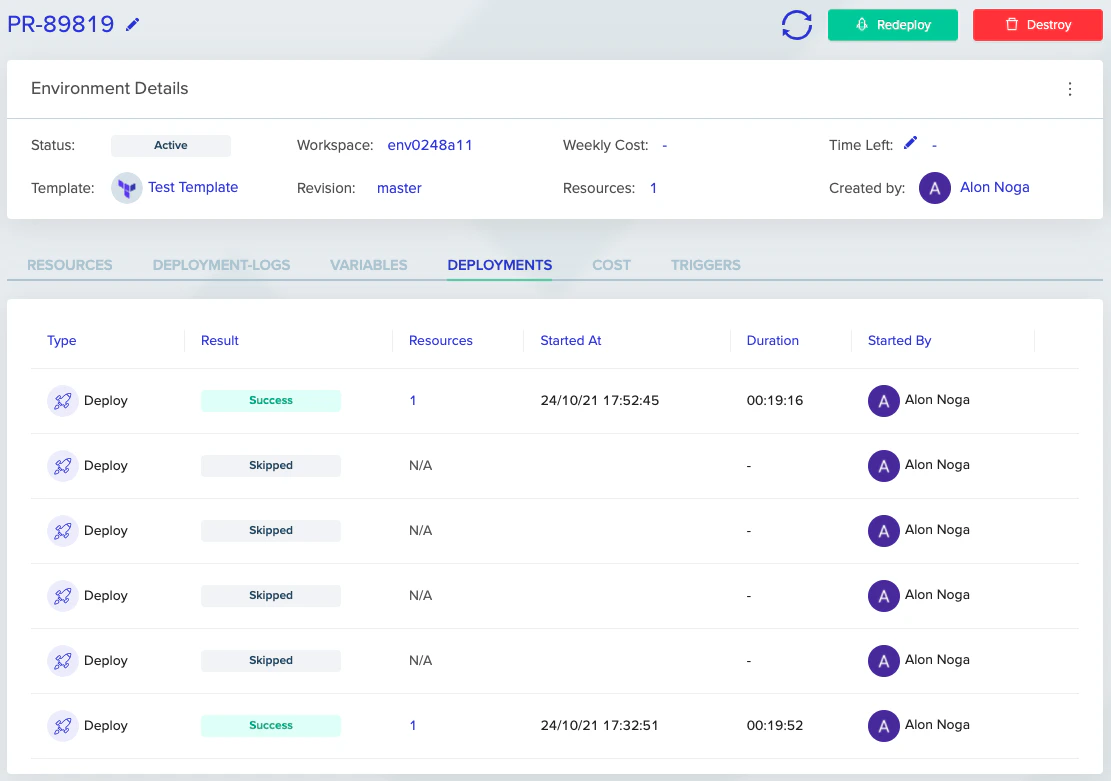
In the example below, four queued deployments were skipped, saving about 80 minutes. Instead of waiting almost 2 hours, the latest version deployed in 20 minutes.
### Common errors addressed by this policy
| Error message | Description |
| :------------------------------------------------------------------------------------------------------ | :------------------------------------------------------------------------------------------------------------------------------------------------------------------- |
| "aws\_secretsmanager\_secret ... You can't perform this operation on secret ... because it was deleted" | A secret used by a resource is marked for deletion or is already deleted. This data source throws an error on the plan phase and prevents the environment's deletion |
| "Error during making a request: ... /get ... in data "http ..."" | An HTTP data source that was available during the deploy phase is not available during the destroy phase |
***
## Skip redundant deployments
Skip redundant deployments is useful for dynamic environments with frequent changes, when you only care about the latest changes and want fast continuous deployment.
When enabled under **Project Settings** > **Policies** > **Skip redundant deployments**: if multiple deploy executions are queued, env zero skips up to the next destroy execution. If there is no destroy execution queued, it skips to the last queued deployment. Destroy deployments and PR plans are never skipped since their sequence matters.
In the example below, four queued deployments were skipped, saving about 80 minutes. Instead of waiting almost 2 hours, the latest version deployed in 20 minutes.
 ***
## Skip PR plans on merge commits
This policy prevents a [PR plan](/guides/admin-guide/environments/plan-on-pull-request) from running on a merge commit when the merge commit includes file changes that are not part of the PR.
By default, env zero considers file changes between two commits. When you push a merge commit, this can include file changes not included in the PR. With this policy enabled, env zero considers only files included in the PR.
Updated PR plan
If you enable this policy, env zero may not update the PR plan for the environment even if the environment revision changed, until you cause the PR plan trigger for this PR.
Supported VCS: GitHub, Bitbucket, GitLab, and Bitbucket Server.
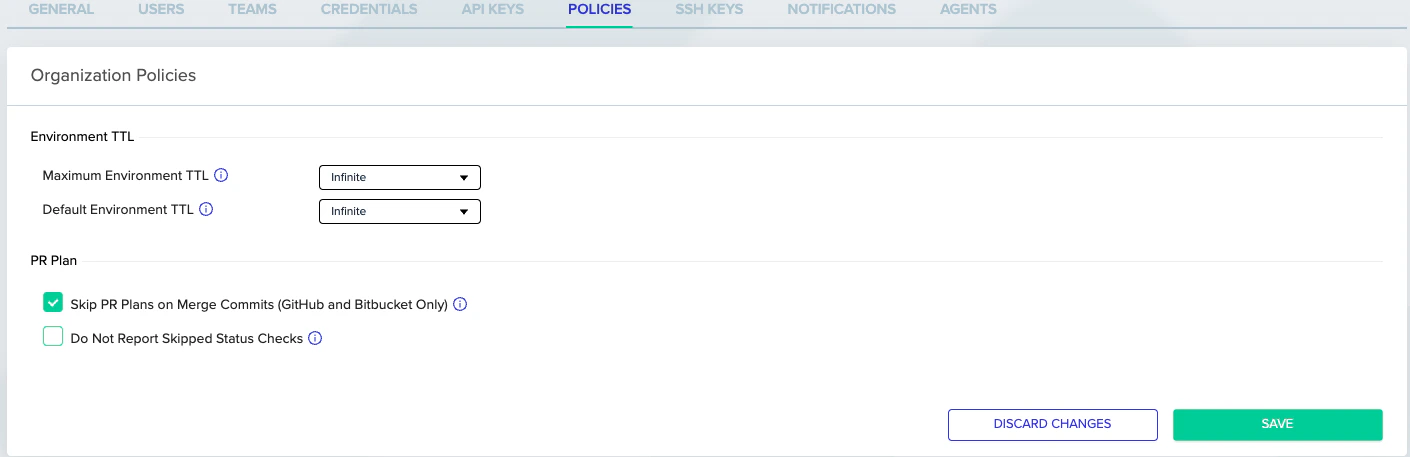
Configure this policy in **Organization Settings** > **Policies**.
***
## Skip PR plans on merge commits
This policy prevents a [PR plan](/guides/admin-guide/environments/plan-on-pull-request) from running on a merge commit when the merge commit includes file changes that are not part of the PR.
By default, env zero considers file changes between two commits. When you push a merge commit, this can include file changes not included in the PR. With this policy enabled, env zero considers only files included in the PR.
Updated PR plan
If you enable this policy, env zero may not update the PR plan for the environment even if the environment revision changed, until you cause the PR plan trigger for this PR.
Supported VCS: GitHub, Bitbucket, GitLab, and Bitbucket Server.
Configure this policy in **Organization Settings** > **Policies**.
 ***
## Do not report skipped status checks
When [Plan on pull request](/guides/admin-guide/environments/plan-on-pull-request) is enabled, env zero reports a commit status check for every PR commit based on the associated PR plan. If a commit includes no changes relevant to the env zero environment (no matching files in the glob pattern or template directory), env zero marks the commit status as "skipped" in GitHub, or "success" in other VCS providers.
Marking commits as "skipped" lets you set those status checks as required in your VCS. However, in some setups, such as monorepos with many env zero templates, you may not want those "skipped" entries to appear. The "Do not report skipped status checks" policy stops env zero from creating the status checks at all for those commits, instead of marking them as "skipped".
Required status check
If you want to make an env zero status check required in your VCS, do not use this policy. If a PR plan does not run and this policy is checked, env zero creates no status check at all, and the merge will be blocked.
Configure this policy in **Organization Settings** > **Policies**.
***
## Do not report skipped status checks
When [Plan on pull request](/guides/admin-guide/environments/plan-on-pull-request) is enabled, env zero reports a commit status check for every PR commit based on the associated PR plan. If a commit includes no changes relevant to the env zero environment (no matching files in the glob pattern or template directory), env zero marks the commit status as "skipped" in GitHub, or "success" in other VCS providers.
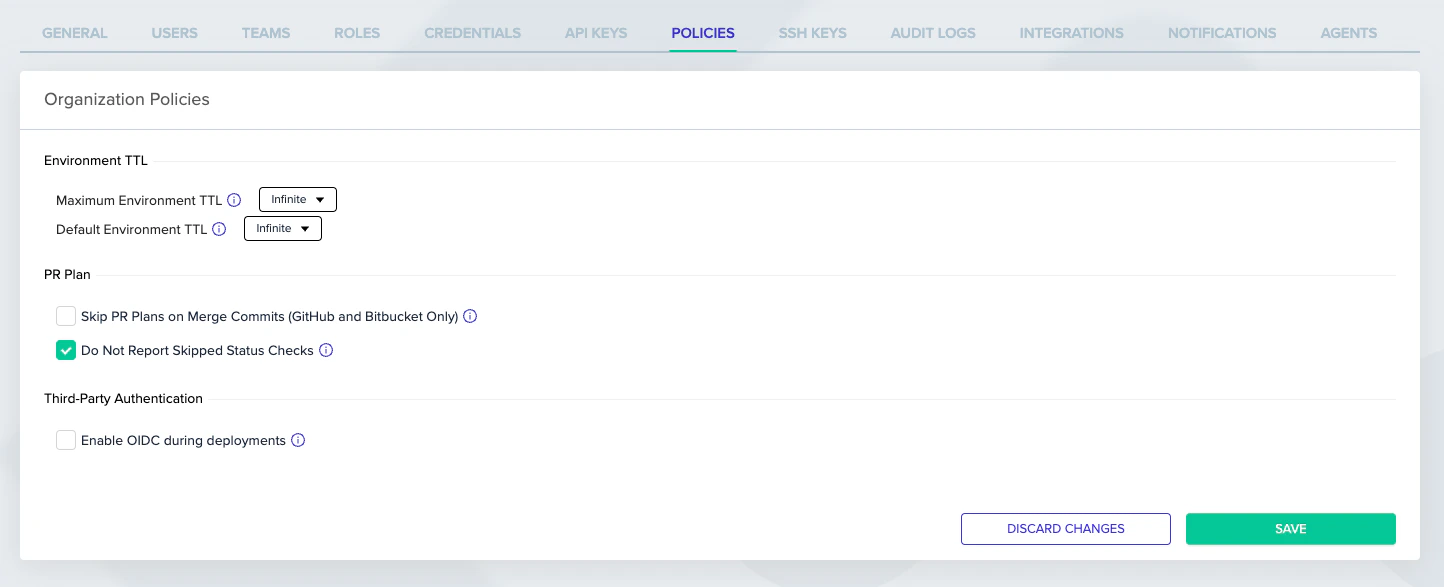
Marking commits as "skipped" lets you set those status checks as required in your VCS. However, in some setups, such as monorepos with many env zero templates, you may not want those "skipped" entries to appear. The "Do not report skipped status checks" policy stops env zero from creating the status checks at all for those commits, instead of marking them as "skipped".
Required status check
If you want to make an env zero status check required in your VCS, do not use this policy. If a PR plan does not run and this policy is checked, env zero creates no status check at all, and the merge will be blocked.
Configure this policy in **Organization Settings** > **Policies**.
 ***
## Bypass apply mergeability check
When using [Plan and apply via PR comments](/guides/admin-guide/environments/plan-and-apply-from-pr-comments), env zero checks that a pull request is mergeable before running an apply. If you also set the `env0/Apply` commit status as a required status check in GitHub branch protection, this creates a circular dependency: the PR is not mergeable because `env0/Apply` has not passed yet, but apply cannot run because the PR is not mergeable.
The Bypass apply mergeability check policy resolves this by evaluating the PR's mergeability while excluding env zero's own Apply status checks from the requirements.
This policy applies to GitHub and GitHub Enterprise only. Other VCS providers are not affected.
### How it works
When this policy is enabled, env zero evaluates PR mergeability by querying GitHub's branch protection rules and repository rulesets directly, rather than relying on GitHub's merged mergeability state. During this evaluation, env zero excludes its own Apply-related status checks (such as `env0/Apply`) from the required checks list.
All other branch protection requirements, such as required reviews and other CI checks, are still enforced. Only the env zero Apply checks are bypassed.
### Enabling the policy
Navigate to **Organization Settings** > **Policies**, and under **Plan and apply from PR comments**, check **Bypass PR mergeability check for env0/Apply (GitHub only)**.
***
## Bypass apply mergeability check
When using [Plan and apply via PR comments](/guides/admin-guide/environments/plan-and-apply-from-pr-comments), env zero checks that a pull request is mergeable before running an apply. If you also set the `env0/Apply` commit status as a required status check in GitHub branch protection, this creates a circular dependency: the PR is not mergeable because `env0/Apply` has not passed yet, but apply cannot run because the PR is not mergeable.
The Bypass apply mergeability check policy resolves this by evaluating the PR's mergeability while excluding env zero's own Apply status checks from the requirements.
This policy applies to GitHub and GitHub Enterprise only. Other VCS providers are not affected.
### How it works
When this policy is enabled, env zero evaluates PR mergeability by querying GitHub's branch protection rules and repository rulesets directly, rather than relying on GitHub's merged mergeability state. During this evaluation, env zero excludes its own Apply-related status checks (such as `env0/Apply`) from the required checks list.
All other branch protection requirements, such as required reviews and other CI checks, are still enforced. Only the env zero Apply checks are bypassed.
### Enabling the policy
Navigate to **Organization Settings** > **Policies**, and under **Plan and apply from PR comments**, check **Bypass PR mergeability check for env0/Apply (GitHub only)**.
 ### When to use this policy
Enable this policy if you:
1. Use [PR comment applies](/guides/admin-guide/environments/plan-and-apply-from-pr-comments)
2. Have GitHub branch protection or repository rulesets that require the `env0/Apply` status check to pass before merging
If you do not have `env0/Apply` set as a required status check in your GitHub branch protection rules, you do not need this policy.
***
## Next steps
* [Approval policies](/guides/policies-governance/approval-policies) - Configure who can approve deployments and under what conditions.
* [Running plan on pull requests](/guides/admin-guide/environments/plan-on-pull-request) - Set up automated plan runs on pull requests.
* [Using continuous deployment](/guides/admin-guide/environments/continuous-deployment) - Configure automatic redeployment on every git push.
* [Environment overview](/guides/admin-guide/environments) - Review the full environment lifecycle, including destroy and inactive states.
### When to use this policy
Enable this policy if you:
1. Use [PR comment applies](/guides/admin-guide/environments/plan-and-apply-from-pr-comments)
2. Have GitHub branch protection or repository rulesets that require the `env0/Apply` status check to pass before merging
If you do not have `env0/Apply` set as a required status check in your GitHub branch protection rules, you do not need this policy.
***
## Next steps
* [Approval policies](/guides/policies-governance/approval-policies) - Configure who can approve deployments and under what conditions.
* [Running plan on pull requests](/guides/admin-guide/environments/plan-on-pull-request) - Set up automated plan runs on pull requests.
* [Using continuous deployment](/guides/admin-guide/environments/continuous-deployment) - Configure automatic redeployment on every git push.
* [Environment overview](/guides/admin-guide/environments) - Review the full environment lifecycle, including destroy and inactive states.