> ## Documentation Index
> Fetch the complete documentation index at: https://docs.envzero.com/llms.txt
> Use this file to discover all available pages before exploring further.
# AWS Single Sign On Integration
> Configure AWS SSO as a SAML 2.0 provider for env zero by creating a custom SAML app in IAM Identity Center, mapping user attributes, and completing the form.
## Introduction
This guide will detail the various steps required to integrate AWS SSO as a SAML provider for your env zero organization. The current implementation supports SAML 2.0 and is used for authentication only, where you define your users in your AWS SSO account to enable them access to your env zero organization.
**Self-Service Configuration Available**: You can configure SAML SSO directly from your organization settings. See [Self-Service SSO Integration](/guides/sso-integrations/self-service-sso) for an overview, or [Self-Service SAML Setup](/guides/sso-integrations/self-service-saml) for step-by-step instructions.
## Steps
1. Login to your AWS Account and navigate to the AWS SSO service.
2. Click on the Applications tabs on the left-hand side menu.
3. Click on the `Add a new application` button.
4. Select `I have an application I want to set up`.
5. Select the `SAML 2.0`
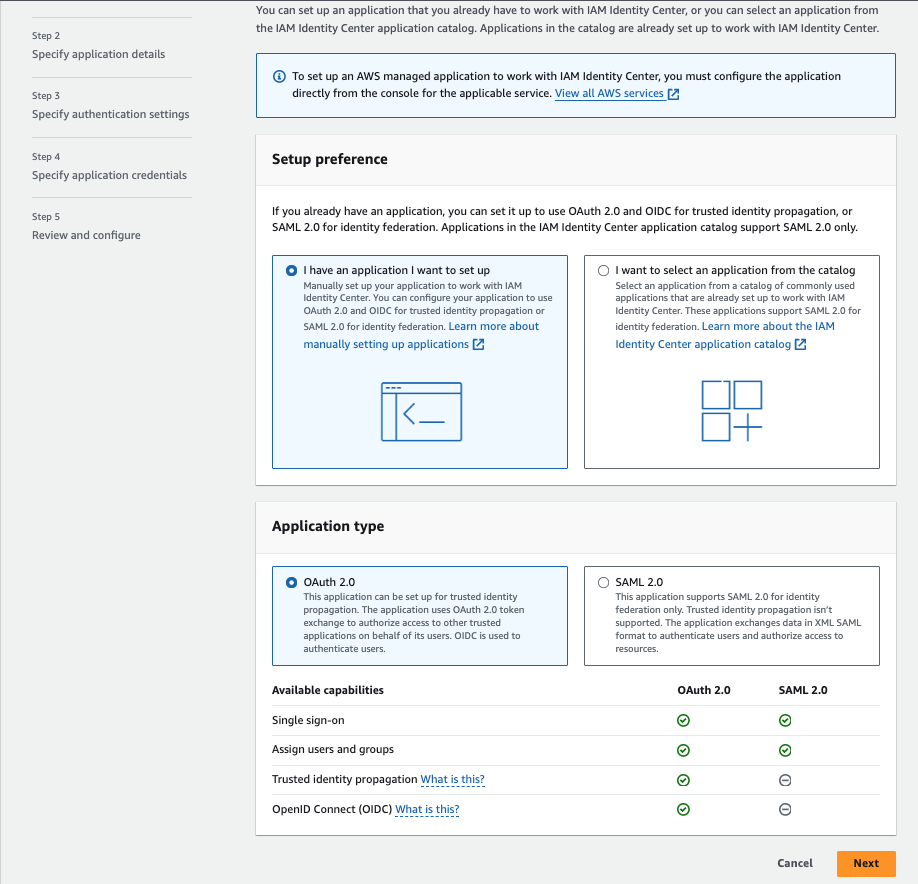 6. Enter the `Display name` and `Description`
7. Configure the `User and group assignment method` section
8. In the `AWS access portal` set the `Application URL` to be `https://app.env0.com/login/sso`
9. Click on the `Next` button
10. In the `IAM Identity Center metadata` section download the `IAM Identity Center Certificate` and copy the `IAM Identity Center sign-in URL`
11. In the `Application properties` set the `Application start URL` to `https://app.env0.com/login/sso`
12. Set the desired `Session duration`
13. In the `Application metadata` section click on the `If you don't have a metadata file, you can manually type your metadata values` link
14. In the `Application metadata` section, under `Application ACS URL` enter the following `https://login.app.env0.com/login/callback?connection={YOUR_ENV0_ORG_ID}`
15. In the `Application SAML audience` enter `urn:auth0:env0:{YOUR_ENV0_ORG_ID}`
16. Click on the `Submit` button
17. In the Action Dropdown select `Edit Attribute mappings`
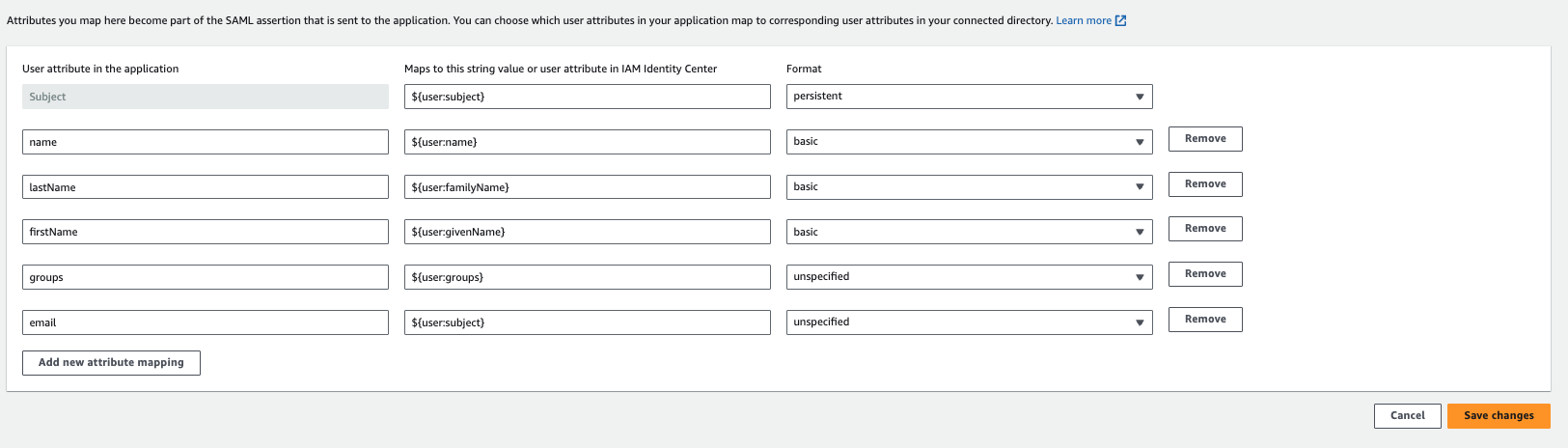
18. Add the following attributes:
| Name | Value | Format | Mandatory |
| :-------- | :------------------- | :---------- | :-------- |
| Subject | \$\{user:subject} | persistent | Yes |
| name | \$\{user:name} | basic | Yes |
| lastName | \$\{user:familyName} | basic | Yes |
| firstName | \$\{user:givenName} | basic | Yes |
| groups | \$\{user:groups} | unspecified | No |
| email | \$\{user:subject} | unspecified | Yes |
6. Enter the `Display name` and `Description`
7. Configure the `User and group assignment method` section
8. In the `AWS access portal` set the `Application URL` to be `https://app.env0.com/login/sso`
9. Click on the `Next` button
10. In the `IAM Identity Center metadata` section download the `IAM Identity Center Certificate` and copy the `IAM Identity Center sign-in URL`
11. In the `Application properties` set the `Application start URL` to `https://app.env0.com/login/sso`
12. Set the desired `Session duration`
13. In the `Application metadata` section click on the `If you don't have a metadata file, you can manually type your metadata values` link
14. In the `Application metadata` section, under `Application ACS URL` enter the following `https://login.app.env0.com/login/callback?connection={YOUR_ENV0_ORG_ID}`
15. In the `Application SAML audience` enter `urn:auth0:env0:{YOUR_ENV0_ORG_ID}`
16. Click on the `Submit` button
17. In the Action Dropdown select `Edit Attribute mappings`
18. Add the following attributes:
| Name | Value | Format | Mandatory |
| :-------- | :------------------- | :---------- | :-------- |
| Subject | \$\{user:subject} | persistent | Yes |
| name | \$\{user:name} | basic | Yes |
| lastName | \$\{user:familyName} | basic | Yes |
| firstName | \$\{user:givenName} | basic | Yes |
| groups | \$\{user:groups} | unspecified | No |
| email | \$\{user:subject} | unspecified | Yes |
 Groups Mapping with AWS SSO
The `groups` attribute in AWS SSO currently supports the UUID of the groups and not the actual name of the group.
This means that if you set the `groups` attribute we will sync the groups based on their UUID.
19. Click on `Assigned users` button and assign the relevant users and groups to the application
20. Navigate to your env zero organization settings and go to the **SSO** tab.
21. Click on **SAML** and complete the self-service form with:
* Identity Provider Single Sign-on URL (AWS SSO sign-in URL)
* X.509 Certificate (AWS SSO Certificate)
## Next steps
* [Self-Service SAML Setup](/guides/sso-integrations/self-service-saml) - Review the general SAML configuration process.
* [Sync Roles & Groups From Your IdP](/guides/sso-integrations/importing-roles-or-groups-from-your-identity-provider) - Import AWS SSO groups into env zero.
* [Okta Integration](/guides/sso-integrations/okta-integration) - Compare with another supported identity provider.
Groups Mapping with AWS SSO
The `groups` attribute in AWS SSO currently supports the UUID of the groups and not the actual name of the group.
This means that if you set the `groups` attribute we will sync the groups based on their UUID.
19. Click on `Assigned users` button and assign the relevant users and groups to the application
20. Navigate to your env zero organization settings and go to the **SSO** tab.
21. Click on **SAML** and complete the self-service form with:
* Identity Provider Single Sign-on URL (AWS SSO sign-in URL)
* X.509 Certificate (AWS SSO Certificate)
## Next steps
* [Self-Service SAML Setup](/guides/sso-integrations/self-service-saml) - Review the general SAML configuration process.
* [Sync Roles & Groups From Your IdP](/guides/sso-integrations/importing-roles-or-groups-from-your-identity-provider) - Import AWS SSO groups into env zero.
* [Okta Integration](/guides/sso-integrations/okta-integration) - Compare with another supported identity provider.