> ## Documentation Index
> Fetch the complete documentation index at: https://docs.envzero.com/llms.txt
> Use this file to discover all available pages before exploring further.
# Azure Active Directory Integration
> Configure Microsoft Entra ID or Azure AD as an OAuth provider for env zero SSO with Redirect URI setup, client secret, group-based team syncing, and SCIM 2.0.
## Overview
Configure Microsoft Entra ID (Azure AD) as an OAuth provider for your env zero organization. This integration enables authentication through Entra ID and supports automatic team syncing based on Entra ID groups.
## Prerequisites
**Edit Organization Settings permission** is required to configure SSO.
## Setup Steps
Register an application in the [Microsoft identity platform](https://docs.microsoft.com/en-us/azure/active-directory/develop/quickstart-register-app). In platform settings, select **Web** and add a Redirect URI: `https://login.app.env0.com/login/callback`
Create a Client Secret and note the value. Copy the Application (client) ID and Client Secret Value for the next step.
Navigate to your organization settings > **SSO** tab. Click **Azure AD** (displayed as "Azure AD" in older tenants) and complete the self-service form with:
* Application (client) ID
* Client Secret Value
* Email domain (e.g., env0.com) or Microsoft tenant domain (e.g., env0.onmicrosoft.com)
**Multitenant Microsoft Entra ID**
If you are in a Multitenant environment, under **Authentication / Supported account types**, select **"Accounts in any organizational directory (Any Azure AD directory - Multitenant)"**.
## Enabling Access
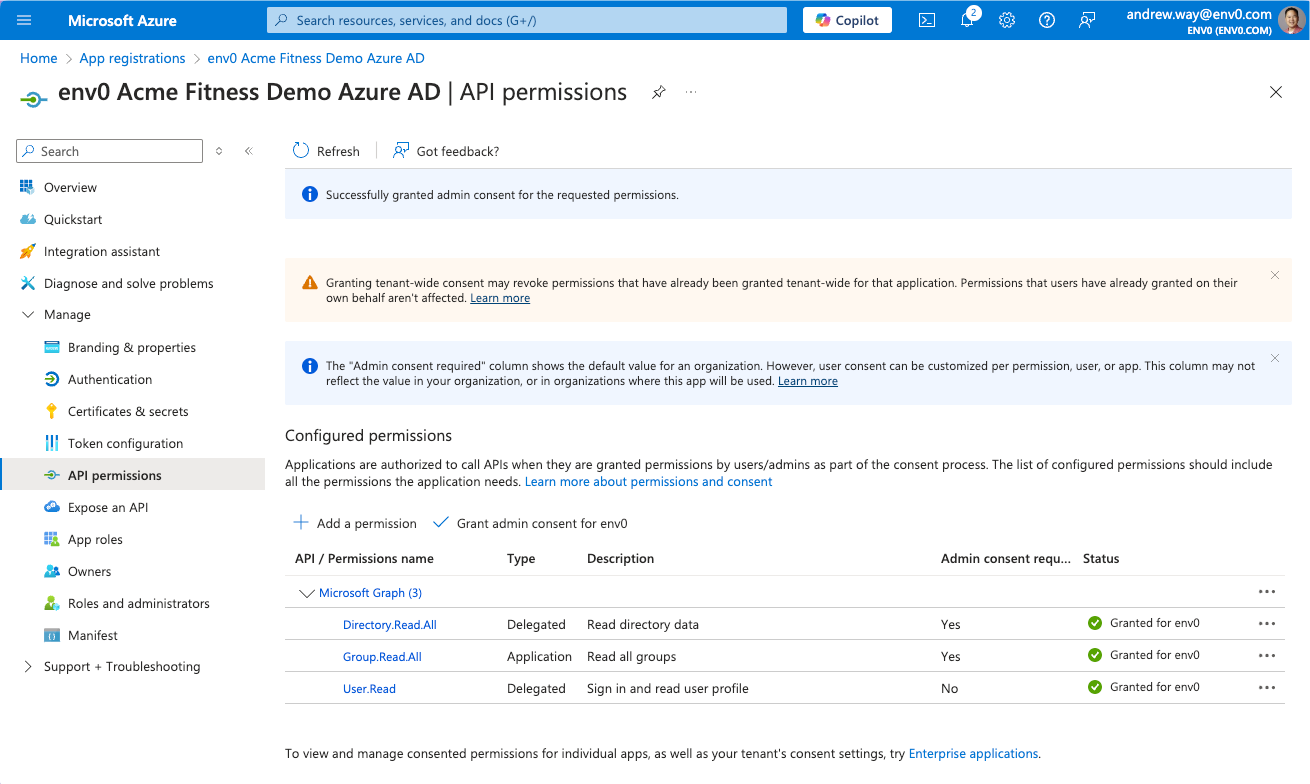
If users have trouble accessing the App Registration, grant admin consent:
Go to **Manage > API Permissions** or **Security > Permissions** in your Entra ID application.
Click **"Grant Admin consent for env zero"** for:
* **Microsoft Graph User.Read** - `Sign in and read user profile` permissions
* **Microsoft Graph Directory.Read.All** permissions
 ## Teams Syncing
**Teams Syncing**
Teams are synced each time a user logs in:
1. env zero creates a new team if one doesn't exist based on the group name from the OAuth provider.
2. If the team exists in env zero, we will not create a new team.
3. Users are assigned to all teams in env zero based on the group names they belong to in the OAuth provider.
4. If a user is removed from a group in the OAuth provider, they are removed from the team in env zero.
Learn more: [Sync Roles & Groups From Your IdP](/guides/sso-integrations/importing-roles-or-groups-from-your-identity-provider)
## Automated User Provisioning (SCIM)
Microsoft Entra ID supports SCIM 2.0 for automatically provisioning and deprovisioning users in env zero. With SCIM, user access is updated continuously rather than only at login. See [SCIM Provisioning](/guides/sso-integrations/scim-provisioning) to set it up.
## Next steps
* [SCIM Provisioning](/guides/sso-integrations/scim-provisioning) - Automate user provisioning with Microsoft Entra ID.
* [Sync Roles & Groups From Your IdP](/guides/sso-integrations/importing-roles-or-groups-from-your-identity-provider) - Import Entra ID groups into env zero.
* [Okta Integration](/guides/sso-integrations/okta-integration) - Compare with the Okta SAML setup guide.
## Teams Syncing
**Teams Syncing**
Teams are synced each time a user logs in:
1. env zero creates a new team if one doesn't exist based on the group name from the OAuth provider.
2. If the team exists in env zero, we will not create a new team.
3. Users are assigned to all teams in env zero based on the group names they belong to in the OAuth provider.
4. If a user is removed from a group in the OAuth provider, they are removed from the team in env zero.
Learn more: [Sync Roles & Groups From Your IdP](/guides/sso-integrations/importing-roles-or-groups-from-your-identity-provider)
## Automated User Provisioning (SCIM)
Microsoft Entra ID supports SCIM 2.0 for automatically provisioning and deprovisioning users in env zero. With SCIM, user access is updated continuously rather than only at login. See [SCIM Provisioning](/guides/sso-integrations/scim-provisioning) to set it up.
## Next steps
* [SCIM Provisioning](/guides/sso-integrations/scim-provisioning) - Automate user provisioning with Microsoft Entra ID.
* [Sync Roles & Groups From Your IdP](/guides/sso-integrations/importing-roles-or-groups-from-your-identity-provider) - Import Entra ID groups into env zero.
* [Okta Integration](/guides/sso-integrations/okta-integration) - Compare with the Okta SAML setup guide.