

env0-discovery.yml file at the root of your repository. env zero automatically discovers this file and creates environments based on its contents, referencing existing templates rather than requiring infrastructure code in the same repository.
How It Works
Discovery by File uses a marker file namedenv0-discovery.yml that you place at the root of your repository. When you configure discovery rules at the project level, env zero scans your GitHub organization for this file and automatically creates environments based on its contents.
Each repository can have only one env0-discovery.yml file, located at the root path. This file can define one or more environments, each referencing an existing env zero template. The environments are created in the project specified by your discovery rule configuration, subject to proper authorization checks.
Prerequisites
Before setting up Discovery by File, ensure you have:- A GitHub VCS connection of type Deployment connected to your env zero organization. See managing VCS connections for details
- At least one template created in your env zero project
- Project-level permissions to configure discovery rules
- Appropriate repository access permissions
Setting Up Discovery Rules
Discovery rules are configured at the project level and define which repositories env zero should scan for theenv0-discovery.yml file.
Access Discovery Configuration
1
Navigate to project settings
Open your project and navigate to the project settings page.
2
Open Environment Discovery
Select the Environment Discovery tab, then click File Discovery to begin configuration.
3
Configure repository scope
Repository scope works by regex. Enter a regex pattern to specify which repositories should accept discovery file changes from.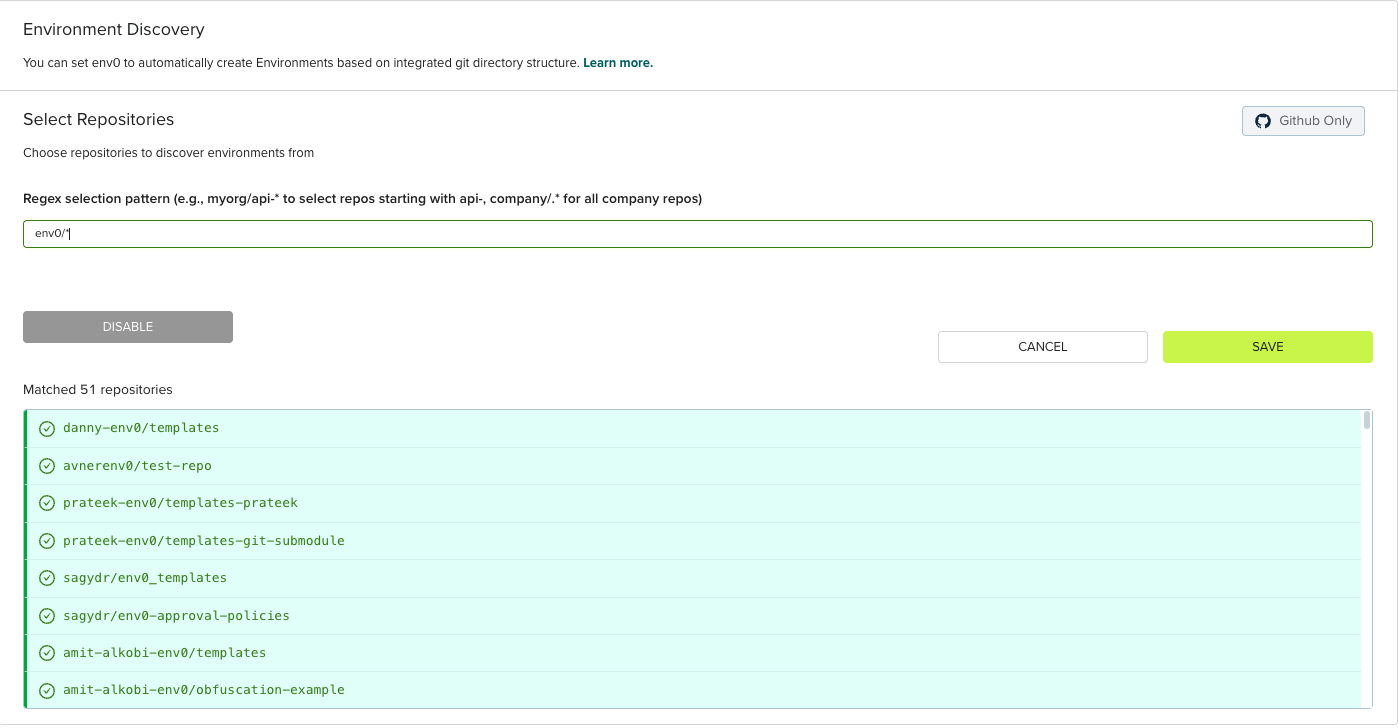
Creating env0-discovery.yml Files
Theenv0-discovery.yml file is a YAML configuration file that defines one or more environments. Each repository must have exactly one env0-discovery.yml file, and it must be placed at the root path of the repository.
env zero relies on a file named env0-discovery.yml to describe the environments and their configurations. Each environment definition in the file should contain:
- name (required): The name of the environment to create. Will be displayed in the env zero UI
- templateId (required, conflicts with templateName): The ID of an existing env zero template to use (e.g.,
123456-asdasd-1556) - templateName (required, conflicts with templateId): The name of an existing env zero template to use (e.g.,
EC2-Instance)
Supported Template TypesDiscovery by File currently supports Terraform and OpenTofu templates only. Other IaC frameworks are not supported at this time.
- projectId (required, conflicts with projectName): The ID of the target project where the environment will be created (subject to authorization)
- projectName (required, conflicts with projectId): The name of the target project where the environment will be created (subject to authorization). For nested projects, use
|as a separator (for example:Team 1|Compute|devorprod|us-east-1)
- workspaceName (optional): The Terraform workspace name to use for this environment
- revision (optional): A specific git branch, tag, or commit SHA for the template deployment
- variableFiles (optional): Array of variable file objects, each with a
pathproperty pointing to a.tfvarsfile. The path must be relative to the root folder of the repository. Files are processed in order, with later files potentially overriding values from earlier files - requiresApproval (optional): Set to
trueto require manual approval before deployments for this environment - isRemoteBackend (optional): Set to
trueto enable Remote backend for this environment - continuousDeployment (optional): Set to
trueto enable automatic deployments when changes are pushed to the configured branch - autoDeployOnPathChangesOnly (optional): Set to
trueto trigger deployments only when files in the template’s configured path change - autoDeployByCustomGlob (optional): A custom glob pattern to specify which file changes should trigger automatic deployments (e.g.,
**/*.tf) - pullRequestPlanDeployments (optional): Set to
trueto automatically run Terraform plans on pull requests - vcsPrCommentsEnabled (optional): Set to
trueto enable env zero to post plan results as comments on pull requests - vcsCommandsAlias (optional): A custom alias for VCS commands used in pull request comments
- driftDetectionCron (optional): A cron expression to schedule automatic drift detection runs (e.g.,
0 4 * * *for daily at 4 AM UTC)
Template AccessTemplates must be assigned to the target project in env zero before they can be referenced in discovery files. Even if you specify a template in your
env0-discovery.yml file, it will only work if that template is already assigned to the target project.Example Configuration
Basic Structure
A basicenv0-discovery.yml file contains environment definitions as an object where each key is an environment identifier:
Multiple Environments with Advanced Configuration
You can define multiple environments in a singleenv0-discovery.yml file with various configuration options:
Multi-Organization SupportIf the env zero GitHub app is installed across multiple organizations, you can define environments that span these organizations within a single
env0-discovery.yml file. Each environment will be processed by the env zero organization that has access to both the repository and the specified project.Using YAML Anchors for Shared Configuration
You can use YAML anchors and aliases to avoid repeating common configuration across multiple environments:&defaultConfig creates an anchor for the common configuration, and <<: *defaultConfig merges those settings into each environment definition. This approach helps maintain consistency and reduces duplication when managing multiple environments with similar settings.
Importing Existing Environments
You can import already deployed environments into your discovery file to bring them under Discovery by File management. This allows you to transition existing environments to code-based configuration without redeploying infrastructure.How to Import an Environment
To import an existing environment, add its configuration to yourenv0-discovery.yml file with the exact details that match the deployed environment:
env0-discovery.yml file using these exact details.
When you create a pull request with the updated env0-discovery.yml file, the preview will show the environment under the Imported section, indicating it will be brought under discovery management.
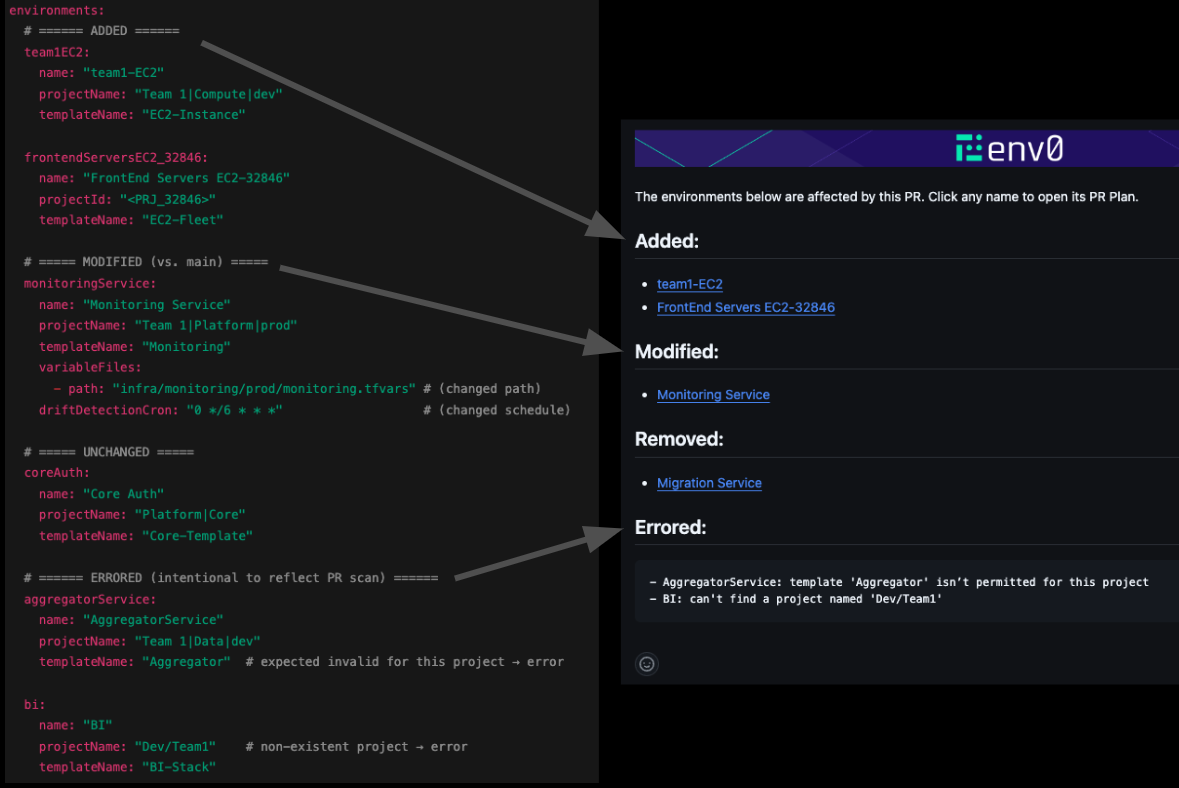
env0-discovery.yml file rather than through the env zero UI.
Import Configuration Requirements
When importing an environment, the discovery file configuration must match the existing environment:- name: Must exactly match the environment name in env zero
- projectName or projectId: Must match the project where the environment currently exists
- templateName or templateId: Must match the template currently used by the environment
- workspaceName: Must match if the environment uses a Terraform workspace
After Import
Once an environment is imported, it becomes fully managed by the discovery file:- Configuration changes should be made by updating the
env0-discovery.ymlfile - The environment will appear in pull request previews when changes affect it
- Removing the environment from the discovery file will trigger environment deletion (subject to your project’s removal strategy)
Importing existing environments is useful when transitioning from manual
environment management to a code-first approach with Discovery by File.
Using Variable Files
Variables must be defined in.tfvars files and referenced using the variableFiles field. This approach supports all variable types including primitives, maps, lists, and objects using full HCL syntax.
variableFiles is an object with a path property. You can reference multiple variable files, similar to how Terraform and OpenTofu support multiple -var-file arguments. Files are processed in the order listed, with later files potentially overriding values from earlier files.
Pull Request Preview
When you create or modify anenv0-discovery.yml file in a pull request, env zero automatically runs a plan to preview the changes. The plan displays the infrastructure resources that will be created, modified, or destroyed based on your template, providing full visibility into the actual infrastructure impact.
- Added: New environments that will be created
- Modified: Existing environments with configuration changes
- Removed: Environments that will be deleted
- Imported: Environments that already exist and are being imported into the discovery file
- Errored: Environments with configuration errors (e.g., invalid template references or project names)
PR plans provide full visibility into infrastructure changes before merging,
helping you catch issues early in the review process.
Plan Triggers
Plans are automatically triggered when:- A new
env0-discovery.ymlfile is added - An existing
env0-discovery.ymlfile is modified - Template references are changed
- Variable values are updated
- Variable file references are modified
Managing Variables
Variables are defined in.tfvars files referenced by the variableFiles field in your env0-discovery.yml file. After an environment is created through Discovery by File, you can add additional variables through the env zero UI. This is particularly useful for secret values that shouldn’t be stored in code repositories.
Adding Variables After Creation
- Navigate to the discovered environment in env zero
- Go to the Variables tab
- Add new variables as needed
- Variables added via UI are merged with variables from
.tfvarsfiles referenced inenv0-discovery.yml
Related
Learn more: Environment discovery overview Learn more: Automatic environment creation from pull requests Learn more: Importing external environmentsNext steps
- Auto-create environments from pull requests - Create ephemeral environments automatically from open pull requests.
- Import external environments into env zero - Bulk-migrate existing environments into env zero management.
- Template overview - Understand the templates referenced in env0-discovery.yml files.