
Using OpenID Connect Tokens

OpenID Connect (OIDC) allows your deployments to exchange short-lived tokens directly from your cloud provider. env zero provides an OIDC token (JWT) as an environment variable. A deployment can use this to access compatible cloud services without a long-lived credential stored in env zero.

Enabling OIDC Token Availability

A JWT token could be available during deployment as an environment variable called ENV0_OIDC_TOKEN. This feature can be enabled by selecting an OIDC credential when creating a credential in the organization’s credentials page.
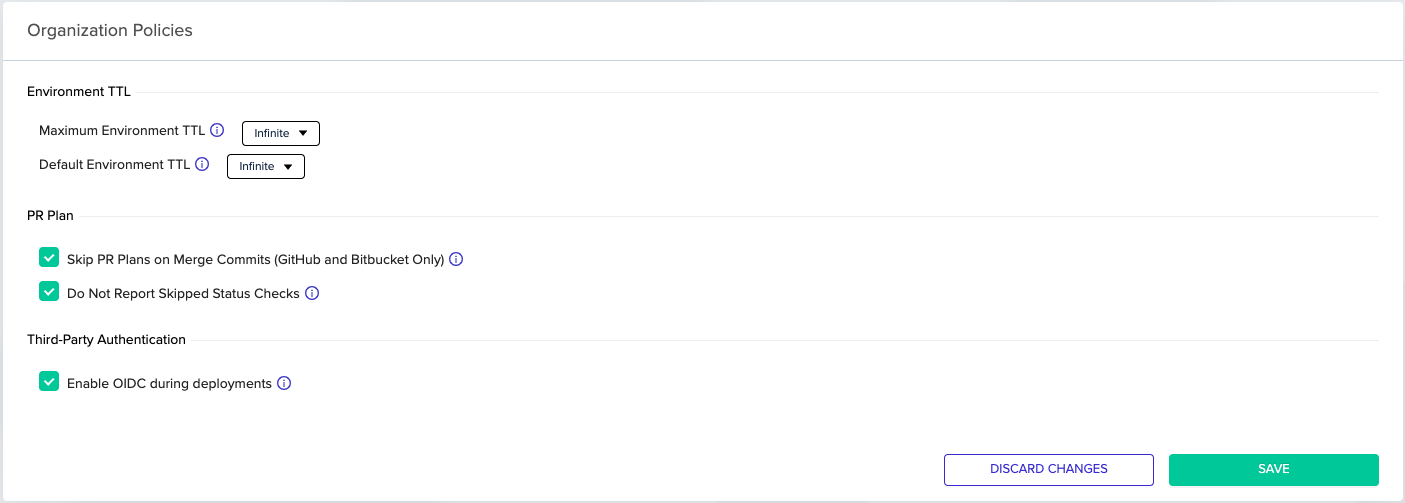
In addition, organization admins can enable this feature by toggling the related checkbox in the organization’s policies tab.
Setting Up Your 3rd Party Service Integration

Consult your 3rd party service’s documentation for how to add an identity provider.
For example, Vault’s JWT Authentication, or AWS’s Creating OpenID Connect (OIDC) identity providers.
The OIDC token is unique to your organization. The custom claims attached to the token contain your organization ID. You can find your env zero organization ID by navigating to the Organization Settings page in our web app and copying the UUID from the URL. In addition, the OpenID Connect ID tokens issued by env zero have a fixed audience (see aud in the table below).

Format of the OpenID Connect ID token

The OpenID Connect ID token contains the following standard claims.
ClaimsDescription
issThe issuer. The issuer is specific to env zero and the value is: https://login.app.env0.com/
subThe subject. It contains the user ID that represents your organization’s OIDC user. If you like to get this ID please contact us
audThe audience. This is a fixed string array value, containing URLs that identify env zero app domain: https://prod.env0.com
iatThe time of issuance. This is when the token was created, which is shortly before the deployment starts.
expThe expiration time. Its value is 24 hours after the time of issuance.
The OpenID Connect ID token also contains some additional custom claims that you should validate:
Additional ClaimsDescription
apiKeyTypeThe value should be oidc. Claim that the provided JWT should be from type oidc only
organizationIdUnique organization ID
projectIdUnique project ID
projectNameProject name
templateIdUnique template ID
templateNameTemplate name
environmentIdUnique environment ID
environmentNameEnvironment name
workspaceNameWorkspace name
deploymentLogIdUnique deployment ID
deploymentTypeDeployment type such as deploy, destroy, prPlan, or task. See the full list.
deployerEmailEmail of the person that triggered the deployment
env0TagUser-controlled free-form string (when ENV0_OIDC_TAG environment variable is set). Informational context only, not an identity claim. See Using claims in IAM trust policies.
Deprecated Additional ClaimsIn addition to all the Custom Claims that are mentioned above, we also have all those claims with a prefix of https://env0.com/ (for example: https://env0.com/organizationId)
Those claims are deprecated and will be removed in the future.

Specific AWS Session Tags:

In addition to the claims mentioned above, there is also a specific section for AWS tags inside a https://aws.amazon.com/tags and inside principal_tags:
Additional ClaimsDescription
https://aws.amazon.com/tags[principal_tags][organizationId]Unique organization ID
https://aws.amazon.com/tags[principal_tags][projectId]Unique project ID
https://aws.amazon.com/tags[principal_tags][templateId]Unique template ID
https://aws.amazon.com/tags[principal_tags][environmentId]Unique environment ID
https://aws.amazon.com/tags[principal_tags][deployerEmail]Email of the person that triggered the deployment
https://aws.amazon.com/tags[principal_tags][deploymentType]Deployment Type
https://aws.amazon.com/tags[principal_tags][env0Tag]User-controlled free-form string. Informational context only, not safe as an IAM trust condition. See Using claims in IAM trust policies.
When writing an AWS IAM trust policy that references aws:PrincipalTag/<claim> or aws:RequestTag/<claim>, always gate on organizationId (and optionally projectId). Do not use env0Tag as a trust condition. It is user-controlled and not unique per tenant. See Using claims in IAM trust policies.
Here is an example of a full JWT Token example:
{
  "https://aws.amazon.com/tags": {
    "principal_tags": {
      "organizationId": [ "66a38abf-69bc-4cb7-ad73-7f61e389079f" ],
      "projectId": [ "5b44fa6d-ecfd-40ab-8e69-14d6fe7c638c" ],
      "templateId": [ "dc9808e2-44d3-48dd-b12a-31a08927ee6e" ],
      "environmentId": [ "9c3ca3cf-870d-4db4-9c60-5adf37faab45" ],
      "deployerEmail": [ "test@test.com" ],
      "deploymentType": [ "deploy" ],
      "env0Tag": [ "production-workload" ]
    }
  },
  "apiKeyType": "oidc",
  "organization": "66a38abf-69bc-4cb7-ad73-7f61e389079f",
  "organizationId": "66a38abf-69bc-4cb7-ad73-7f61e389079f",
  "projectId": "5b44fa6d-ecfd-40ab-8e69-14d6fe7c638c",
  "projectName": "Test Project",
  "templateId": "dc9808e2-44d3-48dd-b12a-31a08927ee6e",
  "templateName": "Test Template",
  "environmentId": "9c3ca3cf-870d-4db4-9c60-5adf37faab45",
  "environmentName": "Dev Test Environment",   
  "workspaceName": "env09c3ca3",
  "deployerEmail": "test@test.com",
  "deploymentLogId": "96e2b169-5e4a-44a4-876b-4a5d26f4412c",  
  "deploymentType": "deploy",  
  "https://env0.com/apiKeyType": "oidc",
  "https://env0.com/organization": "66a38abf-69bc-4cb7-ad73-7f61e389079f",
  "https://env0.com/organizationId": "66a38abf-69bc-4cb7-ad73-7f61e389079f",
  "https://env0.com/projectId": "5b44fa6d-ecfd-40ab-8e69-14d6fe7c638c",
  "https://env0.com/projectName": "Test Project",
  "https://env0.com/templateId": "dc9808e2-44d3-48dd-b12a-31a08927ee6e",
  "https://env0.com/templateName": "Test Template",
  "https://env0.com/environmentId": "9c3ca3cf-870d-4db4-9c60-5adf37faab45",
  "https://env0.com/environmentName": "Dev Test Environment",
  "https://env0.com/workspaceName": "env09c3ca3",  
  "https://env0.com/deploymentLogId": "96e2b169-5e4a-44a4-876b-4a5d26f4412c",
  "https://env0.com/deploymentType": "deploy",
  "https://env0.com/deployerEmail": "test@test.com",
  "https://env0.com/env0Tag": "production-workload",
  "env0Tag": "production-workload",
  "iss": "https://login.app.env0.com/",
  "sub": "auth0|63021f2ce98a11d0678ed6fe",
  "aud": "https://app.env0.com",
  "iat": 1685696926,
  "exp": 1685783326,
  "azp": "hoMiq9PdkRh9LUvVpH4wIErWg50VSG1b",
  "gty": "password"
}

Custom Claims

You can add a custom claim to the OIDC token by setting the ENV0_OIDC_TAG environment variable in env zero.
Security warning: do not use env0Tag as the sole IAM trust condition.env0Tag is a free-form string set by the user configuring the env zero project. env zero does not validate or namespace this value, and it is not unique per tenant. Because every env zero installation signs OIDC tokens with the same issuer, any env zero user in any organization who knows or guesses the string can produce a token carrying the same env0Tag and assume your role.If you use env0Tag in an AWS IAM trust policy, you must also constrain the policy on an immutable, env zero issued claim such as aws:PrincipalTag/organizationId. Never rely on env0Tag alone.
Usage:
  • Set ENV0_OIDC_TAG as an environment variable in env zero.
  • The value is included in the token as both env0Tag and https://env0.com/env0Tag claims.
  • For AWS integrations, it is also included in the https://aws.amazon.com/tags principal_tags.
Example: If you set ENV0_OIDC_TAG=production-workload, the token includes:
{
  "env0Tag": "production-workload",
  "https://env0.com/env0Tag": "production-workload",
  "https://aws.amazon.com/tags": {
    "principal_tags": {
      "env0Tag": ["production-workload"]
    }
  }
}
Treat this value as informational context (for example, a log label or a marker surfaced in downstream tools). Do not treat it as identity.

Using claims in IAM trust policies

Because env0Tag is user-controlled, it is not safe as an authorization gate. Use system-issued claims (organizationId, projectId, environmentId, templateId) for IAM trust conditions instead, and keep env0Tag for informational use only. The examples below use aws:PrincipalTag/<claim>. aws:RequestTag/<claim> is also valid in AWS trust policies and can be used interchangeably for these conditions.
Unsafe vs. safe examples
Unsafe, env0Tag is user-controlled:
{
  "Effect": "Allow",
  "Principal": { "Federated": "arn:aws:iam::<acct>:oidc-provider/<env0-issuer>" },
  "Action": "sts:AssumeRoleWithWebIdentity",
  "Condition": {
    "StringEquals": {
      "aws:PrincipalTag/env0Tag": "my-secret-string"
    }
  }
}
Anyone in any env zero org who sets ENV0_OIDC_TAG=my-secret-string can assume this role. Safe, bind to immutable org identity:
{
  "Condition": {
    "StringEquals": {
      "aws:PrincipalTag/organizationId": "<your-env0-org-id>"
    }
  }
}
Safe, scope further to a specific project:
{
  "Condition": {
    "StringEquals": {
      "aws:PrincipalTag/organizationId": "<your-env0-org-id>",
      "aws:PrincipalTag/projectId": "<your-project-id>"
    }
  }
}
Which claims are safe for trust conditions?
ClaimSourceSafe as IAM trust condition?
organizationIdenv zeroYes. Immutable, unique per tenant.
projectIdenv zeroYes. Immutable, scopes to a single project.
environmentIdenv zeroYes. Immutable.
templateIdenv zeroYes. Immutable.
deployerEmailenv zeroUse with care. Immutable per deploy but the org can change who deploys. Combine with organizationId.
env0TagEnd userNo. Never as a sole condition. Informational context only.

JWT Verification

JWT signatures will be verified against public keys from the issuer.
A JSON Web Key Set (JWKS) URL should be configured on your 3rd party service side.
Keys will be fetched from this endpoint during authentication.
Our JWKS URL is: https://login.app.env0.com/.well-known/jwks.json