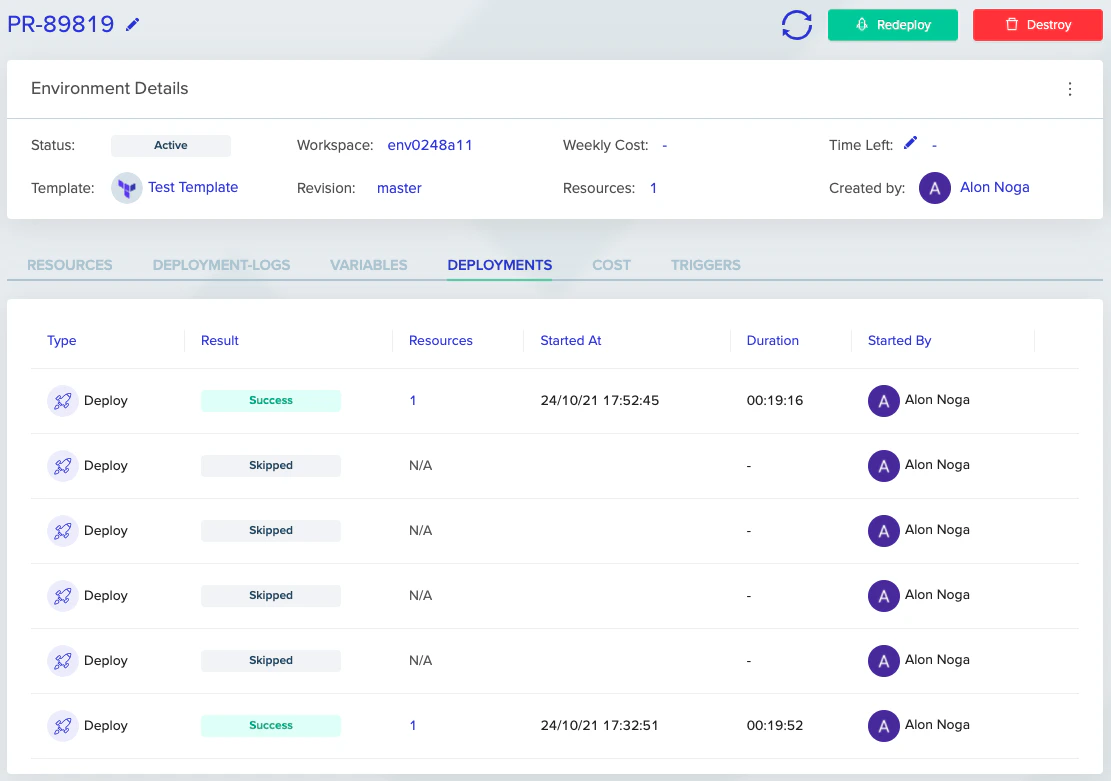
A skip redundant deployments policy is especially useful for dynamic environments with frequent changes, in case you only care about the latest changes and want fast continuous deployment. If enabled under “Project Settings” -> “Policies” tab -> “Skip redundant deployments”, when multiple deploy executions are queued, we will skip up to the next destroy execution. If there is no destroy execution queued, we will skip to the last queued deployment. We will not, however, skip destroy deployments nor PR plans since their sequence matters. In the example below, we can see that we saved about 80 minutes by skipping 4 queued deployments that would have taken about 20 minutes each. Instead of waiting almost 2 hours, we deployed the latest version in 20 minutes.Documentation Index
Fetch the complete documentation index at: https://docs.envzero.com/llms.txt
Use this file to discover all available pages before exploring further.

Next steps
- Skipping the Apply Step - Skip apply when a plan detects no resource changes.
- Using Continuous Deployment - Configure the CD triggers that produce the queued deployments.
- Deployment Scheduling - Schedule deploys and destroys instead of relying on queue order.