Skip State Refresh policy is used as a last resort when facing state mismatches that cause the terraform plan to fail. You can read more about it here. This policy is the equivalent ofDocumentation Index
Fetch the complete documentation index at: https://docs.envzero.com/llms.txt
Use this file to discover all available pages before exploring further.
terraform plan -refresh=false and is available only for destroying environments. To skip the state refresh during deployment, set the TF_CLI_ARGS_plan environment variable to -refresh=false.
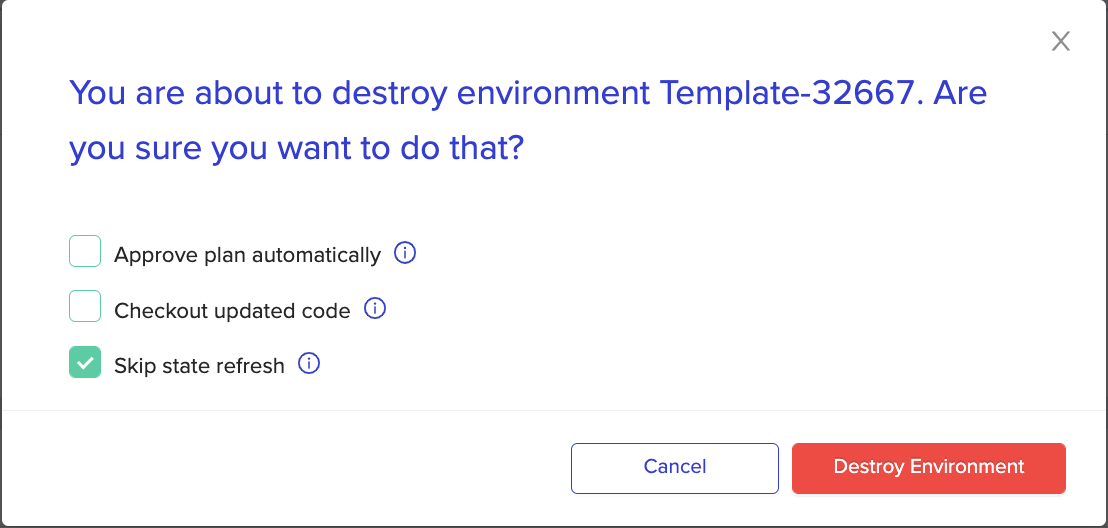
While destroying an environment, you can also tick the skip state refresh checkbox, and the environmental destruction process ignores any state mismatches and will remove the resources that match the current state.
Common errors that can be addressed using this policy:
| Error message | Description |
|---|---|
| ”aws_secretsmanager_secret … You can’t perform this operation on secret … because it was deleted” | A secret used by a resource is marked for deletion or is already deleted. This data source throws an error on the plan phase and prevents the environment’s deletion |
| ”Error during making a request: … /get … in data “http …” | An HTTP Data source that was available during the deploy phase is not available during the destroy phase |
Next steps
- Skipping the Apply Step - Skip apply when a plan has no resource changes.
- Additional Deployment Controls - Set TF_CLI_ARGS_plan and other environment variable controls.
- Environment Overview - Review destroy and inactive environment lifecycle.