

Overview
The Module Usage feature provides insights into how your modules are being utilized across different environments. It includes charts that help understand module adoption and usage trendsHow to Access Module Usage
To view module usage statistics:- Navigate to the module registry and select a module.
- Select the Module Usage tab.
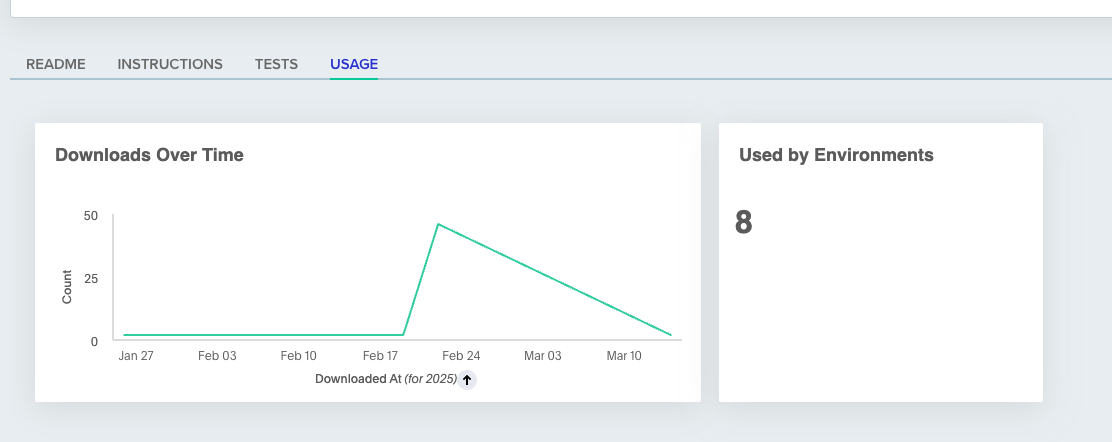
Downloads Over Time
The module download counter tracks the number of times each module has been pulled. This feature enables you to:- Monitor the traction of your modules.
- Understand adoption rates over time.
Used By Environments
This counter displays the number of environments that currently use on this module. It helps you:- Monitor the popularity of your modules.
- Understand the dependency between your environments and modules.
Active environments using this module
A table lists each version of the module with its number of active environments. Expand a version to see its environments, each with a link and its project, 10 per page. A summary above the table shows the total, for example “Used by 12 active environments, 4 in projects you don’t have access to”.- Version select: All versions is the default. Pick one version to show only its row. The select also filters the charts, which show the latest version when All versions is selected. The README and Instructions tabs keep their own version select.
- Projects you cannot open: Their environments are counted but not named. An expanded row ends with a line such as “2 more active environments in projects you don’t have access to”.
- No usage: A module with no active environments shows an empty state.
What module usage covers
Missing data looks like no usage. An empty table means env zero recorded no use, not that nothing uses the module. This applies to the table, the charts, and the API.- Last deploy or destroy only: env zero records each environment’s last successful deploy or destroy. It keeps no history.
- Registry sources only: Git and local module sources are not recorded.
- Two sources for one module: A public module used by both OpenTofu and Terraform environments appears as
registry.opentofu.org/...andregistry.terraform.io/.... - Terraform and OpenTofu environments: For Terragrunt, only run-all
moduleblocks and inline single-module code are recorded. - Nested modules count: A module called from inside another module counts as used.
- Active environments only: Counts and lists leave out environments marked inactive, in an archived project, or destroyed. They return when unarchived.
Module usage API
Both calls require the View Modules permission and never name environments in projects you cannot open.- List Module Usage Sources: Lists the module sources your active environments use, with environment counts overall and per version. Use it to find the source name for Get Module Usage. Subdirectories count under their source.
- Get Module Usage: Lists the active environments that use one source, grouped by version, newest first. Each environment has its project ID,
lastDeployedAt, anddeployedFrom, the template as of its latest deployment. An edit without a redeploy does not show, and a deleted template still appears. An environment on two versions is listed under both and counted once in the total.hiddenEnvironmentCountis the number of counted environments you may not view.
200 with zero environments, which may be missing data. See What module usage covers.
Next steps
- Module overview - Add, version, and manage modules in your registry.
- Testing modules in CI - Automate test runs on module changes.
- Private registry - Set up authentication for local and CI usage.