Control RBAC permissions at the environment level in env zero to grant users or teams access to specific environments using custom roles.
In every organization, there is a need to establish custom permission assignments tailored to their specific needs. For example, when collaborating with outsourced teams, it becomes crucial to grant permissions exclusively to the areas they are directly involved in, without providing unnecessary access. To address this requirement, env zero lets you control RBAC Permissions all the way to the granularity of a specific environment.With this feature, administrators can precisely define permissions at the environment level, ensuring that users are granted access only to the environments directly relevant to their tasks. This capability offers organizations the flexibility to maintain security, optimize collaboration, and tailor permissions according to specific teams or projects
Role to control environment accessIn order to configure Environment Access, the assigning user needs to have the ASSIGN ROLE ON ENVIRONMENT permission.Project and Organization admins have that permission by default.Read more here
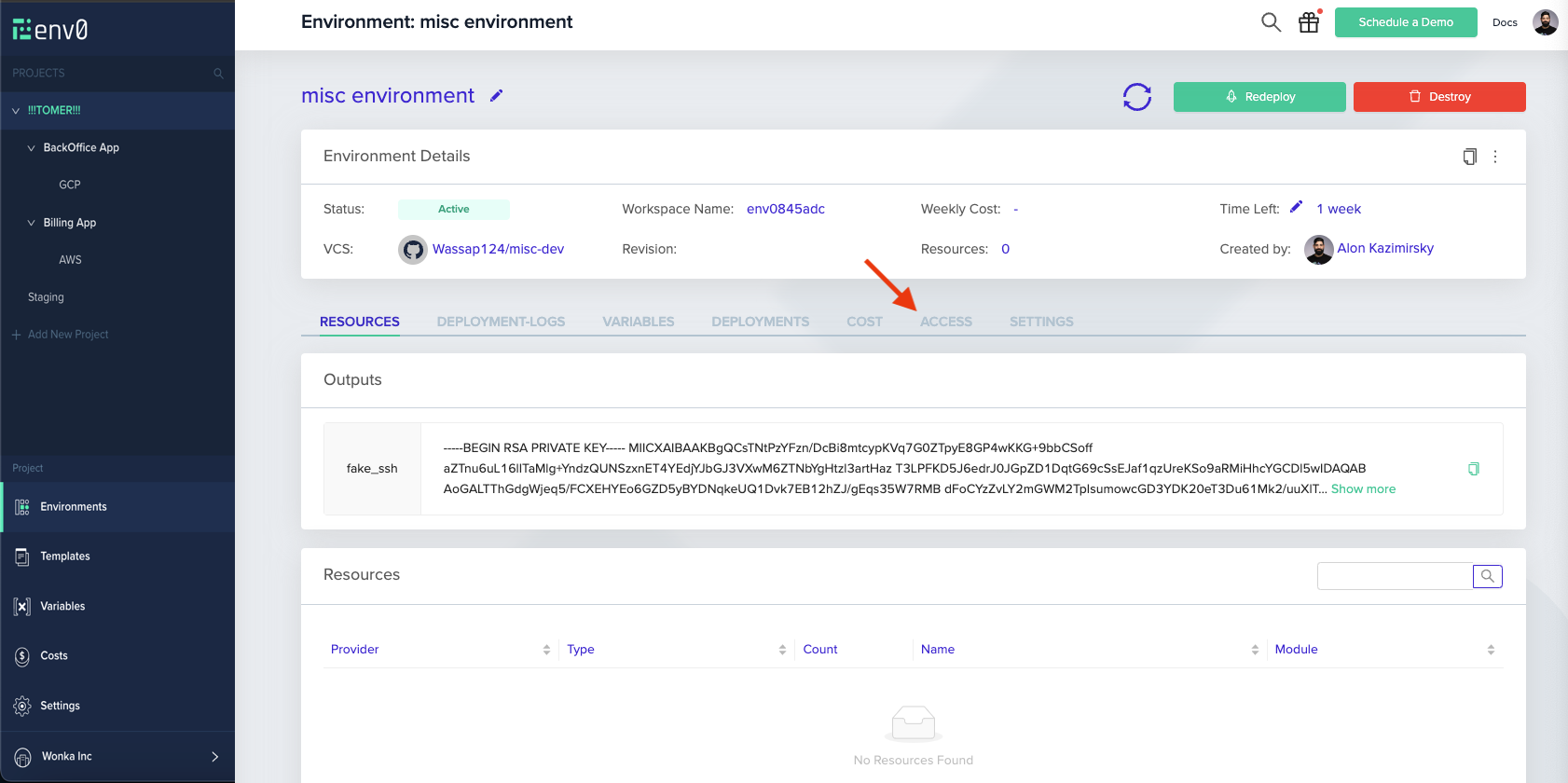
Navigate to an existing environment, and click on the ACCESS tab
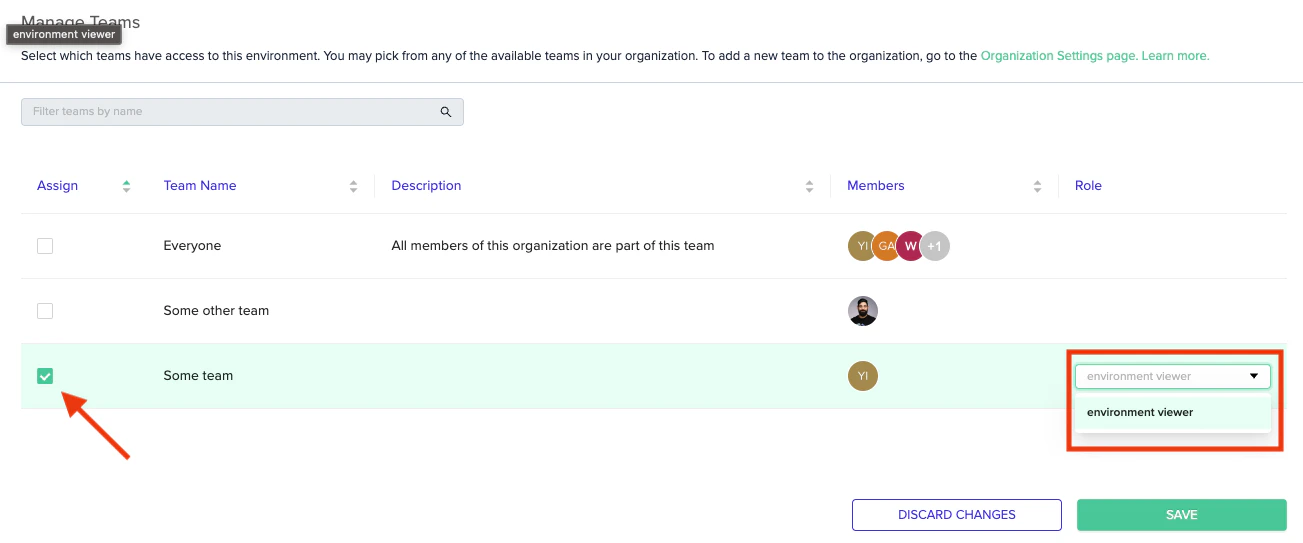
While in that tab, you can assign access to either individual Users or entire Teams
On the two tables, you can see the entire collection of users and teams in your organization (respectively)
To assign one a role on the current environment, make sure the checkbox on the left-hand side is ticked, and select the role you wish to assign
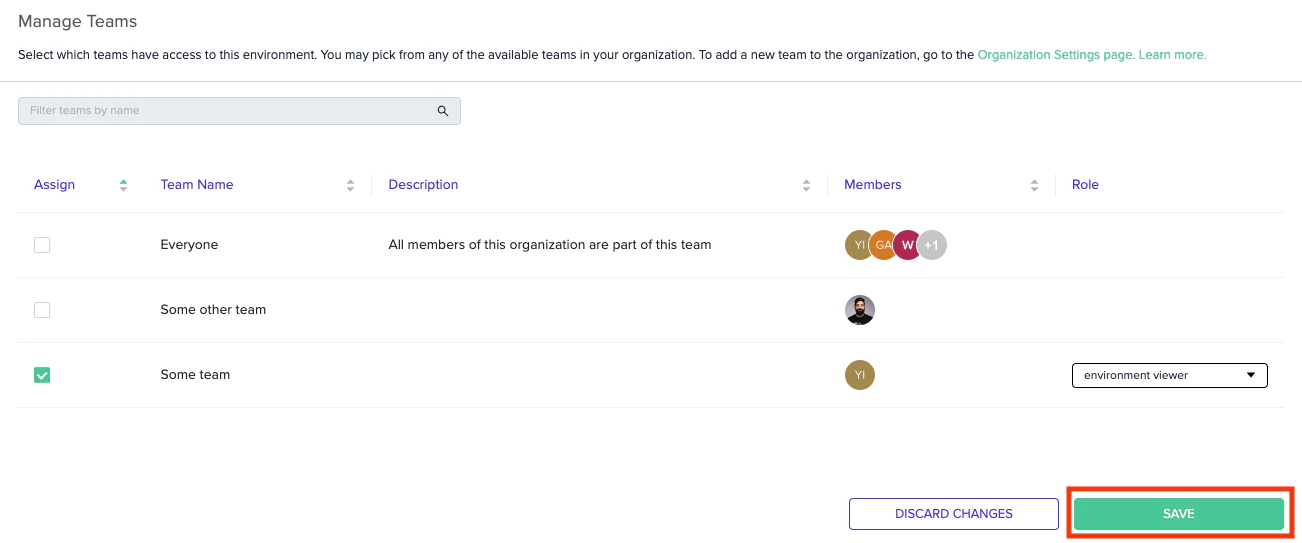
Finally, hit “save”
And you’re good to go!
Project ViewWhen a user is given permissions to a specific environment - they can see all ancestor projects leading up to it. This is purely for traversal, and they won’t have any other permissions for those projects, so keep in mind this is not the same as them having VIEW PROJECT permissions for the project tree
Manage teams - Organize users into teams to assign access in bulk.
Was this page helpful?
{"docsConfig":{"theme":"mint","$schema":"https://mintlify.com/docs.json","name":"env zero docs","colors":{"primary":"#000000","light":"#D2F740"},"logo":{"light":"https://mintcdn.com/envzero-b61043c8/GWfARhdHeVhvtQPk/logo/logo-light-mode.svg?fit=max\u0026auto=format\u0026n=GWfARhdHeVhvtQPk\u0026q=85\u0026s=6349fff9147169f2120c89694f47cbc0","dark":"https://mintcdn.com/envzero-b61043c8/GWfARhdHeVhvtQPk/logo/logo-dark-mode.svg?fit=max\u0026auto=format\u0026n=GWfARhdHeVhvtQPk\u0026q=85\u0026s=3017a6fc552076ce1aa60a773f7cab5c"},"favicon":"https://mintcdn.com/envzero-b61043c8/tSDpnsOW7stD0Hxu/favicon.svg?fit=max\u0026auto=format\u0026n=tSDpnsOW7stD0Hxu\u0026q=85\u0026s=e7c3f9cd1d8663c44ed8c059f5c4e2cb","icons":{"library":"lucide"},"contextual":{"options":["copy","view","chatgpt","claude","perplexity","mcp","cursor","vscode"],"display":"header"},"styling":{"latex":true},"navigation":{"pages":[]}},"deployment":{"deploymentMetadataValue":{"subdomain":"envzero-b61043c8","hasAudioNarration":false,"actualSubdomain":"envzero-b61043c8","customDomains":["docs.envzero.com"],"gitSource":{"type":"github","owner":"env0","repo":"env-zero-docs","deployBranch":"main","contentDirectory":"","isPrivate":true,"mountPath":"","label":""},"chroma":{"liveDeploymentHistoryId":"6ae8502f6bec035f3458f61b","collectionId":"9bc7ad1f-7116-4e1b-b7fd-7010435a0439","schemaVersion":"v3","latestBuiltDeploymentHistoryId":"6ae8502f6bec035f3458f61b"},"feedback":{"thumbs":true},"entitlements":{"AI_CHAT":{"status":"ENABLED"},"WEB_MCP":{"status":"ENABLED"},"NARRATION":{"status":"ENABLED"}},"buildId":"6ae8502f6bec035f3458f61b","clientVersion":"0.0.4045","searchFilterCounts":[{"language":"default","tag":"API reference","count":374},{"language":"default","tag":"Guides","count":216},{"language":"default","tag":"Changelog","count":121},{"language":"default","tag":"Configuration","count":55},{"language":"default","tag":"ACCESS \u0026 IDENTITY","count":43},{"language":"default","tag":"Environments","count":40},{"language":"default","tag":"Cloud Compass","count":39},{"language":"default","tag":"2023","count":36},{"language":"default","tag":"ENVIRONMENTS \u0026 DEPLOYMENTS","count":32},{"language":"default","tag":"2024","count":28}]},"assistantConfig":{},"basePath":"","hasChatPermissions":true,"hasWebMcpPermissions":true,"toggles":[{"name":"kill-isr","enabled":true,"variant":{"name":"disabled","enabled":false,"feature_enabled":true},"impressionData":false},{"name":"agent-mintlify-slack","enabled":true,"variant":{"name":"disabled","enabled":false,"feature_enabled":true},"impressionData":false},{"name":"agent-integrations-settings","enabled":true,"variant":{"name":"disabled","enabled":false,"feature_enabled":true},"impressionData":false},{"name":"automations-pr-grouping","enabled":true,"variant":{"name":"disabled","enabled":false,"feature_enabled":true},"impressionData":false},{"name":"custom-prefix","enabled":true,"variant":{"name":"disabled","enabled":false,"feature_enabled":true},"impressionData":false},{"name":"analytics-v7","enabled":true,"variant":{"name":"disabled","enabled":false,"feature_enabled":true},"impressionData":false},{"name":"user-flows-analytics","enabled":true,"variant":{"name":"disabled","enabled":false,"feature_enabled":true},"impressionData":false},{"name":"no-publish-flow","enabled":true,"variant":{"name":"disabled","enabled":false,"feature_enabled":true},"impressionData":false},{"name":"workos-onboarding","enabled":true,"variant":{"name":"disabled","enabled":false,"feature_enabled":true},"impressionData":false},{"name":"llms-txt-v2","enabled":true,"variant":{"name":"disabled","enabled":false,"feature_enabled":true},"impressionData":false},{"name":"snapshot-serving-live","enabled":true,"variant":{"name":"disabled","enabled":false,"feature_enabled":true},"impressionData":false},{"name":"stripTemperatureMiddleware","enabled":true,"variant":{"name":"disabled","enabled":false,"feature_enabled":true},"impressionData":false},{"name":"support-platform-pylon-zendesk","enabled":true,"variant":{"name":"disabled","enabled":false,"feature_enabled":true},"impressionData":false},{"name":"snapshot-serving","enabled":true,"variant":{"name":"disabled","enabled":false,"feature_enabled":true},"impressionData":false},{"name":"instant-rollback","enabled":true,"variant":{"name":"disabled","enabled":false,"feature_enabled":true},"impressionData":false},{"name":"granular-notifications-server","enabled":true,"variant":{"name":"disabled","enabled":false,"feature_enabled":true},"impressionData":false},{"name":"granular-notifications","enabled":true,"variant":{"name":"disabled","enabled":false,"feature_enabled":true},"impressionData":false},{"name":"automations-fable","enabled":true,"variant":{"name":"disabled","enabled":false,"feature_enabled":true},"impressionData":false},{"name":"fixed-ai-action-pricing","enabled":true,"variant":{"name":"disabled","enabled":false,"feature_enabled":true},"impressionData":false},{"name":"automation-resolve-merge-conflict","enabled":true,"variant":{"name":"disabled","enabled":false,"feature_enabled":true},"impressionData":false},{"name":"scoped-publishing","enabled":true,"variant":{"name":"disabled","enabled":false,"feature_enabled":true},"impressionData":false},{"name":"mintql","enabled":true,"variant":{"name":"disabled","enabled":false,"feature_enabled":true},"impressionData":false},{"name":"page-level-analytics","enabled":true,"variant":{"name":"disabled","enabled":false,"feature_enabled":true},"impressionData":false},{"name":"editor-version-history-v2","enabled":true,"variant":{"name":"disabled","enabled":false,"feature_enabled":true},"impressionData":false},{"name":"billing-page-v2","enabled":true,"variant":{"name":"disabled","enabled":false,"feature_enabled":true},"impressionData":false},{"name":"full-page-search","enabled":true,"variant":{"name":"disabled","enabled":false,"feature_enabled":true},"impressionData":false},{"name":"workspace-projects","enabled":true,"variant":{"name":"disabled","enabled":false,"feature_enabled":true},"impressionData":false},{"name":"assistant-v5","enabled":true,"variant":{"name":"disabled","enabled":false,"feature_enabled":true},"impressionData":false},{"name":"byok-sep-25","enabled":true,"variant":{"name":"disabled","enabled":false,"feature_enabled":true},"impressionData":false},{"name":"fork-pr-previews","enabled":true,"variant":{"name":"disabled","enabled":false,"feature_enabled":true},"impressionData":false},{"name":"revalidation-jwt","enabled":true,"variant":{"name":"disabled","enabled":false,"feature_enabled":true},"impressionData":false},{"name":"vite-origin","enabled":true,"variant":{"name":"disabled","enabled":false,"feature_enabled":true},"impressionData":false},{"name":"billing-updated-9-15","enabled":true,"variant":{"name":"disabled","enabled":false,"feature_enabled":true},"impressionData":false},{"name":"workos-sso-scim","enabled":true,"variant":{"name":"disabled","enabled":false,"feature_enabled":true},"impressionData":false},{"name":"hobby-abuse-scan","enabled":true,"variant":{"name":"disabled","enabled":false,"feature_enabled":true},"impressionData":false},{"name":"dashboard-inbox","enabled":true,"variant":{"name":"disabled","enabled":false,"feature_enabled":true},"impressionData":false},{"name":"workos-signup","enabled":true,"variant":{"name":"disabled","enabled":false,"feature_enabled":true},"impressionData":false},{"name":"turbopuffer-dual-write","enabled":true,"variant":{"name":"disabled","enabled":false,"feature_enabled":true},"impressionData":false},{"name":"workos-enabled","enabled":true,"variant":{"name":"disabled","enabled":false,"feature_enabled":true},"impressionData":false},{"name":"approve-review-flow","enabled":true,"variant":{"name":"disabled","enabled":false,"feature_enabled":true},"impressionData":false},{"name":"sso-setup-deadline-banner","enabled":true,"variant":{"name":"disabled","enabled":false,"feature_enabled":true},"impressionData":false}],"googleFontsInlined":false},"customCss":[{"filePath":"docs-styles.css","content":".tryit-button{border-radius:0;background-color:light-dark(#d2f740,#0c0c0b);color:light-dark(#000,#fff)}.accordion-group,.card{border-radius:0;border-style:dashed}#footer{display:none}.link{color:light-dark(black,white)!important;border-bottom-color:light-dark(#addc06,#d2f740)}"}],"page":{"pagePath":"guides/admin-guide/environments/access","slug":"/guides/admin-guide/environments/access","pageMetadata":{"title":"Environment access","slug":"access","description":"Control RBAC permissions at the environment level in env zero to grant users or teams access to specific environments using custom roles.","keywords":["environment access","RBAC","permissions","role-based access control","environment permissions","access control","custom roles","team access","security"],"href":"/guides/admin-guide/environments/access"},"description":{"compiledSource":"\"use strict\";\nconst {jsx: _jsx} = arguments[0];\nconst {useMDXComponents: _provideComponents} = arguments[0];\nfunction _createMdxContent(props) {\n const _components = {\n p: \"p\",\n ..._provideComponents(),\n ...props.components\n };\n return _jsx(_components.p, {\n children: \"Control RBAC permissions at the environment level in env zero to grant users or teams access to specific environments using custom roles.\"\n });\n}\nfunction MDXContent(props = {}) {\n const {wrapper: MDXLayout} = {\n ..._provideComponents(),\n ...props.components\n };\n return MDXLayout ? _jsx(MDXLayout, {\n ...props,\n children: _jsx(_createMdxContent, {\n ...props\n })\n }) : _createMdxContent(props);\n}\nreturn {\n default: MDXContent\n};\n","frontmatter":{},"scope":{}},"pageType":"default","mdx":{"mdxSource":{"compiledSource":"\"use strict\";const{Fragment:_Fragment,jsx:_jsx,jsxs:_jsxs}=arguments[0];const{useMDXComponents:_provideComponents}=arguments[0];function _createMdxContent(props){const _components={a:`a`,code:`code`,li:`li`,ol:`ol`,p:`p`,ul:`ul`,..._provideComponents(),...props.components},{Frame,Heading,Note,OptimizedImage,Warning}=_components;if(!Frame)_missingMdxReference(`Frame`,true);if(!Heading)_missingMdxReference(`Heading`,true);if(!Note)_missingMdxReference(`Note`,true);if(!OptimizedImage)_missingMdxReference(`OptimizedImage`,true);if(!Warning)_missingMdxReference(`Warning`,true);return _jsxs(_Fragment,{children:[_jsx(_components.p,{children:`In every organization, there is a need to establish custom permission assignments tailored to their specific needs. For example, when collaborating with outsourced teams, it becomes crucial to grant permissions exclusively to the areas they are directly involved in, without providing unnecessary access. To address this requirement, env zero lets you control RBAC Permissions all the way to the granularity of a specific environment.`}),`\n`,_jsx(_components.p,{children:`With this feature, administrators can precisely define permissions at the environment level, ensuring that users are granted access only to the environments directly relevant to their tasks. This capability offers organizations the flexibility to maintain security, optimize collaboration, and tailor permissions according to specific teams or projects`}),`\n`,_jsxs(Warning,{children:[_jsx(_components.p,{children:`Role to control environment access`}),_jsxs(_components.p,{children:[`In order to configure Environment Access, the assigning user needs to have the `,_jsx(_components.code,{children:`ASSIGN ROLE ON ENVIRONMENT`}),` permission.`]}),_jsx(_components.p,{children:`Project and Organization admins have that permission by default.`}),_jsx(_components.p,{children:_jsx(_components.a,{href:`/guides/admin-guide/user-role-and-team-management/user-management`,children:`Read more here`})})]}),`\n`,_jsx(Heading,{level:`2`,id:`how-to-assign-access-to-an-environment`,children:`How to assign Access to an Environment`}),`\n`,_jsx(Heading,{level:`3`,id:`preconditions`,children:`Preconditions`}),`\n`,_jsx(_components.p,{children:`There are 2 things you need before assigning access to an environment:`}),`\n`,_jsxs(_components.ol,{children:[`\n`,_jsxs(_components.li,{children:[`The `,_jsx(_components.a,{href:`/guides/admin-guide/environments/setting-up-a-new-environment`,children:`Environment`}),` should exist beforehand`]}),`\n`,_jsxs(_components.li,{children:[`You need to have a `,_jsx(_components.a,{href:`/guides/admin-guide/user-role-and-team-management/custom-roles`,children:`Custom Role`}),` with the specific permissions you wish to assign`]}),`\n`]}),`\n`,_jsxs(Note,{children:[_jsx(_components.p,{children:`Roles`}),_jsx(_components.p,{children:`At the moment - only custom roles are supported for environment access`})]}),`\n`,_jsx(Heading,{level:`3`,id:`assigning-access`,children:`Assigning Access`}),`\n`,_jsxs(_components.ol,{children:[`\n`,_jsx(_components.li,{children:`Navigate to an existing environment, and click on the ACCESS tab`}),`\n`]}),`\n`,_jsx(Frame,{children:_jsx(OptimizedImage,{src:`https://mintcdn.com/envzero-b61043c8/T2JW_alZSK9mPIUs/images/guides/admin-guide/environments/5bd01cd-project_envs_access_1_fix.png?fit=max\u0026auto=format\u0026n=T2JW_alZSK9mPIUs\u0026q=85\u0026s=262c31702b38cecd05cc81880775c7f3`,alt:`Interface screenshot showing configuration options`,\"data-og-width\":`1682`,width:`1682`,\"data-og-height\":`840`,height:`840`,\"data-path\":`images/guides/admin-guide/environments/5bd01cd-project_envs_access_1_fix.png`,\"data-optimize\":`true`,\"data-opv\":`3`,srcset:`https://mintcdn.com/envzero-b61043c8/T2JW_alZSK9mPIUs/images/guides/admin-guide/environments/5bd01cd-project_envs_access_1_fix.png?w=280\u0026fit=max\u0026auto=format\u0026n=T2JW_alZSK9mPIUs\u0026q=85\u0026s=304fad6ccb9cb9ec5550611ab003de4c 280w, https://mintcdn.com/envzero-b61043c8/T2JW_alZSK9mPIUs/images/guides/admin-guide/environments/5bd01cd-project_envs_access_1_fix.png?w=560\u0026fit=max\u0026auto=format\u0026n=T2JW_alZSK9mPIUs\u0026q=85\u0026s=b25935ed543af29bfb3066c41f45f9b0 560w, https://mintcdn.com/envzero-b61043c8/T2JW_alZSK9mPIUs/images/guides/admin-guide/environments/5bd01cd-project_envs_access_1_fix.png?w=840\u0026fit=max\u0026auto=format\u0026n=T2JW_alZSK9mPIUs\u0026q=85\u0026s=14f4a0f8a00999c2aa196cd21d1ca313 840w, https://mintcdn.com/envzero-b61043c8/T2JW_alZSK9mPIUs/images/guides/admin-guide/environments/5bd01cd-project_envs_access_1_fix.png?w=1100\u0026fit=max\u0026auto=format\u0026n=T2JW_alZSK9mPIUs\u0026q=85\u0026s=d8cb0ef09eadc94a4a2e6605e8312c9e 1100w, https://mintcdn.com/envzero-b61043c8/T2JW_alZSK9mPIUs/images/guides/admin-guide/environments/5bd01cd-project_envs_access_1_fix.png?w=1650\u0026fit=max\u0026auto=format\u0026n=T2JW_alZSK9mPIUs\u0026q=85\u0026s=39983b606f512cb2edcc1a1aceeb323a 1650w, https://mintcdn.com/envzero-b61043c8/T2JW_alZSK9mPIUs/images/guides/admin-guide/environments/5bd01cd-project_envs_access_1_fix.png?w=2500\u0026fit=max\u0026auto=format\u0026n=T2JW_alZSK9mPIUs\u0026q=85\u0026s=b130611db1bbdfb0378b639f08451b46 2500w`})}),`\n`,_jsxs(_components.ol,{start:`2`,children:[`\n`,_jsx(_components.li,{children:`While in that tab, you can assign access to either individual Users or entire Teams`}),`\n`,_jsx(_components.li,{children:`On the two tables, you can see the entire collection of users and teams in your organization (respectively)`}),`\n`,_jsxs(_components.li,{children:[`To assign one a role on the current environment, make sure the checkbox on the left-hand side is ticked, and select the role you wish to assign`,`\n`,_jsx(OptimizedImage,{src:`https://mintcdn.com/envzero-b61043c8/T2JW_alZSK9mPIUs/images/guides/admin-guide/environments/010be27-screenshot_2023-06-08_at_15.png?fit=max\u0026auto=format\u0026n=T2JW_alZSK9mPIUs\u0026q=85\u0026s=a9bc85564d5ddae2b8368aa18119adcd`,alt:`Access tab showing users table with checkbox selected and role dropdown to assign a role`,\"data-og-width\":`1303`,width:`1303`,\"data-og-height\":`543`,height:`543`,\"data-path\":`images/guides/admin-guide/environments/010be27-screenshot_2023-06-08_at_15.png`,\"data-optimize\":`true`,\"data-opv\":`3`,srcset:`https://mintcdn.com/envzero-b61043c8/T2JW_alZSK9mPIUs/images/guides/admin-guide/environments/010be27-screenshot_2023-06-08_at_15.png?w=280\u0026fit=max\u0026auto=format\u0026n=T2JW_alZSK9mPIUs\u0026q=85\u0026s=0bb7532cba3a044be300b50ed60f328a 280w, https://mintcdn.com/envzero-b61043c8/T2JW_alZSK9mPIUs/images/guides/admin-guide/environments/010be27-screenshot_2023-06-08_at_15.png?w=560\u0026fit=max\u0026auto=format\u0026n=T2JW_alZSK9mPIUs\u0026q=85\u0026s=45b3c649c5523c5557bafa9ef862c8d1 560w, https://mintcdn.com/envzero-b61043c8/T2JW_alZSK9mPIUs/images/guides/admin-guide/environments/010be27-screenshot_2023-06-08_at_15.png?w=840\u0026fit=max\u0026auto=format\u0026n=T2JW_alZSK9mPIUs\u0026q=85\u0026s=cf989f708ada6a9ee347f08816b5576a 840w, https://mintcdn.com/envzero-b61043c8/T2JW_alZSK9mPIUs/images/guides/admin-guide/environments/010be27-screenshot_2023-06-08_at_15.png?w=1100\u0026fit=max\u0026auto=format\u0026n=T2JW_alZSK9mPIUs\u0026q=85\u0026s=69bf4190719caed2c82ff36d16882407 1100w, https://mintcdn.com/envzero-b61043c8/T2JW_alZSK9mPIUs/images/guides/admin-guide/environments/010be27-screenshot_2023-06-08_at_15.png?w=1650\u0026fit=max\u0026auto=format\u0026n=T2JW_alZSK9mPIUs\u0026q=85\u0026s=4e2ee14c538c446a6a1ea6dc7a937a6a 1650w, https://mintcdn.com/envzero-b61043c8/T2JW_alZSK9mPIUs/images/guides/admin-guide/environments/010be27-screenshot_2023-06-08_at_15.png?w=2500\u0026fit=max\u0026auto=format\u0026n=T2JW_alZSK9mPIUs\u0026q=85\u0026s=32b1975ae7acdff1fe3a68629a5226db 2500w`}),`\n`]}),`\n`,_jsxs(_components.li,{children:[`Finally, hit “save”`,`\n`,_jsx(OptimizedImage,{src:`https://mintcdn.com/envzero-b61043c8/T2JW_alZSK9mPIUs/images/guides/admin-guide/environments/57e2c71-screenshot_2023-06-08_at_15.png?fit=max\u0026auto=format\u0026n=T2JW_alZSK9mPIUs\u0026q=85\u0026s=7ea6ab5c00feb0a46e9a44ceb8607324`,alt:`Access tab with Save button highlighted after assigning roles to users and teams`,\"data-og-width\":`1302`,width:`1302`,\"data-og-height\":`543`,height:`543`,\"data-path\":`images/guides/admin-guide/environments/57e2c71-screenshot_2023-06-08_at_15.png`,\"data-optimize\":`true`,\"data-opv\":`3`,srcset:`https://mintcdn.com/envzero-b61043c8/T2JW_alZSK9mPIUs/images/guides/admin-guide/environments/57e2c71-screenshot_2023-06-08_at_15.png?w=280\u0026fit=max\u0026auto=format\u0026n=T2JW_alZSK9mPIUs\u0026q=85\u0026s=1514ad6ba4dea839725309a69a9c06a4 280w, https://mintcdn.com/envzero-b61043c8/T2JW_alZSK9mPIUs/images/guides/admin-guide/environments/57e2c71-screenshot_2023-06-08_at_15.png?w=560\u0026fit=max\u0026auto=format\u0026n=T2JW_alZSK9mPIUs\u0026q=85\u0026s=cb248db0a4b954b0aac1abaada049bb5 560w, https://mintcdn.com/envzero-b61043c8/T2JW_alZSK9mPIUs/images/guides/admin-guide/environments/57e2c71-screenshot_2023-06-08_at_15.png?w=840\u0026fit=max\u0026auto=format\u0026n=T2JW_alZSK9mPIUs\u0026q=85\u0026s=755144d709a3008e145ee9e42f9a2bfe 840w, https://mintcdn.com/envzero-b61043c8/T2JW_alZSK9mPIUs/images/guides/admin-guide/environments/57e2c71-screenshot_2023-06-08_at_15.png?w=1100\u0026fit=max\u0026auto=format\u0026n=T2JW_alZSK9mPIUs\u0026q=85\u0026s=6f05a67e368c82e3b04cf304241cf9ed 1100w, https://mintcdn.com/envzero-b61043c8/T2JW_alZSK9mPIUs/images/guides/admin-guide/environments/57e2c71-screenshot_2023-06-08_at_15.png?w=1650\u0026fit=max\u0026auto=format\u0026n=T2JW_alZSK9mPIUs\u0026q=85\u0026s=d8466d14a205b2a1a2db2f45b3469a04 1650w, https://mintcdn.com/envzero-b61043c8/T2JW_alZSK9mPIUs/images/guides/admin-guide/environments/57e2c71-screenshot_2023-06-08_at_15.png?w=2500\u0026fit=max\u0026auto=format\u0026n=T2JW_alZSK9mPIUs\u0026q=85\u0026s=3e958dc112e9861f6ea01696311a43a1 2500w`}),`\n`]}),`\n`]}),`\n`,_jsx(_components.p,{children:`And you’re good to go!`}),`\n`,_jsxs(Warning,{children:[_jsx(_components.p,{children:`Project View`}),_jsxs(_components.p,{children:[`When a user is given permissions to a specific environment - they can see all ancestor projects leading up to it. This is purely for traversal, and they won’t have any other permissions for those projects, so keep in mind this is not the same as them having `,_jsx(_components.code,{children:`VIEW PROJECT`}),` permissions for the project tree`]})]}),`\n`,_jsx(Heading,{level:`2`,id:`next-steps`,children:`Next steps`}),`\n`,_jsxs(_components.ul,{children:[`\n`,_jsxs(_components.li,{children:[_jsx(_components.a,{href:`/guides/admin-guide/user-role-and-team-management/custom-roles`,children:`Custom roles`}),` - Define the custom roles used in environment access assignments.`]}),`\n`,_jsxs(_components.li,{children:[_jsx(_components.a,{href:`/guides/admin-guide/user-role-and-team-management/rbac`,children:`Role-based access control (RBAC)`}),` - Understand how RBAC applies across projects and environments.`]}),`\n`,_jsxs(_components.li,{children:[_jsx(_components.a,{href:`/guides/admin-guide/user-role-and-team-management/teams`,children:`Manage teams`}),` - Organize users into teams to assign access in bulk.`]}),`\n`]})]})}function MDXContent(props={}){const{wrapper:MDXLayout}={..._provideComponents(),...props.components};return MDXLayout?_jsx(MDXLayout,{...props,children:_jsx(_createMdxContent,{...props})}):_createMdxContent(props)}return{default:MDXContent};function _missingMdxReference(id,component){throw new Error(`Expected `+(component?`component`:`object`)+\" `\"+id+\"` to be defined: you likely forgot to import, pass, or provide it.\")}","frontmatter":{},"scope":{"config":{},"pageMetadata":{"title":"Environment access","slug":"access","description":"Control RBAC permissions at the environment level in env zero to grant users or teams access to specific environments using custom roles.","keywords":["environment access","RBAC","permissions","role-based access control","environment permissions","access control","custom roles","team access","security"],"href":"/guides/admin-guide/environments/access"}}},"mdxSourceWithNoJs":null},"mdxExtracts":{"tableOfContents":[{"title":"How to assign Access to an Environment","slug":"how-to-assign-access-to-an-environment","depth":2,"children":[{"title":"Preconditions","slug":"preconditions","depth":3,"children":[]},{"title":"Assigning Access","slug":"assigning-access","depth":3,"children":[]}]},{"title":"Next steps","slug":"next-steps","depth":2,"children":[]}],"codeExamples":{}},"jsLinks":["/_mintlify/custom/envzero-b61043c8/acfe5f113d987bc4/analytics.js","/_mintlify/custom/envzero-b61043c8/21cddeb428c6b3ba/page-dates.js","/_mintlify/custom/envzero-b61043c8/05a202bfcfe4d650/schema.js"],"subdomain":"envzero-b61043c8","siteName":"env zero docs","title":"Environment access - env zero docs","navMaps":{"firstHrefInVersion":{},"firstHrefInLanguage":{}},"lastModified":"2026-08-16T08:36:17.559Z","originalFileLocation":"guides/admin-guide/environments/access.mdx"},"headHtml":"\u003cscript data-mint-head>(function(){var d=document.documentElement,p=null;if(!p){try{p=localStorage.getItem(\"isDarkMode\")}catch(e){}if(p==='true')p='dark';else if(p==='false')p='light';if(p!=='light'\u0026\u0026p!=='dark'\u0026\u0026p!=='system')p=\"system\"}var r=p==='system'?(matchMedia(\"(prefers-color-scheme: dark)\").matches?'dark':'light'):p;d.classList.remove(r==='dark'?'light':'dark');d.classList.add(r);d.setAttribute(\"data-theme-preference\",p)})();\u003c/script>\u003cmeta data-mint-head name=\"description\" content=\"Control RBAC permissions at the environment level in env zero to grant users or teams access to specific environments using custom roles.\">\u003cmeta data-mint-head name=\"application-name\" content=\"env zero docs\">\u003cmeta data-mint-head name=\"generator\" content=\"Mintlify\">\u003clink data-mint-head rel=\"icon\" type=\"image/png\" sizes=\"192x192\" href=\"/mintlify-assets/_mintlify/favicons/envzero-b61043c8/d__z1yG6n7HmXzQt/_generated/favicon/android-chrome-192x192.png\" media=\"(prefers-color-scheme: light)\">\u003clink data-mint-head rel=\"apple-touch-icon\" type=\"image/png\" sizes=\"180x180\" href=\"/mintlify-assets/_mintlify/favicons/envzero-b61043c8/d__z1yG6n7HmXzQt/_generated/favicon/apple-touch-icon.png\">\u003clink data-mint-head rel=\"icon\" type=\"image/png\" sizes=\"16x16\" href=\"/mintlify-assets/_mintlify/favicons/envzero-b61043c8/d__z1yG6n7HmXzQt/_generated/favicon/favicon-16x16.png\" media=\"(prefers-color-scheme: light)\">\u003clink data-mint-head rel=\"icon\" type=\"image/png\" sizes=\"32x32\" href=\"/mintlify-assets/_mintlify/favicons/envzero-b61043c8/d__z1yG6n7HmXzQt/_generated/favicon/favicon-32x32.png\" media=\"(prefers-color-scheme: light)\">\u003clink data-mint-head rel=\"shortcut icon\" type=\"image/x-icon\" href=\"/mintlify-assets/_mintlify/favicons/envzero-b61043c8/d__z1yG6n7HmXzQt/_generated/favicon/favicon.ico\" media=\"(prefers-color-scheme: light)\">\u003clink data-mint-head rel=\"icon\" type=\"image/png\" sizes=\"192x192\" href=\"/mintlify-assets/_mintlify/favicons/envzero-b61043c8/d__z1yG6n7HmXzQt/_generated/favicon-dark/android-chrome-192x192.png\" media=\"(prefers-color-scheme: dark)\">\u003clink data-mint-head rel=\"icon\" type=\"image/png\" sizes=\"16x16\" href=\"/mintlify-assets/_mintlify/favicons/envzero-b61043c8/d__z1yG6n7HmXzQt/_generated/favicon-dark/favicon-16x16.png\" media=\"(prefers-color-scheme: dark)\">\u003clink data-mint-head rel=\"icon\" type=\"image/png\" sizes=\"32x32\" href=\"/mintlify-assets/_mintlify/favicons/envzero-b61043c8/d__z1yG6n7HmXzQt/_generated/favicon-dark/favicon-32x32.png\" media=\"(prefers-color-scheme: dark)\">\u003clink data-mint-head rel=\"shortcut icon\" type=\"image/x-icon\" href=\"/mintlify-assets/_mintlify/favicons/envzero-b61043c8/d__z1yG6n7HmXzQt/_generated/favicon-dark/favicon.ico\" media=\"(prefers-color-scheme: dark)\">\u003cmeta data-mint-head property=\"og:title\" content=\"Environment access - env zero docs\">\u003cmeta data-mint-head property=\"og:description\" content=\"Control RBAC permissions at the environment level in env zero to grant users or teams access to specific environments using custom roles.\">\u003cmeta data-mint-head property=\"og:site_name\" content=\"env zero docs\">\u003cmeta data-mint-head property=\"og:url\" content=\"https://docs.envzero.com/guides/admin-guide/environments/access\">\u003cmeta data-mint-head property=\"og:type\" content=\"website\">\u003cmeta data-mint-head property=\"og:image\" content=\"https://envzero-b61043c8.mintlify.app/_mintlify/api/og/v2?division=Creating+%26+managing+environments\u0026amp;title=Environment+access\u0026amp;description=Control+RBAC+permissions+at+the+environment+level+in+env+zero+to+grant+users+or+teams+access+to+specific+environments+using+custom+roles.\u0026amp;theme=79a6a91646e677889902be77\u0026amp;signature=f5c615acfa96771ea295adfdb84eb07c34ef0435687edac6175787d2a7cb1c46\">\u003cmeta data-mint-head property=\"og:image:width\" content=\"1200\">\u003cmeta data-mint-head property=\"og:image:height\" content=\"630\">\u003cmeta data-mint-head name=\"twitter:card\" content=\"summary_large_image\">\u003cmeta data-mint-head name=\"twitter:title\" content=\"Environment access - env zero docs\">\u003cmeta data-mint-head name=\"twitter:description\" content=\"Control RBAC permissions at the environment level in env zero to grant users or teams access to specific environments using custom roles.\">\u003cmeta data-mint-head name=\"twitter:image\" content=\"https://envzero-b61043c8.mintlify.app/_mintlify/api/og/v2?division=Creating+%26+managing+environments\u0026amp;title=Environment+access\u0026amp;description=Control+RBAC+permissions+at+the+environment+level+in+env+zero+to+grant+users+or+teams+access+to+specific+environments+using+custom+roles.\u0026amp;theme=79a6a91646e677889902be77\u0026amp;signature=f5c615acfa96771ea295adfdb84eb07c34ef0435687edac6175787d2a7cb1c46\">\u003cmeta data-mint-head name=\"twitter:image:width\" content=\"1200\">\u003cmeta data-mint-head name=\"twitter:image:height\" content=\"630\">\u003cmeta data-mint-head name=\"msapplication-config\" content=\"/mintlify-assets/_mintlify/favicons/envzero-b61043c8/d__z1yG6n7HmXzQt/_generated/favicon/browserconfig.xml\">\u003cmeta data-mint-head name=\"apple-mobile-web-app-title\" content=\"env zero docs\">\u003cmeta data-mint-head name=\"msapplication-TileColor\" content=\"#000000\">\u003clink data-mint-head rel=\"canonical\" href=\"https://docs.envzero.com/guides/admin-guide/environments/access\">\u003clink data-mint-head rel=\"alternate\" type=\"application/xml\" href=\"/sitemap.xml\">\u003clink data-mint-head rel=\"alternate\" type=\"text/markdown\" href=\"/guides/admin-guide/environments/access.md\">\u003cscript data-mint-head type=\"application/ld+json\">{\"@context\":\"https://schema.org\",\"@graph\":[{\"@type\":\"Organization\",\"@id\":\"https://docs.envzero.com/#organization\",\"name\":\"env zero docs\",\"url\":\"https://docs.envzero.com\",\"logo\":{\"@type\":\"ImageObject\",\"url\":\"https://mintcdn.com/envzero-b61043c8/GWfARhdHeVhvtQPk/logo/logo-light-mode.svg?fit=max\u0026auto=format\u0026n=GWfARhdHeVhvtQPk\u0026q=85\u0026s=6349fff9147169f2120c89694f47cbc0\"}},{\"@type\":\"WebSite\",\"@id\":\"https://docs.envzero.com#website\",\"name\":\"env zero docs\",\"url\":\"https://docs.envzero.com\",\"publisher\":{\"@id\":\"https://docs.envzero.com/#organization\"}},{\"@type\":\"WebPage\",\"@id\":\"https://docs.envzero.com/guides/admin-guide/environments/access#webpage\",\"url\":\"https://docs.envzero.com/guides/admin-guide/environments/access\",\"name\":\"Environment access\",\"description\":\"Control RBAC permissions at the environment level in env zero to grant users or teams access to specific environments using custom roles.\",\"dateModified\":\"2026-08-16T08:36:17.559Z\",\"isPartOf\":{\"@id\":\"https://docs.envzero.com#website\"},\"breadcrumb\":{\"@id\":\"https://docs.envzero.com/guides/admin-guide/environments/access#breadcrumb\"}},{\"@type\":\"BreadcrumbList\",\"@id\":\"https://docs.envzero.com/guides/admin-guide/environments/access#breadcrumb\",\"itemListElement\":[{\"@type\":\"ListItem\",\"position\":1,\"name\":\"ENVIRONMENTS \u0026 DEPLOYMENTS\",\"item\":\"https://docs.envzero.com/guides/admin-guide/environments\"},{\"@type\":\"ListItem\",\"position\":2,\"name\":\"Creating \u0026 managing environments\",\"item\":\"https://docs.envzero.com/guides/admin-guide/environments\"},{\"@type\":\"ListItem\",\"position\":3,\"name\":\"Environment access\",\"item\":\"https://docs.envzero.com/guides/admin-guide/environments/access\"}]},{\"@type\":[\"Article\",\"TechArticle\"],\"@id\":\"https://docs.envzero.com/guides/admin-guide/environments/access#article\",\"headline\":\"Environment access\",\"name\":\"Environment access\",\"description\":\"Control RBAC permissions at the environment level in env zero to grant users or teams access to specific environments using custom roles.\",\"url\":\"https://docs.envzero.com/guides/admin-guide/environments/access\",\"mainEntityOfPage\":{\"@id\":\"https://docs.envzero.com/guides/admin-guide/environments/access#webpage\"},\"dateModified\":\"2026-08-16T08:36:17.559Z\",\"keywords\":\"environment access, RBAC, permissions, role-based access control, environment permissions, access control, custom roles, team access, security\",\"publisher\":{\"@id\":\"https://docs.envzero.com/#organization\"},\"isPartOf\":{\"@id\":\"https://docs.envzero.com#website\"}}]}\u003c/script>\u003cscript data-mint-head type=\"application/ld+json\">{\"@context\":\"https://schema.org\",\"@type\":\"WebSite\",\"name\":\"env zero docs\",\"creator\":{\"@type\":\"Organization\",\"name\":\"Mintlify\",\"url\":\"https://mintlify.com\"}}\u003c/script>","siteName":"env zero docs","nav":{"global":null,"tabs":[{"tab":"Guides","pages":[{"group":"GET STARTED","pages":[{"title":"Overview: What is env zero?","href":""},{"title":"Product homepage","href":"/guides/admin-guide/homepage"},{"group":"Quick start","pages":[{"title":"Getting Started with env zero","sidebarTitle":"Overview","href":"/guides/getting-started/getting-started"},{"title":"Create your organization","href":"/guides/getting-started/create-your-organization"},{"title":"Connect your Git repository","sidebarTitle":"Connect your Git repository (optional)","href":"/guides/getting-started/connect-your-vcs"},{"title":"Connect your cloud account","href":"/guides/getting-started/connect-your-cloud-account"},{"title":"Create your first template","href":"/guides/getting-started/create-your-first-template"},{"title":"Deploy your first environment","href":"/guides/getting-started/running-your-first-environment"}]},{"group":"Migrate from Terraform Cloud","pages":[{"title":"Migrate from Terraform Cloud","sidebarTitle":"Overview","href":"/guides/admin-guide/tfc-migration"},{"title":"Connect and scan","href":"/guides/admin-guide/tfc-migration/connect-and-scan"},{"title":"Resolve issues","href":"/guides/admin-guide/tfc-migration/resolve-issues"},{"title":"Review and migrate","href":"/guides/admin-guide/tfc-migration/review-and-migrate"},{"title":"Go live","href":"/guides/admin-guide/tfc-migration/go-live"},{"title":"Troubleshooting","sidebarTitle":"TFC migration troubleshooting","href":"/guides/admin-guide/tfc-migration/troubleshooting"}]},{"group":"Plan your setup","pages":[{"title":"Plan your setup","href":"/guides/getting-started/plan-your-setup"}]},{"group":"Reference","pages":[{"title":"Supported platforms","href":"/guides/getting-started/supported-platforms"},{"title":"Glossary","href":"/guides/getting-started/glossary"}]}]},{"group":"ENVIRONMENTS \u0026 DEPLOYMENTS","pages":[{"group":"Creating \u0026 managing environments","pages":[{"title":"Environment overview","href":"/guides/admin-guide/environments"},{"title":"Creating a new environment","description":"Create a new env zero environment from a template with RBAC controls or direct VCS integration for Terraform, OpenTofu, Helm, and other IaC frameworks.","href":"/guides/admin-guide/environments/setting-up-a-new-environment"},{"title":"Environment access","href":"/guides/admin-guide/environments/access"},{"title":"Managing bulk operations","description":"Run deploy, destroy, or other operations on multiple env zero environments simultaneously from the project environments page or organization dashboard.","href":"/guides/admin-guide/environments/bulk-operations"},{"title":"Environment Tags","href":"/guides/admin-guide/environments/tags"},{"title":"Using continuous deployment","href":"/guides/admin-guide/environments/continuous-deployment"},{"title":"Locking environments","href":"/guides/admin-guide/environments/environment-locking"},{"title":"Performing targeted deployments","href":"/guides/admin-guide/environments/targeted-deployments"},{"title":"Configure workflow triggers","href":"/guides/admin-guide/environments/workflow-triggers"},{"title":"Additional deployment controls","href":"/guides/admin-guide/additional-controls"},{"title":"AI-powered summarization and error insights","href":"/guides/admin-guide/environments/ai-powered-summarization-and-error-insights"},{"title":"Moving environments","href":"/guides/admin-guide/environments/move-environment"},{"title":"Plan and apply via PR comments","href":"/guides/admin-guide/environments/plan-and-apply-from-pr-comments"},{"title":"Running plan on pull requests","href":"/guides/admin-guide/environments/plan-on-pull-request"}]},{"group":"Workflows","pages":[{"title":"Workflow overview","href":"/guides/admin-guide/workflows"},{"title":"Creating a new workflow","href":"/guides/admin-guide/workflows/create-a-new-workflow"},{"title":"Partial workflow deployment","href":"/guides/admin-guide/workflows/workflow-partial-deployment"},{"title":"Workflow file reference","href":"/guides/admin-guide/workflows/workflow-file-reference"},{"title":"Workflow file JSON schema","href":"/guides/admin-guide/workflows/workflow-file-json-schema"},{"title":"Terraform provider settings for sub-environments","sidebarTitle":"Terraform provider settings","href":"/guides/admin-guide/workflows/terraform-provider-sub-environment-settings"}]},{"group":"Scheduling \u0026 automation","pages":[{"title":"Deployment scheduling","href":"/guides/admin-guide/environments/scheduling"},{"title":"Running ad hoc tasks","href":"/guides/admin-guide/environments/ad-hoc-tasks"}]},{"group":"Environment discovery","pages":[{"title":"Environment discovery overview","href":"/guides/admin-guide/environment-discovery"},{"title":"Discovery by file","href":"/guides/admin-guide/environment-discovery/discovery-by-file"},{"title":"Auto-create environments from pull requests","sidebarTitle":"Auto-creating environments from pull requests","href":"/guides/admin-guide/environment-discovery/automatic-environment-creation-from-pull-request"},{"title":"Import external environments into env zero","sidebarTitle":"Importing external environments into env zero","href":"/guides/admin-guide/environment-discovery/onboarding-import-external-environments-into-env-zero"}]},{"group":"Drift detection \u0026 remediation","pages":[{"title":"Drift Detection","href":"/guides/admin-guide/environments/drift-detection"},{"title":"Analyze drift cause","href":"/guides/admin-guide/environments/drift-detection/drift-cause"},{"title":"Remediate Drift","href":"/guides/admin-guide/environments/drift-detection/automatic-drift-remediation"},{"title":"Drift Actions","href":"/guides/admin-guide/environments/drift-detection/drift-actions"},{"title":"Drift detection policy","href":"/guides/policies-governance/drift-detection-policy"}]},{"group":"Promotion strategies","pages":[{"title":"Environment promotion strategies","href":"/guides/admin-guide/environments/promotion-strategies"}]}]},{"group":"TEMPLATES \u0026 IaC TOOLS","pages":[{"group":"Managing templates","pages":[{"title":"Template overview","href":"/guides/admin-guide/templates"},{"title":"Managing IaC binary versions","href":"/guides/admin-guide/templates/iac-binaries-versions"},{"title":"Using self-hosted VCS","href":"/guides/admin-guide/templates/self-hosted-vcs"}]},{"group":"Version control integration","pages":[{"title":"Git and VCS integration","href":"/guides/admin-guide/manage-vcs"},{"group":"GitHub integration","pages":[{"title":"Standard GitHub integration","href":"/guides/admin-guide/templates/github-templates"},{"title":"GitHub Enterprise integration","href":"/guides/admin-guide/templates/github-enterprise-integration"}]},{"group":"GitLab integration","pages":[{"title":"Standard GitLab integration","href":"/guides/admin-guide/templates/gitlab-integration"},{"title":"GitLab Enterprise integration","href":"/guides/admin-guide/templates/gitlab-enterprise-integration"}]},{"group":"Bitbucket integration","pages":[{"title":"Standard Bitbucket integration","href":"/guides/admin-guide/templates/bitbucket-integration"},{"title":"Bitbucket Server integration","href":"/guides/admin-guide/templates/bitbucket-server-integration"}]},{"title":"Azure DevOps integration","href":"/guides/admin-guide/templates/azure-devops-integration"}]},{"group":"IaC ecosystem","pages":[{"title":"OpenTofu","href":"/guides/admin-guide/templates/opentofu"},{"title":"Terraform","href":"/guides/admin-guide/templates/terraform"},{"title":"Pulumi integration","href":"/guides/admin-guide/templates/pulumi"},{"title":"AWS CloudFormation integration","href":"/guides/admin-guide/templates/cloudformation"},{"title":"Kubernetes (K8s) integration","href":"/guides/admin-guide/templates/k8s"},{"title":"Helm integration","href":"/guides/admin-guide/templates/helm"},{"title":"Ansible integration","href":"/guides/admin-guide/templates/ansible"},{"title":"Terragrunt integration","href":"/guides/admin-guide/templates/terragrunt"}]},{"group":"Open source projects","pages":[{"title":"OpenTofu project","href":"/guides/community-and-resources/community-and-open-source/opentofu"},{"title":"Terratag project","href":"/guides/community-and-resources/community-and-open-source/terratag"}]},{"group":"Repository structure","pages":[{"title":"Repository structure","href":"/guides/admin-guide/templates/repository-structure"}]},{"group":"Module \u0026 provider registries","pages":[{"title":"Private registry","href":"/guides/admin-guide/private-registry"},{"group":"Modules registry","pages":[{"title":"Module overview","href":"/guides/admin-guide/private-registry/modules"},{"title":"Using modules","href":"/guides/admin-guide/private-registry/modules/module-usage"},{"title":"Testing modules in CI","href":"/guides/admin-guide/private-registry/modules/modules-continuous-integration-testing"}]},{"title":"Providers overview","href":"/guides/admin-guide/private-registry/providers"}]}]},{"group":"PLATFORM CONFIGURATION","pages":[{"group":"Variables \u0026 secrets","pages":[{"title":"Managing variables","href":"/guides/admin-guide/variables"},{"title":"Manage access tokens","href":"/guides/admin-guide/variables/access-tokens"},{"title":"Handling common errors","href":"/guides/admin-guide/variables/common-errors"},{"title":"Working with environment outputs","href":"/guides/admin-guide/variables/environment-outputs"},{"title":"Managing SSH keys","href":"/guides/admin-guide/variables/ssh-keys"},{"title":"Using variable sets","href":"/guides/admin-guide/variables/variable-sets"},{"title":"Managing workflow variables","href":"/guides/admin-guide/variables/workflow-variables"}]},{"group":"Custom flows","pages":[{"title":"Custom flows overview","href":"/guides/admin-guide/custom-flows"},{"title":"Project-level custom flow","href":"/guides/admin-guide/custom-flows/project-level-custom-flow"},{"title":"Custom flow schema (v2)","href":"/guides/admin-guide/custom-flows/version-2-schema"}]},{"group":"State management","pages":[{"title":"Remote backend","href":"/guides/admin-guide/remote-backend"},{"title":"Using self-hosted remote state","href":"/guides/admin-guide/remote-backend/self-hosted-remote-state"},{"title":"Authenticate locally","href":"/guides/admin-guide/remote-backend/login"},{"title":"Running remote plan","href":"/guides/admin-guide/remote-backend/remote-plan"},{"title":"Running remote apply","href":"/guides/admin-guide/remote-backend/remote-apply"},{"title":"Integrate with Terraform Cloud Remote Backend","sidebarTitle":"Integrating with Terraform Cloud Remote Backend","href":"/guides/admin-guide/remote-backend/working-with-terraform-cloud-remote-backend"},{"group":"State migration \u0026 backend configuration","pages":[{"title":"Migrating State","href":"/guides/admin-guide/remote-backend/state-migration"},{"title":"Configuring state access control","href":"/guides/admin-guide/remote-backend/state-access-control"},{"title":"Remote state data source","href":"/guides/admin-guide/remote-backend/remote-state-data-source"}]}]},{"group":"Plugins","pages":[{"title":"Plugins overview","href":"/guides/integrations/plugins"},{"title":"Using the Checkov plugin","href":"/guides/integrations/plugins/checkov-plugin"},{"title":"Using the import variable plugin","href":"/guides/integrations/plugins/import-variable-plugin"},{"title":"Using the OPA plugin","href":"/guides/integrations/plugins/opa-plugin"},{"title":"Terragrunt module detection","href":"/guides/integrations/plugins/terragrunt-modules-detection"},{"title":"Using the TFLint plugin","href":"/guides/integrations/plugins/tflint-plugin"},{"title":"Using the TFsec plugin","href":"/guides/integrations/plugins/tfsec-plugin"},{"title":"Using the Trivy plugin","href":"/guides/integrations/plugins/trivy-plugin"}]}]},{"group":"SELF-HOSTED AGENTS","pages":[{"group":"Getting started","pages":[{"title":"Self-hosted agents overview","href":"/guides/admin-guide/self-hosted-kubernetes-agent/overview"},{"title":"Self-hosted Kubernetes agent","href":"/guides/admin-guide/self-hosted-kubernetes-agent/self-hosted-kubernetes-agent"},{"title":"Install the agent with Terraform","href":"/guides/admin-guide/self-hosted-kubernetes-agent/terraform-bootstrap"},{"title":"Running a standalone Docker agent","href":"/guides/admin-guide/self-hosted-kubernetes-agent/standalone-docker-agent"}]},{"group":"Deployment image","pages":[{"title":"Configuring deployment image","href":"/guides/admin-guide/self-hosted-kubernetes-agent/deployment-image"},{"title":"Extending deployment image","href":"/guides/admin-guide/self-hosted-kubernetes-agent/extending-deployment-image"},{"title":"Changing user ID","href":"/guides/admin-guide/self-hosted-kubernetes-agent/using-a-custom-image-in-an-agent/change-user-id"},{"title":"Run Docker in custom flows","href":"/guides/admin-guide/self-hosted-kubernetes-agent/docker-in-custom-flows"}]},{"group":"Authentication","pages":[{"title":"Authenticating the agent on AWS EKS","href":"/guides/admin-guide/self-hosted-kubernetes-agent/authenticating-the-agent-on-aws-eks"},{"title":"Authenticating the agent on Azure AKS","href":"/guides/admin-guide/self-hosted-kubernetes-agent/authenticating-the-agent-on-azure-aks"}]},{"group":"Configuration","pages":[{"title":"Custom/optional configuration","href":"/guides/admin-guide/self-hosted-kubernetes-agent/custom-optional-configuration"},{"title":"Using cache with PVC","href":"/guides/admin-guide/self-hosted-kubernetes-agent/cache-with-pvc"},{"title":"Using custom CA certificates","href":"/guides/admin-guide/self-hosted-kubernetes-agent/custom-ca-certificates"},{"title":"Hosting deployment logs","href":"/guides/admin-guide/self-hosted-kubernetes-agent/hosting-the-deployment-logs"},{"title":"env zero Hosted Encrypted State","href":"/guides/admin-guide/self-hosted-kubernetes-agent/env-zero-hosted-encrypted-state"}]},{"group":"High availability \u0026 scaling","pages":[{"title":"HA/DR strategy for self-hosted agents","href":"/guides/admin-guide/self-hosted-kubernetes-agent/hadr-strategy-for-self-hosted-agents"},{"title":"Running multiple self-hosted agents","href":"/guides/admin-guide/self-hosted-kubernetes-agent/multiple-self-hosted-agents"},{"title":"Autoscaling self-hosted agents on Azure Container Apps","sidebarTitle":"Autoscaling on Azure Container Apps","href":"/guides/admin-guide/self-hosted-kubernetes-agent/autoscaling-on-azure-container-apps"},{"title":"Monitoring Self-Hosted Agents","href":"/guides/admin-guide/self-hosted-kubernetes-agent/self-hosted-agents-monitoring"}]},{"title":"Troubleshooting","sidebarTitle":"Self-hosted agent troubleshooting","href":"/guides/admin-guide/self-hosted-kubernetes-agent/troubleshooting"}]},{"group":"CLOUD MANAGEMENT","pages":[{"group":"Cloud resource management","pages":[{"title":"Cloud Compass","href":"/guides/cloud-compass/cloud-compass"},{"title":"Configure an AWS cloud account","href":"/guides/cloud-compass/cloud-compass/configure-cloud-accounts"},{"title":"Configure an Azure cloud account","href":"/guides/cloud-compass/cloud-compass/configure-an-azure-cloud-account"},{"title":"Configure a GCP cloud account","href":"/guides/cloud-compass/cloud-compass/configure-a-gcp-cloud-account"},{"title":"Link environments to Cloud Compass","sidebarTitle":"Linking environments to Cloud Compass resources","href":"/guides/cloud-compass/cloud-compass/linking-environments-to-cloud-compass-resources"}]},{"group":"Cloud insights","pages":[{"title":"Cloud Analyst","href":"/guides/cloud-analyst/cloud-analyst"},{"title":"AI chat interface","href":"/guides/cloud-analyst/cloud-analyst/ai-chat-interface"},{"title":"Dashboards","href":"/guides/cloud-analyst/cloud-analyst/dashboards"},{"title":"Explorer","href":"/guides/cloud-analyst/cloud-analyst/explorer"},{"title":"Insights","href":"/guides/cloud-analyst/cloud-analyst/insights"},{"title":"env zero model","href":"/guides/cloud-analyst/cloud-analyst/env-zero-model"}]},{"title":"env zero Context Layer","sidebarTitle":"Context Layer (CloudQuery)","href":"/guides/integrations/context-layer"}]},{"group":"GOVERNANCE \u0026 POLICIES","pages":[{"group":"Policies \u0026 safeguards","pages":[{"title":"Manage policies","href":"/guides/policies-governance/policies"},{"title":"Ready-to-use policies","href":"/guides/policies-governance/ready-to-use-policies"},{"title":"Enable env zero secrets","href":"/guides/policies-governance/allow-env0-secrets"},{"title":"Force remote backend","href":"/guides/policies-governance/force-remote-backend"}]},{"group":"Approval \u0026 deployment controls","pages":[{"title":"Manage approval policies","href":"/guides/policies-governance/approval-policies"},{"title":"Pin deployments to an approved revision","sidebarTitle":"Pin deployments to a revision","href":"/guides/policies-governance/pin-deployments-to-an-approved-revision"},{"title":"Enable destroy protection","href":"/guides/policies-governance/destroy-protection"},{"title":"Default auto-approve","href":"/guides/policies-governance/default-auto-approve"},{"title":"Deployment controls","href":"/guides/policies-governance/deployment-controls"}]},{"group":"Environment quotas \u0026 TTL settings","pages":[{"title":"Set environment limits","href":"/guides/policies-governance/environment-limits"},{"title":"Configure policy TTL","href":"/guides/policies-governance/policy-ttl"}]},{"group":"Cost management","pages":[{"title":"Estimate costs","href":"/guides/policies-governance/cost-estimation"},{"title":"Set budget notifications","href":"/guides/cost-monitoring/budget-notifications"},{"title":"Set cost monitoring","href":"/guides/cost-monitoring/cost-monitoring"},{"group":"Cloud provider cost setup","pages":[{"title":"Configure AWS costs","href":"/guides/cost-monitoring/aws-costs"},{"title":"Configure Azure costs","href":"/guides/cost-monitoring/setup-azure-costs"},{"title":"Configure GCP costs","href":"/guides/cost-monitoring/gcp-costs"}]}]},{"group":"Code Optimizer","pages":[{"title":"Code Optimizer overview","href":"/guides/policies-governance/code-optimizer/overview"},{"title":"Setup \u0026 prerequisites","href":"/guides/policies-governance/code-optimizer/setup"},{"title":"Scanning your code","href":"/guides/policies-governance/code-optimizer/scanning"},{"title":"Generating \u0026 applying fixes","href":"/guides/policies-governance/code-optimizer/fixes"}]}]},{"group":"ACCESS \u0026 IDENTITY","pages":[{"group":"User, role \u0026 team management","pages":[{"title":"Manage users","href":"/guides/admin-guide/user-role-and-team-management/user-management"},{"title":"Manage teams","href":"/guides/admin-guide/user-role-and-team-management/teams"},{"title":"Role-based access control (RBAC)","href":"/guides/admin-guide/user-role-and-team-management/rbac"},{"title":"Default roles","href":"/guides/admin-guide/user-role-and-team-management/default-roles"},{"title":"Custom roles","href":"/guides/admin-guide/user-role-and-team-management/custom-roles"},{"title":"Assigning roles","href":"/guides/admin-guide/user-role-and-team-management/role-assignment"},{"title":"User API keys","sidebarTitle":"Admin API Keys","href":"/guides/admin-guide/user-role-and-team-management/api-keys"}]},{"group":"Organization \u0026 project settings","pages":[{"title":"Manage organizations","href":"/guides/admin-guide/organizations"},{"title":"Manage projects","href":"/guides/admin-guide/projects"},{"title":"Manage sub-projects","href":"/guides/admin-guide/projects/sub-projects"}]},{"group":"SSO \u0026 identity","pages":[{"title":"Self-service SSO integration","href":"/guides/sso-integrations/self-service-sso"},{"title":"Self-service SAML setup","href":"/guides/sso-integrations/self-service-saml"},{"title":"Sync roles \u0026 groups from your IdP","href":"/guides/sso-integrations/importing-roles-or-groups-from-your-identity-provider"},{"group":"SCIM provisioning","pages":[{"title":"SCIM provisioning","href":"/guides/sso-integrations/scim-provisioning"},{"title":"SCIM provisioning with Okta","href":"/guides/sso-integrations/scim-provisioning-okta"},{"title":"SCIM provisioning with Entra ID","href":"/guides/sso-integrations/scim-provisioning-entra-id"}]},{"group":"Identity provider guides","pages":[{"title":"Azure Active Directory integration","href":"/guides/sso-integrations/self-service-azure-ad"},{"title":"AWS Single Sign-On integration","href":"/guides/sso-integrations/aws-single-sign-on"},{"title":"Google Workspace integration","href":"/guides/sso-integrations/google-workspace"},{"title":"JumpCloud integration","href":"/guides/sso-integrations/jumpcloud"},{"title":"Keycloak integration","href":"/guides/sso-integrations/keycloak"},{"title":"Okta integration","href":"/guides/sso-integrations/okta-integration"},{"title":"OneLogin integration","href":"/guides/sso-integrations/onelogin"},{"title":"VMware Workspace ONE integration","href":"/guides/sso-integrations/vmware-workspace-one"}]}]},{"group":"OIDC integrations","pages":[{"title":"General OIDC integrations","href":"/guides/integrations/oidc-integrations"},{"title":"Retrieve OIDC subject identifier","href":"/guides/integrations/oidc-integrations/oidc-retrieving-your-subject-identifier"},{"title":"OIDC for AWS","href":"/guides/integrations/oidc-integrations/oidc-with-aws"},{"title":"OIDC for Azure","href":"/guides/integrations/oidc-integrations/oidc-with-azure"},{"title":"OIDC for GCP","href":"/guides/integrations/oidc-integrations/oidc-with-google-cloud-platform"},{"title":"OIDC for Vault","href":"/guides/integrations/oidc-integrations/oidc-with-vault"}]},{"group":"Auditing \u0026 transparency","pages":[{"title":"Monitoring dashboards","href":"/guides/admin-guide/dashboards"},{"group":"Forwarding logs","pages":[{"title":"Logs forwarding overview","href":"/guides/integrations/logs-forwarding"},{"title":"Amazon CloudWatch","href":"/guides/integrations/logs-forwarding/cloudwatch"},{"title":"Amazon S3 logs","href":"/guides/integrations/logs-forwarding/s3"},{"title":"Coralogix logs","href":"/guides/integrations/logs-forwarding/coralogix"},{"title":"Datadog logs","href":"/guides/integrations/logs-forwarding/datadog"},{"title":"Dynatrace logs","href":"/guides/integrations/logs-forwarding/dynatrace"},{"title":"Google Cloud Logging","href":"/guides/integrations/logs-forwarding/gcp-logging"},{"title":"Grafana Loki logs","href":"/guides/integrations/logs-forwarding/grafana-loki"},{"title":"Logz.io logs","href":"/guides/integrations/logs-forwarding/logzio"},{"title":"New Relic logs","href":"/guides/integrations/logs-forwarding/new-relic"},{"title":"Splunk logs","href":"/guides/integrations/logs-forwarding/splunk"},{"title":"Sumo Logic logs","href":"/guides/integrations/logs-forwarding/sumologic"}]}]}]},{"group":"SECURITY \u0026 COMPLIANCE","pages":[{"title":"Security overview","href":"/guides/overview/security-overview"},{"title":"IP allowlisting","href":"/guides/overview/security-overview/ip-allowlisting"},{"title":"View audit logs","href":"/guides/admin-guide/audit-logs"},{"title":"IP addresses","href":"/guides/overview/security-overview/ip-addresses"}]},{"group":"INTEGRATIONS \u0026 DEVELOPER TOOLS","pages":[{"group":"Notifications","pages":[{"title":"Manage notifications","href":"/guides/integrations/notifications"},{"title":"Microsoft Teams integration","href":"/guides/integrations/notifications/microsoft-teams"},{"title":"Webhook notifications","href":"/guides/integrations/notifications/webhooks"}]},{"group":"Internal developer platforms","pages":[{"title":"Backstage integration","href":"/guides/integrations/internal-developer-platforms/backstage"}]},{"group":"CLI \u0026 API access","pages":[{"title":"env zero CLI Tool","sidebarTitle":"CLI","href":"/guides/community-and-resources/support-and-help/env-zero-cli"},{"title":"env zero CLI command reference","sidebarTitle":"Command reference","href":"/guides/community-and-resources/support-and-help/env-zero-cli/command-reference"},{"title":"Deploy workflows with the env zero CLI","sidebarTitle":"Deploy workflows","href":"/guides/community-and-resources/support-and-help/env-zero-cli/workflows"},{"title":"Troubleshoot the env zero CLI","sidebarTitle":"Troubleshooting","href":"/guides/community-and-resources/support-and-help/env-zero-cli/troubleshooting"},{"title":"env zero API access","sidebarTitle":"API access","href":"/guides/community-and-resources/support-and-help/api-access"}]}]},{"group":"BILLING \u0026 SUPPORT","pages":[{"title":"Purchase options","href":"/guides/billing/purchase-options"},{"title":"Subscription tiers","href":"/guides/billing/subscription-tiers"},{"title":"Managing your subscription","href":"/guides/billing/managing-your-subscription"},{"title":"Support","href":"/guides/community-and-resources/support-and-help/support"}]}]},{"tab":"API reference","pages":[{"title":"API reference","href":"/api-reference/users/list-users-vcs-id-mappings"}]},{"tab":"Changelog","pages":[{"title":"Changelog","href":"/changelogs"}]},{"tab":"Terraform Provider","icon":"external-link","href":"https://registry.terraform.io/providers/env0/env0/latest"},{"tab":"Status Page","icon":"external-link","href":"https://status.env0.com"},{"tab":"Schedule a Demo","icon":"external-link","href":"https://www.envzero.com/demo-request"},{"tab":"Start Free","icon":"external-link","href":"https://app.env0.com/"}]},"basePath":"","title":"Environment access - env zero docs","buildId":"dpl_36EDyZCDfRuoUD9af5CH4M1bqY2h","deploymentId":"dpl_36EDyZCDfRuoUD9af5CH4M1bqY2h","dynamics":["07c022d89b","a74be98ba7"],"chunks":["Frame-DW6UFrUy.js","DynamicMarkdown-B62XqCSI.js","zoom-image-lightbox-eHyQ0tlO.js","lightbox-handle-r17bVUz3.js"]}