

What is an organization?
An Organization is the highest level logical entity in env zero. All Projects, Templates, Variables, Policies, and Environments are defined for a specific organization. Most users belong to a single organization, but they can be a member of several organizations, with different roles and permissions for each one.One organization or several?
Use a single organization for your company. Split work inside it with:- Projects and sub-projects for teams, business units, cloud accounts, and stages such as dev, staging, and production.
- Teams and roles to control who can see and deploy what in each project.
Select the active organization
Users in env zero have one Active Organization. This is shown at the upper left of the screen. To change the Active Organization, click the organization name, and then select an organization from the list.Join an organization
A user can join an organization in the following ways:- When joining env zero the user is added to the env zero Demo Organization.
- By invitation, from an organization administrator.
- By creating a new organization, in which case the user becomes the first user and administrator for the new organization.
- Through Single Sign-On (SSO), if configured for the organization. Users authenticating via SSO are automatically provisioned with appropriate roles.
Create an Organization
To create a new organization, click the organization drawer in the bottom left corner, and then click Create Organization.A new organization starts with a Default Organization Project, and nothing from your other organizations is copied into it. If you only need to separate teams or access, create a project instead.
You can edit these settings later. Once the organization is created, it automatically becomes the Active Organization. You can add a user to the organization in the Settings tab.
Organization Settings
Organization is the highest scope for configuration in env zero. All other entities inherit the organization’s settings. Only a user with the administrator role can view or edit the organization settings. To edit the settings, select the Settings tab at the upper left. Organization settings include name and logo, user management, SSO configuration, API Key management, and policies. Variables configuration is accessed in the Variables tab and is accessible to non-administrator users as well.Finding my Organization ID
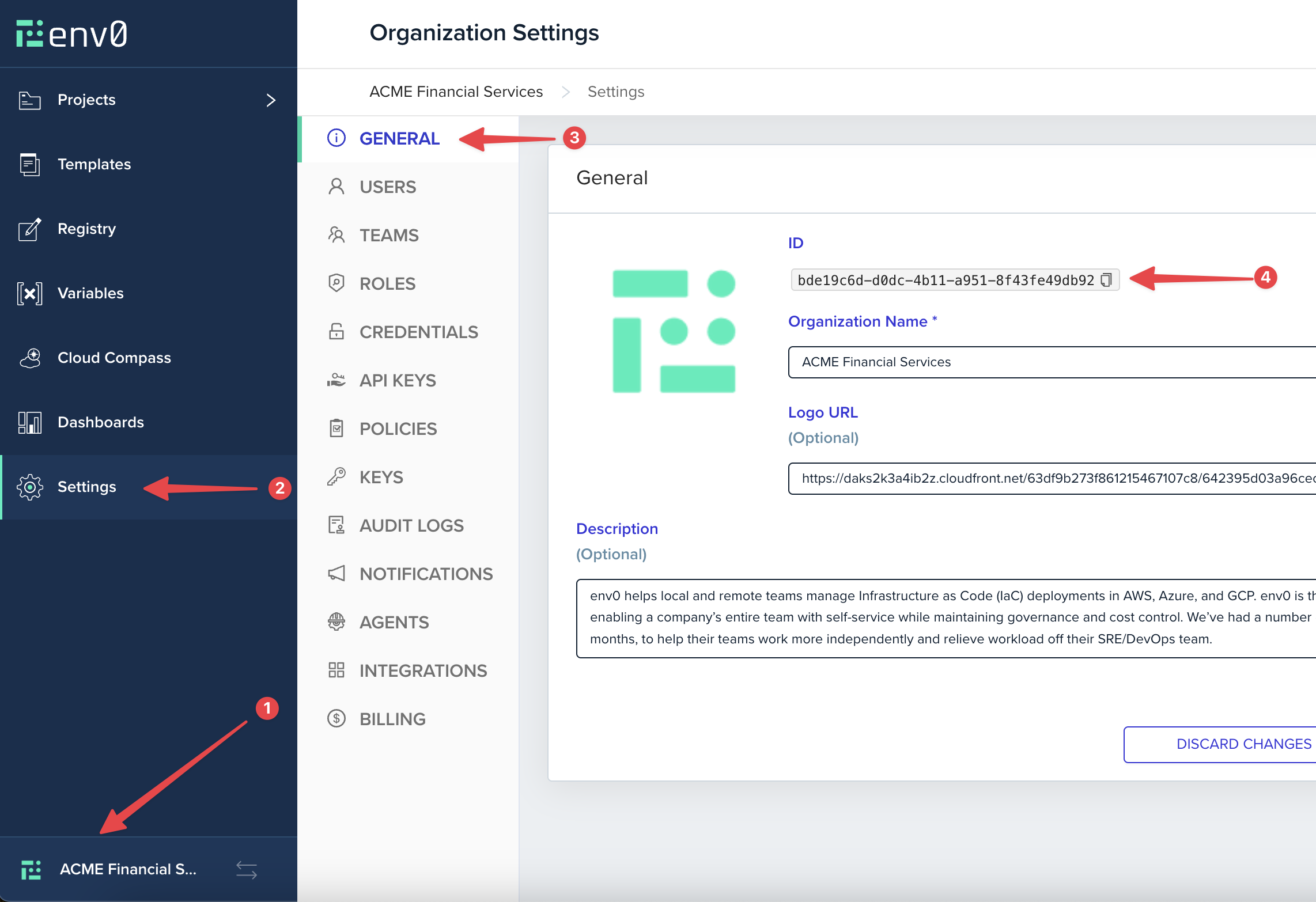
Sometimes you may need your organization ID for various reasons. Here’s how you can find it:- Click on your organization icon in the bottom left corner
- Select
Settingsfrom the left side panel - Go to the
Generaltab underOrganization Settings - Copy the Organization
IDas shown in the screenshot below
Single Sign-On (SSO)
Organizations can configure Single Sign-On to authenticate users through an external identity provider. This enables centralized user management, enforces your security policies, and meets enterprise compliance requirements. SSO can be configured directly from Organization Settings > SSO tab. See Self-service SSO integration for setup instructions.Next steps
- Create a project to separate environments and their access rights
- Group users into teams