

Introduction
This guide will detail the various steps required to integrate AWS SSO as a SAML provider for your env zero organization. The current implementation supports SAML 2.0 and is used for authentication only, where you define your users in your AWS SSO account to enable them access to your env zero organization.Self-Service Configuration Available: You can configure SAML SSO directly from your organization settings. See Self-service SSO integration for an overview, or Self-service SAML setup for step-by-step instructions.
Steps
- Login to your AWS Account and navigate to the AWS SSO service.
- Click on the Applications tabs on the left-hand side menu.
- Click on the
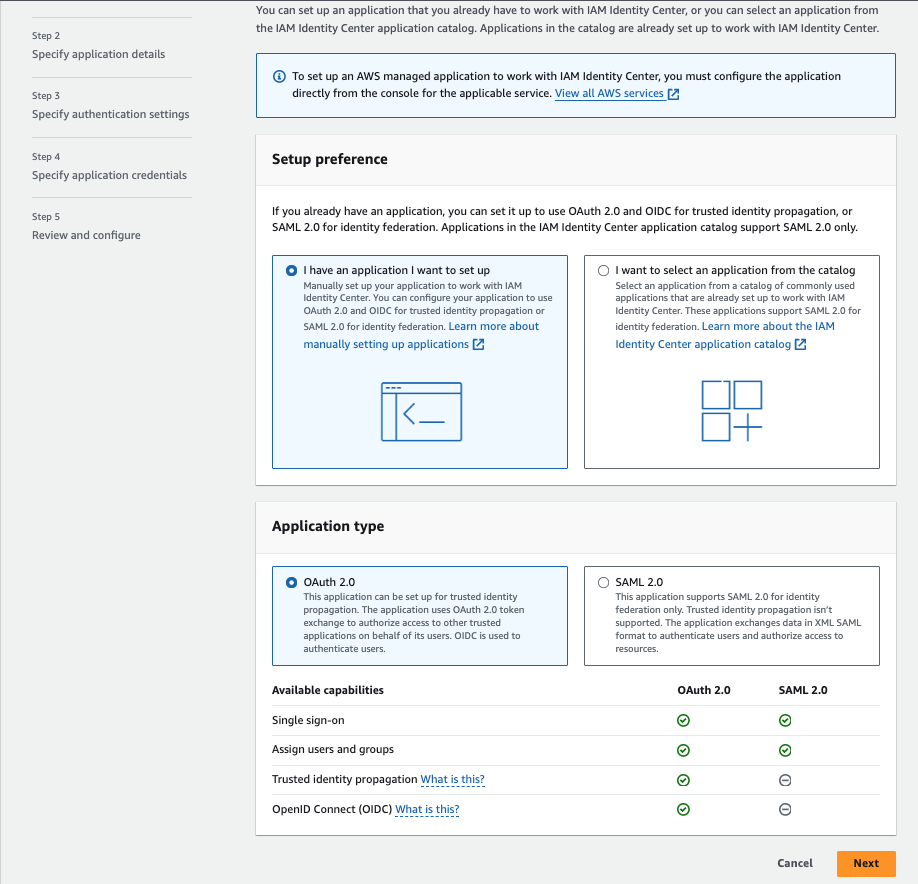
Add a new applicationbutton. - Select
I have an application I want to set up. - Select the
SAML 2.0
- Enter the
Display nameandDescription - Configure the
User and group assignment methodsection - In the
AWS access portalset theApplication URLto behttps://app.env0.com/login/sso - Click on the
Nextbutton - In the
IAM Identity Center metadatasection download theIAM Identity Center Certificateand copy theIAM Identity Center sign-in URL - In the
Application propertiesset theApplication start URLtohttps://app.env0.com/login/sso - Set the desired
Session duration - In the
Application metadatasection click on theIf you don't have a metadata file, you can manually type your metadata valueslink - In the
Application metadatasection, underApplication ACS URLenter the followinghttps://login.app.env0.com/login/callback?connection={YOUR_ENV0_ORG_ID} - In the
Application SAML audienceenterurn:auth0:env0:{YOUR_ENV0_ORG_ID} - Click on the
Submitbutton - In the Action Dropdown select
Edit Attribute mappings - Add the following attributes:
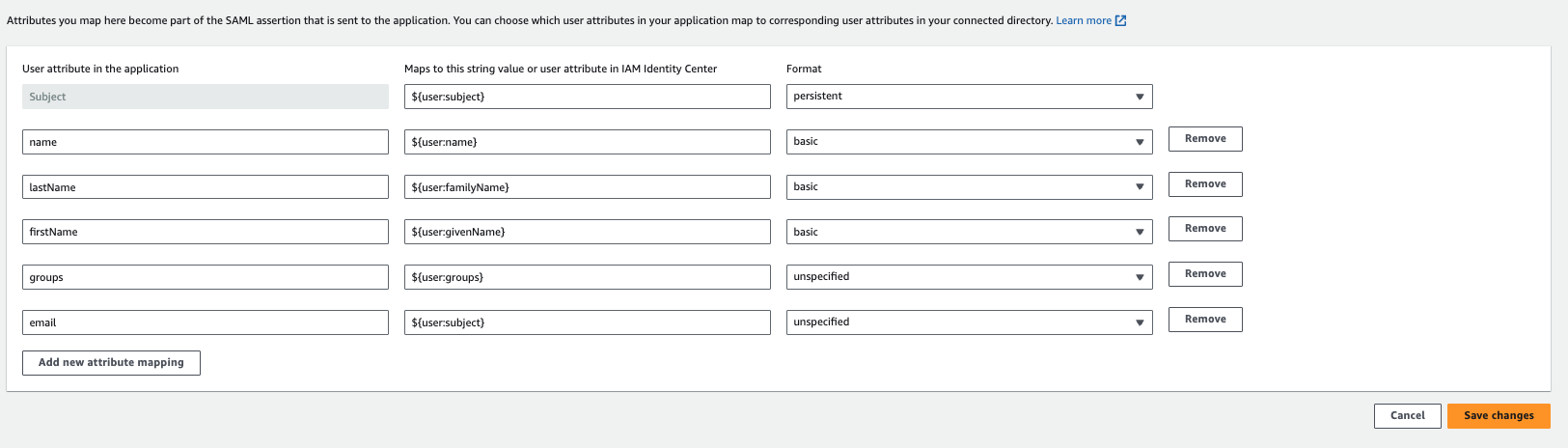
Groups Mapping with AWS SSOThe
groups attribute in AWS SSO currently supports the UUID of the groups and not the actual name of the group.This means that if you set the groups attribute we will sync the groups based on their UUID.- Click on
Assigned usersbutton and assign the relevant users and groups to the application - Navigate to your env zero organization settings and go to the SSO tab.
- Click on SAML and complete the self-service form with:
- Identity Provider Single Sign-on URL (AWS SSO sign-in URL)
- X.509 Certificate (AWS SSO Certificate)
Next steps
- Self-service SAML setup - Review the general SAML configuration process.
- Sync Roles & Groups From Your IdP - Import AWS SSO groups into env zero.
- Okta integration - Compare with another supported identity provider.