

Overview
Configure Microsoft Entra ID (Azure AD) as an OAuth provider for your env zero organization. This integration enables authentication through Entra ID and supports automatic team syncing based on Entra ID groups.Prerequisites
Edit Organization Settings permission is required to configure SSO.Setup Steps
1
Register Application in Microsoft Entra ID
Register an application in the Microsoft identity platform. In platform settings, select Web and add a Redirect URI:
https://login.app.env0.com/login/callback2
Create Client Secret
Create a Client Secret and note the value. Copy the Application (client) ID and Client Secret Value for the next step.
3
Configure in env zero
Navigate to your organization settings > SSO tab. Click Azure AD (displayed as “Azure AD” in older tenants) and complete the self-service form with:
- Application (client) ID
- Client Secret Value
- Email domain (e.g., env0.com) or Microsoft tenant domain (e.g., env0.onmicrosoft.com)
Multitenant Microsoft Entra IDIf you are in a Multitenant environment, under Authentication / Supported account types, select “Accounts in any organizational directory (Any Azure AD directory - Multitenant)”.
Enabling Access
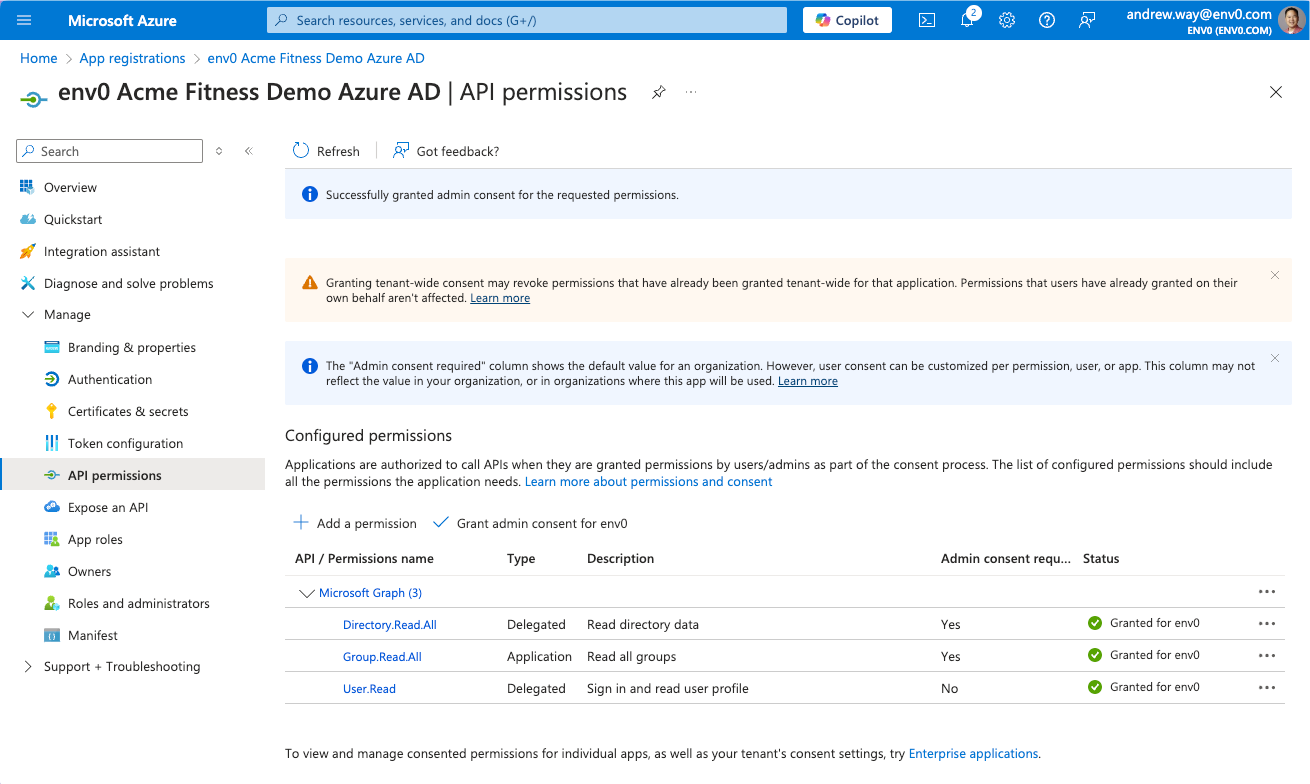
If users have trouble accessing the App Registration, grant admin consent:1
Navigate to API Permissions
Go to Manage > API Permissions or Security > Permissions in your Entra ID application.
2
Grant Admin Consent
Click “Grant Admin consent for env zero” for:
- Microsoft Graph User.Read -
Sign in and read user profilepermissions - Microsoft Graph Directory.Read.All permissions
Teams Syncing
Teams SyncingTeams are synced each time a user logs in:
- env zero creates a new team if one doesn’t exist based on the group name from the OAuth provider.
- If the team exists in env zero, we will not create a new team.
- Users are assigned to all teams in env zero based on the group names they belong to in the OAuth provider.
- If a user is removed from a group in the OAuth provider, they are removed from the team in env zero.
Automated User Provisioning (SCIM)
Microsoft Entra ID supports SCIM 2.0 for automatically provisioning and deprovisioning users in env zero, and for provisioning Entra ID groups as env zero teams. With SCIM, user access is updated continuously rather than only at login. See SCIM provisioning with Entra ID to set it up.Next steps
- SCIM provisioning with Entra ID - Automate user provisioning with Microsoft Entra ID.
- Sync Roles & Groups From Your IdP - Import Entra ID groups into env zero.
- Okta integration - Compare with the Okta SAML setup guide.